CITE THIS NOTEBOOK: Spatial mechanism analyzed: continuous solutions for joints positions by David Balandra. Wolfram Community MAR 29 2023.
NDSolve command is used to obtain continuous solutions for the positions of a RCCC spatial mechanism joints, as well as its animation. Plots of the positions versus the entry angle are provided, as well as a comparison of two calculated variables (c and ϕ) with the results pointed out in Yang (1964). The code can be modified or adapted to animate spatial mechanisms and perform its kinematic analysis.
Functions
Functions
In[]:=
Tx[x_]:=TranslationTransform[{x,0,0}][[1]];(*translationinxaxis*)Ty[y_]:=TranslationTransform[{0,y,0}][[1]];(*translationinyaxis*)Tz[z_]:=TranslationTransform[{0,0,z}][[1]];(*translationinzaxis*)Rx[θx_]:=RotationTransform[θx,{1,0,0}][[1]];(*rotationaroundxaxis*)Ry[θy_]:=RotationTransform[θy,{0,1,0}][[1]];(*rotationaroundyaxis*)Rz[θz_]:=RotationTransform[θz,{0,0,1}][[1]];(*rotationaroundzaxis*)Graphic[Table_,α_,Color_]:=ListPlot[Table,ImageSize600,BaseStyle{18,FontFamily"ArialNarrow"},MeshAll,JoinedTrue,PlotLegends->{α},PlotStyle{Thickness[0.0030],Color},FrameTrue,GridLinesAutomatic,PlotRangeAll];(*PlotFunction*)T3D[V_]:={V[[1]],V[[2]],V[[3]]}(*transformsa4Dvectorintoa3Dvector*)
Mechanism Parameters
Mechanism Parameters
The mechanism parameters are taken from Figure 6.2.2, of the following reference :
[1] CHANG, Da - Yu, et al . KINEMATIC AND STATIC ANALYSIS OF 4 C SPATIAL MECHANISMS . 1998. Thesis Doctoral . University of California, Irvine
See the link or the figure itself below:
[1] CHANG, Da - Yu, et al . KINEMATIC AND STATIC ANALYSIS OF 4 C SPATIAL MECHANISMS . 1998. Thesis Doctoral . University of California, Irvine
See the link or the figure itself below:
In[]:=

In[]:=
(*linklengthparameters*)a=2;b=-3;g=-5;h=4;(*linkorientationparameters*)α=30*Degree;β=-225*Degree;γ=-240*Degree;η=55*Degree;
Position Analysis
Position Analysis
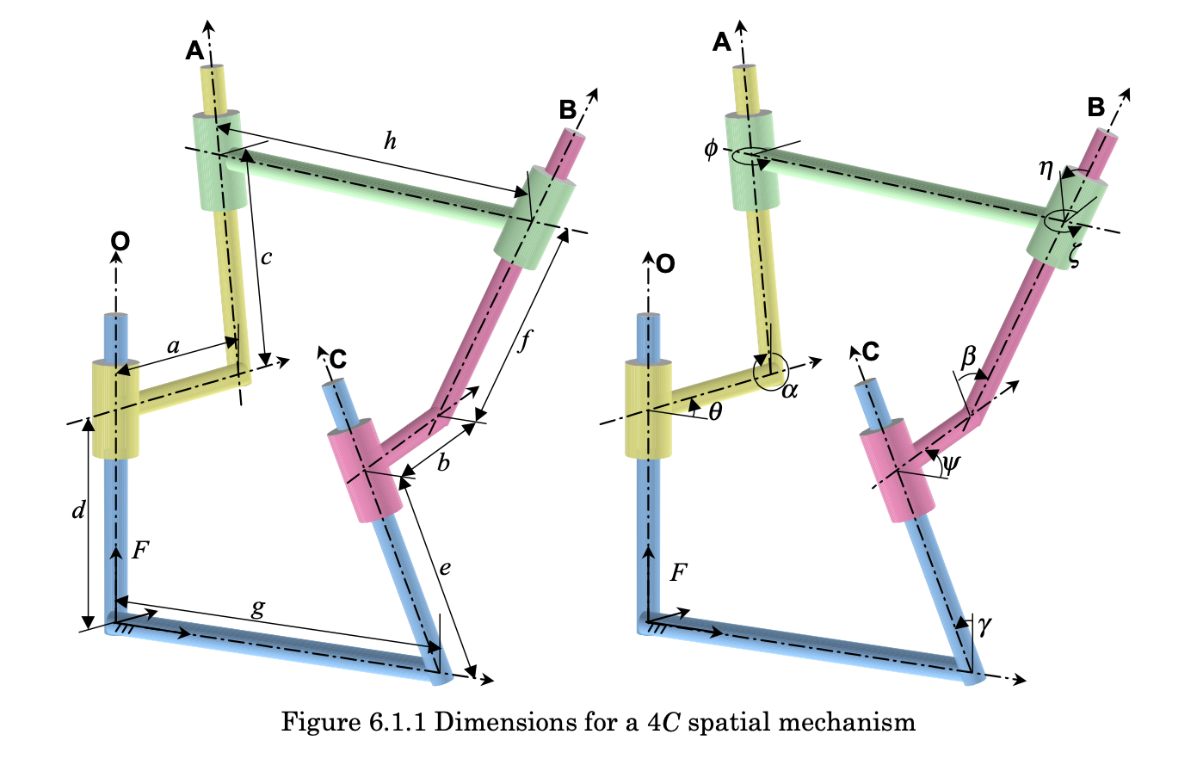
The Mechanism joint positions are analyzed by describing the successive translations and rotations of a coordinate system following the mechanism geometry.Figure 6.1.1, from reference [1], is used to derive the loops O-A-B and O-C-B, which are mathematically reflected as the products of the transformation matrices, T1.T2.T3.T4 and T5.T6.T7.T8, respectively.The condition of loop closure is imposed by equating the matrices Pos 1 and Pos 2, where Pos1=T1.T2.T3.T4 and Pos2=T5.T6.T7.T8.
In[]:=
Clear[θ1,ϕ,θ2,ψ,θ3,ζ];(*Inordertohaveadimensionallyhomogeneoussystemofvariableswedefinec=h*θ1,f=h*θ2,e=h*θ3*)T1=Rz[t];(*entryangleθ1isaknowninput(θ=t)*)T2=Tx[a].Rx[α];T3=Tz[h*θ1[t]].Rz[ϕ[t]];(*c=h*θ1*)T4=Tx[h].Rx[η];T5=Tx[g].Rx[γ];T6=Tz[h*θ3[t]].Rz[ψ[t]];(*e=h*θ3*)T7=Tx[b].Rx[β];T8=Tz[h*θ2[t]].Rz[ζ[t]];(*f=h*θ2*)Pos1=T1.T2.T3.T4;(*loopO-A-B*)Pos2=T5.T6.T7.T8;(*loopO-C-B*)
System of differential equations
System of differential equations
In order to obtain the desired system of differential equations, we differentiate equation Pos1 = Pos2 with respect to time.
Since we have six dependent variables:, ϕ, , ψ, and ζ, we require a system of six differential equations.
Since we have six dependent variables:
θ
1
θ
2
θ
3
In[]:=
Clear[i,j];eqns=Dt[Flatten[Table[Pos1[[i,j]]==Pos2[[i,j]],{i,1,3},{j,1,4}]],t];(*ThelastrowsofthePos1andPos2Matrices,i.e.{0×0×0×1},canbeneglected*)
In[]:=
comb1=Subsets[Dt[Flatten[Table[Pos1[[i,j]]==Pos2[[i,j]],{i,1,3},{j,1,3}]],t],{3}];(*thiscollectsallthree-elementsubsetsfromthefirstthreerowsandthreecolumnsofthematrixPos1=Pos2*)
In[]:=
comb=Table[Join[comb1[[j]],{eqns[[4]],eqns[[8]],eqns[[12]]}],{j,Length[comb1]}];(*thisgivesallthecombinationsconsistingof6differentialequationswherethelastthreeequationsaretakenfromthefirstthreeelementsofthefourthcolumnofthematrixPos1=Pos2,andthefirstthreeequationsaretakenfromthesubsets"comb1"*)
In[]:=
Length[comb](*thereare84totalcombinationsof6differentialequationsmeetingthepreviousconditions*)
Out[]=
84
Initial values to solve the differential equations are taken from the discrete initial solution for the position equation in
Positions, velocities and animation of a RCCC spatial mechanism:
{c-2.2875185937443328`,f2.1464597092048523`,e-1.7705659412352197`,ϕ1.8982407033557724`,ζ-1.0177173097791457`,ψ2.036355807999736`}
Positions, velocities and animation of a RCCC spatial mechanism:
{c-2.2875185937443328`,f2.1464597092048523`,e-1.7705659412352197`,ϕ1.8982407033557724`,ζ-1.0177173097791457`,ψ2.036355807999736`}
In[]:=
s=NDSolvecomb[[3]],θ1π==-2.28751859h,θ2π==2.146459709h,θ3π==-1.7705659h,ϕπ==1.8982407,ζπ==-1.0177173,ψπ==2.0363558,{θ1,ϕ,θ3,ψ,θ2,ζ},t,π,π+2π,Method->{"EquationSimplification"->"Residual"}(*Recallthedefinitions:c=h*θ1,f=h*θ2,e=h*θ3*)
2
9
2
9
2
9
2
9
2
9
2
9
2
9
2
9
Out[]=
θ1InterpolatingFunction,ϕInterpolatingFunction,θ3InterpolatingFunction,ψInterpolatingFunction,θ2InterpolatingFunction,ζInterpolatingFunction


Note that the third combination, comb[[3]], is used in the NDSolve command. The selection of this combination was made through trail and error. First two combinations did not give correct results. There are other combinations which also provide equal results, for example the 81th combination gives the same results. Fortunately, it is possible to verify the continuous solution calculated with NDSolve with the discrete solution calculated with FindMinimum.
In[]:=
PlotEvaluate[{hθ1[t],hθ3[t],hθ2[t]}/.s],t,π,π+2π,PlotLabels{"c","e","f"},FrameFalse,AxesLabel{"(rad)"," (in)"},PlotRangeAll(*plotsthec,eandfjointspositions*)
2
9
2
9
θ
1
s
i
Out[]=
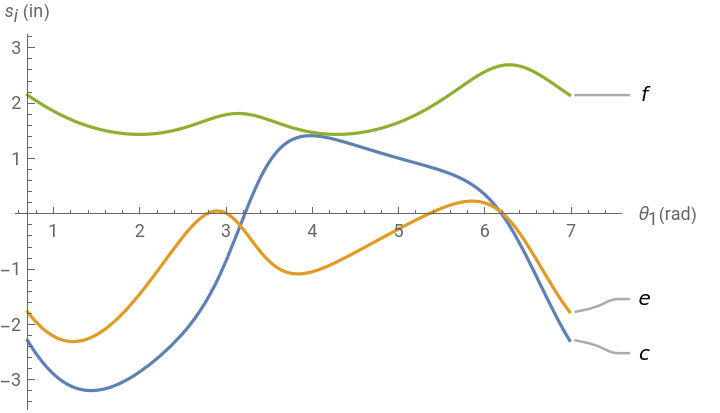
To verify the results given by the NDSolve command, some calculated c (h×θ1) values are arranged and listed. Then we can compare with the values in “” column and “first solution” row, from Table 1 of reference [2] YANG, An Tzu; FREUDENSTEIN, Ferdinand. Application of dual-number quaternion algebra to the analysis of spatial mechanisms. 1964
As can be seen, the values are the same, which tell us the calculated c (h×θ1) values are correct!
S
2
As can be seen, the values are the same, which tell us the calculated c (h×θ1) values are correct!
In[]:=
JoinTablehθ1[t],t,2π,2π+π,π9,Tablehθ1[t],t,π,2π,π9/.s(*Ourcvariableisinreference[2]YANG,AnTzu*)
2
9
3
9
S
2
Out[]=
{{-0.209828,-1.24687,-2.28752,-2.9592,-3.19164,-3.08146,-2.74831,-2.25566,-1.51486,-0.300767,0.912512,1.38388,1.37117,1.21973,1.05548,0.902421,0.731831,0.433441,-0.209828}}
Animation
Animation
Special thanks to Daniel Lichtblau and Dr Francisco Cuenca who directly or indirectly encouraged me to solve the kinematics of a spatial mechanism with the NDSolve command.