Using only right turns compared to left turns means driver safety will be increased and drivers won’t have to wait for red lights. In this project, common pathfinding algorithms, such as Dijkstra’s and A*, were modified to remove left turns and backtracking. These algorithms were first tested on premade grids to ensure basic functionality. Using the OSM API, real world map data was retrieved. Newly developed algorithms were later compared amongst each other and against Wolfram’s standard pathfinding algorithm. Regarding real life applications, the algorithms were able to identify the optimal path on most tested cases; nevertheless, some limitations arose when highways were factored into pathfinding.
Introduction
Introduction
Over the years, many pathfinding algorithms have been developed to optimize travel distance and time. One of the algorithms implemented in this paper, Dijkstra, was developed in 1956. An improvement to Dijkstra, A Star (A*), was developed little more than a decade after the development of Dijkstra. Even today, these two algorithms are viable pathfinding algorithms. Many delivery companies such as UPS have developed their own pathfinding algorithms to improve their business model. One of UPS’s twists to their pathfinding algorithms is they avoid left turns whenever they can, because right turns are safer and drivers never have to wait for a red light to turn. In this paper, both Dijkstra and A* were modified to never allow left turns, and were compared against each other and to the built-in Wolfram pathfinding function. Although my algorithms have some limitations, they will work relatively efficiently on most given cases.
Simulation Graph
Simulation Graph
We start with a small simulation graph, which allows us to easily tell if an algorithm is working. Real life cities are too large to be visualized and tested efficiently. If we test code on large cities, issues will be far harder to find; with a small graph, we can easily tell which vertices have been analyzed by the algorithm.
Graph Generation
Graph Generation
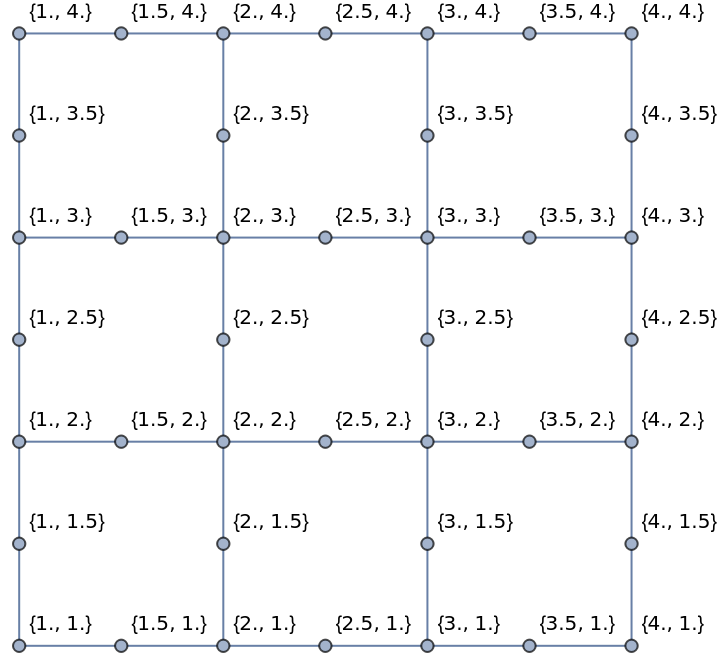
To create a graph, we first must make roads to be put into a graph. Here, 4 basic roads are created in a grid with my roadListGen function:
In[]:=
roadListGen[width_Integer,height_Integer]:=Join[Table[{x,y},{x,1.,width},{y,1,height,0.5}],Table[{x,y},{y,1.,height},{x,1,width,0.5}]]roadList = roadListGen[4,4];
To create a useful graph, we also need to have labels for each point.
In[]:=
labels = Table[Flatten[roadList,1][[x]]->Flatten[roadList,1][[x]],{x,1,Length[Flatten[roadList,1]]}];
Generation for simulation graph:
In[]:=
graph=Graph[Catenate[Map[Apply[UndirectedEdge],Partition[#,2,1]&/@roadList,{2}]],VertexLabels->Automatic,VertexCoordinateslabels]
Out[]=
Pathfinding Algorithm
Pathfinding Algorithm
Right Turn Restriction
Right Turn Restriction
To ensure that only right turns and forward motions are allowed, we must create a function that suggests only right and forward movements. This function uses the current and previous point to determine if a point will be considered a left turn. PlanarAngle calculates the angle between three points. Using the current point, the previous point, we can analyze every adjacent point to the current point to find the angle of a turn. We set PlanarAngle to calculate from the counterclockwise direction.
First, any angle larger than 5Pi/4 radians was considered a left turn. This presented some issues because in some cities, a left turn can contain many nodes and the angle between each node could be less than 5Pi/4. Even though using 10Pi/9 may sacrifice the use of some forward paths that curve slightly left, the issue that allowed left turns was solved.
Function to find only right and forward points:
In[]:=
rightAndForwardPoints[previousPoint_List,currentPoint_List]:=Select[DeleteCases[AdjacencyList[graph,currentPoint],previousPoint], PlanarAngle[currentPoint{previousPoint,#},"Counterclockwise"]<10Pi9&]
Dijkstra Implementation
Dijkstra Implementation
Dijkstra is a path finding algorithm that only factors in distance traveled from the start point. The start point, end point, and a graph are the inputs of this Dijkstra algorithm. The first initialized queue is the AdjacencyList of the start point. After that, an association is created for each point with information about it. For Dijkstra, the only information we need to store is the previous point and the distance that has been traveled from the start point. The previous point is used to find the complete path and the distance traveled is used to determine which point should be calculated next.
Like many path finding algorithms, Dijkstra has a queue. Any time a new adjacent point is discovered, it will be checked to ensure it hasn’t been evaluated yet. If not, the adjacent point will be added to the queue. The algorithm looks through the queue and finds the closest point to the start point to determine what the next point will be. The closest point is determined by EuclideanDistance as we are using a simulated graph. After a the next point has been found, the current points will be removed from the queue to prevent backtracking.
Dijkstra function:
In[]:=
dijkstra[startPoint_List, endPoint_List, graph_] := Module[{queue = AdjacencyList[graph, startPoint], currentPoint, vertexAssociations, nextPoint, path = {}, pathPoint}, vertexAssociations = <| Table[point -> {None, Infinity}, {point, VertexList[graph]}]|>; vertexAssociations[startPoint] = {"start", 0}; Do[vertexAssociations[queuePoint] = {startPoint, EuclideanDistance[startPoint, queuePoint]}, {queuePoint, queue}]; nextPoint = MinimalBy[queue, vertexAssociations[#][[2]] &][[ 1]]; queue = DeleteCases[queue, nextPoint]; While[nextPoint != endPoint || Length[queue], currentPoint = nextPoint; If[vertexAssociations[#][[2]] == Infinity, AppendTo[queue, #]] & /@ rightAndForwardPoints[vertexAssociations[currentPoint][[1]], currentPoint]; Do[If[vertexAssociations[queuePoint][[2]] == Infinity, vertexAssociations[queuePoint] = {currentPoint, EuclideanDistance[currentPoint, queuePoint] + vertexAssociations[currentPoint][[2]]}], {queuePoint, rightAndForwardPoints[vertexAssociations[currentPoint][[1]], currentPoint]}]; nextPoint = MinimalBy[queue, vertexAssociations[#][[2]] &][[1]]; queue = DeleteCases[queue, nextPoint]; ]; AppendTo[path, nextPoint]; pathPoint = nextPoint; While[pathPoint != startPoint, pathPoint = vertexAssociations[pathPoint][[ 1]]; AppendTo[path, pathPoint]; ]; path]
Dijkstra Examples on Simulation Grid
Dijkstra Examples on Simulation Grid
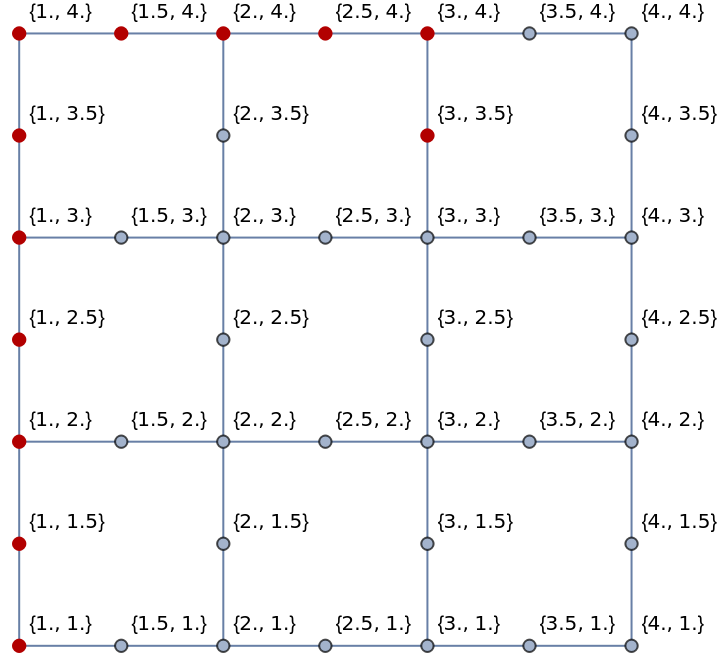
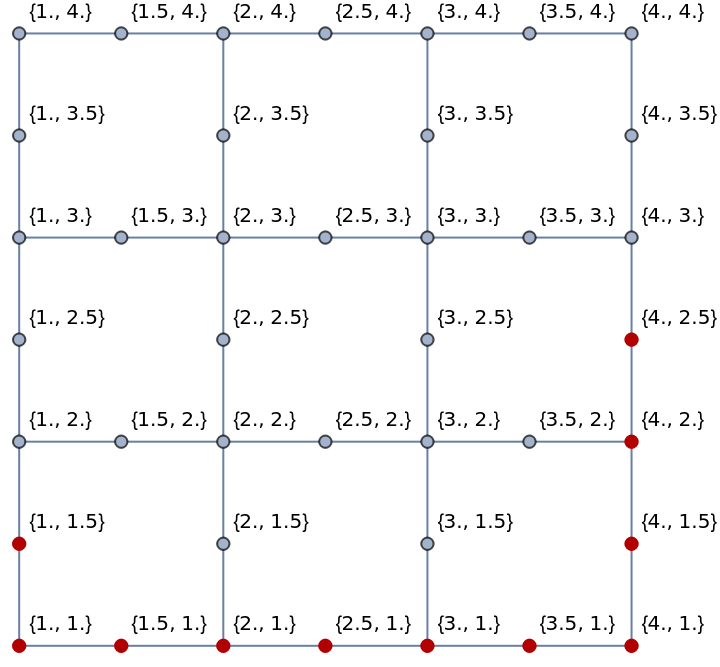
Below are two examples of Dijkstra being run on sets of sample points. To visualize the path, HighlightGraph has been used.
Example 1— between (1, 1) and (3, 3.5):
In[]:=
HighlightGraph[graph,dijkstra[{1.,1.},{3.,3.5},graph]]
Out[]=
Example 2— between (4, 2.5) and (1, 1.5):
In[]:=
HighlightGraph[graph,dijkstra[{4.,2.5},{1.,1.5},graph]]
Out[]=
Implementing Geographic Data
Implementing Geographic Data
After creating a simulation version of Dijkstra, we implement it on geographic data. We obtain all roads in a city, and create Dijkstra and A* algorithms that work on this new data.
Generating Graph for All Roads in a City
Generating Graph for All Roads in a City
The function roads takes a city and finds all the roads and every node in the given city. Open Street Map (OSM) has an API, Overpass, that is used to find data for the given city. OSM has street data for almost anywhere in the world. The example used here is San Francisco.
Gets OSM API data about roads in San Francisco:
Much of the data returned is useless and the data must be sifted through to give useable data.
The function allWays uses pattern matching to find all roads in the returned API data. Again, directedWays will use pattern matching to find the roads which are one-way. Without identifying one-way roads, many calculated paths will use one-way roads as two-way, which causes numerous issues. undirectedWays contains all the elements in allWays that aren’t in directedWays.
First, entire roads are identified, and later, the latitude and longitude for each node along a road are sorted out. This allows us to obtain lists of each road and the coordinates of that road’s nodes. The function directedWays represents one-way roads and undirectedWays represents roads that aren’t one-way.
We again use pattern matching on both directedWays and undirectedWays. The final product is directedRoadList and undirectedRoadList, respectively containing their type of roads and their node’s latitude and longitude coordinates.
The Graph function is then used to create a graph with both directed and undirected edges. This graph will later be used for all calculations.
Geographic Pathfinding Algorithm
Geographic Pathfinding Algorithm
Geographic Right and Forward Points
Geographic Right and Forward Points
This function is the same as the previous function, except it reverses the order of the points. This is done because geographic data is arranged in (latitude, longitude) format, whereas the original function uses Cartesian coordinates in an (x, y) format. To ensure PlanarAngle works correctly, we reverse the order of the points.
A geographic version of the rightAndForwardPoints function:
Geographic Dijkstra
Geographic Dijkstra
This geographic Dijkstra algorithm is very similar to the simulation Dijkstra algorithm. Most of the logic is the same, but the biggest difference is the use of GeoDistance instead of EuclideanDistance, since we are working with geographic data.
Geographic Dijkstra algorithm:
Geographic A*
Geographic A*
A* is an optimized version of Dijkstra. Rather than just factoring in distance from the start point, A* also uses the distance from the end point. The difference between the algorithms for Dijkstra and A* include the additional values that have to be stored and the fact that both start and end distance is being factored into determining the next point from the queue. For A*, the distance from the end has to be stored in an association and when MinimalBy is used to find the next point to calculate, the distance from the end is added to the traveled distance.
Geographic A* algorithm:
Testing on Cities
Testing on Cities
Now that we have our Dijkstra and A* algorithms, they can be tested on cities. We test on Boston, San Francisco, Miami, Washington D.C., and Seattle. For each city, we create a graph from the OSM road data, pick some random points, and run the Wolfram, Dijkstra, and A* algorithms.
Boston
Boston
Code
Code
A list of randomly generated points in Boston:
Running Wolfram’s built-in pathfinding algorithm, Dijkstra, and A*:
Results
Results
Running the program can take up to 30 minutes, so the variables have been changed to directly contain the results.
Below are the five pairs of points we found paths for. For each graphic, the blue point denotes the start point. The red point denotes the end point. The red path is Wolfram’s built-in pathfinding function, with no restrictions. The Dijkstra and A* path are respectively denoted by purple and green.
We are unable to see the Dijkstra path a large amount of the time is it often overlaps with the A* path.
San Francisco
San Francisco
Code
Code
A list of randomly generated points in San Francisco:
Running Wolfram’s built-in pathfinding algorithm, Dijkstra, and A*:
Results
Results
Running the program can take up to 30 minutes, so the variables have been changed to directly contain the results.
Below are the five pairs of points we found paths for. For each graphic, the blue point denotes the start point. The red point denotes the end point. The red path is Wolfram’s built-in pathfinding function, with no restrictions. The Dijkstra and A* path are respectively denoted by purple and green.
Miami
Miami
Code
Code
A list of randomly generated points in Miami:
Running Wolfram’s built-in pathfinding algorithm, Dijkstra, and A*:
Results
Results
Running the program can take up to 30 minutes, so the variables have been changed to directly contain the results.
Below are the five pairs of points we found paths for. For each graphic, the blue point denotes the start point. The red point denotes the end point. The red path is Wolfram’s built-in pathfinding function, with no restrictions. The Dijkstra and A* path are respectively denoted by purple and green.
Washington DC
Washington DC
Code
Code
A list of randomly generated points in Washington D.C.:
Running Wolfram’s built-in pathfinding algorithm, Dijkstra, and A*:
Results
Results
Running the program can take up to 30 minutes, so the variables have been changed to directly contain the results.
Below are the five pairs of points we found paths for. For each graphic, the blue point denotes the start point. The red point denotes the end point. The red path is Wolfram’s built-in pathfinding function, with no restrictions. The Dijkstra and A* path are respectively denoted by purple and green.
Seattle
Seattle
Code
Code
A list of randomly generated points in Seattle:
Running Wolfram’s built-in pathfinding algorithm, Dijkstra, and A*:
Results
Results
Running the program can take up to 30 minutes, so the variables have been changed to directly contain the results.
Below are the five pairs of points we found paths for. For each graphic, the blue point denotes the start point. The red point denotes the end point. The red path is Wolfram’s built-in pathfinding function, with no restrictions. The Dijkstra and A* path are respectively denoted by purple and green.
Analysis
Analysis
Comparisons
Comparisons
After obtaining all the data, we graph them to compare the average distance travelled and average run time across these algorithms.
Comparison of Average Distance Travelled in a City for Wolfram’s Function, Dijkstra, and A*
Comparison of Average Distance Travelled in a City for Wolfram’s Function, Dijkstra, and A*
The following uses the five points we tested to find an average distance travelled in our examples for each city in feet.
The Wolfram algorithm will always be faster than the two algorithms we developed, as it can go any direction it wants, while the two algorithms we created are limited to forward and right turns only. Depending on the city and the points we tested, the two algorithms we created travelled roughly 5-20% more compared to Wolfram’s algorithm.
Comparison of Average Run Time in a City for Dijkstra and A*
Comparison of Average Run Time in a City for Dijkstra and A*
For every city, Dijkstra’s run time is far more than the run time for A*. This make sense as A* uses a heuristic which factors in the distance from the end, while Dijkstra doesn’t have this heuristic. Washington D.C. is an outlier in the data set as Dijkstra is absurdly slow.
Limitations
Limitations
The algorithms we ultimately created have some limitations.
◼
No Backtracking
At first, all backtracking was removed to prevent the algorithms from going in circles. By preventing the program from passing over points it has been to, a key idea couldn’t be used. We all know 3 right turns allow us to do a left turn, but due to the prevention of passing over previous points, our algorithms were restricted from using 3 right turns to do a left turn. Due to this issue, the algorithms will sometimes fail to compute paths.
At first, all backtracking was removed to prevent the algorithms from going in circles. By preventing the program from passing over points it has been to, a key idea couldn’t be used. We all know 3 right turns allow us to do a left turn, but due to the prevention of passing over previous points, our algorithms were restricted from using 3 right turns to do a left turn. Due to this issue, the algorithms will sometimes fail to compute paths.
◼
3D Interpretation of Roads
Many cities have highways vertically above each other. This has caused highways above each other to be interpreted as intersecting by the program. After getting road data from the OSM API, we would need to create a 3D graph to save the vertical data. Using a 3D would make our program significantly slower and harder to implement. A sacrifice of using 2D graphs rather than 3D graphs is the fact that sometimes the algorithms will suggest running off the side of a highway or phasing vertically upwards to another high way.
Many cities have highways vertically above each other. This has caused highways above each other to be interpreted as intersecting by the program. After getting road data from the OSM API, we would need to create a 3D graph to save the vertical data. Using a 3D would make our program significantly slower and harder to implement. A sacrifice of using 2D graphs rather than 3D graphs is the fact that sometimes the algorithms will suggest running off the side of a highway or phasing vertically upwards to another high way.
◼
UTurns on Highways
The algorithms we developed will also sometimes suggest U turning on highways as most highways are two-way. The newly developed algorithms don’t understand there is a barrier between the two directions of a highway. If given more time, this problem could definitely be solved.
The algorithms we developed will also sometimes suggest U turning on highways as most highways are two-way. The newly developed algorithms don’t understand there is a barrier between the two directions of a highway. If given more time, this problem could definitely be solved.
◼
Run Time
Both algorithms we developed ran significantly slower than Wolfram’s built-in algorithm. In the comparisons, we completely removed Wolfram’s algorithm as the run time was often less than a tenth of a second. Both algorithms that we developed always took more than 5 seconds for any computation tested.
Both algorithms we developed ran significantly slower than Wolfram’s built-in algorithm. In the comparisons, we completely removed Wolfram’s algorithm as the run time was often less than a tenth of a second. Both algorithms that we developed always took more than 5 seconds for any computation tested.
Conclusion
Conclusion
The modified Dijkstra and A* to only allow right turns were mostly successful. Currently, both of our algorithms run far slower than Wolfram’s built-in function. If given more time, the algorithms can definitely be better optimized. The results of this study also support the idea that Dijkstra is much slower than A*. The heuristic in A* allows it to sometimes compute the same path in around half the time used by Dijkstra. Although there were still some limitations, the algorithms succeeded on a large amount of test cases.
Overall, right turns are safer than left turns. Although travel distances may be increased by up to 20%, right-turn only paths are not only safer, but also not much slower. Most cities allow right turns on a red light; instead of waiting for traffic lights to turn green, right turns allow drivers to ignore red lights.
Acknowledgements
Acknowledgements
Thanks to:
◼
My mentor, Kegan, for providing help with coding logic, for debugging, and for providing moral support
◼
My allocation group mentor, Jeremy, for helping me get a project I was interested in
◼
My TA, Sam, for being a second mentor
◼
Sophie and Zoya for helping with code
CITE THIS NOTEBOOK
CITE THIS NOTEBOOK
Developing pathfinding algorithms with exclusively right turns
by Ryan Tong
Wolfram Community, STAFF PICKS, July 13, 2023
https://community.wolfram.com/groups/-/m/t/2964488
by Ryan Tong
Wolfram Community, STAFF PICKS, July 13, 2023
https://community.wolfram.com/groups/-/m/t/2964488