The 2024 Paris Olympic Games are in full swing an I was curious where all the events were taking place. I found a raw CVS dataset on Kaggle that I downloaded and converted into a public data repository object. This makes it easy to obtain the data in a nice computable form with the names of the venues and the GeoPosition of each venue:
In[]:=
data=ResourceDataResourceObject


Out[]=


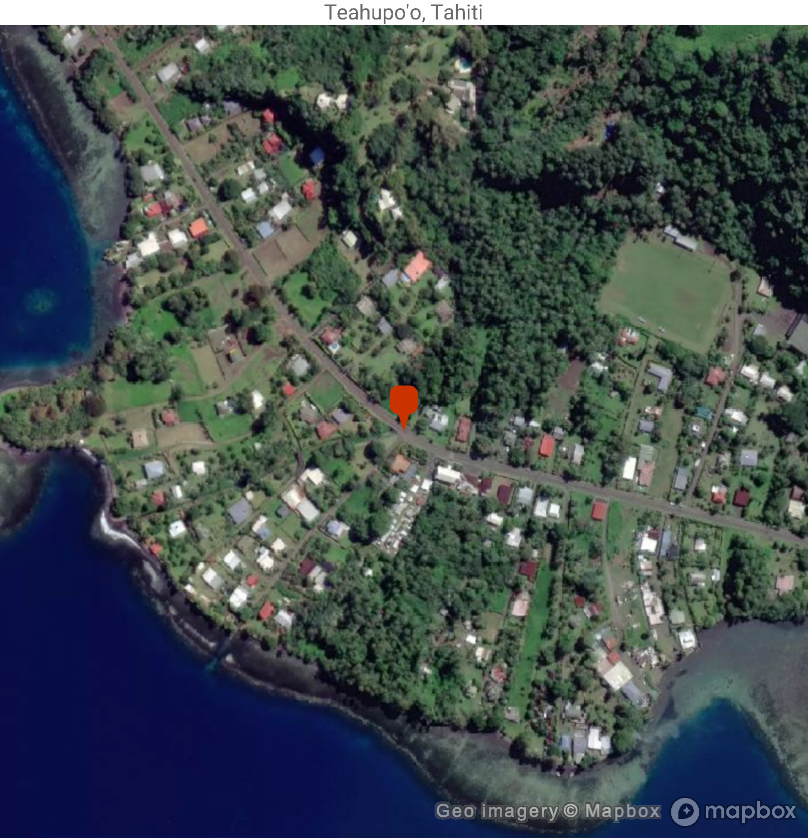
The data contains 39 distinct venues, including the surfing venue in Tahiti 🌴:
In[]:=
venue=data[Select[StringContainsQ[#venue,"Tahiti"]&]];GeoGraphics[GeoMarker[venue[1,"location"]],GeoRange->Quantity[0.25,"Miles"],GeoBackground->"Satellite",PlotLabel->venue[1,"venue"]]
Out[]=
For the rest of this post, I am going to focus on venues in France only; this code removes Tahiti 🌴:
In[]:=
data=data[Select[Not@StringContainsQ[#venue,"Tahiti"]&]];
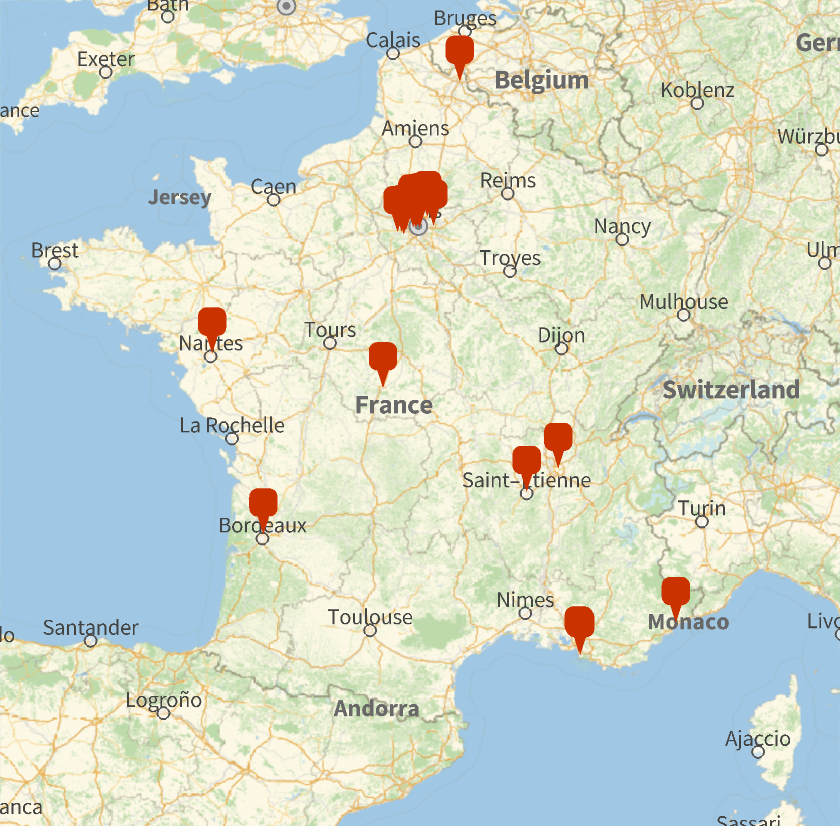
Now we can make an overview of all the venues in France:
In[]:=
GeoGraphicsGeoMarker[data[All,"location"]],GeoRange->
Out[]=
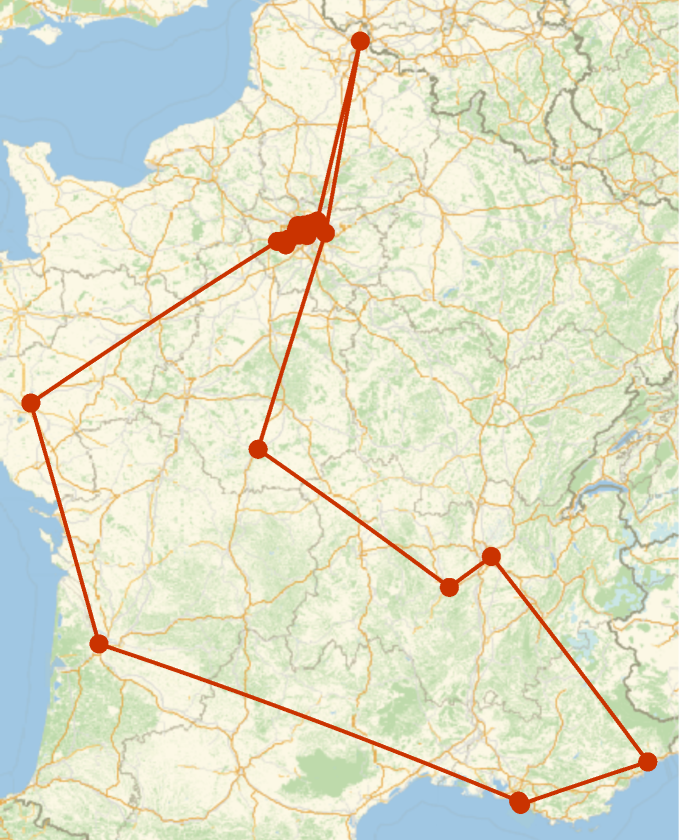
Now let’s make a virtual tour of all the venues. We first get all the locations and use FindShortestTour to get a list of indices that should be visited in order:
geos=Normal[data[All,"location"]];tour=Last[FindShortestTour[geos]]
Out[]=
{1,34,16,17,18,19,15,12,13,14,10,38,11,4,2,5,35,6,36,37,7,24,25,33,29,27,30,26,32,28,31,22,23,21,20,8,9,3,1}
The corresponding locations are:
In[]:=
locations=Normal[data[tour,"location"]]
Out[]=
{GeoPosition[{48.9293,2.24797}],GeoPosition[{48.8616,2.28928}],GeoPosition[{48.8599,2.292}],GeoPosition[{48.8584,2.29448}],GeoPosition[{48.8532,2.30246}],GeoPosition[{48.8565,2.31271}],GeoPosition[{48.8639,2.31356}],GeoPosition[{48.8661,2.31245}],GeoPosition[{48.8656,2.32124}],GeoPosition[{48.8565,2.35241}],GeoPosition[{48.8566,2.35222}],GeoPosition[{48.8566,2.35222}],GeoPosition[{48.8386,2.37847}],GeoPosition[{48.8996,2.36061}],GeoPosition[{48.9245,2.36015}],GeoPosition[{48.9236,2.35545}],GeoPosition[{48.9357,2.33861}],GeoPosition[{48.9385,2.4192}],GeoPosition[{48.9466,2.41976}],GeoPosition[{48.9441,2.43002}],GeoPosition[{48.971,2.52073}],GeoPosition[{50.6119,3.13047}],GeoPosition[{48.8604,2.63737}],GeoPosition[{46.8114,1.68678}],GeoPosition[{45.4605,4.38943}],GeoPosition[{45.7653,4.98203}],GeoPosition[{43.7051,7.19261}],GeoPosition[{43.2699,5.3959}],GeoPosition[{43.3026,5.36907}],GeoPosition[{44.8974,-0.561586}],GeoPosition[{47.256,-1.52468}],GeoPosition[{48.7829,1.96008}],GeoPosition[{48.7881,2.03496}],GeoPosition[{48.7516,2.07841}],GeoPosition[{48.8049,2.12036}],GeoPosition[{48.8414,2.25305}],GeoPosition[{48.8469,2.25002}],GeoPosition[{48.8957,2.22963}],GeoPosition[{48.9293,2.24797}]}
Which we can map with GeoListPlot:
GeoListPlot[locations,Joined->True]
Out[]=
Now let’s create a video where we visit all these venues virtually in a satellite map. The code below generates a 4 second video which transitions from one venue to the next. Between venues the video zooms out a bit so you can see how one venue relates, geographically, to the next. This is done by varying the GeoRange with essentially this function:
The key part of this function is the AnimationVideo, which takes care of generating the individual frames of the video:
To speed up the generation of the video frames, I am using ParallelMap. This automates the parallel computation and speeds things up by about a factor of 8:
After the video is generated it can be published, for example this publishes it to the Wolfram Cloud:
CITE THIS NOTEBOOK
CITE THIS NOTEBOOK
A video tour of the 2024 Paris Olympic Games venues
by Arnoud Buzing
Wolfram Community, STAFF PICKS, August 2, 2024
https://community.wolfram.com/groups/-/m/t/3239514
by Arnoud Buzing
Wolfram Community, STAFF PICKS, August 2, 2024
https://community.wolfram.com/groups/-/m/t/3239514