The Wolfram Emerging Leaders Program: High School (WELP:HS) is a remote, semester-long program designed for exceptional graduates from the Wolfram High School Summer Research Program to continue to develop their skills. Students work in a small group over the course of a semester to do either a research-based project or a product development–based project under the guidance of expert mentors. Projects are centered around a topic at the intersection of the group’s interests.
This essay was written by:
This essay was written by:
During WELP:HS, we aimed to create an instructional model for how electric charges interact. This model shows the electric field vectors and equipotential lines/surfaces for point charges with the ability to manipulate their charge or position in 2D and 3D space. We hoped to create an educational tool to benefit both physics students and teachers.
Introduction
Introduction
Electrical fields are an important concept in physics, however, many students struggle to visualize and comprehend them. As students who are currently taking physics, we noticed how there is a lack of electrical field models that would be helpful for students and teachers in visualizing how they work. The current available models are often lacking key details, such as incomplete electrical fields, or are not user-friendly, which makes learning from them extremely difficult. Our project worked to address these issues by creating a model of electrical fields for point charges that’s comprehensive and interactive.
Generating Electric Fields in 2D
Generating Electric Fields in 2D
First, we wrote out the equation for electrostatic potential for point charges in 2D space.This function will allow us to manipulate charge (q), its position (p), and its distance away (r).
In[]:=
electroStaticPotential[q_,p_,r_]:=Sum,{i,Length[q]}
q[[i]]
Norm[r-p[[i]]]
To compute the electric fields in the 2D space, we have to calculate the derivate of the charges electrostatic potential. We wanted to showcase how two point charges would interact in terms of electric field and equipotential lines. We designed our models to be based off of the inputted position and charge. We started by only having two charges that could be set anywhere on a plane with any charge.
In[]:=
electricField2D[charges_, positions_]:= -D[electroStaticPotential[charges, positions, {x, y}], {{x, y}}]/.[x_] :>
′
Abs
x
2
x
Electric Field Lines
Electric Field Lines
Electric field lines show the direction and relative strength of the electric field produced by the charges. To visualize these lines, we used StreamPlot. This allowed us to show the flow and direction of the current, where there are positive and negative charges, and how the strength of the charge affects the flow.
In[]:=
showField2D[charge_List, positions_List]:= With[ {electricFieldFNs = electricField2D[charge, positions]}, StreamPlot[ electricFieldFNs, {x, -5, 5}, {y, -5, 5} ]]
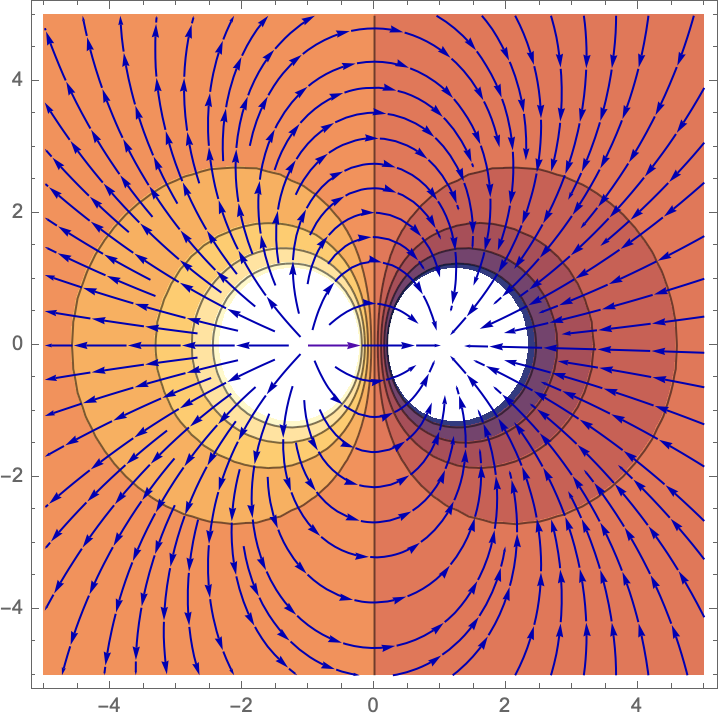
Below is an example with a +1 charge at position (-1, 0) and a -1 charge at position (1, 0). The field lines go from the positive charge and point toward the negative charge
In[]:=
showField2D[{1,-1},{{-1,0},{1,0}}]
Equipotential Lines
Equipotential Lines
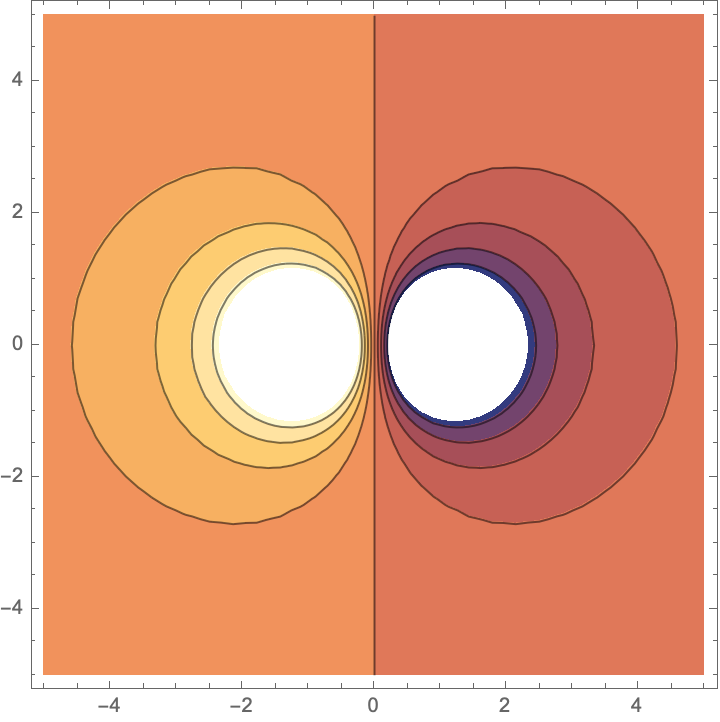
Equipotential lines represent regions where the electric potential remains constant. These lines are always perpendicular to the electric field lines. By making equipotential lines with the electric field lines, we will get a better view of the field and how it behaves.
In[]:=
showEquipotLines[charge_List, positions_List]:= ContourPlot[ Evaluate[electroStaticPotential[charge, positions, {x, y}]], {x, -5, 5}, {y, -5, 5}]
Below are the equipotential lines for a +1 charge at position (-1, 0) and a -1 charge at position (1, 0).
In[]:=
showEquipotLines[{1,-1},{{-1,0},{1,0}}]
Out[]=
Putting it Together
Putting it Together
Now with both our field and equipotential line functions defined, we can assemble them together to model our electric fields in 2D. To generate the model, a user would input the charges and the corresponding x and y coordinate positions of the where the point charges are.
In[]:=
showElectricField2D[charge_List, positions_List]:= Show[ showEquipotLines[charge, positions], showField2D[charge, positions]]
When put together, we can clearly see where the charges are and how the field lines and equipotential lines cross perpendicularly.
In[]:=
showElectricField2D[{1,-1},{{-1,0},{1,0}}]
Out[]=
To create a well rounded model, we created a manipulate so a user can easily change the charge(s) positions or value while noticing how the electric field changed in response.
In[]:=
electricField2D:=Manipulate[Module[ {xPt1, yPt1, xPt2, yPt2, qf1, qf2}, xPt1 = startPoint1[[1]]; yPt1 = startPoint1[[2]]; xPt2 = startPoint2[[1]]; yPt2 = startPoint2[[2]]; qf1 = charge1; qf2 = charge2; Pane[showElectricField2D[{qf1, qf2}, {{xPt1, yPt1}, {xPt2, yPt2}}]]], {{startPoint1, {2, 3}}, {-7, -7}, {7, 7}, Locator}, {{startPoint2, {-2, -3}}, {-7, -7}, {7, 7}, Locator}, {{charge1, .1, "Charge 1"}, -.2, .2, Appearance -> "Labeled"}, {{charge2, -.1, "Charge 2"}, -.2, .2, Appearance -> "Labeled"}, SaveDefinitions -> True]
Generating Electric Fields in 3D
Generating Electric Fields in 3D
Next we wanted to model the electric field in 3D. We modified our previous functions for 2D to account for the distance between each charge and their respective position in the 3D space. Additionally, we wanted to model more than two charges at a time. We adjusted this electricField equation by restricting the input to be lists of charges as opposed to just two charges.
In[]:=
electricField[charge_List, positions_List]:= -D[electroStaticPotential[charge, positions, {x, y, z}], {{x, y, z}}]/.[x_] :>
′
Abs
x
2
x
Electric Field Lines
Electric Field Lines
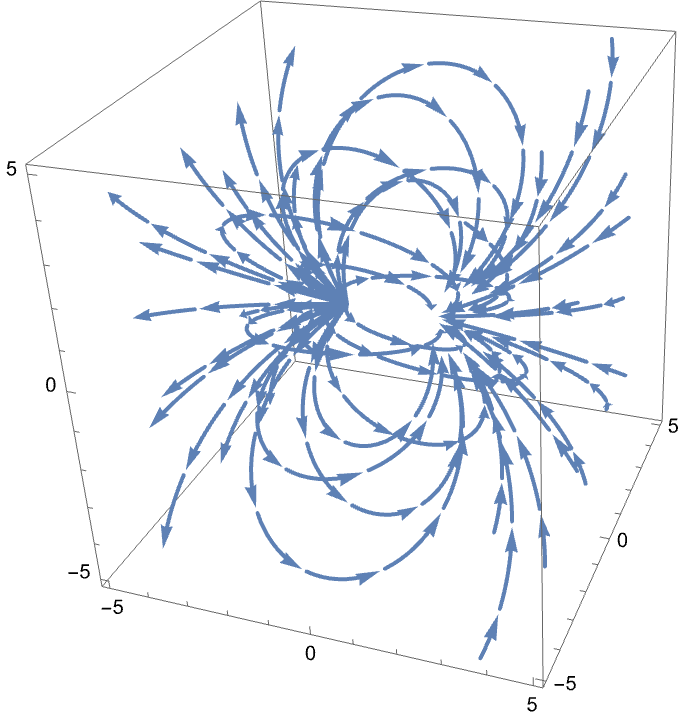
Similar to how we modeled the field in 2D, we used StreamPlot3D for our field lines. This will provide users the ability to interact and see how the field lines are arranged in 3D space. Our inputs remain as the charges and their positions, though this time with a z coordinate value.
In[]:=
showField[charge_List, positions_List]:= StreamPlot3D[ electricField[charge, positions], {x, -5, 5}, {y, -5, 5}, {z, -5, 5}, StreamMarkers -> "Arrow", StreamColorFunction -> None]
Placing our charges of +1 and -1 at positions (-1, 0, 0) and (1, 0, 0), respectively, we can compare how the 3D provides more information than the 2D model of the same charges.
In[]:=
showField[{1,-1},{{-1,0,0},{1,0,0}}]
Out[]=
Equipotential Surfaces
Equipotential Surfaces
In 3D, equipotential lines are replaced with equipotential surfaces. Instead of lines where the electric potential remains constant, we have surface areas where the electric potential remains constant. The electric field lines always pierce the equipotential surfaces perpendicularly, just as they did in 2D.
Here we can see how the equipotential surfaces appear with our point charges at the same positions.
Putting it Together
Putting it Together
With our 3D field lines and equipotential surfaces created, we can put them together to model our electric fields in 3D. To generate the model, a user must input a list of charges and a list of the corresponding x, y, and z coordinate positions of the where each of the point charges are.
When put together, we can clearly see where the charges are and how the field lines and equipotential lines cross perpendicularly.
Since our 3D code allows us have model more than two charges at a time, here we can see what three charges would look like together.
Adjusting the Dimensions
Adjusting the Dimensions
We wanted the electric field to adjust in case the charges were placed too close to the border that was initially restricted to be from -5 to 5 in all directions. This meant going through a similar process as creating the electric field in 3D but this time being mindful of the given coordinates.
We used our previous showField function and adjusted it according to these coordinates to model 3D electric field lines in an adjusted 3D space.
Similarly, we then adjusted our previous showEquipotSurfs function according to these coordinates to model equipotential surfaces in an adjusted 3D space.
Finally, we combined the adjusted 3D electric field lines and equipotential surfaces to create our adjusted 3D model.
Ultimately, this allows for the size and dimensions of the 3D model to adjust to where the charges are placed.
Here’s what our final model of two point charges of -1 and +1 in 3D, but at positions (-2, 1, 1) and (2, 1, 1).
Conclusion
Conclusion
We were able to create models of point charges in both 2D and 3D space, achieving the goal we initially set forth. In these models, we are able to change where the point charges are placed, how many charges there are, and what their respective charges are. Although there are more areas for us to expand upon, currently our project can help physics students and teachers explain concepts of electrical fields in a visual format.
In the future, we hope to expand this project into including an interactive 3D model, similar to the manipulate function created for our 2D model. Additionally, we’d like to expand this type of modeling to other aspects of physics such as Gaussian surfaces, in order to visualize the flux through closed surfaces and its relationship to charge distribution, and magnetism, by modeling magnetic field lines and their interactions with electric fields.
In the future, we hope to expand this project into including an interactive 3D model, similar to the manipulate function created for our 2D model. Additionally, we’d like to expand this type of modeling to other aspects of physics such as Gaussian surfaces, in order to visualize the flux through closed surfaces and its relationship to charge distribution, and magnetism, by modeling magnetic field lines and their interactions with electric fields.
Acknowledgments
Acknowledgments
We would like to acknowledge our mentor, Megan Davis. We would also like to acknowledge Rory Foulger, Eryn Gillam, and the Wolfram Emerging Leaders Program as a whole.
Bibliography
Bibliography
◼
1. Wolfram Research (2008).Vectorplot3d.Wolfram Language function, https://reference.wolfram.com/language/ref/VectorPlot3D.html, updated 2022.
◼
2. John Evans. Electric field of a point charge.Wolfram Demonstrations Project, https://demonstrations.wolfram.com/ElectricFieldOfAPointCharge/, updated 2012.
CITE THIS NOTEBOOK
CITE THIS NOTEBOOK
Modeling electric fields of point charges in 3D
by Wolfram Education Programs
Wolfram Community, STAFF PICKS, February 5, 2025
https://community.wolfram.com/groups/-/m/t/3381091
by Wolfram Education Programs
Wolfram Community, STAFF PICKS, February 5, 2025
https://community.wolfram.com/groups/-/m/t/3381091