In[]:=
{$System,$ProcessorType,$OperatingSystem,$LicenseExpirationDate}
Out[]=
Mac OS X x86 (64-bit),x86-64,MacOSX,
since Version 12.1 : exported Image Size is reduced by factor 0.722
since Version 12.1 : exported Image Size is reduced by factor 0.722
in previous versions (12.0 and before) the Option ImageSize provided .pdf and .jpg files of identical size
since Version 12.1 pdf files are smaller by factor 0.722
in previous versions (12.0 and before) the Option ImageSize provided .pdf and .jpg files of identical size
since Version 12.1 pdf files are smaller by factor 0.722
since Version 12.1 pdf files are smaller by factor 0.722
In[]:=
out=Plot[Sin[x],{x,0,2π},ImageSize300]Export["out.jpg",out];(*jpgfilecreatedis300ptwide*)Export["out.pdf",out];(*pdffilecreatedis216ptwide*)Export["out2.pdf",out,ImageSizeRound[300/0.722]];(*pdffilecreatedis300ptwide*)
Out[]=
ImageDimensions[Import["out.jpg"]](*myOut:{300,176}*)ImageDimensions[Import["out.pdf"][[1]]](*myOut:{216,128}*)ImageDimensions[Import["out2.pdf"][[1]]](*myOut:{300,180}*)
Out[]=
{300,176}
Out[]=
{216,128}
Out[]=
{300,180}
since Version 12.1 : Dividers are no longer exported correctly
since Version 12.1 : Dividers are no longer exported correctly
Thin Lines as Dividers are no longer correctly exported into PDF :
Thin Lines as Dividers are no longer correctly exported into PDF :
In[]:=
gls=Directive[{Thin,Black}];(*gridlinesstyle*)out=Grid[{{1,1},{2,2}},Dividers{{2gls},{2gls}}]Export["test.pdf",out,"PDF"];
Out[]=
1 | 1 |
2 | 2 |
In[]:=
Show[Import["test.pdf"][[1]],ImageSize50]
Out[]=

for me test.pdf appears in external applications (such as Keynote) with thick dividers :

Thin Lines as Dividers can correctly be exported into PDF in Version 12.1 if one introduces Dashing :
Thin Lines as Dividers can correctly be exported into PDF in Version 12.1 if one introduces Dashing :
In[]:=
gls=Directive[{Dashing[{0.1,0.0001}],Thin,Black}];(*gridlinesstyle*)out=Grid[{{5,3},{3,1}},Dividers{{2gls},{2gls}}]Export["test1.pdf",out,"PDF"];
Out[]=
5 | 3 |
3 | 1 |
In[]:=
Show[Import["test1.pdf"][[1]],ImageSize50]
Out[]=

for me test1.pdf appears in external applications (such as Keynote) with thin dividers :

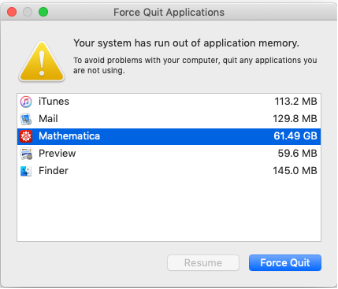
since Version 12.1 : rapid growth of “application memory” size
since Version 12.1 : rapid growth of “application memory” size
since Version 12.1 I frequently get messages such as shown below
since Version 12.1 I frequently get messages such as shown below
MemoryInUse[]MaxMemoryUsed[]MemoryAvailable[]$HistoryLength
Out[]=
754239488
Out[]=
1186262952
Out[]=
2923802624
Out[]=
∞
previous versions 12.0 or before never show this “Force Quit Applications” window
previous versions 12.0 or before never show this “Force Quit Applications” window
general problem : Alignment of PlotMarkers
general problem : Alignment of PlotMarkers
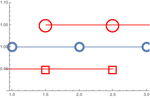
I use Special Characters which you offer under Palettes/Basic Math Assistant as PlotMarkers .
The vertical position of Special Characters is not centered on the data. What controls the vertical offset ?
Your “OpenMarkers” are centered correctly, see below.
The vertical position of Special Characters is not centered on the data. What controls the vertical offset ?
Your “OpenMarkers” are centered correctly, see below.
In[]:=
li={#,1}&/@{1,2,3};li2=#+{.5,.05}&/@li;li3=#-{.5,.05}&/@li;Show[{ListPlot[li,PlotMarkers{"OpenMarkers",20},JoinedTrue,PlotRange{0.9,1.1}],ListPlot[{li2,li3},PlotMarkers{{"○",50},{"◻",50}},JoinedTrue,PlotStyleRed]}]
Out[]=
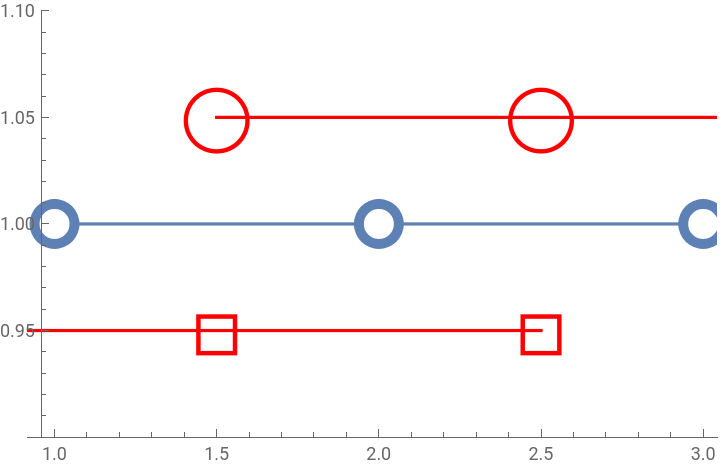
my output :
my output :
Out[]=