Logic puzzles have long been a captivating form of entertainment and intellectual challenge. This project will focus on solving logic puzzles based on given logical statements. This computational essay explores the application of computational methods to solve logic puzzles efficiently and effectively, based on given natural language logical statements. This project will utilize the processing of natural language input and logical reasoning in order to determine solutions to the puzzles. The specific focus of this project is solving traditional logic grid puzzles and this essay computationally replicates algorithms commonly employed by humans to solve such puzzles, exploiting the relationships between logical statements to progressively narrow down the solution space, eventually leading to the puzzle's resolution.
Introduction
Introduction
Logic Puzzles
Logic Puzzles
Logic puzzles come in all shapes and sizes, but the kind of puzzles I will be focusing on solving are commonly referred to as "logic grid" puzzles. Each puzzle has a series of categories with an equal number of options within each category. Each option can be used only once and the goal is the figure out which options are linked together based on a series of clues. The puzzles each have only one unique solution and can be solved by simple logical processes, without any need for educated guesses.
A custom-labeled grid is usually provided for every puzzle, like the one shown below. This allows you to cross-reference every possible option in every category in order to solve the puzzle. You can eliminate pairs you know aren't true with an X and mark pairs you know are related with an O. For example, in the puzzle below, if you know that Simon is 15 you can cross out everything in the box that's in the Simon row or the 15 column.
A custom-labeled grid is usually provided for every puzzle, like the one shown below. This allows you to cross-reference every possible option in every category in order to solve the puzzle. You can eliminate pairs you know aren't true with an X and mark pairs you know are related with an O. For example, in the puzzle below, if you know that Simon is 15 you can cross out everything in the box that's in the Simon row or the 15 column.
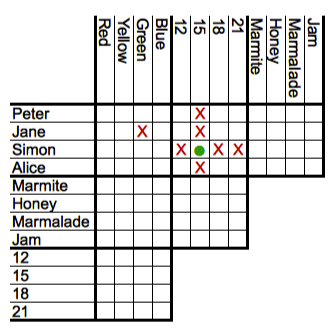
See [1]
Logical Statements
Logical Statements
The clues used to solve these types of puzzles are essentially in the form of logical statements. These clues include sentences such as "Abby wasn't born in April but has blue shoes" or "The girl with red shoes was born in January". Clues like these can be utilized to eliminate possibilities and eventually solve the puzzle. The puzzle I will be solving in this project contains three variables: names, shoe colors, and birth months. The logical statements I have provided to solve this puzzle are as follows:
◼
Abby wasn't born in April but has blue shoes.
◼
The girl with red shoes was born in January.
◼
Paula's shoes are Brown.
◼
Brenda was born in June and does not have red shoes.
Natural Language Processing
Natural Language Processing
The clues needed to solve the logic puzzle are in the form of natural language sentences and cannot be processed by the computer. In order to solve the logic puzzle it is necessary to parse these logical statements into an association or a list of rules, which can be utilized in the program.
In order to process the natural language input, I use a list of FixedOrder grammar rules to analyze and process the sentences according to specific patterns and generate corresponding output. Each FixedOrder line corresponds to a different pattern of logical statement and allows the program to extract information about the shoe color and birth month of those mentioned in the statements. Most of these grammar rules format the inputted logical statement in the format {name,property} -> True/False. The only exceptions are the last 2 grammar rules which formats the logical statement as {shoeColor, birthMonth} -> True/False.
In[]:=
grammar=CloudDeploy@GrammarRules[{(*Example:"Brenda's shoes aren't red"*)FixedOrder[n:GrammarToken["String"],obj:GrammarToken["String"],"are not"|"aren't",prop:GrammarToken["Color"]]:>If[StringContainsQ[n,"'s"],({StringDrop[n,-2],prop}->False),({n,prop}->False)],(*Example:"Brenda's shoes are red"*)FixedOrder[n:GrammarToken["String"],obj:GrammarToken["String"],"are",prop:GrammarToken["Color"]]:>If[StringContainsQ[n,"'s"],({StringDrop[n,-2],prop}->True),({n,prop}->True)],(*Example:"Brenda was born in January"*)FixedOrder[n:GrammarToken["String"],"was",obj:GrammarToken["String"],"in",prop:GrammarToken["String"]]:>({n,prop}->True),(*Example:"Brenda wasn't born in January"*)FixedOrder[n:GrammarToken["String"],"was not"|"wasn't",obj:GrammarToken["String"],"in",prop:GrammarToken["String"]]:>({n,prop}->False),(*Example:"Brenda wasn't born in January but has red shoes"*)FixedOrder[n:GrammarToken["String"],("was not"|"wasn't"),obj:GrammarToken["String"],"in",prop:GrammarToken["String"],"and"|"but","has",col:GrammarToken["Color"],"shoes"]:>({{n,prop}->False,{n,col}->True}),(*Example:"Brenda was born in January and has red shoes"*)FixedOrder[n:GrammarToken["String"],"was","born","in",prop:GrammarToken["String"],"and"|"but","has",col:GrammarToken["Color"],"shoes"]:>({{n,prop}->True,{n,col}->True}),(*Example:"Brenda was born in January but doesn't have red shoes"*)FixedOrder[n:GrammarToken["String"],"was","born","in",prop:GrammarToken["String"],"and"|"but","does not"|"doesn't","have",col:GrammarToken["Color"],"shoes"]:>({{n,prop}->True,{n,col}->False}),(*Example:"Brenda wasn't born in January and doesn't have red shoes"*)FixedOrder[n:GrammarToken["String"],"was not"|"wasn't","born","in",prop:GrammarToken["String"],"and"|"but","does","not","have",col:GrammarToken["Color"],"shoes"]:>({{n,prop}->False,{n,col}->False}),(*Example:"The girl with red shoes was born in January"*)FixedOrder[n:GrammarToken["String"],"girl"|"sister"|"person","with",col:GrammarToken["Color"],"shoes","was","born","in",prop:GrammarToken["String"]]:>({col,prop}->True),(*Example:"The girl with red shoes wasn't born in January"*)FixedOrder[n:GrammarToken["String"],"girl","with",col:GrammarToken["Color"],"shoes","wasn't"|"was not","born","in",prop:GrammarToken["String"]]:>({col,prop}->False)}];
The statements list represents the clues in the form of natural language logical statements that the program must process in order to solve the logic puzzle.
The rules list is set to the initial association of formatted clues based on the result of processing the items in the statements list after applying the grammar rules in grammar to the list.
The following code splits up the rules association into three separate associations depending on what they are referencing:
◼
monthRules holds the rules which have keys in the format {name, month} -> True/False
◼
colorRules holds the rules which have keys in the format {name, shoe color} -> True/False
◼
conditionalRules holds the rules which have keys in the format {shoe color, month} -> True/False
The following image represents how the process of natural language processing works on the statements to convert a sentence from natural language format to elements of an association which I will use in my program.
Initializing Variables
Initializing Variables
The names, shoeColors, and months lists represent all the possible names, shoe colors, and birth months in this puzzle, respectively. These lists will be useful later on in the program when creating matrices, updating matrices, updating the rules list, etc.
I chose to use matrices to hold the data of my logic puzzle to to the ease with which I can analyze patterns in a specific row or column of the matrix.
◼
The colorMatrix represents the relationship between the names of the girls and their shoe colors, with the names on the rows of the matrix and the shoe colors on the columns of the matrix.
◼
The month matrix represents the relationship between the names of the girls and their birth month with the names on the rows of the matrix and the birth months on the columns of the matrix.
Defining Essential Functions
Defining Essential Functions
The function updateMatrix iterates through the rules association and updates the matrix passed in to the function based on the values and keys in the rules association. The keys of each element in the rules association determine the position on the matrix at which to put the value of the element.
The function newValue updates the matrix and the rules association based on a new rule that has been passed into the function. If the value of the new rule is true, the function sets all the other values in the matrix in the same row and column as the new rule to false, since there can only be one true position in any given row or column of the matrix.
The following function iterates through the matrix passed in to the function and updates the rules list based on the values present in the matrix. This is useful for consistency of the rules association and the matrix when making changes to the matrix directly.
The following function is used to fill a given row/column of the matrix with a True if the three other values in that row/column are False . If the length of the row/column without the Null elements is equal to 3 that means the list consists of 3 Falses and 1 space that should be True. We can tell that the 3 values are False because the moment a value is set to True, the rest of the row/column will be filled with Falses .
The following function checks all of the rows and columns in the matrix for instances in which there are three false values and one empty spot {} in a row/column and replaces the empty spot with True, updating the rules list accordingly. In order to do this, this function utilizes the fillInRow function defined above.
Solving for Shoe Colors
Solving for Shoe Colors
Displaying the empty matrix of names and shoe colors which will be filled with True and False values to solve the logic puzzle
Calling the updateMatrix function in order to update the values in the colorMatrix with the basic rules in colorRules after processing the natural language logic statements.
The code below updates both the colorRules association and the colorMatrix matrix by calling the newValue function. This function iterates through the colorRules association and passes each value into the newValue function so that any True values in the matrix will set the other values in the same row/column to False, updating the colorRules association accordingly.
The following code calls the findTrue function in order to check if there are three False values in any given row or column, setting the remaining value to True, updating the colorRules association accordingly.
Solving for Birth Months
Solving for Birth Months
Utilizing the Completed Shoe Color Matrix to Help Solve the Birth Month Matrix
Utilizing the Completed Shoe Color Matrix to Help Solve the Birth Month Matrix
The code below creates a list of the Keys from the colorRules association which have the value True
The colorsToNames association is used to map each shoe color to the person who has that shoe color based on the trueColors list.
The conditionalRules association was defined earlier and holds the rules that are not matched directly with a certain person's name.
The following code iterates through the conditionalRules association which holds the month rules that depend on shoe color. Using the colorsToNames association, the following code re-formats the rule in the format {name, month} -> True/False.
The following code adds the rules in the moreMonthRules list to the monthRules association to get a comprehensive list of the clues that are related to birth months.
Filling in the Birth Month Matrix
Filling in the Birth Month Matrix
Displaying the empty matrix of names and birth months which will be filled with True and False values to solve the logic puzzle
Calling the updateMatrix function in order to update the values in the colorMatrix with the basic rules in monthRules after processing the natural language logic statements and reformatting conditionalRules.
The code below updates both the monthRules association and the month matrix by calling the newValue function. This function iterates through the monthRules association and passes each value into the newValue function so that any True values in the matrix will set the other values in the same row/column to False, updating the monthRules association accordingly.
The following code calls the findTrue function in order to check if there are three False values in any given row or column, setting the remaining value to True, updating the monthRules association accordingly.
Displaying the Final Solved Logic Puzzle
Displaying the Final Solved Logic Puzzle
Combining Matrices
Combining Matrices
joinedMatrix holds the combined version of the colorMatrix and the monthMatrix as if they were side by side each other in the format of a list of sublists. Each sublist is a row of the final matrix.
Formatting Final Matrix
Formatting Final Matrix
The code below sets rowLabels to the names list and sets columnLabels to the list of the shoeColors and months combined.
This code displays the final completed logic puzzle in the form of a table with the appropriate headings: names as the rows and shoe colors and birth months as the columns.
Conclusion and Future Work
Conclusion and Future Work
The algorithms used were effective in efficiently solving the logic puzzle. I managed to read the natural language input, convert it into a usable form, and use it to solve the logic puzzle. However, the algorithms used are somewhat constrained in their application to different types of logic puzzles with different formats of logical statements. The natural language processing utilized for this project uses fixed order statements, which are not very effective for different formats of logical statements. In addition, these algorithms will not be able to solve larger logic puzzles with 4 or 5 different variables. In order to make my natural language processing more robust, I can leverage machine learning techniques to build NLP models that can be trained to read these types of logical statements. By processing different types of logical statements more effectively, I will be able to solve more complex logic problems with more variables and more complex logical statements.
Acknowledgements
Acknowledgements
I would like to acknowledge everyone in the Wolfram High School Summer Research Program for teaching me the Wolfram language, allowing me to complete this project. Specifically, I would like to thank my mentor, Eli Morton, for his continuous guidance and the instrumental role he has played throughout my work on this project.
References
References
1
.Wikimedia Foundation. (2023, June 22). Logic puzzle. Wikipedia. https://en.wikipedia.org/wiki/Logic_puzzle
CITE THIS NOTEBOOK
CITE THIS NOTEBOOK
Solving logic puzzles based on logical statements
by Nishnath Polavarapu
Wolfram Community, STAFF PICKS, July 13, 2023
https://community.wolfram.com/groups/-/m/t/2963199
by Nishnath Polavarapu
Wolfram Community, STAFF PICKS, July 13, 2023
https://community.wolfram.com/groups/-/m/t/2963199