Fluid flow is a natural phenomenon that is easy to take for granted, a common assumption being that the motion of fluids such as water or air is natural and very basic. However, with deeper analysis the motion of simple fluids such as water is much more complicated and intricate than expected and when modeled with the Navier-Stokes equations leads to some very complex and realistic behavior. In this project, the motion of fluids is modeled using the Navier-Stokes equations for laminar fluid flow, and then uses the results to analyze the optimal orientations of different shapes in this flow. This is applicable to real-world scenarios such as wind tunnels and fluidic machine modeling. In addition, the same logic can be used to model other examples in fluid dynamics such as fluidic oscillators and fluid flow through technical objects.
Introduction
Introduction
The Navier-Stokes Equations are a set of equations that model ideal fluid flow, from simulating wind tunnels to the flow of rivers. In this project, the Navier-Stokes Equations were used to simulate 2D and 3D laminar flow in static shapes. This project explores the applications of this approach from modelling the optimal orientation and rotational paths of objects in channel flow, to using the same fluid logic to create other famous examples in the field of fluid dynamics, including a simulation of a fluidic oscillator. Simulating fluids in this way involves the use of Partial Differential Equations (PDEs), specifically generating them from the applicable Navier-Stokes equations to a geometric configuration and solving them with specified boundary conditions with the Wolfram Language in order to generate vector fields that represent the flow of the fluid in the specified geometric configuration. This vector-field based approach can be used to model complex fluid behavior (permitted that the simulation resolution used is acceptable) including the applications that are presented below.
The Navier-Stokes Equations
The Navier-Stokes Equations
The Navier-Stokes Equations are a set of partial differential equations (PDEs) that describe the motion of viscous fluid substances. The two Navier-Stokes equations that apply to the fluid flows simulated in this project are the Continuity Equation and the Momentum Equation, modeling the conservation of mass and the conservation of momentum respectively.
Variables and their Meanings
Variables and their Meanings
Out[]=
The Continuity Equation (Conservation of Mass)
The Continuity Equation (Conservation of Mass)
∂ρ
∂t
For incompressible fluids, the pressure gradient is constant, and as a result the equation simplifies to the following
∇•u=0
The Momentum Equation (Conservation of Momentum)
The Momentum Equation (Conservation of Momentum)
ρ + u + ∇u = -∇p + μ + f
∂u
∂t
2
∇
The momentum equation describes the conservation of momentum in fluids, ensuring that each particle of fluid shares its momentum with other fluid particles in accordance with the laws of physics.
Note that the f in the equation represents any external forces acting on the fluid, (e.g. gravity). In this simulation, gravity is assumed to be negligible, so the f term is not used.
Note that the f in the equation represents any external forces acting on the fluid, (e.g. gravity). In this simulation, gravity is assumed to be negligible, so the f term is not used.
Applying Navier-Stokes Equations
Applying Navier-Stokes Equations
Converting the Navier-Stokes equations into code involves using the Wolfram Language Functions that solve PDEs. In this project, NDSolve is used to solve PDEs numerically as opposed to solving them symbolically which can be done with DSolve in Wolfram Language.
Simplifying the Navier-Stokes Equations
Simplifying the Navier-Stokes Equations
A common technique when analyzing fluids using the Navier-Stokes equations is to combine the Continuity and Momentum equations into one, this can be done using the following simplification.
Writing the momentum equation with the viscous stress tensor τ which describes internal stress on the fluid:
Writing the momentum equation with the viscous stress tensor τ which describes internal stress on the fluid:

Knowing that the viscous stress tensor τ is given as:

Further integrating the definition that ϵ is :
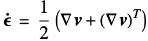
Finally combining the two equations, the resulting equation is:

Solving the Navier-Stokes Equations Simultaneously
Solving the Navier-Stokes Equations Simultaneously
Before moving on, a simple check can be done to verify the integrity of the derivation so far.The units work out, following Newton’s second law of motion F = ma. With the current, simplified state of the momentum equation, it can be easily substituted into the mass conservation equation: Finally combining the two equations, the resulting equation is:

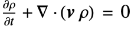

Converting Equations into Component Form
Converting Equations into Component Form
Converting the resulting equation into component form, we obtain the following:
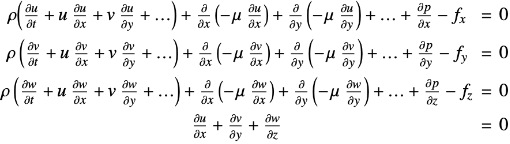
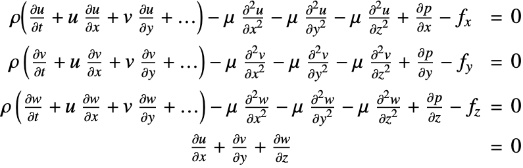
For a constant dynamics viscosity μ a further simplification is possible, resulting in:
Implementing Static Fluids
Implementing Static Fluids
Import the NDSolve package for future mesh generation and other useful utilities.
In[]:=
Needs["NDSolve`FEM`"]$HistoryLength = 0;
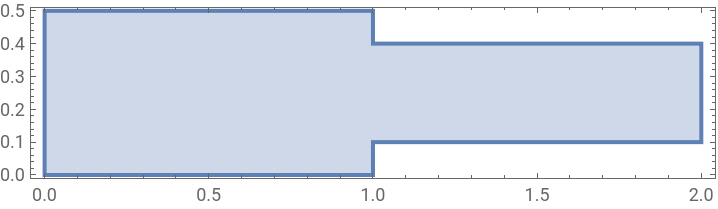
In order to simulate static fluids inside a container, this project uses Wolfram Language Regions for easy integration into various plotting and mathematical functions. The region for the static fluid is defined below.
Create a semi-complex rectangular region using RegionUnion and Visualize:
In[]:=
Ω=RegionUnion[Rectangle[{0,0},{1,1/2}],Rectangle[{1,1/10},{2,2/5}]];RegionPlot[Ω,AspectRatio->Automatic]
Out[]=
Set up the fluid parameters and the static fluid variables that will eventually model the x and y velocity along with the pressure:
vars={{u[x,y],v[x,y],p[x,y]},{x,y}};pars=<|"DynamicViscosity"->Quantity[0.934,"Pascals""Seconds"],"MassDensity"->Quantity[1.25,("Grams")/("Centimeters")^3]|>;
The initial velocity in the x-direction is prescribed through the boundary conditions. This is done by specifying an inflow profile for the u dependent variable on the left-hand side of the region. On the bottom and upper part of the region, a wall boundary condition is specified. Wall boundary conditions are specified by setting the u and v components to 0, this will ensure that the model displacement in those places is 0. An outflow condition is set on the right-side of the domain, and in this case we set the pressure to 0 for simplicity. In general each dependent variable (u, v) should either have a Dirichlet condition or a Robin-type Neumann specified. A pure Neumann value like Neumann 0 is not sufficient- this will lead to the solution to only be accurate to a constant. Dirichlet Boundary Conditions can be used to model velocity and pressure specification as well as modelling physical constraints. Neumann Boundary Conditions can be used to model Shear Stress or the rate of change of a variable across a boundary (like pressure or displacement), they can also be used to model Natural Boundaries where the physical problem will naturally dictate the flux of momentum or mass. For example, in free-surface flows, specifying the normal stress on the free-surface boundary helps maintain consistency with fluid dynamics principles.
The next step is to set up the Fluid Flow PDE, luckily for static fluids, Wolfram Language provides functions specifically for this task.
Set up the Fluid Flow PDE Component (op stands for operating parameters, pars stands for fluid parameters)
MatrixForm[op=FluidFlowPDEComponent[vars,pars]];
As specified above, the next step is to set up the simple boundary conditions in terms of plot space
bcs={DirichletCondition[{u[x,y]==4*0.3*y*(0.5-y)/(0.41)^2,v[x,y]==0.},x==0.],DirichletCondition[{u[x,y]==0.,v[x,y]==0.},0<x<2],DirichletCondition[p[x,y]==0.,x==2]};
A stable solution for the boundary conditions can be found if the velocities are interpolated with a higher order than the pressure. This helps create more accuracy of values between grid points with the help of higher degree polynomial or interpolation schemes. The pressure variable is normally of a lower order meaning that pressure is often approximated using simpler interpolation schemes or at a coarser level (larger grid spaces) compared to velocities. This approach is often chosen because pressure variations tend to be smoother and less sensitive to numerical errors when compared to velocities.
Finally, we can solve the PDE
In[]:=
{uVel,vVel,pressure}=NDSolveValue[{op=={0,0,0},bcs},{u,v,p},{x,y}∈Ω,Method->{"FiniteElement","InterpolationOrder"->{u->2,v->2,p->1}}];
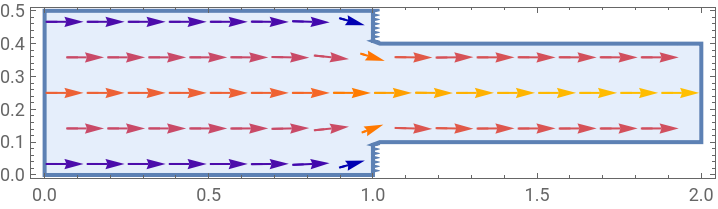
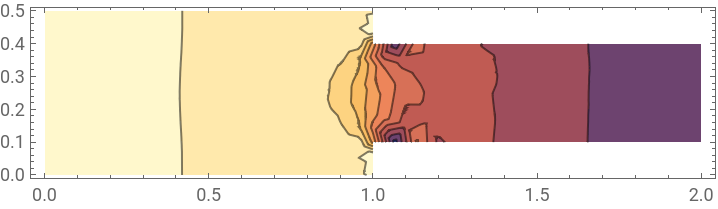
Plotting the resulting geometry to verify the realism of the solution
VectorPlot[{uVel[x,y],vVel[x,y]},{x,y}∈Ω,AspectRatio->Automatic]ContourPlot[pressure[x,y],{x,y}∈Ω,AspectRatio->Automatic]
Out[]=
Out[]=
Application: Fluid in a Rectangle-Non-Slip Condition (Top Wall Treadmill)
Application: Fluid in a Rectangle-Non-Slip Condition (Top Wall Treadmill)
This example is a common example in fluid dynamics and verifies that the realism of the fluid simulation framework while exploring non-slip boundaries. Here, a rectangular region is filled with a fluid and a mechanism is created to drive the fluid in the positive x-direction like a conveyor belt. It is important to note that there are two types of boundaries, slip and non-slip. Normally, a fluid will flow and collide with a wall and effectively ‘slip’ against it, basically the wall has no effect on the resulting velocity of the fluid. In the no-slip case, the wall can have a velocity and at points along those walls, the fluid velocity will be set to 0, essentially moving the fluid with the wall through a low pressure zone between the fluid and the wall.
Set up the fluid variables and a slightly different simulation environment, like before
Set up the fluid flow PDE (also like before)
Set up the boundary conditions and solve the Fluid Flow PDE
Visualizing the pressure as a scalar field. Both Contour and Density plots work well for this
Visualize the velocities using vector and stream plots, creating a framework for future use
Parametric Analysis- Comparing the Flow Field for Various Reynolds Numbers
Parametric Analysis- Comparing the Flow Field for Various Reynolds Numbers
This section will make use of the ParametricNDSolve function which works just like NDSolve, with the addition that parameters can be specified. ParamatricNDSolve will then return a function, then when fed numerical values for the parameters will compute the numerical solution.
Starting by setting a symbolic Reynolds Number (Re)
Set up the Fluid Flow PDE
Set up a parametric function for different Reynolds Numbers
Compute the solutions for different Re’s
Find the positions of the largest gradients of the u and v velocity for the last computed Reynolds number
To visualize the pressure differences better, it is necessary to reflect the steeper gradients by having a finer resolution at steeper gradients. Seeing that the flow gradient is higher at the walls, a graded mesh will be best for this task. This allows for refinements while not increasing the overall number of elements by too much.
The following code generates a graded mesh (m1) and then multiplies it with itself to increase the resolution at the corners
Visualizing the mesh:
Create a new parametric function, but this time using the constructed mesh:
Compute more solutions for the purpose of creating an animation:
Extract a few mesh points to be used as StreamPoints (determines how many stream lines to draw)
Extract a few mesh points to be used as StreamPoints (determines how many stream lines to draw)
Comparing Results With Known Benchmarks
Comparing Results With Known Benchmarks
Before moving on to non-static fluid flow, it is important to get a quantitative measure for how well the current simulation compares to more “official” sources.
Import the Benchmark Results (vx and uy data represent benchmark data for x and y velocity respectively)
Compare the computed solution at x=1/2 with the benchmark results for different Reynolds Numbers
The results, while not completely exact, seem pretty close to accurate laminar flow, especially for higher Re’s.
The same process is applied for y=1/2
Simulating Fluid Flow Around Static Obstacles
Simulating Fluid Flow Around Static Obstacles
In this section, we use the same equations as for static fluids but extend the approach to work around obstacles, expanding the boundary conditions that were set in the previous section and allowing for more complex behavior.
Start by setting up the dimensions for the new boundary region, which will be a large square with evenly spaced smaller square cutouts as the obstacles
L is the length of the square region and x1 and y1 define the base coordinates of the β sub-rectangles
L is the length of the square region and x1 and y1 define the base coordinates of the β sub-rectangles
Define the fluid flow region based on the parameters above. This will create the large enclosure as well as the square cutouts
Combine the regions using RegionUnion and then take the difference from the enclosure to create a simple obstacle course for the fluid flow
Set up variable functions to compute x-velocity, y-velocity, and pressure (similar to the static fluids section)
Define the mesh and display it in a wireframe
Define a discrete time step as well as the Navier-Stokes Equations to solve
Define the boundary conditions for this region (inflow, outflow, and walls)
Solve the PDE’s using Table (not as optimal as before)
Plot the results using StreamPlot
This approach works well with fluid flow coming in from the left and exiting from the right, but this approach can also be extended to fluid flows from other directions, including diagonal fluid flow. In the following example, the boundary conditions will be adjusted so that the flow will originate from the top left corner.
Set up the new boundary conditions for diagonal flow
Solve the new set of PDE’s using Table
Plot the results
Simulating Object Balance Points in Dynamic 2-D Laminar Flow
Simulating Object Balance Points in Dynamic 2-D Laminar Flow
With an accurate framework for simulating static fluids, we can extend the same Navier-Stokes Equations to represent inflow and outflow conditions, effectively modelling a flowing fluid.
Starting by defining a square region and some coordinates for objects to be rendered
L and H have to be cleared so that the variable names are free to be re-assigned to the new fluid simulation region
L and H have to be cleared so that the variable names are free to be re-assigned to the new fluid simulation region
Defining Shape Regions, From Simple Polygons to Complex Shapes
Defining Shape Regions, From Simple Polygons to Complex Shapes
This is the part of the project where the capability of Wolfram Language’s Region functions is used extensively, as they are fairly easy to work with and can model some complex behavior with a few simple manipulations.
Defining an “A”-style letter contour
Defining a letter “B”- style contour
Defining a Variable Star-Style Region
Specify which region to use for the simulation
Method for Analyzing Dynamic Laminar Flow
Method for Analyzing Dynamic Laminar Flow
In this project, the method for analyzing rotation of different shapes, two copies of the region are created, one to simulate flow in a channel without any obstacles, and the other to simulate channel flow but in a region with the shape cut out. This has the same effect as simulating fluid motion around that region specifically (assuming that region stays still). The original copy comes into use when visualizing, so that the only part of the animation that is in motion is the shape that is being rotated.
Clear the previous definitions of the regions to avoid ambiguity
Define the Fluid Flow Regions, where the simulations will take place
Extract vertices from the polygon to be used as potential pivot points later in the simulation (this can generate more complex behavior than just a pivot around a centroid)
In the case of flowing fluids, we solve the PDE’s using Time Integration which is easy enough to implement and finds a solution to dynamic boundaries as specified in the boundary conditions.
Set up Time Integration Variables and Interpolation Functions which are used for future visualization
Clear previous definitions of the Time Integration Variables and Interpolation Functions
Clear previous definitions of the Time Integration Variables and Interpolation Functions
Solve the PDE’s for both regions (channel and channel with obstacle)
Plot the Pressure Distribution in Both Channels
We can also plot the same relation using a Density Plot
Finally, we can animate the fluid flow using a DensityPlot
Animation as GIF Below
Next, we can animate the rotation of the selected object without the fluid
Animation as GIF Below
Animate the star moving around a fixed pivot point (not the center)
Animation as GIF Below
Now adding the rotation of the object to the fluid flow, we can overlay them on top of each other
Animation as GIF Below
Note that with K simulation steps, the final orientation of the fluid is the “balance-point” for that object in a fluid simulated with K simulation steps. Note that for higher numbers of K, the flow gets more turbulent as the solution found by NDSolve strays farther and farther away from reality. Another important note is that some shapes (like this star) don’t always have a balancing point as the forces on them by the fluid are never in equilibrium. However, simple shapes like triangles balance in K ~ 200 steps.
3-D Laminar Flow
3-D Laminar Flow
The same fluid dynamics principles can be extended into 3-D with the help of the full Navier Stokes equations. Up until now, the Navier-Stokes equations that were being used were a simplification by eliminating the components only applicable to 3-D and approximating the effects of centian forces by not explicitly stating them in the equations used (e.g. gravity).
The equation for simulating flow through a technical object is below, and is very similar to the Navier-Stokes equations explained in the 2D section, just with an extra dimension in the u velocity matrix as well as in the identity matrix.
As with all previous fluid simulations, we start by creating a 3D Mesh
Clear the previous (2D) definition of mesh
Clear the previous (2D) definition of mesh
Converting the 3D region into a mesh for added precision
Convert the mesh into a hollow structure for fluid flow
Set up the simulation variables as well as the 3D Navier-Stokes Equations
(op stands for operational parameters)
(op stands for operational parameters)
Set up an inflow function that ramps up the amount of fluid pumped in over time
Set up an inflow function that ramps up the amount of fluid pumped in over time
Set up the inflow profile and plot it
Set up the velocity and the boundary conditions, initial conditions, and time steps
Finally, run the simulation wrapped in an Absolute Timing to monitor simulation time
Visualize the Pressure Distribution as a Contour Plot in 3D
Calculate the minimum and maximum velocity
Plot the resulting flow vectors on a 3D Vector Plot
(rmf stands for region member flow)
(rmf stands for region member flow)
Animate the Pressure Contour
Animation as GIF Below
Animation as GIF Below
Finally, animate the vector plot
Animation as GIF Below
Simulating Fluidic Structures: Fluidic Oscillators
Simulating Fluidic Structures: Fluidic Oscillators
The same laminar flow that has worked for static and dynamic fluids is also applicable to other fluid dynamics examples. These examples provide a great test for the accuracy of the simulation and create some very interesting visualizations. One of these applications that this project explores is that of fluidic oscillators. A fluidic oscillator, like any other oscillator, oscillates between two states, but what makes fluidic oscillators unique is that their states oscillate without any moving parts, other than the fluid itself.
Set up the dimensions for a square region on which to house the fluid
Create triangular regions to cut out from the larger region to create the desired shape
Display the resulting region
Similar to the rotating polygon code, set the fluid flow region to our cutout
Also similar to the polygon simulation, create the two channel and non channel regions
(Clear the previous definitions of the regions)
(Clear the previous definitions of the regions)
Set up the simulation variables and functions
Define the boundary conditions (inflow, outflow, and wall boundaries)
Solve the Navier-Stokes Equations for both the channel, and non-channel flow
Plot the results, including the pressure contour and density plots
Finally, animate the oscillation (not great but the streamlines are visible and can display the motion)
Animation as GIF Below
Conclusion, Limitations, and Future Work
Conclusion, Limitations, and Future Work
In this project, laminar fluid flow was simulated using the Navier-Stokes equations in order to find the optimal orientation of different objects in laminar flow. This project involved using vectors to represent flow in static objects such as rectangles and eventually more complex regions eventually, leading to the ideal rotations and transformations of different shapes in fluid flow. Using the same simulation framework, this project was able to accurately represent static and flowing fluids, both in 2-D and 3-D, additionally extending to fluidic applications in the real-world with fluidic oscillators. Overall, this project aimed to visualize fluid dynamics and how fluidic forces transform and manipulate the motion and appearance of different shapes, and is easily applicable to real-world scenarios due to the use of similar techniques to simulate deformations of objects in wind tunnels as well as in submarine design.
While this project did use laminar flow to draw insights about the orientations of different shapes in different fluid flow conditions, it also had a few notable limitations. These limitations include the inefficiencies in the time integration code, particularly noticeable in the 3-D Navier-Stokes equation simulations, the focus on laminar flow (pressure driven) versus other types of flows such as temperature driven flow (more applicable to oceans and rivers) and compressible flow (since most fluids found in nature are of this nature). Another limitation is the uncertainty in the solutions that NDSolve is able to find to satisfy the fluid simulation conditions, as the flow tends to be more turbulent as the time steps increase.
Further work should focus on addressing these limitations as well as expanding on the more basic approach used in this project. There is room for optimization in the time integration code as well as using parametrically defined regions instead of Wolfram Language regions for more precision with NDSolve, NDSolveValue, and ParametricNDSolve. Additionally, the project could expand to simulating laminar flow with object rotation and transformation in 3-D, a goal which was not possible in the time frame allotted for this project but which would have more real-world applications.
While this project did use laminar flow to draw insights about the orientations of different shapes in different fluid flow conditions, it also had a few notable limitations. These limitations include the inefficiencies in the time integration code, particularly noticeable in the 3-D Navier-Stokes equation simulations, the focus on laminar flow (pressure driven) versus other types of flows such as temperature driven flow (more applicable to oceans and rivers) and compressible flow (since most fluids found in nature are of this nature). Another limitation is the uncertainty in the solutions that NDSolve is able to find to satisfy the fluid simulation conditions, as the flow tends to be more turbulent as the time steps increase.
Further work should focus on addressing these limitations as well as expanding on the more basic approach used in this project. There is room for optimization in the time integration code as well as using parametrically defined regions instead of Wolfram Language regions for more precision with NDSolve, NDSolveValue, and ParametricNDSolve. Additionally, the project could expand to simulating laminar flow with object rotation and transformation in 3-D, a goal which was not possible in the time frame allotted for this project but which would have more real-world applications.
Acknowledgements
Acknowledgements
I want to thank to my mentor Shenghui Yang for his continuous support and guidance through my project as well as all the TA’s and directors of the WSRP24 program.
References
References
◼
Laminar Flow—Wolfram Language Documentation. (2022). Wolfram.com. https://reference.wolfram.com/language/PDEModels/tutorial/FluidDynamics/LaminarFlow.html
◼
Sharp, N. (2015, November 27). The Fluidic Oscillator. FYFD. https://fyfluiddynamics.com/2015/11/a-fluidic-oscillator-is-a-device-with-no-moving/
◼
Fluid Dynamics PDEs and Boundary Conditions—Wolfram Language Documentation. (2024). Wolfram.com. https://reference.wolfram.com/language/guide/FluidDynamicsPDEModels.html
◼
3D Transient Fluid Flow: New in Wolfram Language 12. (2024). Wolfram.com. https://www.wolfram.com/language/12/nonlinear-finite-elements/3d-transient-fluid-flow.html
CITE THIS NOTEBOOK
CITE THIS NOTEBOOK
Modeling optimal orientations of objects in laminar fluid flow
by Sanay Nesargi
Wolfram Community, STAFF PICKS, July 11, 2024
https://community.wolfram.com/groups/-/m/t/3214449
by Sanay Nesargi
Wolfram Community, STAFF PICKS, July 11, 2024
https://community.wolfram.com/groups/-/m/t/3214449