ORIGINAL ARTICLE: Mayerhöfer TG, Noda I, Pahlow S, Heintzmann R, Popp J (2023) Correcting systematic errors by hybrid 2D correlation loss functions in nonlinear inverse modelling. PLoS ONE 18(4): e0284723. https://doi.org/10.1371/journal.pone.0284723
Recently a new family of loss functions called smart error sums has been suggested. These loss functions account for correlations within experimental data and force modeled data to obey these correlations. As a result multiplicative systematic errors of experimental data can be revealed and corrected. The smart error sums are based on 2D correlation analysis which is a comparably recent methodology for analyzing spectroscopic data that has found broad application. In the corresponding paper (T. G. Mayerhöfer, I. Noda,S. Pahlow, R. Heintzmann, and J. Popp, PLOS ONE 18, e0284723 (2023)) we mathematically generalize and break down this methodology and the smart error sums to uncover the mathematic roots and simplify it to craft a general tool beyond spectroscopic modelling. This reduction also allows a simplified discussion about limits and prospects of this new method including one of its potential future uses as a sophisticated loss function in deep learning. To support its deployment, the following computer code allows reproduction of the basic results.
Initializations
Initializations
This determines which residual sum of squares is used. Select “1” for the conventional residual sum of squares. The other 4 alternatives are selected by using the equation number in the main manuscript. “10” is the conventional smart error sum. “12” is the 2T2D residual sum of squares. “16” is the 2T2D phase angle based RSS and “17” the phase angle based RSS for series
In[]:=
method=14;
This value determines which kind of Cauchy-type function is used for the simulations. Choose “1” for the function with a=b=0. Select “2” for setting a=1 and b=0. Using “3” means a=0 and b=1.”4” introduces also disproportionate changes, but different ones compared to “3”
In[]:=
function=3;
This value determines which kind of Cauchy-type function is used for the original curves. Choose “1” for the function with a=b=0. Select “2” for setting a=1 and b=0. Using “3” means a=0 and b=1.”4” introduces also disproportionate changes, but different ones compared to “3”
In[]:=
realfunction=3;
Defines a range of x values for which the function values are calculated. In the default case the range starts at 900 and ends at 1100 with a stepsize of 4
In[]:=
x1=Table[ö,{ö,900,1100,4}];
Defines the number and values of t. For conventional 2D correlation analysis, the number must be > 3. In contrast to conventional 2D correlation analysis, however, the values need neither to be equidistant nor sorted according to magnitude, e.g., {1,1.6,4.1,2.3,4.9} is allowed. For 2T2D all values could be equal or only one can be chosen. If you change the number, do not forget that you have to adapt the input for the NMinimize function coresspondingly.
In[]:=
tt={1,2,3,4,5};
This provides the error. The error is added to 1 and (error+1) is the factor with which the original curves will be multiplied
In[]:=
error=0.1;
Width at halfheight for function type “1”
In[]:=
γ=30;
Position of the maximum if b=0
In[]:=
x0=1000;
Calculates the original curves and multiplies it with (error+1)
In[]:=
Experiment=Table[(1+error)eΦ[x1[[i]],tt[[j]],γ,x0,realfunction],{j,1,Length[tt]},{i,1,Length[x1]}];
Stepsize for the Plot
In[]:=
kl=0.01;
Simple illustration of the way the smart error sums work, by using the relations between t1 and the other t values. If you choose the conventional error sum, the minimum will be at about error+1, if not it will be at your first t
In[]:=
ListPlot[Table[{t1,DS[x1,{t1,tt[[2]]t1,tt[[3]]t1,tt[[4]]t1,tt[[5]]t1},γ,x0,Experiment,method,function]},{t1,tt[[1]]-2error,tt[[1]]+2error,kl}],JoinedTrue,PlotRangeAll]
Out[]=
This is the minimization of the error sum; The first part in the curly brackets is the error function, the second additional conditions. Here, certain ranges are specified for the variables t to allow a faster convergence
In[]:=
Timing[Result=NMinimize[{DS[x1,{t1,t2,t3,t4,t5},γ,x0,Experiment,method,function],2>t1>0,3>t2>1,4>t3>2,5>t4>3,6>t5>4},{t1,t2,t3,t4,t5}]]
{0.96875,{7.13318×,{t10.99983,t22.00001,t33.00001,t44.,t54.99999}}}
-15
10
Compare the results with tt!
In[]:=
tt1={t1,t2,t3,t4,t5}/.Result[[2]]
{0.99983,2.00001,3.00001,4.,4.99999}
In[]:=
OriginalCurves=Table[{x1[[i]],eΦ[x1[[i]],tt[[j]],γ,x0,realfunction]},{j,1,Length[tt]},{i,1,Length[x1]}];ErroneousCurves=Table[{x1[[i]],(1+error)eΦ[x1[[i]],tt[[j]],γ,x0,realfunction]},{j,1,Length[tt]},{i,1,Length[x1]}];FittedCurves=Table[{x1[[i]],eΦ[x1[[i]],tt1[[j]],γ,x0,function]},{j,1,Length[tt]},{i,1,Length[x1]}];
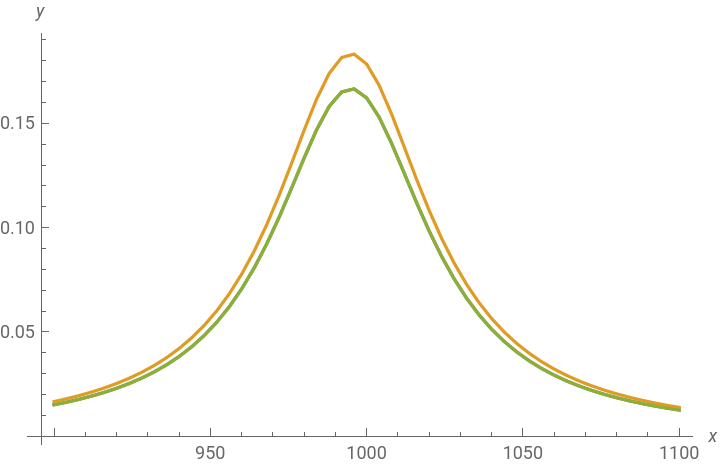
Prints the original and the erreneous data and compares it with the fitted curves
In[]:=
Table[Print[ListPlot[{OriginalCurves[[i]],ErroneousCurves[[i]],FittedCurves[[i]]},JoinedTrue,PlotLegends{"Original","Experiment","Fit"},AxesLabel{x,y}]],{i,1,Length[tt]}];
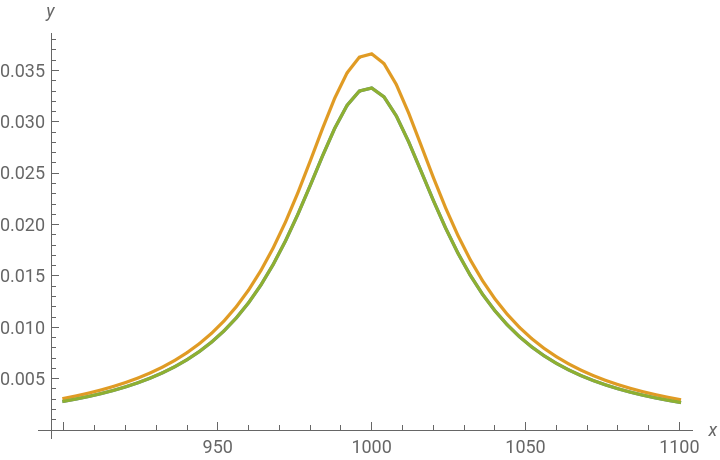


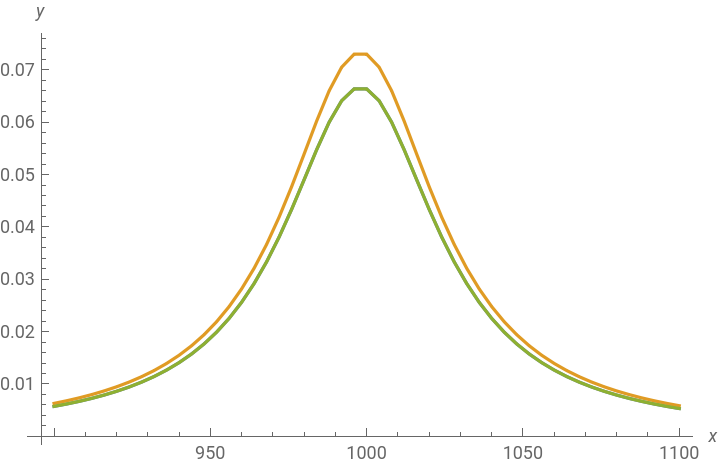
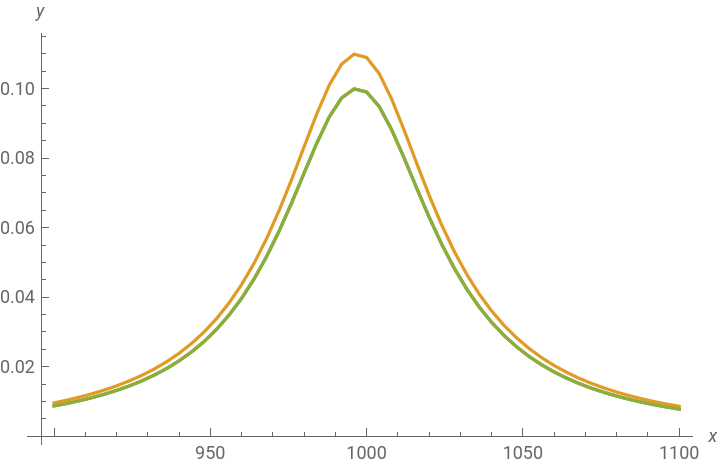
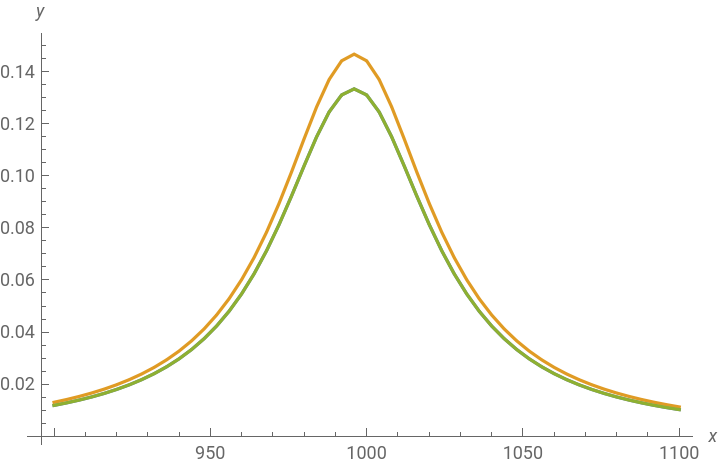
Exports the data
Export["a.xy",Table[Flatten[{x1[[i]],Table[eΦ[x1[[i]],tt[[j]],γ,x0,realfunction],{j,1,Length[tt]}],Table[(1+error)eΦ[x1[[i]],tt[[j]],γ,x0,realfunction],{j,1,Length[tt]}],Table[eΦ[x1[[i]],tt1[[j]],γ,x0,function],{j,1,Length[tt]}]}],{i,1,Length[x1]}]//N,"Table"]
a.xy
This calculates the conventional synchronous and asynchronous maps and displays them. For the theory behind we recommend: Noda I, Ozaki Y. Two-Dimensional Correlation Spectroscopy: Applications in Vibrational and Optical Spectroscopy: Wiley; 2005.
In[]:=
Y1=Table[eΦ[x1[[i]],tt[[j]],γ,x0,function],{j,1,Length[tt]},{i,1,Length[x1]}];(*Matrixoftheoriginalcurves*)Y2=Experiment;(*Matrixoftheerroneouscurves*)Average=Sum[Y1[[i]],{i,1,Length[tt]}]/Length[tt];Averagespectra=Table[{x1[[i]],Average[[i]]},{i,1,Length[Average]}];(*"Averagespectrum"oftheoriginalcurves*)(*"Averagespectrum"oftheoriginalcurves*)Average2=Sum[Y2[[i]],{i,1,Length[tt]}]/Length[tt];Averagespectra2=Table[{x1[[i]],Average2[[i]]},{i,1,Length[Average2]}];(*"Averagespectrum"oftheerroenouscurves*)
Calculation of the Synchroneous map
In[]:=
Φ=Tablex1[[i]],x1[[j]],Sum[Y1[[k,i]]*Y2[[k,j]],{k,1,Length[Y1],1}],{i,1,Length[x1]},{j,1,Length[x1]};
1
Length[Y1[[1]]]-1
Printing of the Synchroneous map
Calculation of the Asynchroneous map
Printing of the Asynchroneous map
Calculation of the Phase angle Map
Printing of the Phase angle Map
This calculates the 2T2D synchronous and asynchronous maps and displays them. Note that the Asynchronous map and the Phase angle map can have values different from zero only if function and real function are different. For the theory behind we recommend: I. Noda, J. Mol. Struct. 1160, 471 (2018).
Printing of the Synchroneous map
Printing of the Asynchroneous map
Printing of the Phase angle Map
CITE THIS NOTEBOOK
CITE THIS NOTEBOOK
Correcting systematic errors by hybrid 2D correlation loss functions
by Thomas Mayerhöfer
Wolfram Community, STAFF PICKS, May 4 2023.
https://community.wolfram.com/groups/-/m/t/2914905
by Thomas Mayerhöfer
Wolfram Community, STAFF PICKS, May 4 2023.
https://community.wolfram.com/groups/-/m/t/2914905