Recently I was asked to give a presentation about Kolmogorov Arnold Networks at work in one of our informal “AI Chat Sessions”. To prepare for the talk and test my own understanding, I tried to implement KANs myself in Wolfram Language, and here is how I did it.
What are KANs?
What are KANs?
The KAN paper that came out on 30th April 2024 received a lot of attention in the machine learning community and has already triggered many new papers, implementations and generalizations. This page collects links to many resources. KANs builds on the Kolmogorov-Arnold representation theorem, which states that any continuous function of several variables can be represented as a finite superposition of continuous functions of a single variable and addition. Stated mathematically:This means that we need at most (2n+1)n one-dimensional functions to exactly represent . Unfortunately these one-dimensional functions may be non-smooth or even fractal, and difficult to find. Let's look at some simple examples where we can apply the K-A theorem manually:
Foranycontinuousfunction,thereexistcontinuousfunctionsandsuchthat:
f(,,…,)
x
1
x
2
x
n
ϕ
i
ψ
ij
f(,,…,)()
x
1
x
2
x
n
2n+1
∑
i1
ϕ
i
n
∑
j1
ψ
ij
x
j
f(,,…,)
x
1
x
2
x
n
Example 1: f (x, y) = x/y:
f[x_,y_]=x/y;[u_]=Exp[u];[u_]=Log[u];[u_]=-Log[u];f[x,y]==[[x]+[y]]
Φ
1
ϕ
1,1
ϕ
1,2
Φ
1
ϕ
1,1
ϕ
1,2
Out[]=
True
Example 2: f (x, y) = x^y:
In[]:=
f[x_,y_]=x^y;[u_]=Exp[Exp[u]];[u_]=Log[Log[u]];[u_]=Log[u];f[x,y]==[[x]+[y]]
Φ
1
ϕ
1,1
ϕ
1,2
Φ
1
ϕ
1,1
ϕ
1,2
Out[]=
True
Example 3: f (x, y,z) = x^y + Sin[y /z]:
In[]:=
f[x_,y_,z_]=x^y+Sin[y/z];[u_]=Exp[Exp[u]];[u_]=Log[Log[u]];[u_]=Log[u];[u_]=0;[u_]=Sin[Exp[u]];[u_]=0;[u_]=Log[u];[u_]=-Log[u];f[x,y,z]==[[x]+[y]+[z]]+[[x]+[y]+[z]]
Φ
1
ϕ
1,1
ϕ
1,2
ϕ
1,3
Φ
2
ϕ
2,1
ϕ
2,2
ϕ
2,3
Φ
1
ϕ
1,1
ϕ
1,2
ϕ
1,3
Φ
2
ϕ
2,1
ϕ
2,2
ϕ
2,3
Out[]=
True
Example 4: f (x, y,z) = (x^y)/z:
I gave up on this one... But what if we use the K-A theorem in a nested way? Then we can simply apply the functions form examples 1 and 2. This approach is exactly what KANs do - they generalize the K-A theorem to multiple layers.
g[x_,y_]=x^yf[x_,y_,z_]=g[x,y]/z
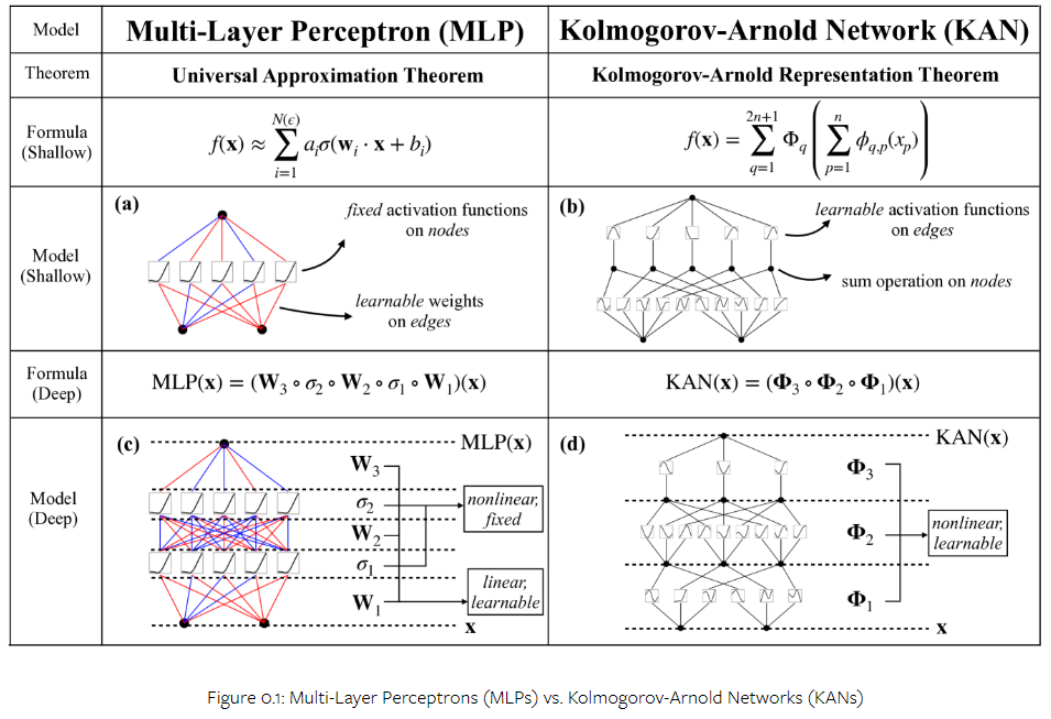
The KAN paper points out that one may interpret the K - A theorem as a 2 - layer feed - forward neural net, and based on this they suggest how it can be extended to more layers. The second ingredient they introduce is the idea of representing the functions in each layer by B-splines. Some of the main claims about KANs are that they can approximate functions more efficiently (using less parameters/memory) than multilayer perceptrons (MLPs), and that they are interpretable.
The following figure from the paper compares MLPs and KANs.
The following figure from the paper compares MLPs and KANs.
Implementing KANs in Wolfram Language
Implementing KANs in Wolfram Language
The Wolfram Language has an inbuilt function for B-Splines, however I was not able to use it inside a ElementwiseLayer, and therefore had to implement it myself. Here I define B-spline basis functions over the interval [0,1], with m being the number of intervals, i the index of the basis function ,and p the polynomial order of the B-spline:
In[]:=
B[i_,0,m_][t_]:=Boole[i(1/m)<=t<(i+1)(1/m)]B[i_,-1,m_][t_]:=0B[i_,p_,m_][t_]:=Simplify[Boole[i(1/m)<=t<(i+1+p)(1/m)]((t-i/m)/(p/m)B[i,p-1,m][t]+((i+1+p)/m-t)/(p/m)B[i+1,p-1,m][t])]
Here are examples of how the basis functions look for polynomial orders 0-2. Note that the sum of the basis functions are 1 over the entire domain .
In[]:=
m=5;Table[B[i,0,m][t],{i,0,m-1}];Table[B[i,1,m][t],{i,-1,m-1}];Table[B[i,2,m][t],{i,-2,m-1}];Row[{Plot[%%%,{t,0,1},PlotRange->All,ImageSize->Medium,PlotLabel->"m="<>ToString[m]<>", p=0",Filling->Axis],Plot[%%,{t,0,1},PlotRange->All,ImageSize->Medium,PlotLabel->"m="<>ToString[m]<>", p=1",Filling->Axis],Plot[%,{t,0,1},PlotRange->All,ImageSize->Medium,PlotLabel->"m="<>ToString[m]<>", p=2",Filling->Axis]}]
Out[]=
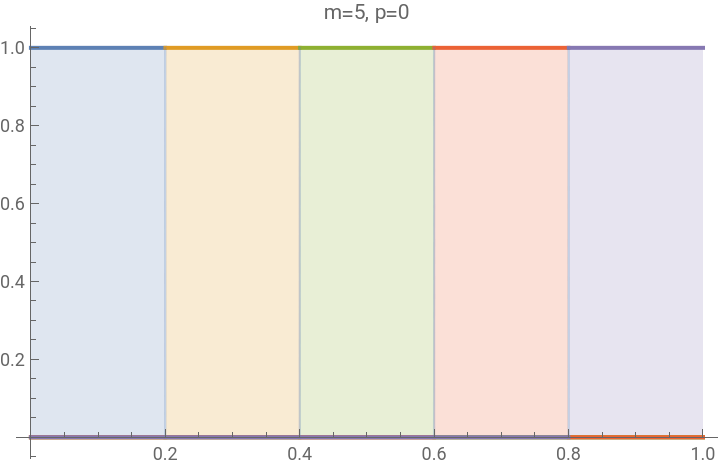
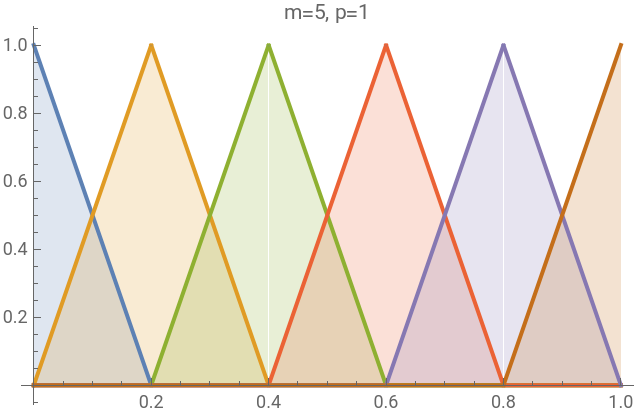
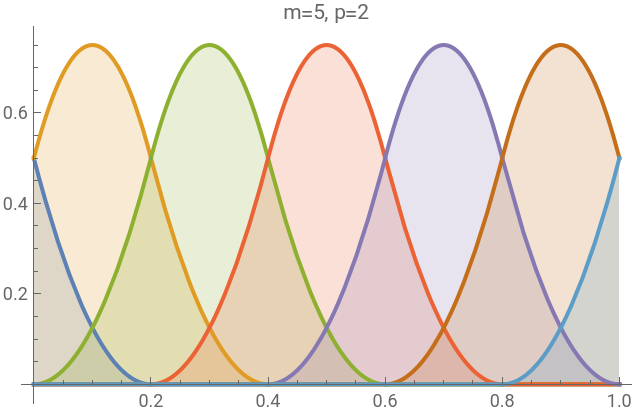
Note that the basis functions are simply shifted functions of each other. Therefore, instead of applying different basis functions to the same input, we may instead apply the same input to shifted versions of the input. Based on this, we can implement a KAN layer as follows:
In[]:=
KANlayer[inputs_,outputs_,m_,p_]:=NetGraph[<|"repeat"ReplicateLayer[{outputs,m+p}],"shift"NetArrayLayer["Array"Table[j/m,{i,outputs},{j,-p,m-1},{k,inputs}]],"thread"ThreadingLayer[#1-#2&],"spline"ElementwiseLayer@Function[t,Evaluate[Simplify`PWToUnitStep[B[0,p,m][t]]]],"alpha"NetArrayLayer["Array"0.1RandomReal[{-1,1},{outputs,m+p,inputs}]],"times"ThreadingLayer[Times],"sum"AggregationLayer[Total,-2;;-1]|>,{NetPort["Input"]"repeat",{"repeat","shift"}"thread""spline",{"spline","alpha"}"times""sum"NetPort["Output"]},"Input"inputs,LearningRateMultipliers{"shift"0,"alpha"2}]
Here is an example:
In[]:=
KANlayer[3,1,10,2]
Here are some functions to extract the learnt spline functions in each layer and plot them:
Examples
Examples
Example: 1D curve fitting
Example: 1D curve fitting
Note how the MLP struggles to learn the function.
Note also that for this 1D case, the final output is simply the single spline learnt by the KAN.
Note also that for this 1D case, the final output is simply the single spline learnt by the KAN.
Example: 2D curve fitting
Example: 2D curve fitting
Example: classification
Example: classification
Note that the MLP is better than the KAN here, but the KAN is not “extremely bad”.
Running pyKAN using Wolfram
Running pyKAN using Wolfram
It is also easy to run the original pyKAN python library from a Wolfram notebook:
In[]:=
pip install pykan
Import libraries and set the device:
In[]:=
import torch
from kan import *
import matplotlib.pyplot as plt
device = torch.device("cpu")
from kan import *
import matplotlib.pyplot as plt
device = torch.device("cpu")
Load data:
In[]:=
from sklearn.datasets import load_iris
from sklearn.model_selection import train_test_split
def load_iris_dataset():
# Load iris dataset
iris = load_iris()
data = iris.data
target = iris.target
# Convert to PyTorch tensors
data_tensor = torch.tensor(data, dtype=torch.float32)
target_tensor = torch.tensor(target, dtype=torch.long)
# Split dataset into train and test sets
train_data, test_data, train_target, test_target = train_test_split(data_tensor, target_tensor, test_size=0.2, random_state=42)
# Create data loaders (optional, if you want to batch and shuffle the data)
train_loader = torch.utils.data.DataLoader(torch.utils.data.TensorDataset(train_data, train_target), batch_size=1, shuffle=True)
test_loader = torch.utils.data.DataLoader(torch.utils.data.TensorDataset(test_data, test_target), batch_size=1, shuffle=False)
train_inputs = torch.empty(0, 4, device=device)
train_labels = torch.empty(0, dtype=torch.long, device=device)
test_inputs = torch.empty(0, 4, device=device)
test_labels = torch.empty(0, dtype=torch.long, device=device)
# Concatenate all data into a single tensor on the specified device
for data, labels in train_loader:
train_inputs = torch.cat((train_inputs, data.to(device)), dim=0)
train_labels = torch.cat((train_labels, labels.to(device)), dim=0)
for data, labels in test_loader:
test_inputs = torch.cat((test_inputs, data.to(device)), dim=0)
test_labels = torch.cat((test_labels, labels.to(device)), dim=0)
dataset = {}
dataset['train_input'] = train_inputs
dataset['test_input'] = test_inputs
dataset['train_label'] = train_labels
dataset['test_label'] = test_labels
return dataset
iris_dataset = load_iris_dataset()
from sklearn.model_selection import train_test_split
def load_iris_dataset():
# Load iris dataset
iris = load_iris()
data = iris.data
target = iris.target
# Convert to PyTorch tensors
data_tensor = torch.tensor(data, dtype=torch.float32)
target_tensor = torch.tensor(target, dtype=torch.long)
# Split dataset into train and test sets
train_data, test_data, train_target, test_target = train_test_split(data_tensor, target_tensor, test_size=0.2, random_state=42)
# Create data loaders (optional, if you want to batch and shuffle the data)
train_loader = torch.utils.data.DataLoader(torch.utils.data.TensorDataset(train_data, train_target), batch_size=1, shuffle=True)
test_loader = torch.utils.data.DataLoader(torch.utils.data.TensorDataset(test_data, test_target), batch_size=1, shuffle=False)
train_inputs = torch.empty(0, 4, device=device)
train_labels = torch.empty(0, dtype=torch.long, device=device)
test_inputs = torch.empty(0, 4, device=device)
test_labels = torch.empty(0, dtype=torch.long, device=device)
# Concatenate all data into a single tensor on the specified device
for data, labels in train_loader:
train_inputs = torch.cat((train_inputs, data.to(device)), dim=0)
train_labels = torch.cat((train_labels, labels.to(device)), dim=0)
for data, labels in test_loader:
test_inputs = torch.cat((test_inputs, data.to(device)), dim=0)
test_labels = torch.cat((test_labels, labels.to(device)), dim=0)
dataset = {}
dataset['train_input'] = train_inputs
dataset['test_input'] = test_inputs
dataset['train_label'] = train_labels
dataset['test_label'] = test_labels
return dataset
iris_dataset = load_iris_dataset()
Create and train model:
In[]:=
model = KAN(width=[4, 5, 3], grid=5, k=3, seed=0, device=device)
model(iris_dataset['train_input'])
def train_acc():
return torch.mean((torch.argmax(model(iris_dataset['train_input']), dim=1) == iris_dataset['train_label']).float())
def test_acc():
return torch.mean((torch.argmax(model(iris_dataset['test_input']), dim=1) == iris_dataset['test_label']).float())
results = model.fit(iris_dataset, opt='Adam', metrics=(train_acc, test_acc),
loss_fn=torch.nn.CrossEntropyLoss(), steps=100, lamb=0.01, lamb_entropy=10.)
model(iris_dataset['train_input'])
def train_acc():
return torch.mean((torch.argmax(model(iris_dataset['train_input']), dim=1) == iris_dataset['train_label']).float())
def test_acc():
return torch.mean((torch.argmax(model(iris_dataset['test_input']), dim=1) == iris_dataset['test_label']).float())
results = model.fit(iris_dataset, opt='Adam', metrics=(train_acc, test_acc),
loss_fn=torch.nn.CrossEntropyLoss(), steps=100, lamb=0.01, lamb_entropy=10.)
Concluding remarks
Concluding remarks
What I have shown here is by no means an efficient implementation of KANs, and it is not a serious comparison of KANs vs MLPs. However, it was nice to see how easy KANs could be implemented in the Wolfram Language, and it helped me understand KANs and explain it to my colleagues. I would be very interested to learn if other people in the Wolfram Community have looked into KANs more seriously and maybe have a more advanced implementation in Wolfram Language.
CITE THIS NOTEBOOK
CITE THIS NOTEBOOK
Kolmogorov-Arnold networks (KANs) in Wolfram language
by Andreas Hafver
Wolfram Community, STAFF PICKS, Auust 23, 2024
https://community.wolfram.com/groups/-/m/t/3254225
by Andreas Hafver
Wolfram Community, STAFF PICKS, Auust 23, 2024
https://community.wolfram.com/groups/-/m/t/3254225