At the time of this post, on April 1, 2026, NASA will launch the first crewed space mission around the Moon since the Apollo era. Known as Artemis II, the mission will not land on the Moon, nor will it orbit the Moon, but will undergo a free-return trajectory that whips the crew around the Moon and back along an asymmetric figure eight path.
In[]:=
Dataset["PrimaryCrew"]
Out[]=
JPL Horizons published trajectory data that can be accessed via a Wolfram Function Repository item called “HorizonsEphemerisData”. Using this tool, you can ask for the state (position and velocity) of the spacecraft. The data assumes a launch on April 1 which is obviously dependent on finding no reason to delay the launch due to technical issues. JPL Horizons refers to the spacecraft using the numerical identifier “-1024”. Hopefully, in the future, NASA will publish a SPICE kernel that can be used for native support of such data.
In[]:=
horizonsEarth="State","@-1024",<|"Frame"->"EclipticJ2000","Center"->,"Dates"->,,|>,All,"Dataset";
The dataset can be converted to a tabular object for optimal display.
In[]:=
Tabular[horizonsEarth]
Out[]=
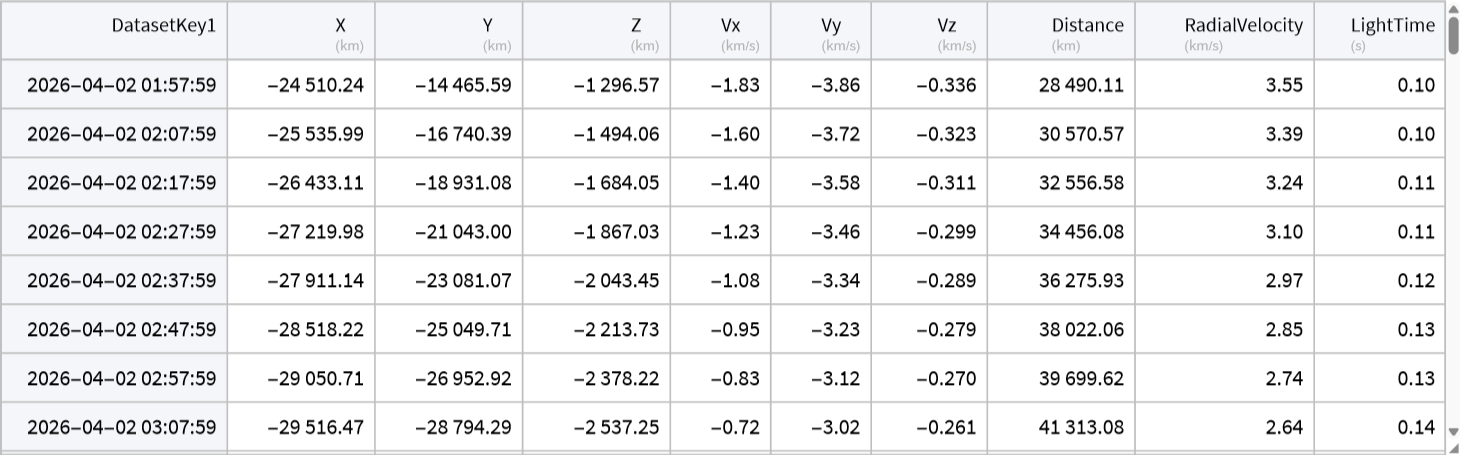
The dates and 3D positions of the spacecraft can be extracted via:
In[]:=
datesEarth=Keys[Normal[horizonsEarth]];
In[]:=
xyzArtemisEarth=QuantityMagnitude[Values/@Values@Normal[horizonsEarth[[All,{"X","Y","Z"}]]],"AstronomicalUnit"];
To visualize the event, we need a few pieces of data
In[]:=
earthRad=QuantityMagnitude["EquatorialRadius"],"AstronomicalUnit"
Out[]=
0.00004263521
In[]:=
moonRad=QuantityMagnitude["EquatorialRadius"],"AstronomicalUnit"
Out[]=
0.000011618
In[]:=
flybyDate=DateObject[{2026,4,6,22,0},TimeZone->0];
In[]:=
moonFlybyPos=AstroPosition,"MeanEcliptic",flybyDate,,"Cartesian"["Data"]
Out[]=
{-0.000870163,-0.00255084,-0.000243179}
In[]:=
moonPath=LineAstroPosition,"MeanEcliptic",#,,"Cartesian"["Data"]&/@datesEarth;
In[]:=
artemisEarthTimeSeries=TimeSeries[Transpose[{datesEarth,xyzArtemisEarth}]]
Out[]=
TimeSeries


Manipulate can be used to interactively animate the event. Some undocumented code is used to get the correct rotation of Earth as a function of time.
In[]:=
artemisDataFromEarth[d_]:={StandardRed,AbsolutePointSize[10],Point[artemisEarthTimeSeries[d]],Opacity[.85],AbsoluteThickness[2],Line[xyzArtemisEarth]}
Here, some functionality that will hopefully be publically documented in a future version is used to rotate the textured Earth based on the date.
In[]:=
rotatingEarth[d_]:=ScaleGeometricTransformation["TexturedSurface"][[1]],Astronomy`AstroOrientationMatrix[{"ITRS",d},{"MeanEcliptic",d}],earthRad,{0,0,0}
In[]:=
moonDataFromEarth[d_]:=White,SphereAstroPosition,"MeanEcliptic",d,,"Cartesian"["Data"],moonRad,Opacity[.5],AbsoluteThickness[2],moonPath
In[]:=
optionsFromEarth=;
In[]:=
formatDate[d_]:=Style[DateString[d,{"DayShort"," ","MonthNameShort"," ","Year"," ","Hour24",":","Minute",":","Second"," ","GMT"}],GrayLevel[.75],Bold,17]
In[]:=
Manipulate[Graphics3D[{artemisDataFromEarth[d],rotatingEarth[d],moonDataFromEarth[d]},optionsFromEarth,PlotLabel->formatDate[d]],{d,datesEarth[[1]],datesEarth[[-1]],Quantity[1,"Minutes"]},SaveDefinitions->True]
Out[]=


We can also generate a list of frames and export them to a movie with the following:
In[]:=
frames=TableGraphics3D[{artemisDataFromEarth[d],rotatingEarth[d],moonDataFromEarth[d]},ImageSize->{600,720},optionsFromEarth,PlotLabel->formatDate[d]],d,datesEarth[[1]],datesEarth[[-1]],;
In[]:=
SlideShowVideo[frames,DefaultDuration->15,RasterSize->{600,720}]
Out[]=
Notice that the Moon (in white) flies through the scene just as the spacecraft is reaching its furthest point from Earth
Lunar-centric View
Lunar-centric View
It’s also possible to view this lunar flyby from the Moon’s point of view. The following variation is nearly the same as above, but changes the origin to be the Moon.
The dates and 3D positions of the spacecraft can be extracted via:
In this reference frame, the Earth appears to orbit the Moon and so creates an orbital arc with the Moon at the origin.
CITE THIS NOTEBOOK
CITE THIS NOTEBOOK
Artemis II trajectory: crewed lunar flyby to launch on April 1, 2026
by Jeffrey Bryant
Wolfram Community, STAFF PICKS, March 31, 2026
https://community.wolfram.com/groups/-/m/t/3672762
by Jeffrey Bryant
Wolfram Community, STAFF PICKS, March 31, 2026
https://community.wolfram.com/groups/-/m/t/3672762