Advanced Analytics - Visualizing Direct and Indirect Sales
Advanced Analytics - Visualizing Direct and Indirect Sales
Diagram - Analyzing and Visualizing Direct Indirect Sales
Out[]=
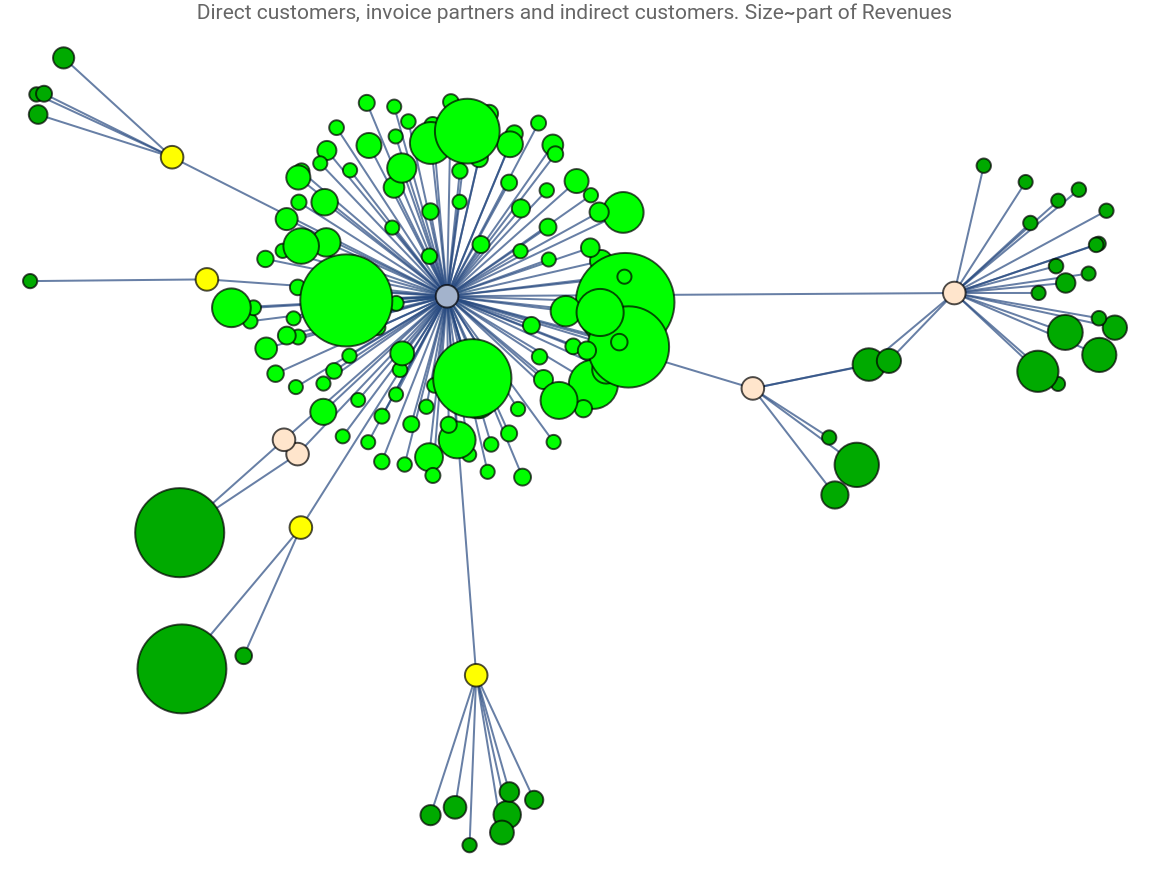
In the Nordic IT related professional services market, it is common for customers to strive for having a few suppliers. This means that niche companies sometimes have to sell their services through a large company - a middleman - referred to by the client’s purchase department. The contracts for the large companies are time limited which means that the niche companies contract with the client are at risk.
As a part of recent advisory project with a client , I wanted to visualize how a company had most of its revenues in direct relationships and - for the indirect revenues - that the relationships with its customers survived the change of middleman.
In a dialogue with the client we came up with the graph above.
An explanation:
- The company itself is the light grey node in the middle.
- An edge to a light green node shows a direct relationship. An edge to a yellow node shows an indirect relationship to an indirect customer. Indirect customer are coloured to in darker green. Light orange nodes are middlemen that have changed during the period.
- The size of green nodes shows the revenue during the last 18 months. The time window (18 months) was selected based on project length, not financial year.
The visualization shows that most of the clients are direct. Also, it shows that in some cases the relationship to indirect customers survive the change of direct supplier. These are the light orange nodes.
As a part of recent advisory project with a client , I wanted to visualize how a company had most of its revenues in direct relationships and - for the indirect revenues - that the relationships with its customers survived the change of middleman.
In a dialogue with the client we came up with the graph above.
An explanation:
- The company itself is the light grey node in the middle.
- An edge to a light green node shows a direct relationship. An edge to a yellow node shows an indirect relationship to an indirect customer. Indirect customer are coloured to in darker green. Light orange nodes are middlemen that have changed during the period.
- The size of green nodes shows the revenue during the last 18 months. The time window (18 months) was selected based on project length, not financial year.
The visualization shows that most of the clients are direct. Also, it shows that in some cases the relationship to indirect customers survive the change of direct supplier. These are the light orange nodes.
Work flow - Analyzing and Visualizing Direct and Indirect Sales
Out[]=
C:\Users\FDO\OneDrive\Documents\_MyResearch\Advanced analytics - Cases\\Direct Indirect sales\aData.json
Anonymized actual data from the the case:
In[]:=
container=Import["https://www.wolframcloud.com/obj/ScieranObjects/Published/aData.json"];$structuralBaseWIndicatorsMm=Association[#]&/@container;RandomChoice@$structuralBaseWIndicatorsMm
Out[]=
name,total revenue45568.6,directInvoicing45568.6,inDirectInvoicing0,inDirectPartners{}
C
1
The explanation of the keys in the list of Associations are:
- “name”, name of the client
- “total revenue”, total revenue during the period
- “directInvoicing”, direct invoicing to the client
- “indirectInvoicing”, indirect invoicing to the client
- “inDirectPartners”, list of companies that acts as middlemen.
This is not the ideal format but given the client’s specific configuration of CRM and ERP systems and limited resources for extracting & compiling the data it was the format that it was agreed to work with.
- “name”, name of the client
- “total revenue”, total revenue during the period
- “directInvoicing”, direct invoicing to the client
- “indirectInvoicing”, indirect invoicing to the client
- “inDirectPartners”, list of companies that acts as middlemen.
This is not the ideal format but given the client’s specific configuration of CRM and ERP systems and limited resources for extracting & compiling the data it was the format that it was agreed to work with.
Building the graph
Building the graph
First, for each customer, we find the indirect partner and delete duplicates.
In[]:=
$inDirectList=((Query[All,"inDirectPartners"]@$structuralBaseWIndicatorsMm)//Flatten//DeleteDuplicates//Sort)
Out[]=
{,,,,,,,}
I
1
I
2
I
3
I
4
I
5
I
6
I
7
I
8
Second, we create the subgraph with the company and its invoice partners.
In[]:=
invoiceGraphList="C"#&/@$inDirectList
Out[]=
{C,C,C,C,C,C,C,C}
I
1
I
2
I
3
I
4
I
5
I
6
I
7
I
8
Third,we get the name and the indirect partners. Note that an empty indirect list implies that the relationship is direct.
In[]:=
grafListPrel={#["name"],#["inDirectPartners"]}&/@$structuralBaseWIndicatorsMm;grafListPrel//Short
Out[]//Short=
{{,{}},147,{,{}}}
C
1
C
149
An empty second element implies a direct relationships. Replace the empty ones with “C”, that is, the company itself.
In[]:=
grafList=grafListPrel//.{}{"C"};grafList//Short
Out[]//Short=
{{,{C}},147,1}
C
1
A helper function
In[]:=
Clear@linkAtoSublist;linkAtoSublist[{a_,sub_List}]:=a#&/@sub;
Join the two graphs, the first with the indirect and the second with the direct.
In[]:=
g=Join[(linkAtoSublist[#]&/@grafList)//Flatten,invoiceGraphList];g//Short
Out[]//Short=
{C,158,C}
C
1
I
8
The initial graph is then:
In[]:=
Graph[g]
Out[]=
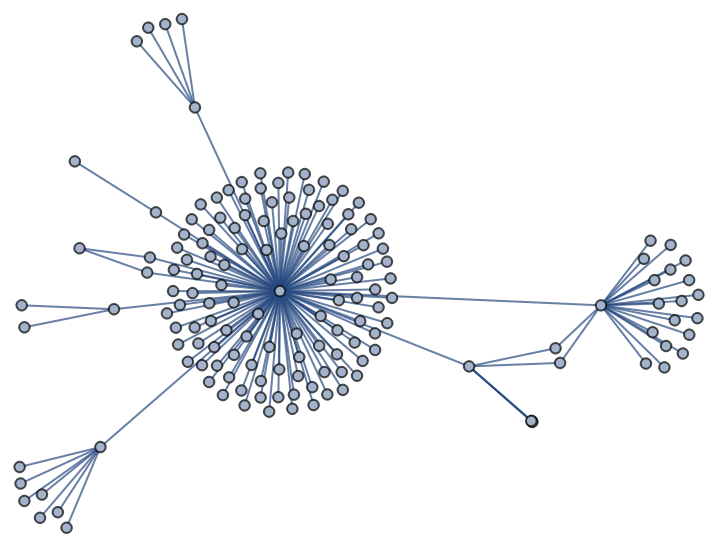
The initial graph clearly shows that most customers are direct. But it is missing the the relative size and the interesting property that the company has survived changes of intermediaries isn’t highlighted.
Annotate the graph
Annotate the graph
The goal is to high light different subsets of the nodes
First, we identify all graph elements that are direct customers. The code below detects all graph components where at least one is the company "C".
First, we identify all graph elements that are direct customers. The code below detects all graph components where at least one is the company "C".
In[]:=
directCustomers=Cases[g,a_b_a/;b"C"]
Out[]=
{,,,,,,,,,,,,,,,,,,,,,,,,,,,,,,,,,,,,,,,,,,,,,,,,,,,,,,,,,,,,,,,,,,,,,,,,,,,,,,,,,,,,,,,,,,,,,,,,,,,,,,,,,,,,,,}
C
1
C
3
C
4
C
5
C
7
C
8
C
9
C
10
C
11
C
12
C
13
C
15
C
16
C
17
C
18
C
20
C
21
C
22
C
24
C
25
C
26
C
27
C
28
C
30
C
31
C
34
C
35
C
36
C
37
C
39
C
40
C
41
C
43
C
44
C
45
C
46
C
47
C
49
C
50
C
51
C
54
C
55
C
57
C
58
C
59
C
60
C
61
C
62
C
65
C
67
C
68
C
70
C
71
C
72
C
73
C
74
C
75
C
76
C
77
C
80
C
81
C
83
C
85
C
86
C
87
C
89
C
91
C
93
C
94
C
95
C
96
C
97
C
98
C
99
C
100
C
101
C
103
C
104
C
105
C
106
C
109
C
110
C
111
C
112
C
114
C
116
C
117
C
118
C
119
C
121
C
122
C
123
C
124
C
125
C
126
C
128
C
129
C
130
C
132
C
133
C
134
C
135
C
136
C
137
C
138
C
139
C
140
C
142
C
143
C
147
C
149
Second, identify the indirect customers.
In[]:=
indirectCustomers=Cases[g,a_b_a/;And[MemberQ[$inDirectList,b],a≠"C"]]//DeleteDuplicates
Out[]=
{,,,,,,,,,,,,,,,,,,,,,,,,,,,,,,,,,,,,,}
C
2
C
6
C
14
C
19
C
23
C
29
C
32
C
33
C
38
C
42
C
48
C
52
C
53
C
56
C
63
C
64
C
66
C
69
C
78
C
79
C
82
C
84
C
88
C
90
C
92
C
102
C
107
C
108
C
113
C
115
C
120
C
127
C
131
C
141
C
144
C
145
C
146
C
148
Third, we prepare the weights for the size. Here the total revenue for the customer is used to create an association with the relative size. Also, we create a size parameter for nodes that merely are there for place holding (the company itself and the middlemen)
In[]:=
custAndPropAssoc=<|#["name"]->#["total revenue"]/($structuralBaseWIndicatorsMm[[All,"total revenue"]]//Total)&/@$structuralBaseWIndicatorsMm|>;(*check<|Map|>patternvs<||>Map*)zeroInv=<|(#(Values@custAndPropAssoc//Mean)&/@Join[$inDirectList,{"C"}])|>;allVertexWeight=Join[custAndPropAssoc,zeroInv];allVertexWeight//Short
Out[]//Short=
0.000432433,156,C0.00671141
C
1
Last, we create the graph by using the HighlightGraph function
In[]:=
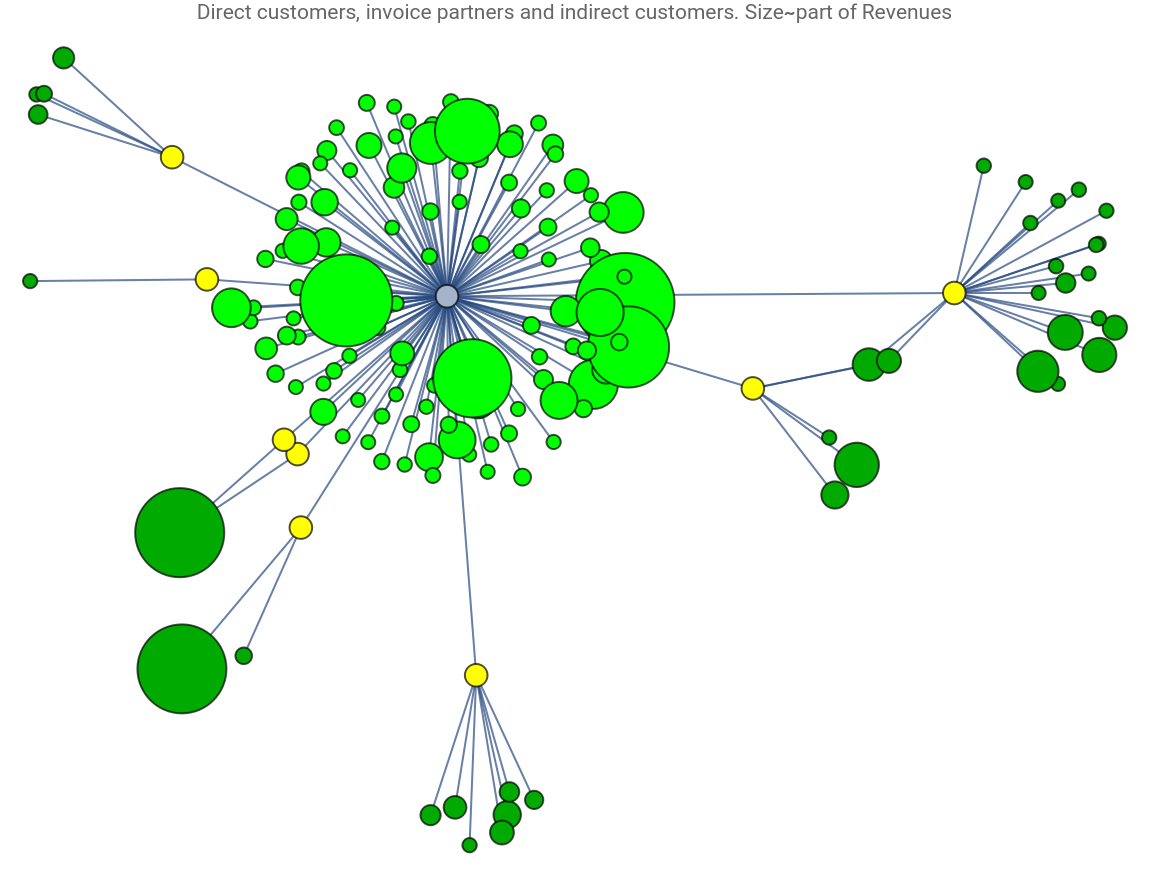
$highG=HighlightGraph[g,{Style[directCustomers,Green],Style[$inDirectList,Yellow],Style[indirectCustomers,Darker@Green]},PlotLabel"Direct customers, invoice partners and indirect customers. Size~part of Revenues",VertexSizeThread[Keys[allVertexWeight]Rescale[Values[allVertexWeight],{Min@Values[allVertexWeight],Max@Values[allVertexWeight]},{5,35}]],ImageSizeLarge,GraphLayout{"SpringElectricalEmbedding","Tolerance"0.9}]
Out[]=
Identify all customers that are indirect and their indirect partners except for C itself
Find the customers with more than one indirect partner. These are the ones where the customer has changed the partner but kept C (based on that C has sent invoices)
For these customers, identify the indirect partners
Add styling to those nodes in the graph
Discussion - Visualization Direct/Indirect Sales
An traditional visualization of direct vs indirect sales is a pie chart, see below.
In the project, this diagram would have lost relevant information that was available in the CRM and ERP systems. Information that showed the strength of the company’s relationship to its customers despite the middlemen. Also, in the pie chart, information about the relative size of the customers and the number of middlemen are lost.
In the project, this diagram would have lost relevant information that was available in the CRM and ERP systems. Information that showed the strength of the company’s relationship to its customers despite the middlemen. Also, in the pie chart, information about the relative size of the customers and the number of middlemen are lost.
In the advisory project for the client, the visualization generated good dialogues about the company’s “go to market” strategy and how this could be developed as part of a potential acquisition.