Aggregation systems on grid graphs grow at each step by attaching a new atom to pre-existing configuration according to a set of local constraints. The multiway graphs of these systems fascinate us by sometimes filling space and other times reaching frustrated and dead surfaces. This project continues to explore aggregation systems on three-dimensional grid graphs by introducing unique and indivisible atoms, which adhere to specific combination rules. We examine configurations formed with a few special building blocks, whose interlocking mechanisms allow for practical experiments. These shapes, designed for the physical world, also have an abstract mathematical representation in terms of adjacency relations that form noteworthy graph structures. We introduce the concept of instruction graphs, ensure their uniqueness with regard to constructions in the physical world. By comparing computational models to physical sculptures, we validate the practical applicability of our new approach, highlighting its potential to enhance our understanding and control of space-filling structures.
Introduction
Introduction
Aggregation systems are built by adding new atoms to an already existing configuration. The purpose of this project is to explore all possible configurations using a given set of building blocks. The rules we will use to form our configurations are based on the physical characteristics of the building blocks: they will only bind together when their cuts and studs fit properly.
Our approach
Our approach
Building Blocks
Building Blocks
In order to build a 3D Aggregation System, we first need to choose a geometric shape to build upon. Starting with cubes, we then construct different building blocks, each with specific “rules.” We think of these building blocks as indivisible atoms that can only bind to another preexisting atom according to certain local constraints.
We use voxels to build each block and then use an association to distinguish where the “Ins” and “Outs” should be placed. Visually, “Ins” correspond to the cuts in each piece, while “Outs” are located on every stud. This association makes it possible to compute all the different configurations between the pieces and subsequently build an aggregation system with them.
All the pieces are built as a union of their cuts, main plate, and studs. In the following image, we can see the process of building the L-shaped 2x2 plate:
We use voxels to build each block and then use an association to distinguish where the “Ins” and “Outs” should be placed. Visually, “Ins” correspond to the cuts in each piece, while “Outs” are located on every stud. This association makes it possible to compute all the different configurations between the pieces and subsequently build an aggregation system with them.
All the pieces are built as a union of their cuts, main plate, and studs. In the following image, we can see the process of building the L-shaped 2x2 plate:
Out[561]=


In[708]:=
$BracketOPrototile=Association["Name"->99781,"Voxels"->Union[cutsBracketO,plateBracketO,cubeBracketO,studsBracketO],"Ins"->Association[1->{{4,5,4},{0,0,1}},2->{{9,5,4},{0,0,1}}],"Outs"->Association[3->{{4,5,6},{0,0,1}},4->{{9,5,6},{0,0,1}},5->{{4,1,3},{0,-1,0}},6->{{9,1,3},{0,-1,0}}]];
This specific example builds a Bracket (99781) with two “Ins” and four “Outs.” We repeat the same mechanism with all our desired pieces to obtain a set of pieces that will give our aggregation system more possible configurations. Part of the importance of having different pieces is also exploring their limitations: an aggregation system of 1x1 plates will allow a stack without ever encountering a dead or frustrated surface, but its adjacency graph will always be a path graph.
On the other hand, “Tiles” only contain “Ins,” making it impossible to build an aggregation system without additional pieces. Their specific characteristics make them end pieces on every block, creating a dead surface wherever they’re placed. The more pieces we add to our database, the larger the number of multiway systems and sculptures we will be able to build.
On the other hand, “Tiles” only contain “Ins,” making it impossible to build an aggregation system without additional pieces. Their specific characteristics make them end pieces on every block, creating a dead surface wherever they’re placed. The more pieces we add to our database, the larger the number of multiway systems and sculptures we will be able to build.


Rotations and Translations
Rotations and Translations
Since we are building every single block with voxels, we only need to consider the ways a cube can rotate to account for all possible rotations of our pieces. A cube has 24 possible rotations, calculated as follows:
Lastly, there are eight rotations through one of the four pairs of opposing corners.
If we want to explore all possible configurations, we need not only a rotation function but also a translation function, so that we can stack blocks together.
Lastly, there are eight rotations through one of the four pairs of opposing corners.
If we want to explore all possible configurations, we need not only a rotation function but also a translation function, so that we can stack blocks together.
◼
The first rotation is the identity rotation, which means not doing anything.
◼
There are six rotations through the middle of one of the six pairs of opposing edges.
◼
There are nine rotations around the axes through the middle of one of the three pairs of opposing faces.
◼
Lastly, there are eight rotations through one of the four pairs of opposing corners.
Adding these up, we have 1 + 9 + 6 + 8 = 24 possible rotations .
Tiles
Tiles
To display each building block, we use a function called “InitializeTiling” that includes not only the voxels but also the “Ins” and “Outs.”
InitializeTiling[proto_]:=Association["Ins"->Values[proto["Ins"]],"Outs"->Values[proto["Outs"]],"Tiles"->Association[1->proto],"Voxels"->proto["Voxels"]]
Having a generalized function, instead of calling each prototile individually each time, is much easier and will be beneficial once we get to the multiway graphs and sculptures.
Multiway Graphs
Multiway Graphs
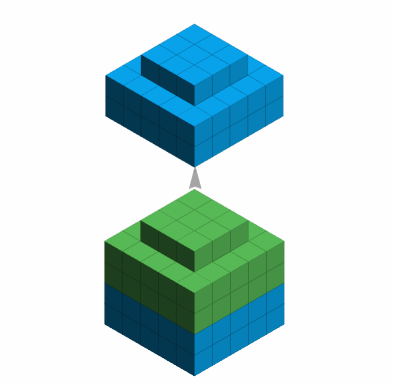
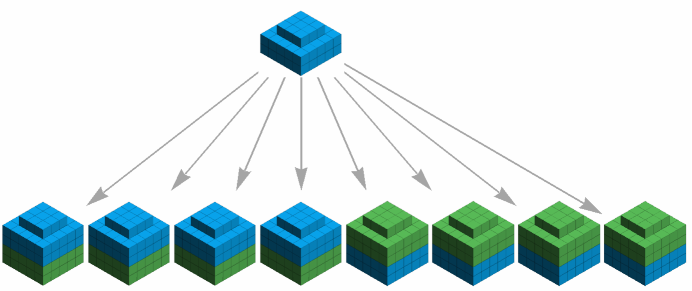
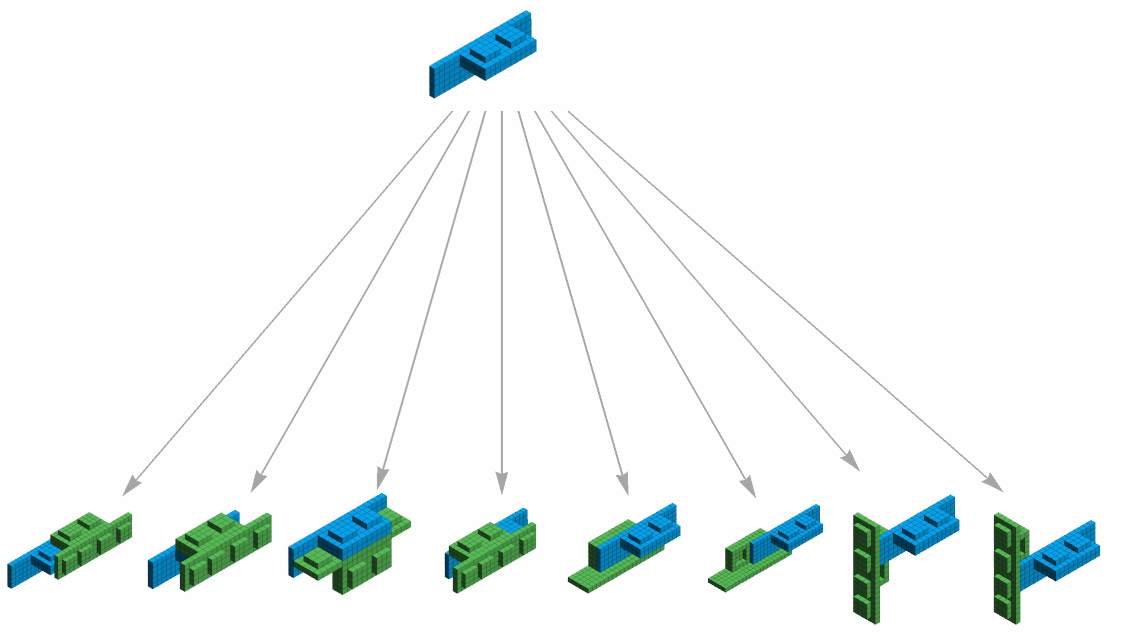
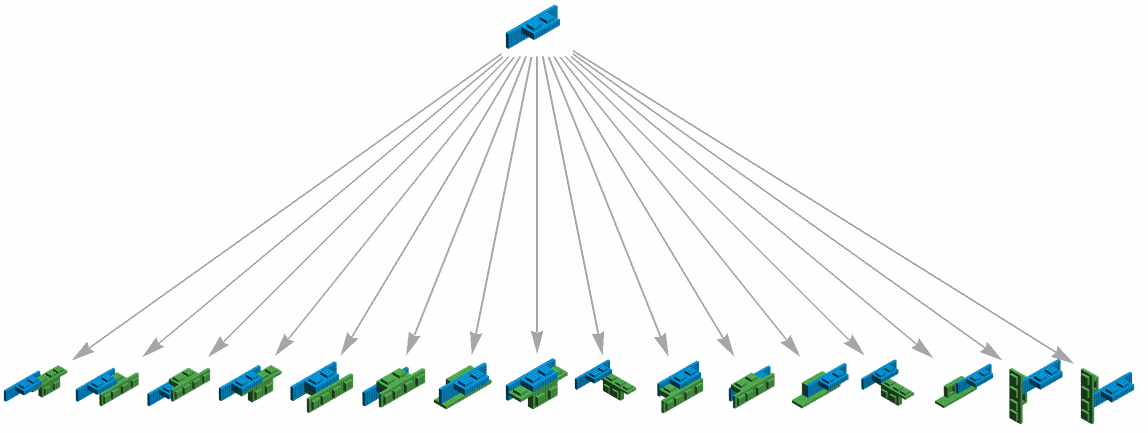
Multiway graphs explore every possible configuration given a specific set of pieces. Our aggregation system adds one piece at a time, where every possibility is computed and explored. If we canonicalize them, we filter out any duplicates generated by rotation and symmetry. If not, the number of possibilities is much larger. Here’s a clear comparison between a canonicalized multiway graph after one step and one without canonicalization of a 1x1 plate and a 1x2-1x4 bracket.
Multiway System (Canonicalized)
Module[{res,graph,block=$PlatePrototile},res=Reap[Nest[MultiIterate[IterateBuilder[block],CanonicalizeBy[BuildingSignature,ReverseSort]][#]&,{InitializeTiling[block]},1]];graph=SimpleGraph[Flatten[res[[2]]]];Graph[graph,AspectRatio->1/3,EdgeStyle->Gray,VertexSize->2,GraphLayout->"LayeredDigraphEmbedding",VertexSize->1,PerformanceGoal->"Quality",VertexShapeFunction->Function[{off,val,scale},Inset[DisplayBlocks[val],off,Automatic,First[scale]]]]]
Multiway System:
Module[{res,graph,block=$PlatePrototile},res=Reap[Nest[MultiIterate[IterateBuilder[block],CanonicalizeBy[Identity,ReverseSort]][#]&,{InitializeTiling[block]},1]];graph=SimpleGraph[Flatten[res[[2]]]];Graph[graph,AspectRatio->1/3,EdgeStyle->Gray,VertexSize->2,GraphLayout->"LayeredDigraphEmbedding",VertexSize->1,PerformanceGoal->"Quality",VertexShapeFunction->Function[{off,val,scale},Inset[DisplayBlocks[val],off,Automatic,First[scale]]]]]
Instruction Graphs & Sculptures
Instruction Graphs & Sculptures
Sculptures
Sculptures
Each one of our so-called “sculptures” has been made using one of two methods: the Random Iterate Builder or the Explorer, which allows the user to dynamically choose the configuration of each piece (with the same physical restrictions that we would face in the real world).
The Random Iterate Builder chooses configurations with equal probability and keeps adding them one at a time. The only specifications needed are the piece we want to use for the sculpture and the number of pieces to be added.
The Random Iterate Builder chooses configurations with equal probability and keeps adding them one at a time. The only specifications needed are the piece we want to use for the sculpture and the number of pieces to be added.
Random Iterate Builder:
The Graphical Explorer allows us to work with more than one piece . The inputs to the function are all the desired pieces . It begins with an initialization piece that has to be specified . The “Ins” and “Outs” are marked with a black half - sphere resembling a button . Whenever the user clicks on it, the Explorer will display all available pieces to continue . Once a new piece has been chosen, we click "branch,” and it’ s time to pick which of the multiway paths we want to follow .
This process is repeated until we either encounter only dead surfaces or choose to stop the aggregation system voluntarily .
Instruction Graphs
Instruction Graphs
Adjacency Graphs can visually represent our Building Blocks’ sculptures. Each vertex represents a piece, labeled as {i, “Name”} with i = 1, ..., n depending on the total number of pieces in the given “sculpture”. If two vertices are connected by an edge, it indicates that at least one connection between their “Ins” and “Outs” has been made. Additionally, there is a label indicating the rotation of both pieces being joined.
Mathematica already has an AdjacencyGraph function, but uniqueness isn’t guaranteed, so we built our own. This is crucial because our goal is to construct an instruction graph based on an adjacency graph. To build a specific sculpture based on a graph, we need to know the rotation of each piece being added to the configuration, as well as the specific “Ins” and “Outs”. Once we incorporate this information into the graph, uniqueness can be assured, allowing us to build sculptures from the graph using a converter.
Converter
Converter
The GraphToBuilding function takes the graph’s data as input, computes all the necessary information, and outputs a sculpture with the specified specifications. We can test this with RandomIterateBuilder and observe that the only difference is the color, which is chosen randomly and has no importance beyond the aesthetic of the building.
RandomIterateBuilder graph:
BuildingAdjacencyGraph:
GraphToBuilding converted graph :
RandomIterateBuilder graph:
BuildingAdjacencyGraph
GraphToBuilding converted graph:
Other sculptures and their graphs
Other sculptures and their graphs
All of these buildings were made using the Explorer and the Instructions Graph function.
Closed Path Graph:
Closed Path Graph:
Pieces used:
Sculpture:
Instructions Graph:
Pinwheel:
Pinwheel:
Pieces used:
Sculpture:
Dead surface ring:
Dead surface ring:
Pieces used:
Sculpture:
Concluding Remarks
Concluding Remarks
Having conducted the analysis, it is intriguing to utilize both graphs and sculptures as inputs to generate 3D or graph representations. Employing building blocks for an aggregation system has granted us the freedom to establish our own rules, resulting in multiway systems that yield both artistic and analytical insights. Moving forward, expanding the range of pieces promises to further reveal the expansive potential of multiway systems.
Author Contributions
Author Contributions
I would like everyone who had an input in my project, but especially Brad Klee, who helped me not only with the project selection process, but also was nothing but patient and helpful when it came to coding. This project builds upon “LEGO meets Multiway Systems” by Brad Klee, from which most of the functions used were found.
References
References
1
.B. Klee, LEGO meets Multiway Systems. Wolfram Community, January 2, 2024.
Cite This Notebook
Cite This Notebook