This is a small study on processing and visualising some properties of large-scale gridded population density data with Mathematica.
The source of data used here is available with a freely acquirable user account from https://sedac.ciesin.columbia.edu/data/set/gpw-v4-population-count-adjusted-to-2015-unwpp-country-totals-rev11/data-download. Citation below:
The source of data used here is available with a freely acquirable user account from https://sedac.ciesin.columbia.edu/data/set/gpw-v4-population-count-adjusted-to-2015-unwpp-country-totals-rev11/data-download. Citation below:
Center for International Earth Science Information Network - CIESIN - Columbia University. 2018. Gridded Population of the World, Version 4 (GPWv4): Population Count Adjusted to Match 2015 Revision of UN WPP Country Totals, Revision 11. Palisades, New York: NASA Socioeconomic Data and Applications Center (SEDAC). https://doi.org/10.7927/H4PN93PB. Accessed 29 September 2023.
To start, we need the dataset. Here I use the data downloadable from the above link, specifically from 2020 data in 2.5 (arc)minute resolution in GeoTIFF format. If you are low on RAM you might choose to use a coarser version of this dataset.
Import downloaded population estimate data at approximately 5 km resolution .
popestimate=Import["gpw-v4-population-count-adjusted-to-2015-unwpp-country-totals-rev11_2020_2pt5_min_tif/gpw_v4_population_count_adjusted_to_2015_unwpp_country_totals_rev11_2020_2pt5_min.tif","Image"]//(*Removespecialnegativevaluesfromthedataset.*)ImageClip[#,{0,10^10}]&;
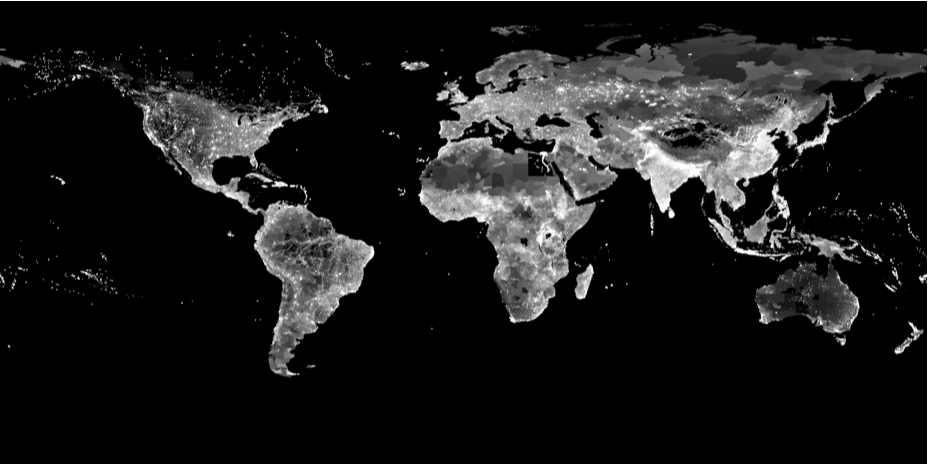
By rescaling the data we can see it makes sense. Some areas have very coarse data resolution, but these areas are typically also very sparsely populated; the dynamical scale of this dataset is quite dramatic.
Inspect data visually:
ColorToneMapping[ImageAdjust[ImageResize[popestimate,Scaled[1/4],Resampling->"Linear"]]]
Out[]=
By summing values of pixels we can acquire the total population:
Total global population according to the dataset:
totalpop=Total[ImageData[popestimate],2]
Out[]=
7.75798×
9
10
What I am (and hopefully are you too) really interested about is how the human population is clustered. Specifically, we want to find minimum radius GeoDisk for a specific population size.
One might naively consider this an easy deal: just throw something like NMinimize at it and be done. Unfortunately this is pretty hopeless; a single GeoDisk masking step (the basis for computing a population inside it) takes a good fraction of a second and global optimization routines in Mathematica lack the geometric intuition for this problem.
My solution is below; this essentially starts with a grid of large GeoDisks and seeks to find smaller candidate disks by subdividing the grid and reducing the disk size as much as possible.
One might naively consider this an easy deal: just throw something like NMinimize at it and be done. Unfortunately this is pretty hopeless; a single GeoDisk masking step (the basis for computing a population inside it) takes a good fraction of a second and global optimization routines in Mathematica lack the geometric intuition for this problem.
My solution is below; this essentially starts with a grid of large GeoDisks and seeks to find smaller candidate disks by subdividing the grid and reducing the disk size as much as possible.
In[]:=
ClearAll[findMinDisk];Module[{radiuspopulation,reduceradius,reducestep},(*ComputeapopulationinsideaGeoDisk.*)radiuspopulation[position_,radius_]:=(*ImageCorrelateproducesasingle-pixelimagewiththepopulationasthepixelvalue.*)ImageData[(*Thisessentiallymultipliestwoimagesofthesamesizepixelbypixel,andsumsthevalues.*)ImageCorrelate[popestimate,(*Essentiallyabinarymaskrepresentingthedisk;partsonthediskhaveavalueof1,outsideavalueof0.Theprojectionmatchesthepopulationestimatedataimage.*)Image[GeoGraphics[{GeoStyling[White],GeoDisk[position,Quantity[radius,"Kilometers"]]},GeoBackground->Black,GeoRange->"World",GeoProjection->"Equirectangular",ImagePadding->None],ColorSpace->"Grayscale",ImageSize->ImageDimensions[popestimate]],Padding->None]][[1,1]];(*Attemptfindingasmallerradiusfulfillingthetargetpopulationconstraintataposition,usingabinarysearch.*)reduceradius[position_,startradius_,targetpop_]:=Last[Nest[Apply[With[{m=Mean[{##}]},If[radiuspopulation[position,m]>=targetpop,{#1,m},{m,#2}]]&],{0.,startradius},20]];(*Astepinthesearchprocess.*)reducestep[{candidates_,radius_,targetpop_,grid_}]:=With[{passed=(*Replacecandidatepositionswithsubdividedneighbourhoodpositionsandselectthosewhichfulfillthetargetpopulationconstraint.*)Parallelize[Select[DeleteDuplicates[Flatten[Table[(*Sanitizepositions.Notethatthiscodeprobablyfailstofindacorrectsolutionifacandidatepositionleadingtothefinalsolutionliesexactlyatapole.*){Clip[#1,{-90.,90.}],#2}&@@(i+{lat,lon}),{i,candidates},{lat,{-grid,0.,grid}},{lon,{-grid,0.,grid}}],2]],radiuspopulation[#,radius]>targetpop&]]},(*Argumentforthenextiterationstepwithreducedradiusandgridsize.*){passed,Min[Parallelize[reduceradius[#,radius,targetpop]&/@passed]],targetpop,grid/2}];(*FindaminimumGeoDiskfulfillingthepopulationconstraintbytestingcandidatepositions,replacingthemwithsubdividedneighbourhoodcandidates,filteringthembythepopulationconstraintandreducingtheobservedradiusrepeatedly.*)findMinDisk[targetpop_,radius_]:=Nest[reducestep,{(*Thisisabithackish,butessentiallycoverstheentireglobewitha10°grid.*)Flatten[Table[{lat,lon},{lat,-80,80,10},{lon,-170,160,10}],1],radius,targetpop,10.},11]//(*CreateaGeoDiskonbasisofafoundsolutioncandidate.*)Apply[GeoDisk[GeoPosition[First[#1]],Quantity[#2,"Kilometers"]]&]]
Here we compute the disks for 50th and 99th percentiles of the global population. If you’re actually evaluating the code, this is a good chance to grab some coffee since evaluating these takes almost ten minutes on my laptop.
In[]:=
pop50percentile=findMinDisk[0.50totalpop,5000.]
Out[]=
GeoDiskGeoPosition[{29.2969,100.195}],
In[]:=
pop99percentile=findMinDisk[0.99totalpop,13000.]
Out[]=
GeoDiskGeoPosition[{30.2051,16.4648}],
You may ask what’s up with the second argument, the initial radius of the disk? Essentially it must be large enough to find good candidates in the initial round, but if it is unnecessarily large, the first round of reduceradius computation will take excessively long time. Thus an educated guess can save time.
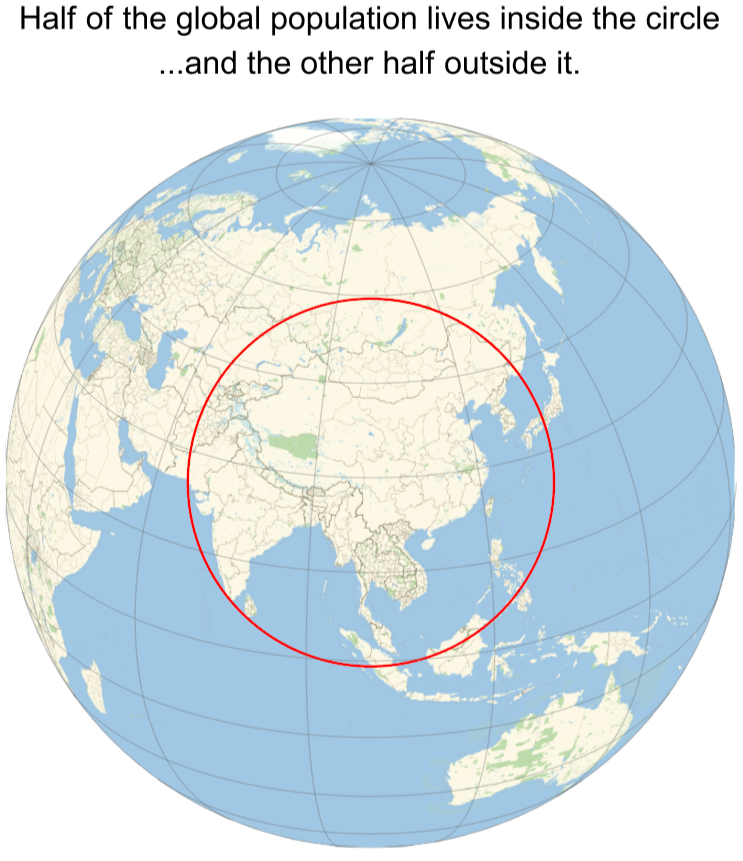
Now that we have the data, we can visualise it. Only certain projections maintain circles as circles; I choose the orthographic projection first.
Half of the human population lives in a surprisingly compact area, this is nowadays called a Valeriepieris circle:
Now that we have the data, we can visualise it. Only certain projections maintain circles as circles; I choose the orthographic projection first.
Half of the human population lives in a surprisingly compact area, this is nowadays called a Valeriepieris circle:
In[]:=
GeoGraphics[{Thick,Red,GeoCircle@@pop50percentile},GeoProjection->{"Orthographic","Centering"->First[pop50percentile]},GeoRange->"World",GeoBackground->"StreetMapNoLabels",GeoZoomLevel->4,GeoGridLines->{Range[-75,75,15],Range[-180,150,30]},ImagePadding->Scaled[.02],PlotRangeClipping->False,ImageSize->Full,PlotLabel->Style["Half of the global population lives inside the circle\n...and the other half outside it.",Black,24]]
Sometimes there are also news of how 99% of the global population can occasionally “observe sunlight” at the same moment; this is a slight stretch since it includes even astronomical twilight. Nonetheless, almost a full hemisphere has only 1% of the world population. We can see it by observing the antipode of the 99% population circle:
We can also observe both 50% and 99% disks together. Here maybe the most sensible projection to use is the azimuthal equidistant projection with North Pole centering:
CITE THIS NOTEBOOK
CITE THIS NOTEBOOK
Global population distribution: what's a Valeriepieris circle, and where 99% of us live
by Jari Kirma
Wolfram Community, STAFF PICKS, September 30, 2023
https://community.wolfram.com/groups/-/m/t/3024465
by Jari Kirma
Wolfram Community, STAFF PICKS, September 30, 2023
https://community.wolfram.com/groups/-/m/t/3024465