A cellular automaton, or CA, is a computational model made up of a grid of cells in any number of dimensions that dynamically changes state in response to the states of the cells around it. This project describes the Mutate and Sort algorithms that I developed to convert any 1D CA into another 1D CA and any 2D CA into another 2D CA, given that all CAs are executed for the same period of time, as well as explain the basics of 1D and 2D Cellular Automata.
Introduction to One-Dimensional Cellular Automaton
Introduction to One-Dimensional Cellular Automaton
1D Cellular Automaton(Elementary Cellular Automaton) is the most basic type of CA. It contains a 1D grid of cells that only have 2 possible states, 1 or 0. 1 is represented as a black cell and 0 as a blank cell. In the grid, a cell and its two neighbors form a neighborhood and the CA rule contains all the 8 combinations of a neighborhood. Each combination of a neighborhood is assigned a 1 or a 0, determining the current cells future state.
We can access Rule 30 and the rule icon for Rule 30
In[]:=
ResourceFunction["ComputationalSystemRules"][CellularAutomaton[30]]RulePlot[CellularAutomaton[30]]
Out[]=
{{1,1,1}0,{1,1,0}0,{1,0,1}0,{1,0,0}1,{0,1,1}1,{0,1,0}1,{0,0,1}1,{0,0,0}0}
Out[]=
We can easily visualize Rule 30 as well, for 15 steps. Each row represents a new step.
Rasterize[ArrayPlot[CellularAutomaton[CellularAutomaton[30],{{1},0},15]],ImageResolution->200]
Out[]=
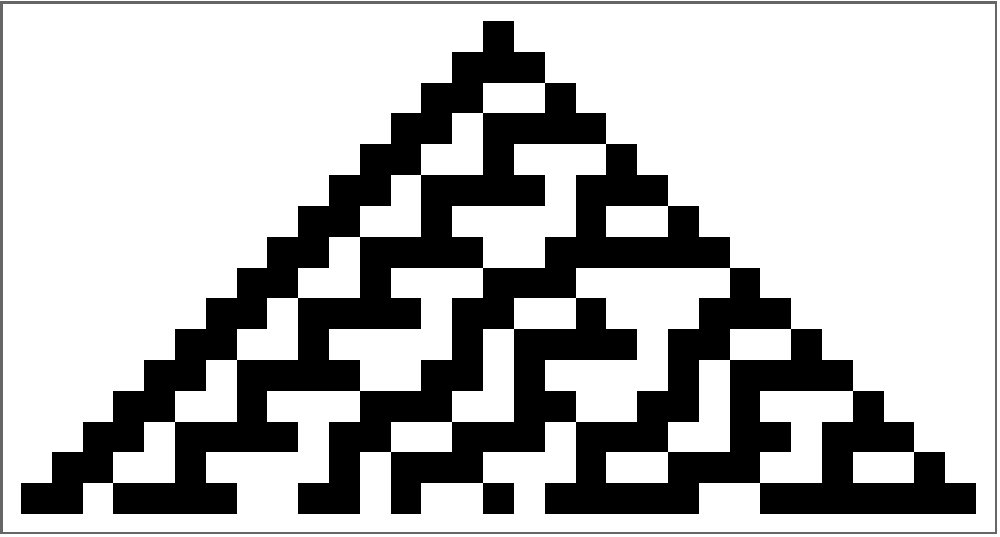
It can be observed that an Elementary Cellular Automaton is essentially an array of associations between an array and an integer. In order to mutate a rule, it is necessary to be able to access the basic rule without any visualizations and tinker with the values of the association.
Mutate and Sort Algorithms for Elementary CA
Mutate and Sort Algorithms for Elementary CA
Show Rule Function
Show Rule Function
I first created a simple function that would visually show a given rule for 15 steps when ran.
In[]:=
showrule[rule_]:=Module[{},Rasterize[Show[ArrayPlot[CellularAutomaton[rule,{{1},0},15]],ImageSizeTiny],ImageResolution->200]]
Mutation Function
Mutation Function
The mutation function essentially takes in a rule and mutates the values of the association in the rule given a certain probability. I set the probability to 0.4 meaning the mutation function randomly mutates a given rule with less than a 40% chance. The lower the mutation probabiity, the more iterations the algorithm has to do, therefore increasing the runtime. This mutation function will be run several times to give the computer a wide range of mutations to choose from.
In[]:=
mutateRule[rule0_]:=Module[{rule=rule0},((Keys[#]->If[RandomReal[]<=mutationProbability,RandomChoice[{0,1}],Values[#]])&/@rule)]
Sort Function
Sort Function
The sort function takes in a list of the images of the mutated rules, a list of the mutated rules and the target image. The reason why it needs to take in a list of the mutated images and the mutated rules is because the function creates an association, using Thread, between each image and rule and then sorts them out based on how close the image is to the target image.
In[]:=
sortedrules[imageofrules_,listofrules_,trgtimg_]:=Module[{imgrul=imageofrules,rules=listofrules,target=trgtimg},SortBy[Thread[imgrul->rules],(ImageDifference[ColorConvert[ImageResize[Rasterize[Keys[#]],ImageDimensions[target]],"Grayscale"],target])&]]
This association is necessary because the optimal approach for the sorting algorithm would be to only sort out the mutated rules based on how close it is to the target rule and then run showrule on the closest rule. We can simulate this with the mutated rules of rule 186 and the target rule of rule 30. The code and errors would be as shown.
In[]:=
fakesortedrules[listofrules_,trgtrule_]:=Module[{mutated=listofrules,target=trgtrule},nearestrul=Part[Nearest[mutated,trgtrule],1];]fakesortedrules[ResourceFunction["ComputationalSystemRules"][CellularAutomaton[186]]&/@mutatedRules,ResourceFunction["ComputationalSystemRules"][CellularAutomaton[30]]]

Unfortunately, this approach does not work because you cannot find use Nearest between two lists of associations.
Automate Function
Automate Function
During each iteration, the automate function runs the mutate and sort functions, extracts the closest rule to the target rule, runs show rule on the rule and then call itself while passing in the new rule. It does this until both the initial rule and the target rule and the initial image and target image are the same. The automate function takes in a rule and a population. The population is a number that determines the amount of mutations of that rule. A large population creates more mutations of the rule which gives the algorithm a wider range of rules to work with. The wide range of rules decreases the number of iterations but increases the amount of time of each iteration since it has to produce more mutations and sort more rules. I found 20 to be a population number not small enough to substantially increase the number of iterations but also not large enough to substantially increase the length of each iteration.
In[]:=
automate[rule_,population_]:=Module[{},mutatedRules=Table[mutateRule[rule],population];While[UnsameQ[initialrule,finalrule]&&UnsameQ[showrule[initialrule],showrule[finalrule]],rulesimages=ArrayPlot[CellularAutomaton[#,{{1},0},15]]&/@mutatedRules;initialrule=Values[First[sortedrules[rulesimages,mutatedRules,targetimage]]];Print[showrule[initialrule]];count+=1;automate[initialrule,20];];]
Rule Picker Function
Rule Picker Function
In order to test out the the algorithm, I decided to randomly pick out an initial rule and a target rule out of a list of all possible 1D rules, and try mutating the initial rule to be the target rule. I did not want the two rules being the same, so I added in an If statement to check if they were the same and then run the function again.
In[]:=
rulepicker[rules_]:=Module[{},finalrule=rules[[RandomInteger[{1,255}]]];targetimage=Rasterize[ArrayPlot[CellularAutomaton[finalrule,{{1},0},15]]];initialrule=rules[[RandomInteger[{1,255}]]];If[SameQ[finalrule,initialrule],rulepicker[rules],Null;]]
Initialization and Execution
Initialization and Execution
The code below, when run, initializes the list of all possible rules, the variable count which stores the amount of iterations of automate, and the mutation probability. It also runs rulepicker and the automate function.
Introduction to Two-Dimensional Cellular Automaton using Substitution System
Introduction to Two-Dimensional Cellular Automaton using Substitution System
We can visualise this System for 4 steps
We can also easily extract any step of the Substitution System, which will be important later.
We can visualize the first 10 Substitution Systems through 5 steps
The main idea here is that in order to mutate the rule, we need to change the elements inside the 2D array associated with the integer in the rule.
Mutate and Sort Algorithms for Two-Dimensional CA
Mutate and Sort Algorithms for Two-Dimensional CA
Show Rule Function
Show Rule Function
Just as I did in the Elementary CA, I first created a show function that visually shows the rule through 5 steps.
Mutate Function
Mutate Function
The two mutate function takes in a rule and a mutation probability. It iterates through the rule picking a random real number each time and randomly changing the value if the random real is less than or equal to the mutation probability.
Sorted Rules
Sorted Rules
The sorted rules function is the exact same as the Elementary CA sorted rules function and performs the same function; returning an sorted association of the CA images and their rules.
Automate Function
Automate Function
The automate function is also similar to the Elementary automate function, the only adjustments being the different variables: twoDmutatedrules, twoDmutatedimages, twoDinitialrule, twoDcount.
Initialize and Execution
Initialize and Execution
I first randomly initialized the target rule and initial rule. Then I initialized population to 10 because 20 would take hours to run, twoDcount to 0, mutationprobability to 0.4 and then ran automate. I also stored the closest images for each iteration in an array called ans because there were too many iterations to consecutively print the closest rules. I then printed the first two and last two closest rules in ans.
Comments and Future Ideas
Comments and Future Ideas
Comparing the 1D and 2D Cellular Automaton iteration count
Comparing the 1D and 2D Cellular Automaton iteration count
Clearly the total amount of iterations for 2D CA is greater than for 1D CA. This is because the 2D CA is larger than the 1D CA over during their respective time frames. We can prove this by getting the length of the rows and columns of twoDinitialrule over 5 steps and get the length of the rows and columns of rule 30 over 15 steps, and then get the total amount of elements in each CA.
The computer has to go through 1024 elements for the 2D CA whereas for the 1D CA it only has to go through 496 elements, less than half the amount for the 2D CA!
Getting "Stuck"
Getting "Stuck"
Often when finding a rule in both the 1D and 2D CA, the algorithim gets "stuck" at a rule, meaning it prints out the same rule several times in a row, not mutating it. This is able to be fixed by increasing the mutation probability, but the iteration count increases as well, thus increasing the overall runtime.
Future Directions
Future Directions
In the future, I would like to optimize the mutate and sort functions for both 1D and 2D CA so that it finds the target rule quicker, and gets "stuck" less often while having a small iteration count. I would also like to apply this to the real world, specifically modeling oil spills. In my WELP project, my group had developed a rudimentary 1D mutate and sort algorithm to represent the progression of an oil spill, and show the uncertainties and behavior changes in an oil spill. I would like to extend that project further using the 2D Cellular Automaton mutate and sort algorithm that I have developed, to more accurately model an oil spill.
Acknowledgements
Acknowledgements
I would like to give thanks to Nicolò Monti for his inspiration of the mutate and sort algorithm for Cellular Automaton and his continuous support since I embarked on this project. I would also like to give thanks to my WELP group, Lakshmi Agarwal and Sharon Frid, who helped me develop the basic 1D algorithm during our time at WELP.
CITE THIS NOTEBOOK
CITE THIS NOTEBOOK
Creating mutate and sort algorithms for one-dimensional and two-dimensional cellular automatons
by Mich Obia
Wolfram Community, STAFF PICKS, March 12, 2024
https://community.wolfram.com/groups/-/m/t/3139639
by Mich Obia
Wolfram Community, STAFF PICKS, March 12, 2024
https://community.wolfram.com/groups/-/m/t/3139639