Introduction
Introduction
With indoor recreational activities unavailable during the COVID-19 pandemic, green spaces became increasingly important to mental and physical health. Parks and trails provide a safe and affordable source of exercise while stemming the long term psychological costs of the lockdown. Green spaces also benefit the environment by allowing rainwater to percolate into ground instead of running off impervious surfaces into waterways. However, without an automated annotation method, detailed block by block maps of urban green space are not available for most cities. Utilizing such a dataset, city planners would be able to better monitor the health and distribution of vegetation in order to maximize coverage and well being.
Since companies are responsible for a large proportion of urban land use, this project examines satellite imagery of the area surrounding their headquarters and assigns a "green score" that can be compared to other metrics.
Since companies are responsible for a large proportion of urban land use, this project examines satellite imagery of the area surrounding their headquarters and assigns a "green score" that can be compared to other metrics.
Related Work
Related Work
◼
Satellites have been used directly to calculate the normalized difference vegetation index {NDVI} which measures plant health based on how certain frequencies of light are reflected or absorbed. However, this method only has a spatial resolution of 10m and fails to capture fine-grained structures
◼
Techniques such as VHR aerial imagery, LIDAR data or imagery from unmanned aerial vehicles are able to capture more detailed structures but are limited by their scope and availability.
Methods
Methods
Curate Top 1000 Largest Publicly Traded Companies by Total Assets
In[]:=
companyList=EntityListFilteredEntityClassEntityClass"Company",->TakeLargest[1000],EntityFunction[c,!MissingQ[c["Position"]]&&!MissingQ[c["City"]]&&c["OwnershipType"]=="PubliclyTraded"];
Group companies by distinct locations
Surprisingly, many companies share the exact same location which reduces the number of images that needed to be processed.
positionGroups=Short[GroupBy[{#["Position"],#}&/@companyList,First->Last]]
Out[]//Short=
GeoPosition[{22.284,114.15}],,,,,,,,,GeoPosition[{39.93,116.4}],,,,,,,,,,,,,,,,,,,,,,,,,,,415,GeoPosition[{34.93,135.7}],GeoPosition[{37.9692,-87.5745}]
Satellite image for each company's headquarters
imageList=Association[#->RemoveAlphaChannel[GeoImage[#,GeoZoomLevel->17]]&/@Keys[positionGroups]]
Run the initial algorithm for each company
In[]:=
GreenScore[img_] := ImageMeasurements[ColorReplace[ColorQuantize[img, {Black, Gray, Green}], {Gray -> Black, Green->White}], "MeanIntensity"]greenScores1={GreenScore[#],#}&/@imageList;
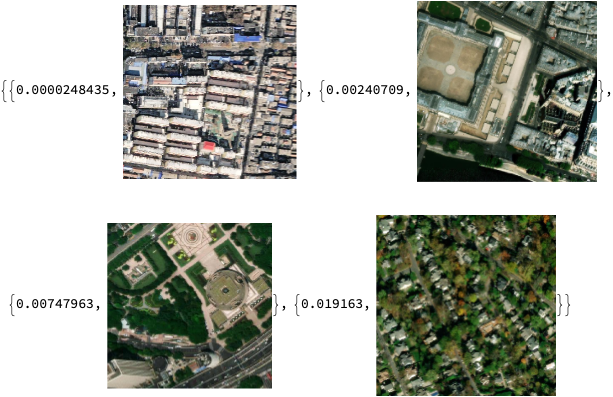
Visual test shows that this initial approach works well to gauge the overall vegetation of an image
scoresList1=Sort[Values[greenScores1]];scoresList1[[1;;Length[scoresList1];;120]]
Out[]=
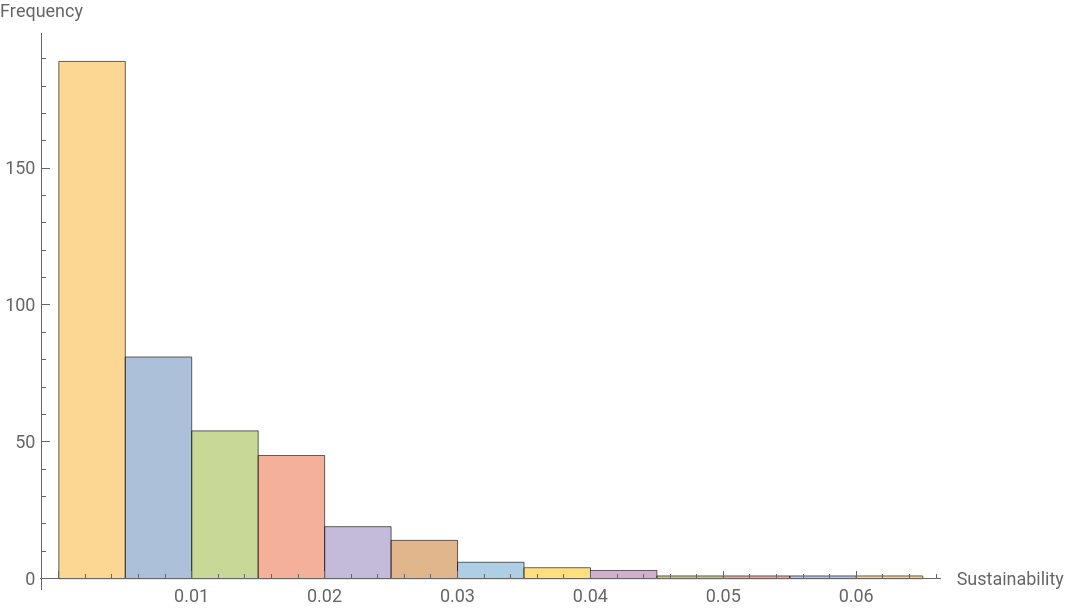
Histogram of green score distribution is heavily skewed right which indicates that this algorithm isn't accounting for all the variance in greenery
Module[{findValue},findValue[in_]:=If[Length[#]>2,Take[#,2],#]&@positionGroups[Values[KeySelect[PositionIndex[greenScores1],MatchQ[{in,_}]]][[1]][[1]]];Histogram[Map[Tooltip[#,Sort[Flatten[Map[findValue,#]]]]&,BinLists[First/@Values[greenScores1],{0,1,0.005}]],AxesLabel->{"Green Score", "Frequency"}]]
Out[]=
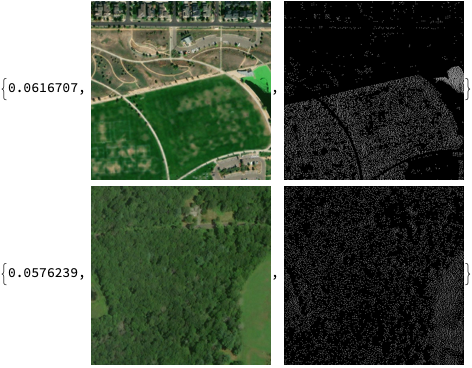
Fail Case Scenarios
Although image 2 clearly has more green space by area, the algorithm misses dark shades of green which results in image 1 having a higher pixel density and higher overall score.
Column[{Append[scoresList1[[-1]],ColorReplace[ColorQuantize[scoresList1[[-1]][[2]],{Black,Gray,Green}],{Gray->Black,Green->White}]],Append[scoresList1[[-2]],ColorReplace[ColorQuantize[scoresList1[[-2]][[2]],{Black,Gray,Green}],{Gray->Black,Green->White}]]}]
Out[]=
Modifications
Modifications
Select a natural green color to better detect vegetation
Neon green () is rarely found in nature so choosing a more representative shade will account for a larger variety of vegetation. Forest green is said to resemble the average leaf color of trees in a deciduous forest.

In[]:=
forestGreen = RGBColor[34/256,139/256,34/256]
Module[{img1,img2},img1=ColorReplace[ColorQuantize[scoresList1[[-1]][[2]],{Black,Gray,forestGreen}],{Gray->Black,forestGreen->White}];img2=ColorReplace[ColorQuantize[scoresList1[[-2]][[2]],{Black,Gray,forestGreen}],{Gray->Black,forestGreen->White}];{{ImageMeasurements[img1,"MeanIntensity"],scoresList1[[-1]][[2]],img1},{ImageMeasurements[img2,"MeanIntensity"],scoresList1[[-2]][[2]],img2}}]
Out[]=

This revision causes the algorithm to correctly score image 2 higher than image 1 but the green map is still spotty as dark green pixels are misinterpreted.
Satellite imagery distorts color so let's find the colors in the image that are closest to forest green instead.
closeColors=DeleteMissing[Flatten[FindMatchingColor[#[[2]]&/@Take[scoresList1,-10],{forestGreen}]]]
Qualitative analysis shows that the 4th color gives the segmentation of green patches.
Increase pixel density of green map to better approximate area
ColorDistance function computes the color difference from forest green for each pixel. This segments the image into smooth patches but overlooks dark green areas while misinterpreting light surfaces.
ColorsNear function sets a threshold for what color constitutes as green. This method correctly identifies patches of green while still maintaining a significant level of detail. However, dark patches and green water are sometimes still misclassified. This pixel level approach is unable to contextualize the greenery from a single point in order to abstract notions of land and sea.
Run modified algorithm for each company
Denser green map results in higher average pixel intensity
Histogram reveals roughly symmetrical distribution which indicates that this modified algorithm is able to represent the variation in vegetation across images
Comparison of Methods
Comparison of Methods
Original method generates a sparse map of green points which frequently confounds rooftops and dark patches.
Color distance generates a dense map but drowns out the details of small urban structures and misinterprets rooftops.
Colors near balances the prior methods and generates a fine-grained yet dense map that ignores buildings.
Color distance generates a dense map but drowns out the details of small urban structures and misinterprets rooftops.
Colors near balances the prior methods and generates a fine-grained yet dense map that ignores buildings.
Calculate the amount of green space around a given company's headquarters
Calculate the amount of green space around a given company's headquarters
Visualizations
Visualizations
Group companies by city
Satellite image of each city
Run modified algorithm for each city
Histogram shows left skew as cities have a higher average green score than companies as headquarters are often located in downtown districts.
Each circle is located on top of a city and its size and color corresponds to that city's green score. Notice that green scores generally decrease from East to West and North to South.
Compare company headquarters in the context of the corresponding city
Compare companies' physical green score to their sustainability metrics
Sustainability scores were sourced from Census ESG ratings and rescaled from 0 to 1.
Plot shows nearly no correlation between green score and sustainability score which was surprising because I figured that sustainable companies would plant more vegetation.
Continuation and Conclusion
Continuation and Conclusion
Open Street Map
Open Street Map
Utilizing crowd sourced data from OSM, it is possible to supplement satellite imagery with annotated polygon tiles that give contextual clues like function and accessibility. OSM features are labelled with various descriptive tags like "forest" or "park" which can be interpreted as green space. These feature polygons can then be overlaid onto satellite imagery to assist the algorithm in determining whether regions of green pixels are actually green spaces. However, the quality and coverage of OSM polygons varies greatly between regions so they can serve only as a guideline.
Neural Networks
Neural Networks
Convolutional neural networks have been employed to great effect for large scale remote sensing from satellite imagery. By considering regions of pixels, a trained CNN might learn to recognize abstract structures and ignore green pixels that aren't actually green spaces. However, as mentioned previously, there is currently no dataset of fine-grained urban greenspace to train such a model.
Overall, this project accomplished its goal of quantifying green space around a company's headquarters and discovered interesting trends between data points. By mapping and monitoring green space, this method could help guide urban development and improve well-being.
Acknowledgements
Acknowledgements
I would like to thank everyone at Wolfram High School Summer Camp 2021 for this wonderful experience, especially Stephen Schroeder, Anika Patel, Abhinav Govindaraju, Ian Lee and Sidharth Jain for accompanying me through the two week duration of this project.