See my post Geometry and Symmetry Chapter 4 about Chapter 4 of my book: http://dx.doi.org/10.13140/RG.2.2.17922.80322. However this post should be self contained. Code is in the following closed initialization cell.
Geometry And Symmetry Appendix 4.7
Geometry And Symmetry Appendix 4.7
Definitions
Definitions
4.7 Further comments on plane tessellations
4.7 Further comments on plane tessellations
This last section concerns practical considerations on actually working on tessellations. Our group tessellation algorithm gives cells as they are generated in the group, this can depend on the generators. But they most likely do not give a nice display. So our first section below shows how to plot a user defined portion of a tessellation.
Our second section concerns the case when a practical tiling method does not give good borders, unlike as in the graphic above where borders define adjacent octagonal cells. We can distinguish cells by color with adjacent cells a different color. There is some mathematics here, specifically the four color theorem which says that 4 colors will suffice for any polygonal tessellation. We will see that unless triangles are involved 3 colors should be enough.
4.7.1 Choosing cells in a tessellation
4.7.1 Choosing cells in a tessellation
The following algorithm will tessellate with a number at the centroid of each cell .
In[]:=
Options[groupATessL]={returnAssoc->False};groupATessL[G_,tas_,P_,OptionsPattern[]]:=Module[{tabA,n},n=Length[G];tabA=<|Table[i->{TasTF[G[[i]],tas]@P,pcentroid[TasTF[G[[i]],tas]@P]},{i,n}]|>;If[OptionValue[returnAssoc],Return[tabA]];Show[Table[Graphics[{{Black,Thickness[.005],Line[tabA[i][[1]]]},{Black,Text[Style[i,10],tabA[i][[2]]]}}],{i,n}]]]
For our first example we use the parallelograms of our first example for Group I. Note our cell is line style, that the first and last points are the same.
In[]:=
{p,q}={{-1.8337165994212103`,2.736646713237377`},{1.7521455008048097`,0.2910803142189895`}}
Out[]=
{{-1.83372,2.73665},{1.75215,0.29108}}
In[]:=
par={{0,0},p,p+q,q,{0,0}}
Out[]=
{{0,0},{-1.83372,2.73665},{-0.0815711,3.02773},{1.75215,0.29108},{0,0}}
In[]:=
τp=TranslationTransform[p];τq=TranslationTransform[q];
In[]:=
c=pcentroid[par]
Out[]=
{-0.0326284,1.21109}
In[]:=
G1a=discreteTransGroup[<|1->τp,2->InverseTF[τp],3->τq,4->InverseTF[τq]|>,c,2,5,returnGroup->True]
»
number of group elements calculated 61
Out[]=
{{1},{2},{3},{4},{1,1},{1,2},{1,3},{1,4},{2,2},{2,3},{2,4},{3,3},{4,4},{1,1,1},{1,1,3},{1,1,4},{1,3,3},{1,4,4},{2,2,2},{2,2,3},{2,2,4},{2,3,3},{2,4,4},{3,3,3},{4,4,4},{1,1,1,1},{1,1,1,3},{1,1,1,4},{1,1,3,3},{1,1,4,4},{1,3,3,3},{1,4,4,4},{2,2,2,2},{2,2,2,3},{2,2,2,4},{2,2,3,3},{2,2,4,4},{2,3,3,3},{2,4,4,4},{3,3,3,3},{4,4,4,4},{1,1,1,1,1},{1,1,1,1,3},{1,1,1,1,4},{1,1,1,3,3},{1,1,1,4,4},{1,1,3,3,3},{1,1,4,4,4},{1,3,3,3,3},{1,4,4,4,4},{2,2,2,2,2},{2,2,2,2,3},{2,2,2,2,4},{2,2,2,3,3},{2,2,2,4,4},{2,2,3,3,3},{2,2,4,4,4},{2,3,3,3,3},{2,4,4,4,4},{3,3,3,3,3},{4,4,4,4,4}}
Note that the group elements are all n-tuples, , of the integers 1,2,3,4.
n<=5
In[]:=
groupATessL[G1a,<|1->τp,2->InverseTF[τp],3->τq,4->InverseTF[τq]|>,par]
Out[]=
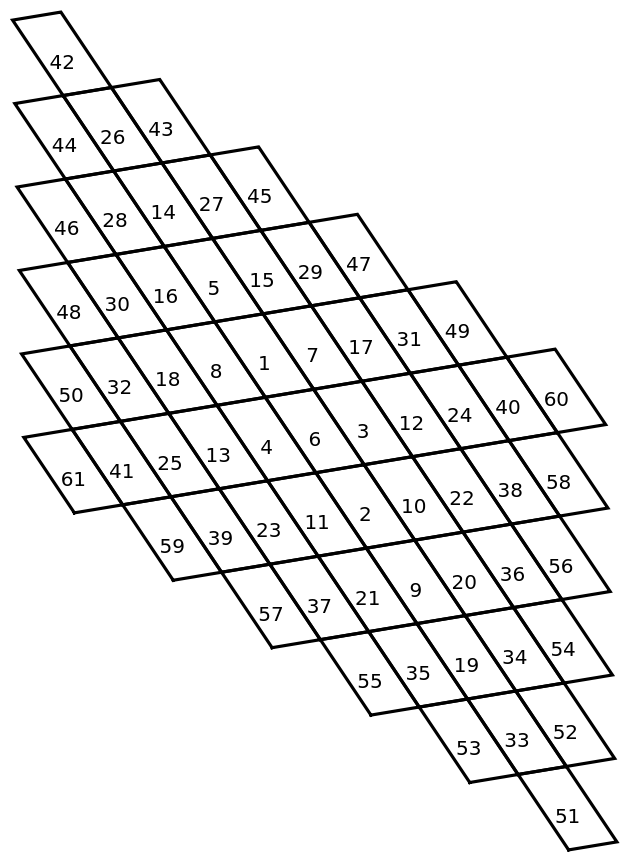
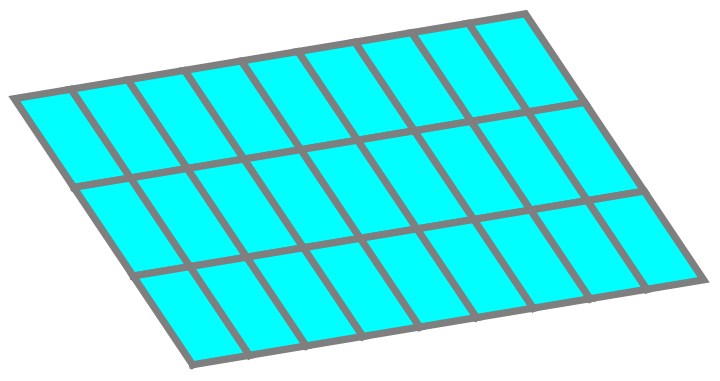
To get a nice parallelogram tessellations we choose cells
In[]:=
Sa={50,32,18,8,1,7,17,31,49,41,25,13,4,6,3,12,24,40,59,39,23,11,2,10,22,38,58}
Out[]=
{50,32,18,8,1,7,17,31,49,41,25,13,4,6,3,12,24,40,59,39,23,11,2,10,22,38,58}
We now use the group association to give a custom tessellation .
In[]:=
Aa=groupATessL[G1a,<|1->τp,2->InverseTF[τp],3->τq,4->InverseTF[τq]|>,par,returnAssoc->True];
In[]:=
Graphics[{Cyan,EdgeForm[{Gray,Thickness[.01]}],Polygon[Table[Aa[i][[1]],{i,Sa}]]}]
Out[]=
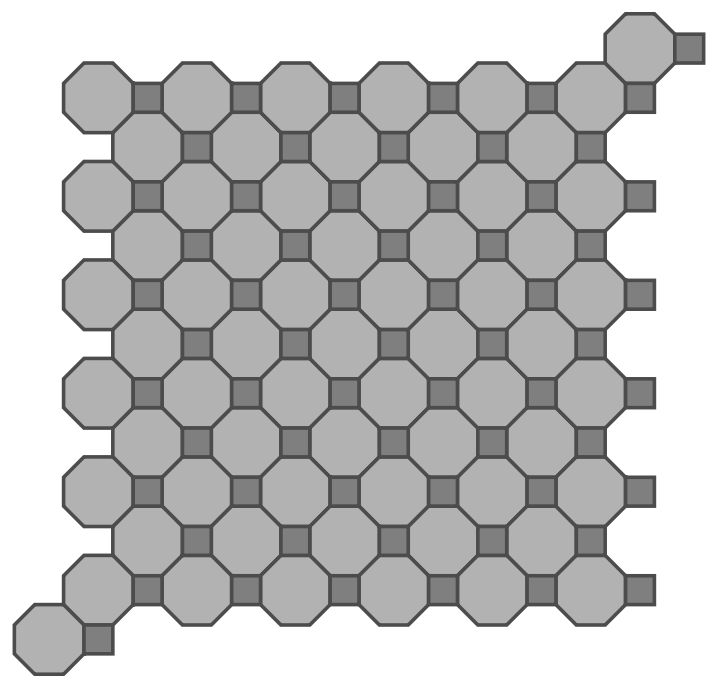
Here is a more complicated example with a compound tessellation.
In[]:=
τd=TranslationTransform[{1,1.}];
In[]:=
oct={{0.7071067811865475`,-0.2928932188134522`},{0.7071067811865475`,0.2928932188134525`},{0.2928932188134524`,0.7071067811865475`},{-0.2928932188134526`,0.7071067811865475`},{-0.7071067811865477`,0.29289321881345237`},{-0.7071067811865475`,-0.2928932188134526`},{-0.29289321881345226`,-0.7071067811865477`},{0.29289321881345276`,-0.7071067811865475`},{0.7071067811865475`,-0.2928932188134522`}};
In[]:=
sqr={{0.7071067811865475`,-0.2928932188134522`},{1.2928932188134525`,-0.2928932188134522`},{1.2928932188134525`,0.2928932188134525`},{0.7071067811865475`,0.2928932188134525`},{0.7071067811865475`,-0.2928932188134522`}};
In[]:=
G3=discreteTransGroup[<|1->τd,2->InverseTF[τd],3->ρh|>,{0,-0},2,6,returnGroup->True];
»
number of group elements calculated 63
In[]:=
Show[groupTessellate[G3,<|1->τd,2->InverseTF[τd],3->ρh|>,oct,GrayLevel[.7],GrayLevel[.3]],groupTessellate[G3,<|1->τd,2->InverseTF[τd],3->ρh|>,sqr,GrayLevel[.5],GrayLevel[.3]]]
Out[]=
In[]:=
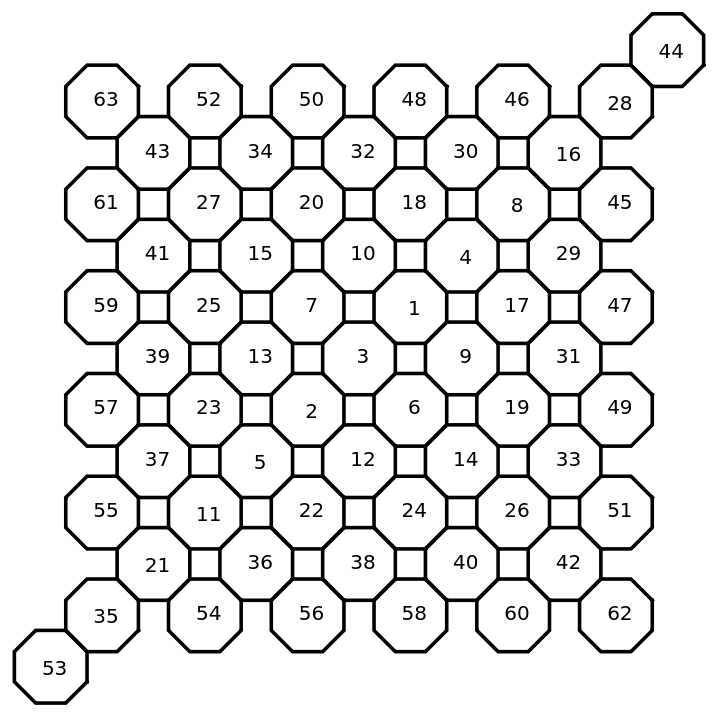
groupATessL[G3,<|1->τd,2->InverseTF[τd],3->ρh|>,oct]
Out[]=
In[]:=
S=Range[1,63];S1=Delete[S,Partition[{44,35,54,56,58,60,62,53,63,61,59,57,55,35},1]]
Out[]=
{1,2,3,4,5,6,7,8,9,10,11,12,13,14,15,16,17,18,19,20,21,22,23,24,25,26,27,28,29,30,31,32,33,34,36,37,38,39,40,41,42,43,45,46,47,48,49,50,51,52}
In[]:=
groupATessL[G3,<|1->τd,2->InverseTF[τd],3->ρh|>,sqr,returnAssoc->False]
Out[]=
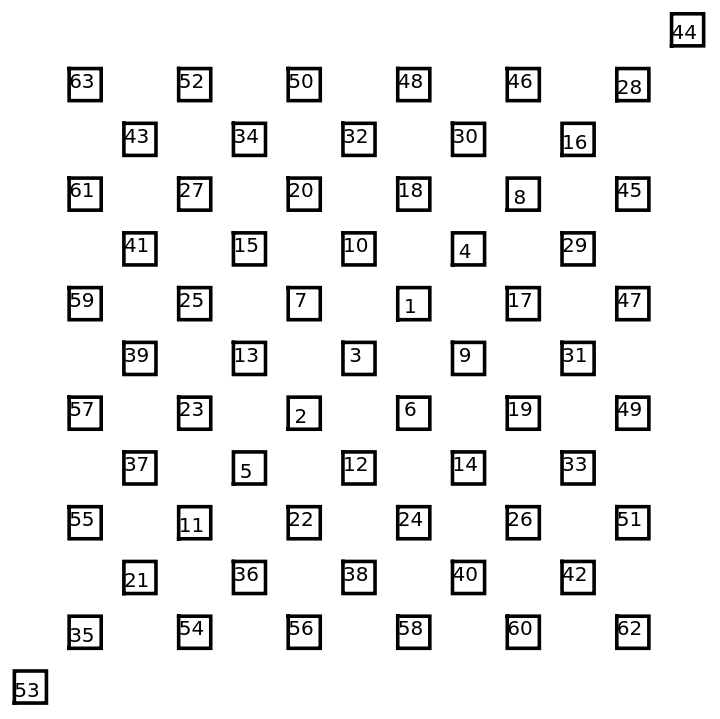
This is much nicer.
We want to clean up our example for group 11.
This is very messy as there are several group elements giving the same cell . G11 is the symmetry group but we can use a simpler construction group. We find another translation in G11
Then the level 7 group
gives
It is a help picking out cells to first construct a working diagram which would look like this.
We have 3 missing cells in the graphic we want. We could go to level 8, but an alternate strategy is to use our association B1 which identifies the numbered cells. We notice that the missing cells are translates of cells we have so the missing cells are given by
In[]:=
Now the desired graphic is
4.7.2 Coloring part of a tessellation.
4.7.2 Coloring part of a tessellation.
For some applications the cell edges are either not desirable or possible. One such example is using a stencil to place a graphic on a t-shirt as in the picture below of your author’s daughter, the maker of the shirt (www.makewithtanya.com ).
Here adjacent cells must have a different color. We a saved from a lot of colors by the 4-color theorem that says this can be done with at most 4 colors since our cells are polygonal. In fact, for most tessellations 3 colors suffice. It is not clear that this holds for a symmetric coloring but in my examples it does. We may use the groupATessL association to facilitate this.
Our first example is the hexagon above without edges using groupTessL.
Here we need only 2 colors . A tessellation needing 3 colors we have a paver I call a pseudoTriangle with symmetry group IX . We note that three pavers touch each other in an edge requiring at least 3 colors. But we will 3-color it.
To avoid duplication of cells we will use a construction group of type group I.
To make our pseudo-triangle we start with the equilateral triangle
We find the centroid of our triangle and a the lower left vertex.
and use 3-fold rotations
and add an indent
and also the reflection ρh@indent
In[]:=
We let
and we have
This polygon makes a tessellation.
To use stencils to make a shirt we will need three colors, we number the cells of a level 9 tessellation.
The next example comes from the entrance porch of the Ridgefield CT recreation center that I visit frequently.
This did strike me as somewhat unusual, with only translation symmetry, but until writing this subsection I did not grasp the importance: to use stencils I need 4 colors. To construct this
Since there are no rotations or reflections we need the inverses so
We have then the transformation group of type Group I
Using edges this is easy
But our large squares share part of a boundary so adjacent ones need to be another color. Also we would like a rectangular paving rather than this parallelogram. So we use groupATessL. Most details will be omitted here. We get an outline with numbered cells
The numbers refer to the same transformation applied to the different polygons. We pick out the ones we want but separate the larger squares in to gray and brown. We get 4 associations with slightly different cells chosen. We put the data in a hidden cell. These can be accessed by those using the notebook form of this chapter.
Or resulting tiling is
Intuitively making this tiling more complicated should require more colors. But in fact that is not the case. For example we could make the small square into a smaller rectangle and the rectangles larger so that those who meet at a vertex would have a common edge piece. Leaving out details the outline might be
with adjacent rectangles needing to be different colors . But that can be also easily achieved more elegantly than this example. We leave coloring this with the same translation symmetries as the example above to the reader.
Conclusion
Conclusion
CITE THIS NOTEBOOK
CITE THIS NOTEBOOK
Geometry and symmetry: chapter 4 plane tessellations appendix
by Barry H Dayton
Wolfram Community, STAFF PICKS, June 17, 2025
https://community.wolfram.com/groups/-/m/t/3480946
by Barry H Dayton
Wolfram Community, STAFF PICKS, June 17, 2025
https://community.wolfram.com/groups/-/m/t/3480946