Preamble
Preamble
In my previous post, I described how to use the CSockets paclet, which replaces the built-in functions for working with sockets. I will briefly remind you that in it you can open a socket, connect to a remote server and start the server yourself. The main difference from Wolfram Mathematica’s built-in sockets, which work using the ZeroMQ library, is that my implementation is more stable for sending large byte arrays, and on average several times faster. This is very important for websites that weigh on the order of a few megabytes. According to my experience, even if you write a small static website of 3-5 megabytes by yourself, when using built-in sockets it will take 5-10 seconds to load on a local-host, and when I tested the same static website using CSockets, everything was loaded in a fraction of a second. As I showed in the previous post - a picture weighing 365 kb will take about 40 milliseconds to load.
In this post I want to talk about my next package, which is one level higher in the networking stack. This paclet is called TCPServer. Its main purpose is to provide a universal way to handle messages that arrive at a server over TCP. If you’ve ever tried to build your own server using Wolfram Mathematica’s built-in functions, you know that an object like SocketListener can only receive messages in packets no larger than 8 kilobytes. And if two messages arrive at the server very quickly and are smaller than 8 kilobytes, the server concatenates them into a single packet. The point is that the server processes raw data and does not know what protocol and rules are used for communication. It was this problem that prompted me to write this package. Below I will try to describe the problem and solution in more detail. Let’s get started!
Installation
Installation
TCPServer paclet is installing in the standard way from the Paclet Repository. However, in order for it to work, it needs a few dependencies with common functions for my other packages, which are located there in the Paclet Repository. In general, just run this code:
In[]:=
PacletInstall["KirillBelov/Internal"]PacletInstall["KirillBelov/Objects"]PacletInstall["KirillBelov/TCPServer"]
Out[]=
PacletObject

Out[]=
PacletObject
Out[]=
PacletObject
Next, you just need to import the paclet context as usual:
In[]:=
Get["KirillBelov`TCPServer`"]
It’s done!
Functions
Functions
The package contains only one function, but they have a fairly general and asbtractive application:
In[]:=
?TCPServer
Out[]=
Here I must make a small digression. The point is that the TCPServer symbol from the package is defined as a "mutable" object. This means that after creation it names a number of properties that can be changed directly and will not create new expressions, as it usually happens for example with Associations. This feature is implemented simply by wrapping around a symbol, which is essentially a reference to the association. However, such a simple thing as a modifiable object opens up huge possibilities for writing efficient and readable code to customize the functionality of our server.
Creation
Creation
Finally, let’s try to create a server. Since I mentioned above that this is a “mutable” object, it has a special constructor that can be called like this:
In[]:=
tcp=TCPServer[]
Out[]=
TCPServer

As a result, we see a SummaryBox wrapper where all the properties of our object are listed. Each of these properties can be retrieved directly by name like this:
In[]:=
tcp["Icon"]
Out[]=

Or like this:
In[]:=
tcp@Propertiestcp@"Logger"
Out[]=
{Icon,Init,Logger,Buffer,CompleteHandler,DefaultCompleteHandler,MessageHandler,DefaultMessageHandler,Self,Properties}
Out[]=
Automatic
Any property can be changed:
In[]:=
tcp@Logger=Printtcp["Logger"]
Out[]=
Print
Out[]=
Print
In the same way, you can always get directly the values of the internal symbol that stores the association with the properties:
In[]:=
tcp@Self
Out[]=
Icon
,InitIdentity,LoggerPrint,Buffer,CompleteHandler,DefaultCompleteHandlerFunction[{KirillBelov`TCPServer`Private`client,KirillBelov`TCPServer`Private`data},Length[KirillBelov`TCPServer`Private`data]],MessageHandler,DefaultMessageHandlerFunction[{KirillBelov`TCPServer`Private`client,KirillBelov`TCPServer`Private`data},Close[KirillBelov`TCPServer`Private`client]],SelfKirillBelov`TCPServer`TCPServer`$11,PropertiesKeys[KirillBelov`TCPServer`TCPServer`$11]

We are most interested in only four basic properties from our object:
◼
“DefaultCompleteHandler” - function that calculates the expected length of the full message by the received packet
◼
“CompleteHandler” - an association or list that contains a set of functions to check the expected length of a message. This can include a single function exactly like the one above
◼
“DefaultMessageHandler” - function that is called to process a complete message
◼
“MessageHandler” - set of functions for processing by condition
All functions take the same set of parameters as input. The first argument must be the connected client and the second argument the received byte array. FFor example a handler that checks the expected length of a message:
In[]:=
myCompleteHandler[client_,data_ByteArray]:=Length[data]
And the handler that is executed at the moment when the message is completely received:
In[]:=
myMessageHandler[client_,message_ByteArray]:=BinaryWrite[client,Echo[message]]
As is easy to guess these two functions simply implement an echo server that returns exactly what it receives. Now let’s add these functions as handlers to the server:
In[]:=
tcp["DefaultCompleteHandler"]=myCompleteHandlertcp["DefaultMessageHandler"]=myMessageHandler
Out[]=
myCompleteHandler
Out[]=
myMessageHandler
We have configured the server. Let’s run it like this:
In[]:=
listener=SocketListen[8000,tcp@#&]
Out[]=
SocketListener

Now let’s connect to this server:
In[]:=
client=SocketConnect[8000]
Out[]=
SocketObject

And we’ll send something:
In[]:=
WriteString[client,"hello"]
The result is:
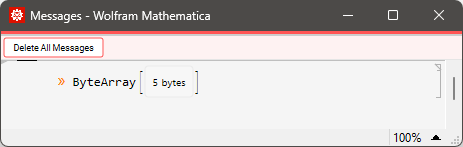
And let’s read the response:
In[]:=
response=SocketReadMessage[client]
Out[]=
ByteArray
And convert it to a string:
In[]:=
ByteArrayToString[response]
Out[]=
hello
And now the trick of object modifiability. Without stopping the server we can change its properties, add or remove something. Let’s add a message handler to the MessageHandler property (not DefaultMessageHandler) like this:
In[]:=
SetAttributes[myEquals,Orderless]myEquals[s_String,ba_ByteArray]:=s==ByteArrayToString[ba]
In[]:=
tcp["MessageHandler","hi"]=Function[{cl,msg},myEquals[msg,"hi"]]->Function[{cl,msg},WriteString[cl,"Hello! How Are you?"]]
Out[]=
Function[{cl,msg},myEquals[msg,hi]]Function[{cl,msg},WriteString[cl,Hello! How Are you?]]
In[]:=
tcp["MessageHandler","bye"]=Function[{cl,msg},myEquals[msg,"bye"]]->Function[{cl,msg},WriteString[cl,"Bye! See you.."]]
Now CompleteHandler looks like this:
As we can see this is an association with the double rule. The first key is just a unique name. It has no functionality and I use it to describe the entry point. The second key is a condition function that takes the same arguments (client, message) as input and returns True or False. If the function returns True, the rightmost function is called on the same arguments (client, message). It’s important to note that condition checking comes from the top down. Now let’s try to send “hi” and “bye” messages to the server:
Everything works as intended. In this way we can extend the server functionality as much as we want. The most important thing in my opinion is a unified way of adding conditions and entry points. The above were pretty simple examples. Next we will look at two more slightly more complex examples. To better understand how the server works inside, below is its schematic diagram.
Schematic Diagram
Schematic Diagram
In principle, the diagram makes everything clear. It is important to note that in this case a packet is an association that must contain keys: “SourceSocket” and “DataByteArray”. The other keys are not required. The extended packet includes the “Completed” and “ExpectedLength” keys.
HTTP Hello World
HTTP Hello World
Now a few more examples to see what the advantage of the approach I am proposing is. First, I’ll add the ability for the server to respond with a static page to a simple HTTP request. First, a function that makes sure that it is indeed an HTTP request that wants to get the “/” resource:
Variable that stores the response with the page HTML:
And a function that sends a response to the client:
Now we just add them to the server:
It’s all working. If necessary, we can easily set up a handler that will parse the address in the GET request and return the pages in the working directory by it.
Remote Kernel
Remote Kernel
Another simple example is a remote kernel to execute code. It’s simple - we export the request to a string. We turn it into an expression and execute it on the server, and return ExpressionJSON as the most versatile way to export expressions in the Wolfram Language. Here’s how you can do it!
Now just replace the default handler:
And let’s write a special function that will send an expression, wait for execution, and immediately read it:
And let’s try to perform some expressions:
The beauty of it all is that I can connect to this server from any programming language that can send a TCP message and call the Wolfram Language kernel.
CSockets
CSockets
At the beginning of this article, I talked about my C socket communication paclet. And I wasn’t just talking about that. Look how easy it is to switch to using a different socket interface. The functionality of the server will remain the same, it will just transfer data much faster:
Install:
Create listener:
And client:
Revert to default echo-server:
Now let’s compare speeds:
Native sockets:
CSockets:
Conclusion
Conclusion
That’s all for today! If you have any questions - please ask them in the comments, or you can write to me personally using my profile contacts. I tried to describe in detail how to use my TCPServer paclet. I hope it will be useful to readers. You can also grab the full server code in the repository on GitHub. In my next articles I will tell you how to implement HTTP protocol and write a simple HTTP server using my packages, and then we will discuss WebSocket protocol and creating your own protocol. This will show you how to create the foundation for most web technologies using only the Wolfram Language (and a little bit of C in the form of LibraryLink). Thank you all for your attention!
CITE THIS NOTEBOOK
CITE THIS NOTEBOOK
TCPServer: a flexible full Wolfram Language based server
by Kirill Belov
Wolfram Community, STAFF PICKS, September 01, 2023
https://community.wolfram.com/groups/-/m/t/3002947
by Kirill Belov
Wolfram Community, STAFF PICKS, September 01, 2023
https://community.wolfram.com/groups/-/m/t/3002947