ORIGINAL ARTICLE: C. Liu, K. Chang, and K. Zou, “Realistic simulation of reflection high-energy electron diffraction patterns for two-dimensional lattices using Ewald construction,” Journal of Vacuum Science & Technology B 40, 054002 (2022).
DOI: https://doi.org/10.1116/6.0001899
DOI: https://doi.org/10.1116/6.0001899
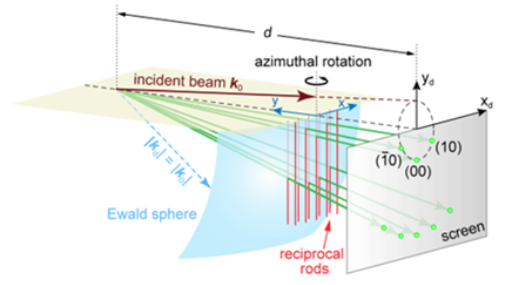
Article Abstract: Reflection high - energy electron diffraction (RHEED) is a powerful tool for characterizing crystal surface structures. However, the setup geometry leads to distorted and complicated patterns, which are not straightforward to link to the real - space structures. A program with a graphical user interface is provided here to simulate the RHEED patterns. Following the Ewald construction in the kinematic theory, we find out the exact geometric transformation in this model that determines the positions of diffraction spots. The program can deal with many forms of surface structures, including surface reconstructions or domains. The simulations exhibit great agreement with the experimental results in various cases. This program will benefit the structure analysis in thin - film growth and surface science studies.
Introduction
Introduction
This program contains a GUI for fully interacting operations. Besides the lattice structures, many experimental parameters are free to customize, such as beam energy, incident angle, sample azimuth, spot broadening and overall intensity. Furthermore, it supports multiple sets of lattices in a single simulation, so that the simulation can cover more complicated cases in practice, including reconstruction, phase separation and rotational domains.
Manual for RHEED Simulator
Manual for RHEED Simulator
Fig1.Structureconstructioninterface.
1
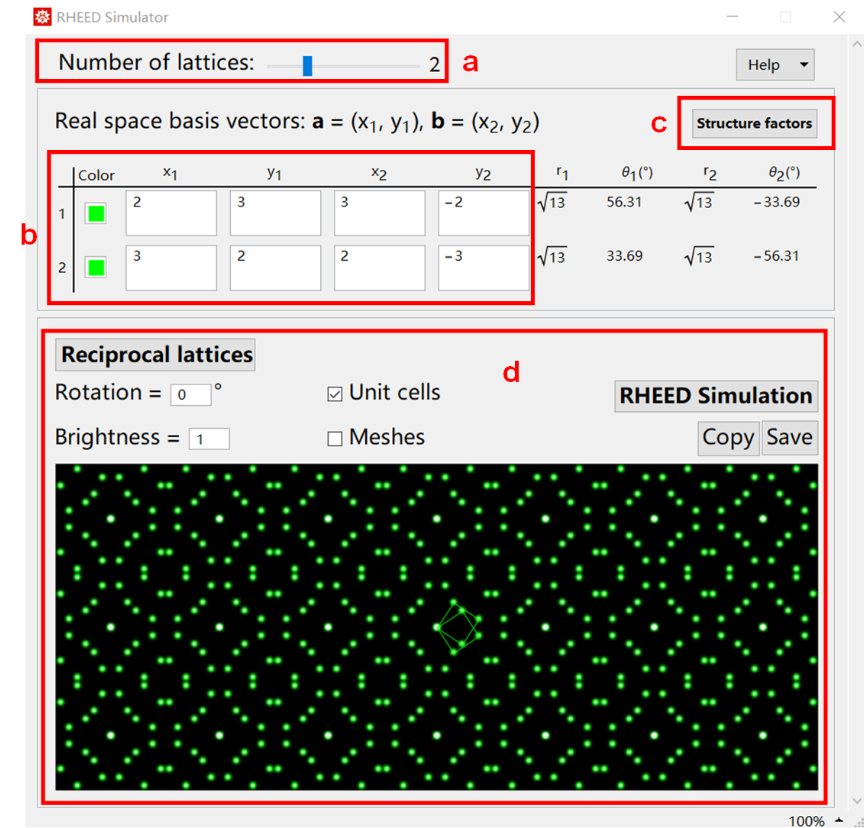
.Wolfram Mathematica should be installed to use the program. The full program is contained in RHEED_Simulator.nb. To run it, double-click on the file or open it in the Mathematica menu File > Open as shown in Fig.1.
2
.You can run the code in RHEED Simulator code v3.3.nb to open a new window. The interface mainly contains two panels, the structure setup in real space (a-c) and the preview of reciprocal lattice (d).
3
.Set the number of independent lattices in (a). The slider maximum is 5, beyond which one can directly edit the number following, putting in any positive integers. The number of rows of table (b) updates automatically when (a) is changed.
4
.In (b), each row defines the coordinates of the basis vectors a = (, ), b = (, ). The values are in arbitrary unit here. I recommend use 1 for the unreconstructed unit cell. The absolute length unit of the lattice constants can be given later on. The (r, θ) columns show the length and angle of the vectors for double-checking.
x
1
y
1
x
2
y
2
Fig 2. Structure factor setup.
5
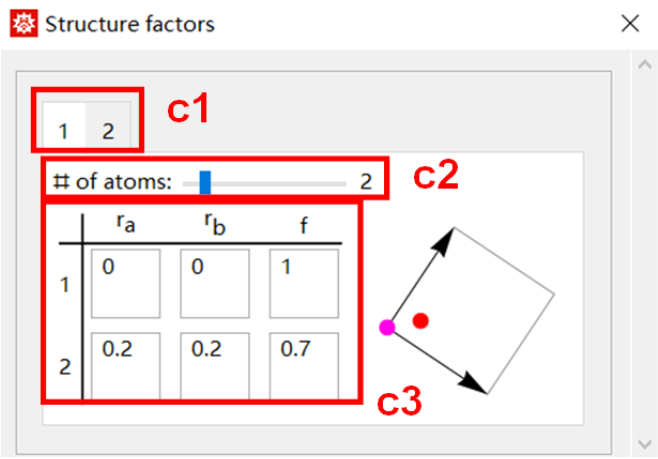
.Click Structure factors button (c). It opens up a new window as shown in Fig.2. The tab numbers (c1) are corresponding to the lattice numbers in (b). Set the number of atoms within the unit cell (c2) (by default it is 1). Set the relative coordinates (,) (0~1) and relative scattering factor of each atom in (c3). The graph previews the unit cell and positions of the atoms (The parameters in Fig.2 are just for purpose of demonstration).
r
a
r
b
6
.Back to the main window in Fig.1. In (d), click Reciprocal lattices button then the pattern is updated, which can also be viewed as a simulation of LEED approximately. One can check Unit cells or Meshes to see which lattice the spots belong to. The Rotation can rotate the whole pattern. The rotating angle will be passed on to the initial RHEED simulation.
7
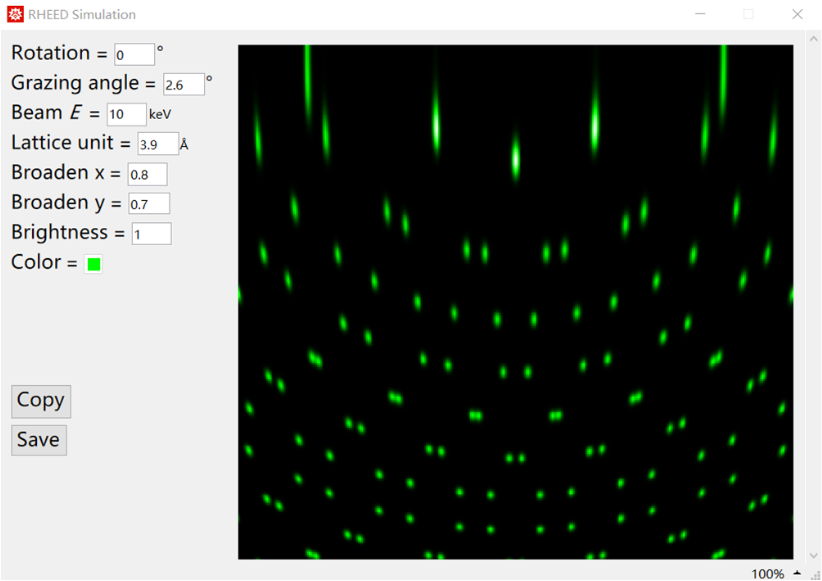
.Click RHEED Simulation button. A new window will be created as shown in Fig.3. The simulated RHEED pattern is displayed on the right. Customize the parameters:
Rotation: any angle desired.
Grazing angle: 1~6 degree is a reasonable range.
Beam E: 10~15 keV.
Lattice unit: 1~20 Å. Unit length corresponds to 1 in (b).
Broaden x & Broaden y: 0.2~5. Broadening factors of spots along x and y directions.
Brightness: Overall intensity rescaling.
Color: Open up a color setter to pick up the color of the spots.
The simulation is automatically updated after any parameter is changed.
Rotation: any angle desired.
Grazing angle: 1~6 degree is a reasonable range.
Beam E: 10~15 keV.
Lattice unit: 1~20 Å. Unit length corresponds to 1 in (b).
Broaden x & Broaden y: 0.2~5. Broadening factors of spots along x and y directions.
Brightness: Overall intensity rescaling.
Color: Open up a color setter to pick up the color of the spots.
The simulation is automatically updated after any parameter is changed.
8
.Click Copy button to copy the graph to clipboard. Clicking Save button will bring up a dialog window to select a local directory and set the file name. This will save the graph in common image formats.
To save the model parameters in the main interface in Fig.1, pressing Ctrl+s will save in the current file and Ctrl+Shift+s will save as a new file.
To save the model parameters in the main interface in Fig.1, pressing Ctrl+s will save in the current file and Ctrl+Shift+s will save as a new file.
Code
Code
Copyrights
Copyrights
© Copyright 2022 Chong Liu
Licensed under the Apache License, Version 2.0 (the “License”); you may not use these files except in compliance with the License.
You may obtain a copy of the License at http://www.apache.org/licenses/LICENSE-2.0
Unless required by applicable law or agreed to in writing, software distributed under the License is distributed on an “AS IS” BASIS, WITHOUT WARRANTIES OR CONDITIONS OF ANY KIND, either express or implied. See the License for the specific language governing permissions and limitations under the License.
Licensed under the Apache License, Version 2.0 (the “License”); you may not use these files except in compliance with the License.
You may obtain a copy of the License at http://www.apache.org/licenses/LICENSE-2.0
Unless required by applicable law or agreed to in writing, software distributed under the License is distributed on an “AS IS” BASIS, WITHOUT WARRANTIES OR CONDITIONS OF ANY KIND, either express or implied. See the License for the specific language governing permissions and limitations under the License.
CITE THIS NOTEBOOK
CITE THIS NOTEBOOK
Realistic simulation of reflection high-energy electron diffraction patterns for two-dimensional lattices using Ewald construction
by Chong Liu, Kai Chang, Ke Zou
Wolfram Community, STAFF PICKS, September 20, 2023
https://community.wolfram.com/groups/-/m/t/3016872
by Chong Liu, Kai Chang, Ke Zou
Wolfram Community, STAFF PICKS, September 20, 2023
https://community.wolfram.com/groups/-/m/t/3016872