In this article I will expose and show a use case of python and Mathematica [Wolfram Language] applied to a classical clustering example , the magical fusion between the wolfram language and python will just show how a such union could be between two multiparadigm language that one inspire the other and vice versa. As you know Jupyter notebook was inspired by Mathematica the first notebook that marry text , illustration , formatted text , code and visualization in the same place. Learning another language is usually a most and offer infinite possibilities. So In this article we will deep dive into this fusion and show some of benefits of this great union.
Clusterings With Mathematica And Python
Clusterings With Mathematica And Python
We need to install anaconda and Wolfram Mathematica
You could try a free trial of wolfram Mathematica from this link
https://www.wolfram.com/mathematica/trial/
You could try a free trial of wolfram Mathematica from this link
https://www.wolfram.com/mathematica/trial/
Importing Python Environment in Mathematica
Importing Python Environment in Mathematica
In[]:=
SetEnvironment["PATH"Environment["PATH"]<>";"<>"C:\\Users\\NeverMind\\anaconda3"];SetEnvironment["PATH"Environment["PATH"]<>";"<>"C:\\Users\\NeverMind\\anaconda3\\Library\\bin"];
In[]:=
RegisterExternalEvaluator["Python","C:\\Users\\NeverMind\\anaconda3\\python.exe"]
Out[]=
1df0e99e-1344-40cb-a97b-bcdaaf0c21eb
In[]:=
session=StartExternalSession["Python"]
Out[]=
ExternalSessionObject

In[]:=
FindExternalEvaluators[];
Import python modules and code some function
Import python modules and code some function
In[]:=
from numpy import array, matrix
from scipy.io import mmread, mmwrite
import numpy as np
import pandas as pd
from scipy.io import mmread, mmwrite
import numpy as np
import pandas as pd
In[]:=
from sklearn.datasets import make_blobs
from sklearn.cluster import KMeans
from sklearn.cluster import KMeans
This python function is useful to insert plot in Mathematica notebook
In[]:=
import io
from PIL import Image
import matplotlib.pyplot as plt
def show_plt(plot):
buf = io.BytesIO()
plot.savefig(buf, transparent=True, format='png')
buf.seek(0)
im = Image.open(buf).convert("RGBA")
buf.close()
return im
from PIL import Image
import matplotlib.pyplot as plt
def show_plt(plot):
buf = io.BytesIO()
plot.savefig(buf, transparent=True, format='png')
buf.seek(0)
im = Image.open(buf).convert("RGBA")
buf.close()
return im
Out[]=
ExternalFunction
We use make_blobs() function on and show_plot defined previously from sklearn.datasets to show and plot a small dataset generated with a random_state =10
In[]:=
X, y = make_blobs(random_state=10)
kmeans = KMeans(n_clusters=3).fit(X)
pre= kmeans.predict(X)
pred=np.array([pre])
df=pd.DataFrame({'x':X[:,0],'y':X[:,1],'Target':y})
ax1 = df.plot.scatter(x='x',
y='y',
c='DarkRed')
show_plt(plt)
kmeans = KMeans(n_clusters=3).fit(X)
pre= kmeans.predict(X)
pred=np.array([pre])
df=pd.DataFrame({'x':X[:,0],'y':X[:,1],'Target':y})
ax1 = df.plot.scatter(x='x',
y='y',
c='DarkRed')
show_plt(plt)
Out[]=
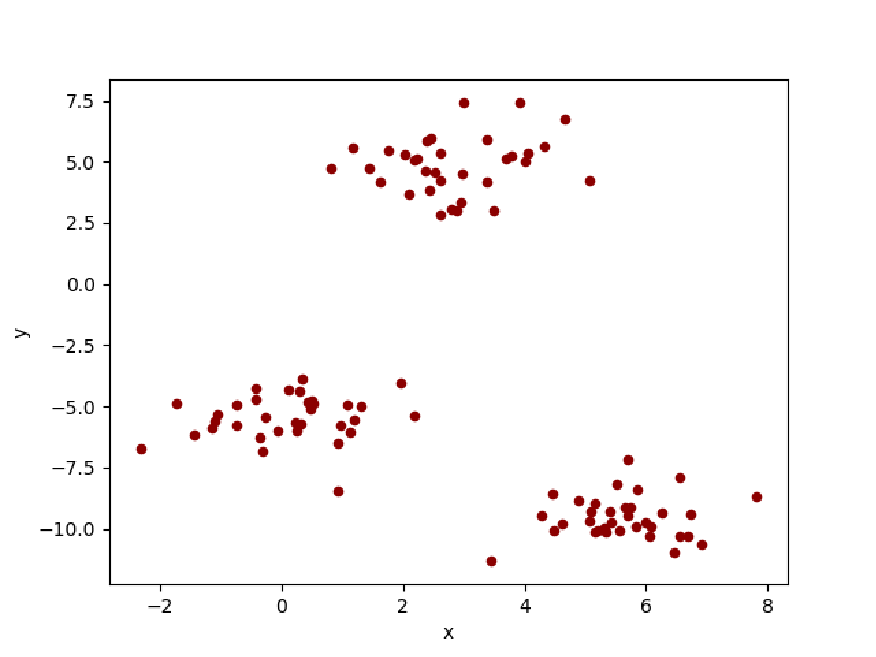
The main example with random_state=1
The main example with random_state=1
We will generate a random small dataset from Python and exported it to Wolfram Language
In[]:=
X, y = make_blobs(random_state=1)
kmeans = KMeans(n_clusters=3).fit(X)
pre= kmeans.predict(X)
pred=np.array([pre])
kmeans = KMeans(n_clusters=3).fit(X)
pre= kmeans.predict(X)
pred=np.array([pre])
We will export the data as matrices by mmwrite
In[]:=
mmwrite('labels.mtx',pred)
mmwrite('dataX',X)
mmwrite('dataX',X)
Get the centers of clusters
In[]:=
cent = kmeans.cluster_centers_
cent
cent
Out[]=
NumericArray
In[]:=
centers=%
Out[]=
NumericArray
Print the centers as a List
In[]:=
centers//Normal
Out[]=
{{-1.47108,4.33722},{-10.0494,-3.85954},{-6.58197,-8.17239}}
Creating a pandas data frame forthe small dataset
In[]:=
df=pd.DataFrame({'x':X[:,0],'y':X[:,1],'Target':y})
df
df
Out[]=


Plotting the list of points by Python and show the plot in Mathematica
In[]:=
import matplotlib.pyplot as plt
ax1 = df.plot.scatter(x='x',y='y',c='DarkBlue')
ax1 = plt.scatter(cent[:,0],cent[:,1],marker=r'$\heartsuit$',color='red')
plt.grid(True)
show_plt(plt)
ax1 = df.plot.scatter(x='x',y='y',c='DarkBlue')
ax1 = plt.scatter(cent[:,0],cent[:,1],marker=r'$\heartsuit$',color='red')
plt.grid(True)
show_plt(plt)
Out[]=
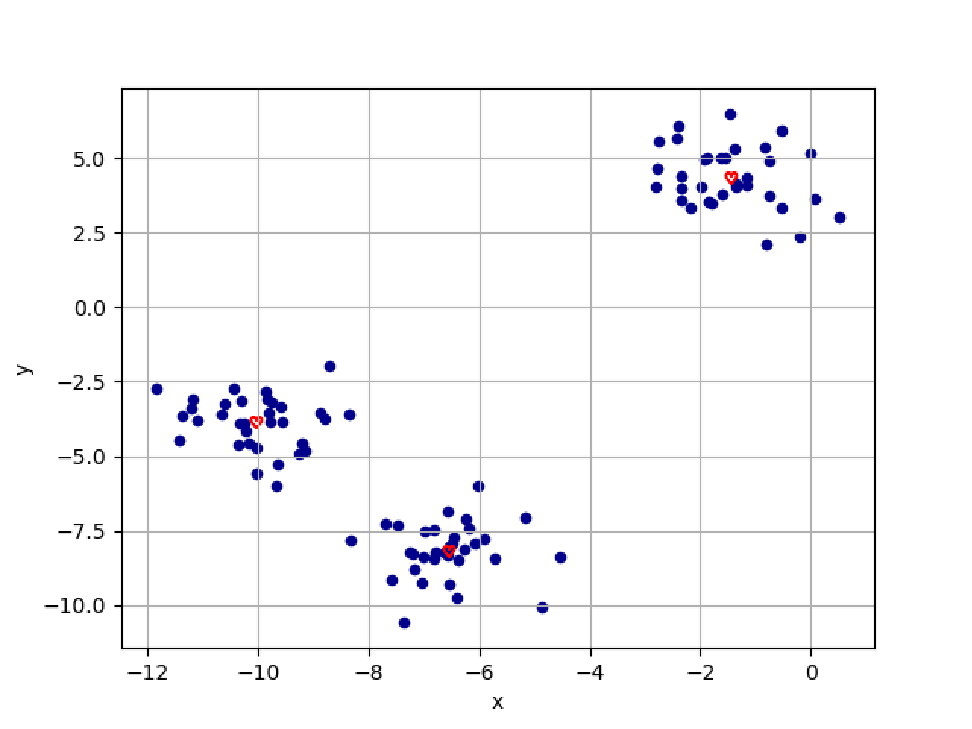
The result now is formatted as a dataset for wolfram language
In[]:=
df=pd.DataFrame({'x':X[:,0],'y':X[:,1],'Target':y});
df;
df;
Out[]=


Slicing the columns for the coordinates of points for plotting with Wolfram language
Clustering with 100 % WL
Clustering with 100 % WL
WL result
WL result
Clustering with 100 % Python
Clustering with 100 % Python
In[]:=
import matplotlib.pyplot as plt
plt.clf()
plt.scatter(X[:, 0], X[:, 1], marker='o', c=y,
s=25, edgecolor='k')
plt.scatter(cent[:,0] ,cent[:,1], marker=r'$\heartsuit$',color='red')
show_plt(plt)
plt.clf()
plt.scatter(X[:, 0], X[:, 1], marker='o', c=y,
s=25, edgecolor='k')
plt.scatter(cent[:,0] ,cent[:,1], marker=r'$\heartsuit$',color='red')
show_plt(plt)
Density Plot with Python
Density Plot with Python
In[]:=
plt.clf()
# Step size of the mesh. Decrease to increase the quality of the VQ.
h = .02 # point in the mesh [x_min, x_max]x[y_min, y_max].
# Plot the decision boundary. For that, we will assign a color to each
x_min, x_max = X[:, 0].min() - 1, X[:, 0].max() + 1
y_min, y_max = X[:, 1].min() - 1, X[:, 1].max() + 1
xx, yy = np.meshgrid(np.arange(x_min, x_max, h), np.arange(y_min, y_max, h))
# Obtain labels for each point in mesh. Use last trained model.
Z = kmeans.predict(np.c_[xx.ravel(), yy.ravel()])
# Put the result into a color plot
Z = Z.reshape(xx.shape)
plt.figure(1)
plt.clf()
plt.imshow(Z, interpolation='nearest',
extent=(xx.min(), xx.max(), yy.min(), yy.max()),
cmap=plt.cm.Paired,
aspect='auto', origin='lower')
plt.scatter(X[:, 0], X[:, 1], marker='o', c=y,
s=25, edgecolor='k')
plt.scatter(cent[:,0] ,cent[:,1], marker=r'$\heartsuit$',color='red')
show_plt(plt)
# Step size of the mesh. Decrease to increase the quality of the VQ.
h = .02 # point in the mesh [x_min, x_max]x[y_min, y_max].
# Plot the decision boundary. For that, we will assign a color to each
x_min, x_max = X[:, 0].min() - 1, X[:, 0].max() + 1
y_min, y_max = X[:, 1].min() - 1, X[:, 1].max() + 1
xx, yy = np.meshgrid(np.arange(x_min, x_max, h), np.arange(y_min, y_max, h))
# Obtain labels for each point in mesh. Use last trained model.
Z = kmeans.predict(np.c_[xx.ravel(), yy.ravel()])
# Put the result into a color plot
Z = Z.reshape(xx.shape)
plt.figure(1)
plt.clf()
plt.imshow(Z, interpolation='nearest',
extent=(xx.min(), xx.max(), yy.min(), yy.max()),
cmap=plt.cm.Paired,
aspect='auto', origin='lower')
plt.scatter(X[:, 0], X[:, 1], marker='o', c=y,
s=25, edgecolor='k')
plt.scatter(cent[:,0] ,cent[:,1], marker=r'$\heartsuit$',color='red')
show_plt(plt)
Python result
Python result
Final Results
Reference
Reference
◼
Hybrid Imaging and Visualization Employing Machine Learning with Mathematica - Python by Joseph Awange, Béla Paláncz, Lajos Völgyesi (z-lib.org)