COVID 19 : TOP4 visualization per days of the week
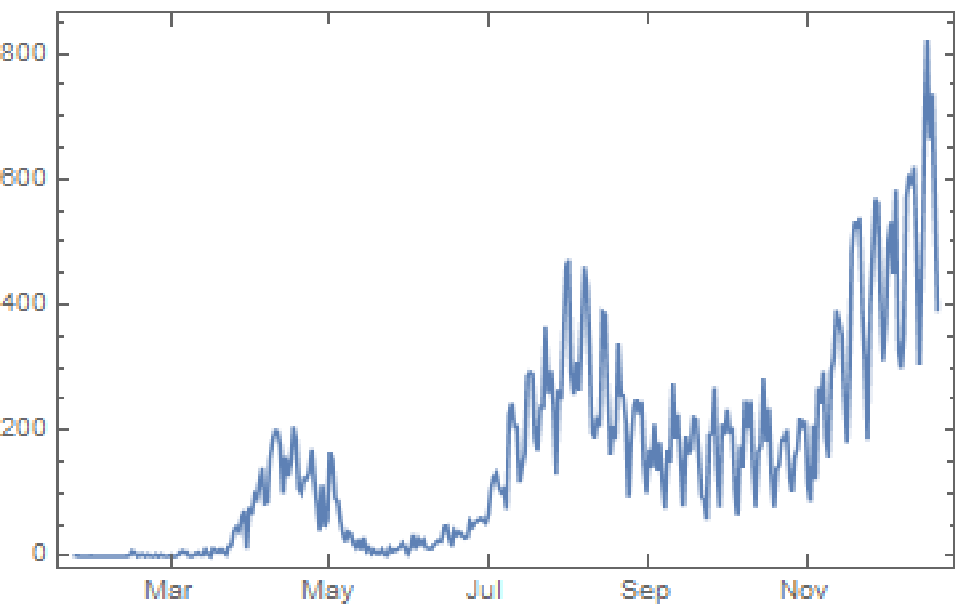
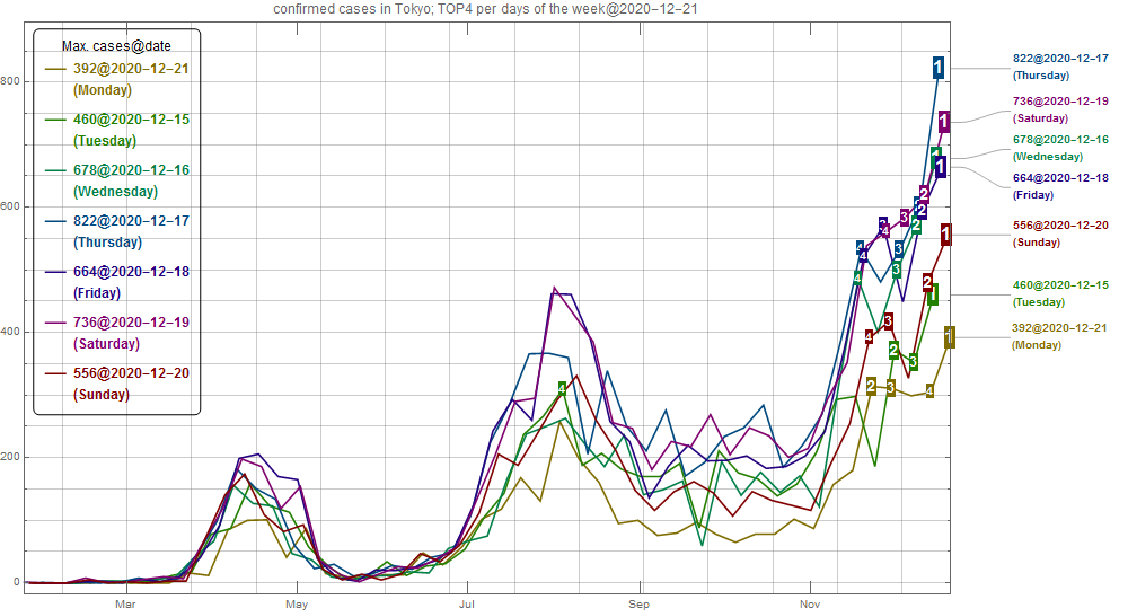
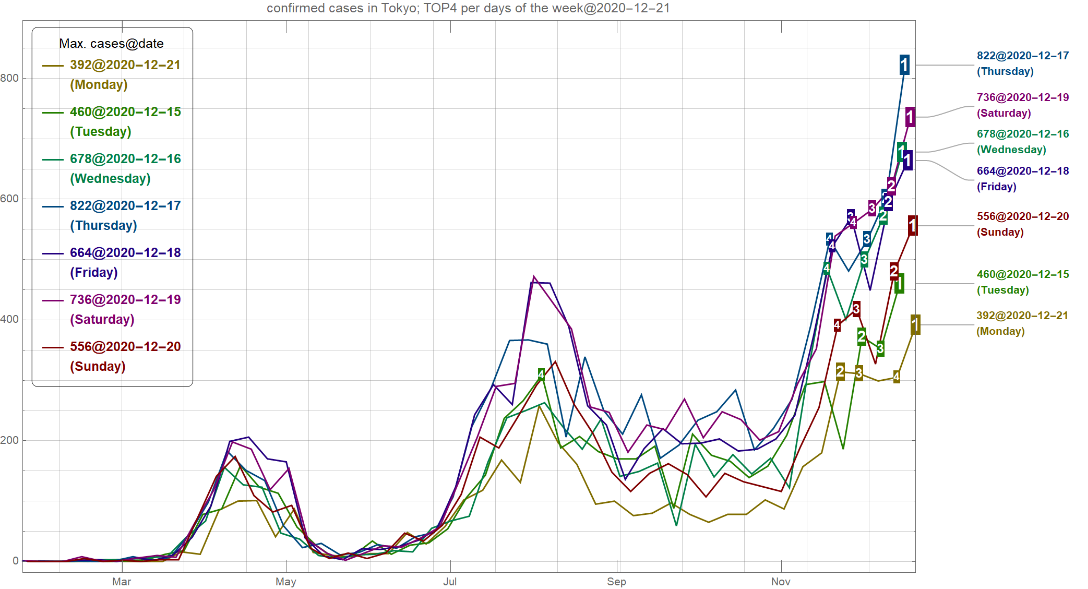
2020 - 12 - 21 (Mon) UPDATE : Today in Tokyo, daily confirmed case 392 is reported. This is a smaller value than the maximum value (822@2020 - 12 - 17), but is actually the maximum value on Mondays. Every day in the last week is breaking TOP1 record as shown in this "TOP4 visualization per days of the week".
(IN Japanese) 東京の新規感染者について、本日21日(月曜日)は最高値(822人)の半数以下ですが、下記のように「曜日毎のTOP4」で図示すると、過去一週間の全曜日がTOP1更新、つまり「1週間連続記録更新」となっているのが分かります。
(IN Japanese) 東京の新規感染者について、本日21日(月曜日)は最高値(822人)の半数以下ですが、下記のように「曜日毎のTOP4」で図示すると、過去一週間の全曜日がTOP1更新、つまり「1週間連続記録更新」となっているのが分かります。
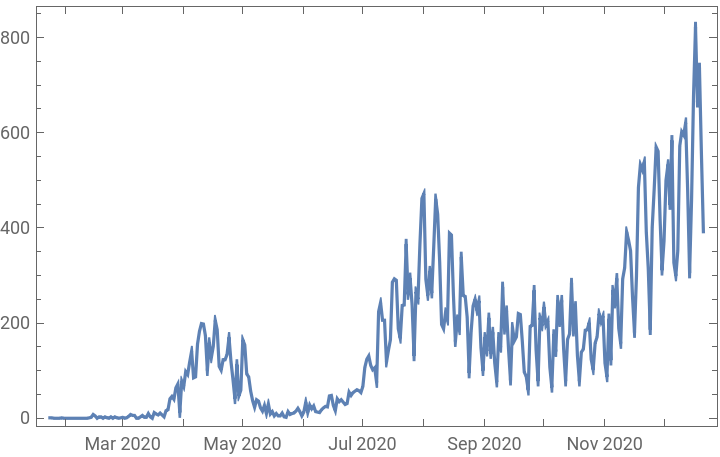
Everyday in Tokyo, daily confirmed case is being reported in the form like “highest value in Fridays” or “2nd highest value in Sundays” in the latest news, reflecting periodic peak structure with one-week period as shown below.To avoid this periodic peak structure, one can plot the 7-day average line. However, for daily updates, alternative choice is to plot seven lines from Monday to Sunday with visualising TOP 4 ranking on each line. The following quick hack provides a TOP4 visualization per days of the week as shown below.
data import and save
data import and save
First, one can obtain open data from the following url.
In[]:=
url="https://stopcovid19.metro.tokyo.lg.jp/data/130001_tokyo_covid19_patients.csv";import=Import[url];
Next, create a variable `d’ in the form : d={{ISODate1, number1},{ISODate2, number2},{ISODate3, number3}...} with using some tricks to create continuous date-list without empty data.
In[]:=
idtarget=5;lastday=import[[-1,idtarget]];zeroday=import[[2,idtarget]];dayrange=DateString[#,"ISODate"]&/@DayRange[zeroday,lastday];d={#[[1]],#[[2]]-1}&/@Tally[Join[dayrange,import[[2;;,idtarget]]]];
OPTIONAL: add new
OPTIONAL: add new
One can add the newest data, because open data has one-day delay, as following;
AppendTo[d,{DateString["ISODate"],392}];(*392casesarereportedtoday(2020-12-21)*)
OPTIONAL: save and load
OPTIONAL: save and load
One can save the variable d.
In[]:=
SetDirectory[NotebookDirectory[]];Save["covid19data.m",d];
In[]:=
SetDirectory[NotebookDirectory[]];Get["covid19data.m"];
data plot
data plot
After defining the following title of plot,
In[]:=
title="confirmed cases in Tokyo; TOP4 per days of the week";
In[]:=
title="東京の新規感染者:曜日毎のTOP4";
one can use the following plot command `plt’.
In[]:=
Clear[plt];plt[iend_:1,top_:4]:=Block[{idtarget,today,lastday,zeroday,dayrange,w,c,r,dw,dws,txt,dco,larg,pm,dlp,d2,dlp0},lastday=d[[-1,1]];zeroday=d[[1,1]];w={Monday,Tuesday,Wednesday,Thursday,Friday,Saturday,Sunday};c=Table[Hue[i/7,1,1/2],{i,1,7}];r=(Rule@@#)&/@Transpose[{w,c}];dw[i_]:=Select[d2,(#[[1]]w[[i]])&][[;;,{2,3}]];dws[i_,topn_]:=Sort[dw[i],#1[[2]]>#2[[2]]&][[;;Min[topn,Length[d2]]]];txt[d_]:=Text[Style[ToString[d[[2]]]<>"@"<>ToString[d[[1]]]<>"\n("<>ToString[DayName[d[[1]]]]<>")",DayName[d[[1]]]/.r,Bold]];dco[i_]:=Callout[dw[i],txt[dw[i][[-1]]]];larg[txt_,n_]:=Nest[Style[#,Larger]&,txt,n];pm[max_,c_]:=Table[larg[Text[Style[n,Bold,White],Backgroundc],max-n],{n,1,max}];dlp[i_,topn_]:=DateListPlot[{#}&/@dws[i,topn],PlotMarkerspm[topn,c[[i]]]];d2={DayName[#[[1]]],#[[1]],#[[2]]}&/@d[[;;-iend]];dlp0=DateListPlot[dco/@Range[7],PlotLegendsPlaced[LineLegend[Table[txt[dws[i,1][[1]]],{i,1,7}],LegendLabel"Max. cases@date",LegendFunction(Framed[#,RoundingRadius5]&),LegendMargins5],{Left,Top}],GridLinesAll,PlotStylec,PlotRange{{zeroday,lastday},All},ImageSize1000];Show[dlp0,Table[dlp[i,top],{i,1,7}],PlotLabeltitle<>"@"<>d2[[-1,2]]]];
plt[]
Out[]=
DateListPlot[d]
Out[]=
The above code is little bit messy but works in the following animation. Note: I noticed this code generates wrong legend box on the wolfram cloud but I can see correct image on my local PC.
OPTIONAL: Animation
OPTIONAL: Animation
To make an animation, we use ParallelDo and the unix command `convert’.
save[days_]:=ParallelDo[Export[StringPadLeft[ToString[i],6,"0"]<>".gif",plt[i,4]],{i,1,days}]
save[260];
TIPS: the following convert command requires large memory. Please check or google.
convert -reverse -layers optimize -delay 2 -loop 0 0*.gif -delay 1000 000001.gif tokyo.gif
convert tokyo.gif -coalesce -scale 30% -deconstruct tokyo_small.gif
Of course, one can elaborate with Mathematica only (without convert).
convert -reverse -layers optimize -delay 2 -loop 0 0*.gif -delay 1000 000001.gif tokyo.gif
convert tokyo.gif -coalesce -scale 30% -deconstruct tokyo_small.gif
Of course, one can elaborate with Mathematica only (without convert).
In[]:=
SetDirectory[NotebookDirectory[]];
ListAnimate[Import["tokyo_small.gif"]]
Out[]=
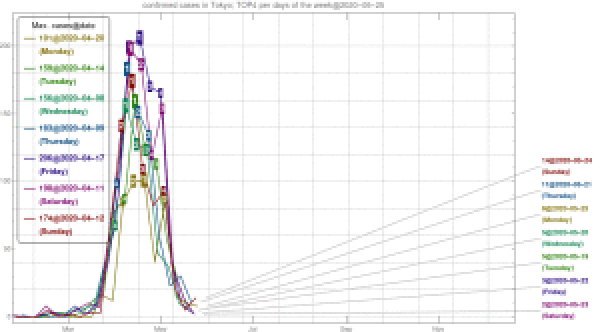
The above “TOP4 per days of the week” animation visualizes that the 3rd wave is emerging in Tokyo and is bigger than the previous waves. One can use this code to check another periodic peak structure of other cities or countries.
UPDATED : v .3. 2020-12-21