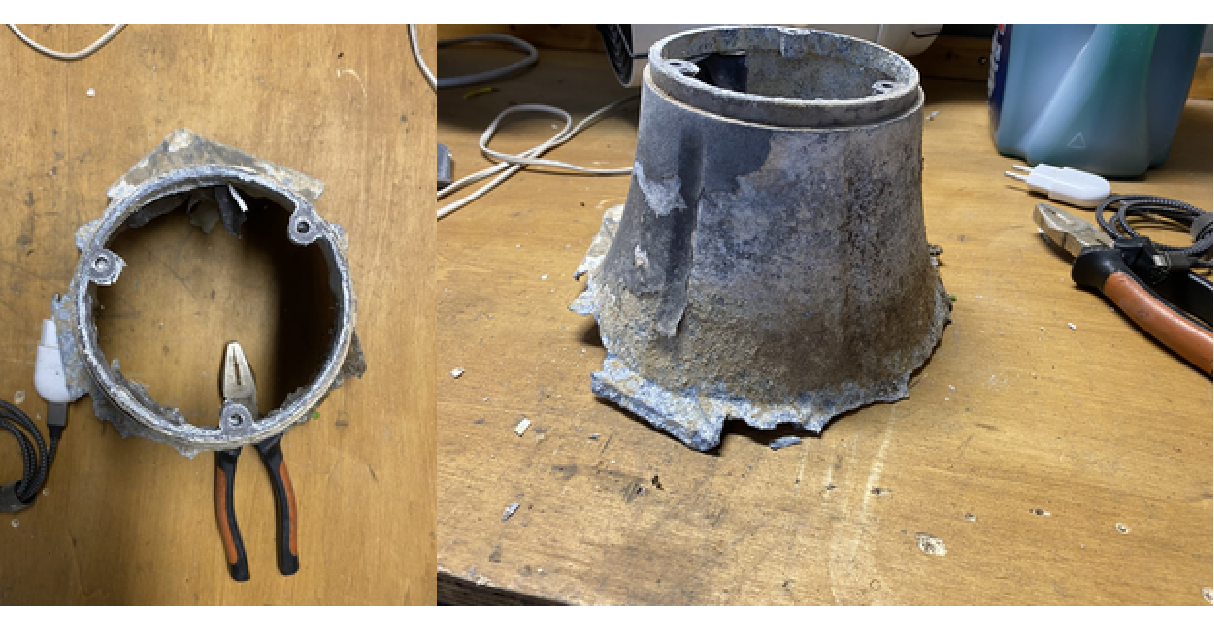
No, this isn’t a story about spacecraft or cutting-edge medical devices, we’re staying firmly planted in the backyard. Specifically, we’re talking about a humble street lamp: one of those unassuming metal poles that quietly light up our outdoor spaces. Mine, however, had seen better days. Years of exposure to humid soil, rain, and scorching sand had eaten away at its base. The alloy? Cheap and clearly not made to last.
Normally, this would be the point where you toss the whole thing and buy a new one. And believe me, I thought about it. But the manufacturer no longer sells replacement parts, and frankly, I wasn’t ready to give up on it. So instead, I turned to something a little more modern: 3D printing.
In this post, I’ll walk you through how I used a 3D printer to restore a rusty old lamp — and maybe even improve on the original design. Let’s get into it.
Nature is powerful — and not always in friendly ways. Climate and environmental agents like moisture, heat, and soil acidity can drastically weaken even tough materials like metal alloys. In our case, corrosion had eaten through the base of a simple garden lamp. To rebuild it, we started by extracting key dimensions from photos, as shown in the following images. The most critical feature was the triangular screw layout at the base. With one known screw distance, we computed the full layout, circumscribed circle, and used that to define the base geometry. From there, we modeled the hexagonal footprint, screw holes, and outer curvature, all programmatically, using code instead of manual CAD.
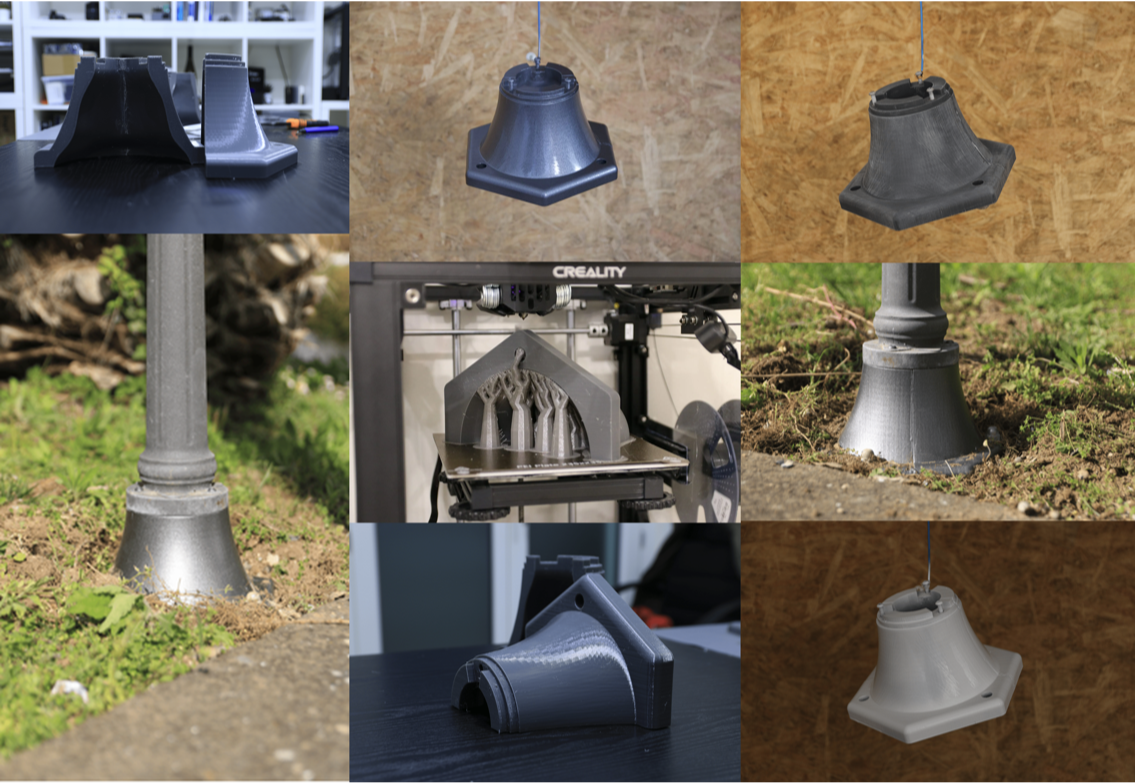
We chose PETG for its balance of cost and mechanical properties, printing the part in two segments to fit the bed and align layer lines with the main load direction. A 50% triangular infill and six perimeter walls provided solid strength without excess material. The result is a durable, customized replacement, with layer orientation and geometry optimized for real-world use. Photos of the final printed part follow.
Design
Design
Precise dimensions are critical — and in this case, most could be extracted from a single photo. The key constraint was the base screw layout: three screws forming a perfect equilateral triangle. With just one known screw-to-screw distance, we computed the radius of the circumscribed circle and pinpointed all three screw positions. This formed the foundation for the entire design. From there, we defined the base hexagon, added the central pole interface (anchored by another set of three screws), and traced the outer curvature from a side photo to refine the overall shape. Manually modeling all this in a standard CAD program? Possible , but tedious.
Instead, we coded it. Computational CAD shifts the process from drawing to scripting: you define geometry through logic, not lines. It’s parametric, repeatable, and surprisingly enjoyable once you get the hang of it. We defined the screw layout via trigonometry, extruded the hex base, cut precise holes, and modeled the outer contour with math or image tracing. For this project, we relied on OpenCascade a powerful, open-source CAD kernel, to model solids, perform Boolean operations, and prepare the geometry for export. The structure was broken into key components: a hex base, a revolved neck, three evenly spaced screw holes, and a segmented top extrusion. Each part was defined in code for precision, flexibility, and automation. Let’s now examine how each component comes together in detail.
First of all, we need to load useful packages:
In[]:=
Needs["OpenCascadeLink`"]Needs["NDSolve`FEM`"]
In[]:=
geom=;a=90;imgs=Table[Show[geom,ViewPoint->{1.5Cos[aDegree],1.5Sin[aDegree],0.7},ViewVertical->{0,0,1}],{a,0,360,25}];ListAnimate[imgs,AnimationRunning->False]
Out[]=

Dimensions
Dimensions
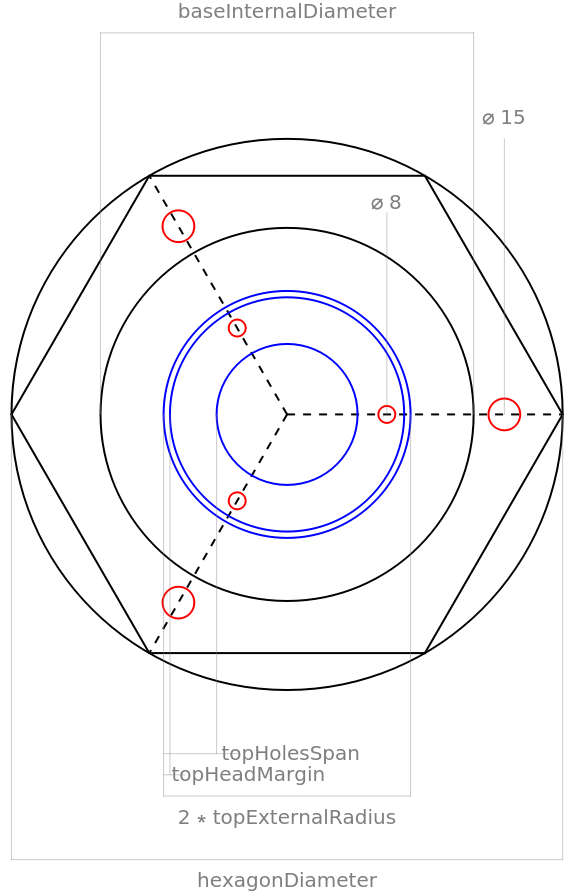
Several dimensions were required to reconstruct the geometry. These were taken directly from the damaged part using a caliper and measuring tape. The following technical drawing illustrates the key measurements.
In[]:=
scaleFactor=;hexagonDiameter=260;baseInternalDiameter=176;baseMainHoleDiameter=205;baseThickness=23;
-3
10
In[]:=
bodyHeight=102;topHeadMargin=3;topExternalDistance=110.5;topExternalRadius=topHeadMargin+topExternalDistance/2;topHeadHeight=7.2;topHolesSpan=22;
In[]:=
topHolesInterDistance=81.5;topHolesTriangle=topHolesInterDistance*Cos[30Degree];topHolesDistance=*topHolesTriangle;topHolesDiameter=8;baseHolesDiameter=15;
2
3
In[]:=
neckHeight=7.8;neckMargin=4;
In[]:=
draw2D=Graphics
Out[]=
Base
Base
The base is formed by subtracting a central cylindrical hole from a hexagonal solid. A fillet is then applied to smooth the transition along the upper edge.
In[]:=
Graphics[{FaceForm[],EdgeForm[Black],Circle[{0,0},hexagonDiameter/2],circDiff=Disk[{0,0},baseInternalDiameter/2],hex=RegularPolygon[hexagonDiameter/2,6],tri=Rotate[RegularPolygon[baseMainHoleDiameter/2,3],30Degree,{0,0}]}]
Out[]=

Body
Body
The body is created using a revolution operation. First, a 2D profile is drawn based on the design dimensions. This profile is then rotated 360° around the z-axis to generate the full 3D shape.
Both the external and internal profiles are defined using splines. To ensure smooth curvature near the ends, the first and last control points are repeated. Only the top section is defined separately using a segmented line, in order to account for the outer edge margin.
Then, the revolved body is combined with the hexagonal base to form a single solid. After that, the necessary holes are added to complete the geometry.
Holes
Holes
The holes are positioned at every other vertex of the hexagon, spaced 120 degrees apart starting from zero. As shown in the technical drawing, cylindrical shapes can be used to cut these holes using a Boolean difference operation, applying it to both the neck and the base.
Neck
Neck
The final step is adding the neck spacer — a small height increase in the areas between the holes. This feature reinforces the structure without interfering with the screw placements.
The shape is now complete! We can export the model as an .stl file and prepare it for 3D printing.
3D print
3D print
Since most print beds aren’t large enough to accommodate the full part, the model can be split into two halves for easier printing.
Each half can now be exported as a separate .stl file and imported directly into Cura to prepare the print. From there, we can adjust orientation, supports, and slicing settings to optimize the printing process.
Finite Element Analysis
Finite Element Analysis
Most of the dimensions are driven by design constraints, fitting the base to the main pole and aligning with the ground screw positions. But what about the thickness? Why is it so substantial? Could it be made thinner? More importantly, how do we determine the optimal thickness?
To answer that, we need to understand how the material behaves under load. This involves analyzing the stress and strain by defining the applied forces and boundary conditions. Some aspects are straightforward—like modeling PETG as a linear elastic material using the manufacturer’s data. Others require more thought.
Parametric design
Parametric design
Let’s reshape the previous geometry by treating the thickness, previously referred to as “shift”, as a parameter. This allows us to generate multiple variations of the same part, all respecting the original geometric constraints but with different wall thicknesses and internal profiles.
For instance, we can introduce five designs:
Let' s define variables and material parameters for the PETG:
Boundary conditions
Boundary conditions
As a starting point, we consider the failure load of a threaded insert, approximately 1200 Newtons. This represents a realistic scenario: a 10 kg force applied at 1.5 meters, akin to someone leaning on the pole. It provides a solid baseline for structural analysis, with room for additional safety margins. To proceed, appropriate boundary conditions must be defined. The top and bottom faces are assumed to be vertically constrained, as the structure is supported by a concrete base. The bottom holes are treated as fixed, reflecting the anchoring effect of the mounting screws.
For the top face, we simulate a bending moment by applying a vertical load along the Z-axis. In this setup, half of the top face is subjected to compression (pushing downward), while the opposite half experiences tension, particularly around the insert holes, mimicking the effect of screws pulling under load. This approach captures the key mechanical stresses that the part would face in real-world use.
Therefore, we need to define the position of each boundary condition explicitly:
◼
Top holes: These serve as the points of load application. We model the applied force here to simulate the stress from a bending moment.
◼
Bottom holes: These are treated as fixed constraints, reflecting the anchoring effect of the screws that prevent any movement.
◼
Base surface: This represents the contact with the external ground. Here, we apply vertical displacement constraints to simulate the support provided by the concrete foundation.
◼
Each of these conditions must be defined using Boolean logic to assign the correct constraints and loads to the appropriate regions of the geometry in the simulation.
Visualize the load scheme
Visualize the load scheme
Load scheme
Load scheme
Given the required load distribution, we can leverage the geometry of the structure to simplify the analysis. The surface region of interest can be approximated as a half-annulus, with inner and outer radii r1 and r2. The applied load is modeled as a distributed force across this region. This force varies with position and can be defined as:
To satisfy mechanical equilibrium, the moment generated by this distributed load must equal the moment produced by a concentrated 1200 N force applied at the opposite insert hole. This condition is expressed as:
This setup allows us to replicate the bending moment introduced by a realistic pulling force and distribute it across the relevant surface area. Numerical evaluation follows.
Solid Mechanics
Solid Mechanics
Now it’s time for the Finite Element Analysis. We’ve defined everything we need, the geometry, material properties, boundary conditions, and the regions where loads and constraints are applied. With this setup, we can use the SolidMechanicsPDEComponent to generate the governing equations.
These are the partial differential equations that define the mechanical equilibrium of the structure under the applied loads and constraints. They describe how internal stresses develop in response to external forces, ensuring that the system satisfies both force and moment balance at every point.
Note that these equations remain the same across all design variations due to the consistent geometric constraints. The only thing that changes is the mesh, the specific discretization of each model, on which the equations are solved.
Parametric study
Parametric study
In fact, we can solve the same set of equations over each geometry variant and observe how the material responds under identical loading conditions. This allows us to directly compare the effects of different wall thicknesses and internal shapes on stress distribution, deformation, and overall structural performance.
Post processing
Post processing
To effectively visualize the results, we first convert each half-geometry into a Region object. This allows us to:
1
.Map the displacement field to congruently deform the geometry, giving a realistic view of how the structure would physically respond under load.
2
.Overlay the stress distribution onto the deformed shape, helping us understand where the highest internal stresses occur and how they propagate through the material.
This approach provides an intuitive and detailed visualization of both deformation and internal stress, making it easier to assess the performance of each design.
Once we have the displacement results from the finite element solution, we can compute both stress and strain fields using the material properties (like Young’s modulus and Poisson’s ratio). Strain is calculated from the spatial derivatives of the displacement field. Stress is then obtained from strain using the constitutive relations for linear elasticity (e.g., Hooke’s law for isotropic materials).
With these computed, we can visualize stress and strain directly on the deformed geometry, providing clear insight into how the material behaves under load — where it stretches, compresses, and concentrates force.
These quantities are extremely useful for assessing how close the material is to failure. By comparing the computed stress values to the ultimate strength of PLA, we can estimate the safety margin. However, it’s important to adjust this evaluation to account for the anisotropic nature of 3D-printed materials. Due to the layer-by-layer deposition process, printed parts are typically transversely isotropic, with significantly lower strength in the Z-direction. Rescaling the stress values accordingly gives a more realistic picture of the material’s performance and potential failure zones.
As observed, the highest stress concentrations are located near the insert regions. This is expected and acceptable, as the insert–PETG interface is likely to fail before the structural base itself collapses. However, it’s important to consider that impact loads, such as someone suddenly leaning or bumping into the structure, can reach values up to 10 times higher than the proposed static load. This significantly increases the risk of localized failure, particularly in weaker areas like the insert interface.
Given the relatively low cost of 3D printing filament, selecting a 16 mm thickness is a practical and safe choice, as it consistently provides a generous safety margin. Moreover, the component may be subjected to various forms of external stress, including impacts from garden tools or long-term environmental degradation due to exposure to sun, moisture, or temperature fluctuations. In this context, a thicker wall not only improves structural strength but also enhances the durability and resilience of the part in real-world conditions.
CITE THIS NOTEBOOK
CITE THIS NOTEBOOK
Fixing the unfixable: CAD workflow & parametric thickness optimization for lamp base reconstruction
by Alessandro Mastrofini
Wolfram Community, STAFF PICKS, June 16, 2025
https://community.wolfram.com/groups/-/m/t/3480192
by Alessandro Mastrofini
Wolfram Community, STAFF PICKS, June 16, 2025
https://community.wolfram.com/groups/-/m/t/3480192