Image modification frequently leaves behind statistical anomalies in the color data of an image. In this project, I gathered and analyzed statistics belonging to natural and modified images. Using the statistical distributions and correlations between the two sets, I developed a model to determine if an image was constructed from parts of separate photos.
Introduction
Introduction
The increasing popularity of social media and global connectivity have hastened the spread of misinformation, especially through doctored images. Software such as Adobe Photoshop and AI generation allow fabrication of defamatory and controversial images. I wanted to create a program that could detect certain forms of image manipulation. There is a huge variety in methods of image manipulation, such as erasing objects, image splicing, and more. This paper studies and develops a model to determine if an image has been photoshopped.
The specific type of editing that this paper focuses on is a complete splice within an image. A splice occurs when parts of two different images are combined to form a singular image.
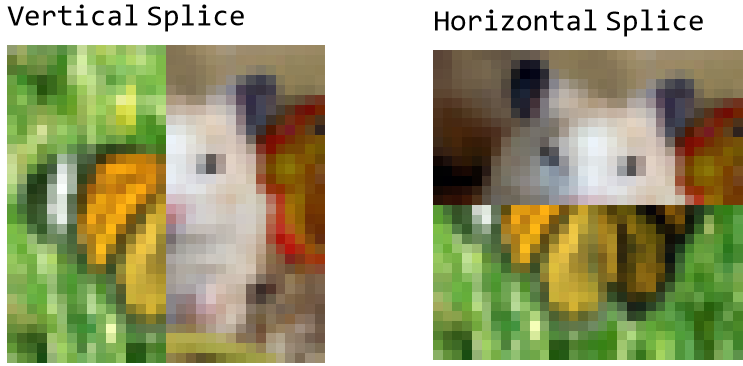
Retrieving Data
Retrieving Data
To begin with, I needed to find a dataset of images that I could analyze. I chose to use the CIFAR-100 dataset, which contains 60,000 32x32 pixel images. The CIFAR-100 dataset provides a variety of different colors and natural images, and the relatively smaller, standardized image sizes allow more fluid experimentation and data analysis.
Imports the CIFAR-100 dataset and assigns to a variable:
In[]:=
imageDataset=ResourceObject["CIFAR-100"];cifar100=Keys[ResourceData[imageDataset]];
We also need to create a photoshopped data set to compare to CIFAR-100. To do this, I used built in Wolfram functions to create a second set of images composed of a combination of two CIFAR images. The photoshopped images are created from the same 1000 images, so the total pixels are the same between the two datasets.
Creates photoshopped dataset with images composed of two halves of existing images:
In[]:=
combineImages[a_,b_]:=With[{dims=ImageDimensions[a]},With[{cut=dims[[1]]/2},ImageCollage[{ImageTake[a,All,cut],ImageTake[b,All,cut-dims[[2]]]}]->"Cut at "<>IntegerString[cut]]];createCombinedImages[imageSet_List]:=Association[combineImages@@@Partition[imageSet,2,1,{1,1}]];
For now, we will work with 1000 CIFAR images due to limitations in computational power. I can use the functions defined earlier to choose 1000 random images and create their modified counterparts.
Important Note: Because the images are randomly generated each time, graphs and results may vary.
Important Note: Because the images are randomly generated each time, graphs and results may vary.
Creates the data sets I will analyze:
In[]:=
cifar100Images=RandomChoice[cifar100,1000];photoshoppedImages=createCombinedImages[cifar100Images];
Statistical Analysis
Statistical Analysis
Now that we have our datasets, we are now ready to do some statistical analysis. There are two main categories of statistical analysis of images.
◼
Image Properties- These statistics, such as image entropy, the randomness of the image, correspond to overall patterns measurements of the image.
◼
Pixel-by-pixel Properties- These statistics occur at or between individual pixels. For example, the distance in brightness between two pixels is an example of one of these properties.
Image Properties
Image Properties
Our hypothesis for image properties is that they should be extremely similar, and in some cases, congruent, between the two datasets. Both datasets are created from the exact same pixels, so the total data of image properties will not vary much.
First, we need to define the list of properties we will use. I chose to use the built in attributes in the ImageMeasurements function. These include: "Intensity", the brightness of the image/pixel, "Skew", the crookedness of an image, "Entropy", the randomness of an image, and "Energy", overall trends in Intensity.
First, we need to define the list of properties we will use. I chose to use the built in attributes in the ImageMeasurements function. These include: "Intensity", the brightness of the image/pixel, "Skew", the crookedness of an image, "Entropy", the randomness of an image, and "Energy", overall trends in Intensity.
Defines attributes to analyze:
In[]:=
attributes={"MinIntensity","MaxIntensity","MeanIntensity","MedianIntensity","StandardDeviationIntensity","Skew","Entropy","Energy"};
Next, we need to find the values of each of these attributes for every image in our two datasets.
Creates a two-dimensional list containing the values of the 8 attributes in each image:
In[]:=
cifar100Attributes=Table[ImageMeasurements[a,b],{a,cifar100Images},{b,attributes}];photoshoppedImageAttributes=Table[ImageMeasurements[a,b],{a,Keys[photoshoppedImages]},{b,attributes}];
Now that we have our data, we need to find a way to represent it graphically. I used two different graphs, a dot plot and a bar chart, which offer slightly different perspectives of the data. For the dot plot, I chose to graph the attribute values for real images on the x-axis, and attribute values for fake images on the y-axis. The major flaw in the dot plot method is that I had to map values for each image onto another. There is no perfect way to do this, and I chose to simply match element i to element i', since element i' is composed of half of element i.
Formats and composes the data into a list of points:
In[]:=
getGraphData[attributeNumber_Integer]:=Table[{cifar100Attributes[[a,attributeNumber]],photoshoppedImageAttributes[[a,attributeNumber]]},{a,1000}];
Now that we have our data points, we can create a dot plot of each attribute. In the dot plot, we set the lengths of both axis equal in addition to adjusting the aspect ratio to make the graph a square. This will make the data on the graph easier to analyze.
Creates the 8 dot plots, and adjusts the axes:
In[]:=
getMaxData[attributeNumber_Integer]:=Max[Flatten[getGraphData[attributeNumber]]];getMinData[attributeNumber_Integer]:=Min[Flatten[getGraphData[attributeNumber]]];ManipulateListPlotgetGraphData[i],,{{i,1,Dynamic[attributes[[i]]]},1,8,1,ControlType->Setter},SaveDefinitions->True
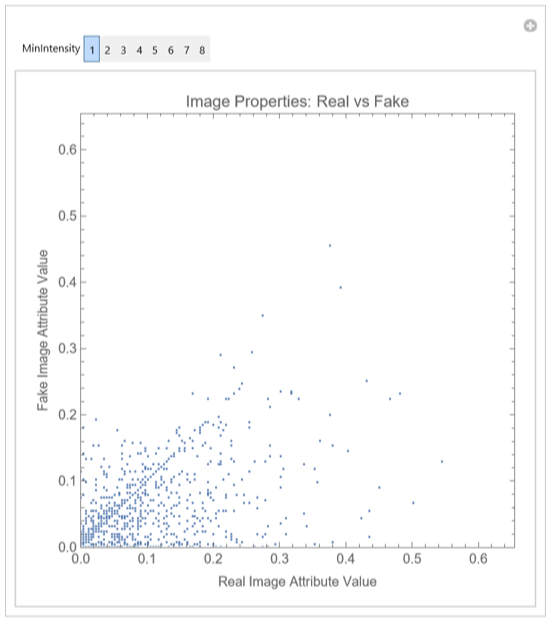
In these graphs, points lying on the line y=x represent "perfect" data values, where the attribute is equivalent between an image and its faked counterpart. All of these graphs roughly follow this line. However, the flaws in representing the data with a dot plot can be seen, as while the overall distribution remains centered on y=x, individual data points are all over the place due to the limitations in our mapping technique.
We can also use a bar chart to graph the distributions of the data. The major benefit of a bar chart over dot plots is that the data is separated into two graphs. This way, the distribution will be far easier to analyze. To do this, I scaled the data of the real images into 20 equally sized "bins". I also divided the fake image data into the bins, so that the data is standardized.
Function for sorting data and creating bar charts:
In[]:=
simultaneousTransformBarChart[data_List,otherdata_List]:=Module{dataIncrement,tmp,othertmp},dataIncrement=(Max[data]-Min[data])20//N;tmp=Sort[BinCounts[Round[#,dataIncrement]&/@data,{Min[data]-dataIncrement,Max[data]+dataIncrement,dataIncrement}]];othertmp=Sort[BinCounts[Round[#,dataIncrement]&/@otherdata,{Min[data]-dataIncrement,Max[data]+dataIncrement,dataIncrement}]];othertmp[[-1]]+=Length[otherdata]-Total[BinCounts[Round[#,dataIncrement]&/@otherdata,{Min[data]-dataIncrement,Max[data]+dataIncrement,dataIncrement}]];BarCharttmp,,BarChartothertmp,
Now, we apply this function to graph bar charts for each of our attributes.
Generates bar charts, with the left side being real data and the right side being fake:
In[]:=
Manipulate[GraphicsRow[simultaneousTransformBarChart[Part[#,i]&/@cifar100Attributes,Part[#,i]&/@photoshoppedImageAttributes]],{{i,1,Dynamic[attributes[[i]]]},1,8,1},ControlType->Setter,SaveDefinitions->True]
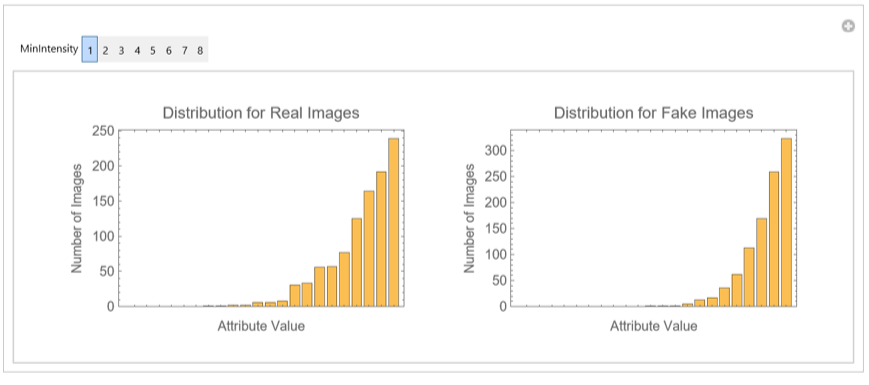
For each of the graphs, the two bar charts depict very similar correlations between our real and fake datasets. To verify this, we can calculate the correlation between the data points for each of our attributes.
Generates an association of correlation values:
In[]:=
Table[attributes[[i]]->Correlation[Sort[Part[#,i]&/@cifar100Attributes],Sort[Part[#,i]&/@photoshoppedImageAttributes]],{i,1,8}]
Out[]=
{MinIntensity0.997806,MaxIntensity0.99705,MeanIntensity0.995703,MedianIntensity0.99004,StandardDeviationIntensity0.99711,Skew0.994156,Entropy0.983911,Energy0.966705}
These correlation numbers are extremely close to 1, so it means the two data sets are extremely alike. Therefore, as predicted, overall image properties remain practically identical in a large dataset when the only modification to the images is changing the order of the pixels.
Pixel-by-Pixel Properties
Pixel-by-Pixel Properties
For simple transformations, my hypothesis is that pixel-by-pixel data will be a far more effective way of determining if an image is natural or modified.
Once again, we need to determine which properties to use. Wolfram's built in functions for pixel-by-pixel image analysis are quite limited, so I elected to create my own functions to make data collection more flexible and comprehensive. Before we begin finding attributes to analyze, we first need to break down images into pixels. Therefore, I wrote a couple helper functions that break an image down to colors, then sorts those colors into their closest color bin. These properties are a lot more computationally intensive, so I decided to analyze 100 images at a time instead of 1000.
Once again, we need to determine which properties to use. Wolfram's built in functions for pixel-by-pixel image analysis are quite limited, so I elected to create my own functions to make data collection more flexible and comprehensive. Before we begin finding attributes to analyze, we first need to break down images into pixels. Therefore, I wrote a couple helper functions that break an image down to colors, then sorts those colors into their closest color bin. These properties are a lot more computationally intensive, so I decided to analyze 100 images at a time instead of 1000.
Creates a list of sorted colors of an image:
This function opens the door to analyze attributes of individual pixels as well as the relationship between two pixels. One attribute I analyzed was the average variation of each pixel. In other words, the average distance between each color and the bin they were grouped into.
Function for Average Distance:
Using the common colors, we can then find values for the percent occupied by the most common color, and also the ratio of most common to second most common color.
Extension functions for common colors:
Apply each of these functions to the image sets to extrapolate the data:
Gathers data into a list:
Now that we have our data, we can display it using the bar charts function from earlier.
Creates bar charts with 3 attributes:
Once again, the correlation between the real and fake image data is nearly 1. However, what's more interesting about the pixel-by-pixel analysis of the images is that the distributions, as shown by the bar charts, are different. The disparity between the distributions, especially in the proportion of dominant colors, could open the window to creating a model through either machine learning or probability.
Finally, since the current manipulation I am doing is cutting an image in half vertically, another method I wanted to analyze was to test if there was a huge spike in color difference across horizontal pixels. To do this, I checked the average color change between two adjacent columns. I chose to use Manhattan distance because it is more suited for the 3 dimensional RGB points and so that the direction of change didn't matter.
Creates function to find average change in color across two columns:
Since we only have one splice, I chose to graph out the values for the maximum spike.
Apply this function to the two datasets (this step takes a while to run):
Graph the data:
Retrieve Correlation:
As you can see, the data for the horizontal pixel change (hPMA) is a lot more promising. This makes sense, since the images which we modified have a singular column to column jump that stands out from the rest. However, additional processing and optimization needs to be done before we can develop a determining model.
Developing an Identifier Model
Developing an Identifier Model
Now that we finished statistical analysis, we need to use our findings to create a function that can identify when an image has been spliced. By far the most promising attribute we have looked at is the maximum increase across two adjacent columns. However, as the distribution shows, this graph isn't perfect, and there is fairly significant overlap in the distribution between the real and fake images. My solution to this issue was to modify the hPMA number so that it took into account the overall image data. My initial thought was simply to divide the hPMA by the average increase between columns. However, this has many edge cases in which it doesn't work.
For example, in the above natural image, the modified hPMA value would be extremely high, since there is a increase when the sky touches the building. To solve this issue, I instead divided the original maximum hPMA value by the second largest hPMA value.
The new algorithm:
This way, in cases such as the image above, my new value would return something close to 1 due to there being two large, relatively equal distances. While this new method isn't perfect, it is far more effective in separating the distribution of values between the real and fake datasets.
Bar chart of attribute values of my new algorithm:
After analyzing the data and a little trial and error, I decided that the value of 1.25 would suit the data best. Anything less than 1.25 would signify a natural image, and spikes with an adjusted hPMA value of larger than 1.25 would represent an image with a splice in it.
Function for determining whether an image is natural or not:
Testing the Function
Testing the Function
To test, we first need to create a testing dataset. The testing dataset would include both natural and modified images. To do this, I randomly chose 500 cifar-100 images as my natural images, and randomly composed another 500 CIFAR-100 images as modified images.
Creates Association for Natural and Cut Images
Now that we have the data we will use, I created a function that can calculate the percent accuracy of the algorithm I developed and test my algorithm on the two data sets above.
Creates new function that returns accuracy given an algorithm and testing data
Test the data for natural images
And for fake
This algorithm is fairly accurate, with an average accuracy of around 85.9%. The algorithm can detect spliced images correctly with an accuracy of 90.5%. However, when it is fed a natural image, there is a 18.8% chance that it falsely flags the image as modified. The errors can likely be attributed to certain natural images containing geometric shapes resulting in a large spike between columns. (Note that these percentages are from a more exhaustive test with 10000 images.)
I also wanted to test if my algorithm works for when the images aren't cut straight down the middle. To do this, I adjusted the creation function of the photoshopped data so that it would start at a random index.
Modifies my initial image modification function to randomize the location of the splice.
Creates and tests the random dataset (this step takes very long to run, so run at your own risk).
The accuracy for when the cut is randomized is 90.6%, which is pretty much the exact same as when the cut is straight down the middle. My model also correctly predicted the pixel value where the actual splice happened.
Extensions
Extensions
There are many extensions to improve on my current model. Currently, the model tests for a vertical line where two images have been combined. I can modify the program so that it can also check for if there is a horizontal line where two images collide.
Function for testing horizontal cuts
Combining the vertical and horizontal test functions, we can generalize into a single function that tests for both horizontal and vertical cuts
General cut testing function
In addition, I wanted to make my program possible for images with larger dimensions. To limit computation time, I decided to resize images down to 64 by 64 pixels.
Cuts larger images down to 64 pixels wide:
Conclusion
Conclusion
Results
Results
This study demonstrated the potential in statistically determining whether an image is natural or modified. It also showed some of the difficulties in purely using statistics to analyze image data. The study was able to create an accurate statistical model to determine if an image was stitched together from multiple images. However, factors such as geometric shapes and similar colors across images sometimes still trick the model. From my research and experimentation with image statistics, it is my belief that a universal model for detecting modifications to images remains outside the current scope of statistical analysis.
Applications and Future Additions
Applications and Future Additions
The main application of the project is being able to detect if an image has been composed out of multiple images. The program is fairly accurate, though a bit on the conservative side. This project could help lay a foundation for the development of tools to limit misinformation on the internet spread through the usage of images. The scope of this project was quite limited, so there are a lot of potential improvements I can make:
◼
There is a lot of room for improvement in the current function. A major weakness of the current model is its long computational time, and therefore its inability to quickly iterate through large sets of images. In addition, while the average accuracy is roughly 85%, there is significant room for improvement. This could be done through the usage of machine learning to optimize the cutoff constant.
◼
I would like to compare my current model with other models. For example, the statistical analysis of the pixel-by-pixel property distributions were promising, so I believe that creating a model based purely off those statistics would be interesting to compare with my current model. In addition, I would like to test the effectiveness of inserting an image and its values into a machine learning algorithm.
◼
There are many other methods of image modification beyond those discussed in this paper. For example, adding or removing small objects and color manipulation of the whole image. The method I developed for detecting splices in images could be generalized to detect any form of object manipulation within an image. However, this would require significantly more computational power as more pixels and patterns of pixels would need to be analyzed. I believe a statistical approach similar to that used in this study could be used to detect images which have been modified through color filters.
◼
AI-generated images are a rapidly growing field. I tried analyzing images from stable diffusion using some of the attributes above. However, images from stable diffusion and similar image generating AI are built from the statistics of existing online images, so a surface statistical analysis resulted in correlation values ranging from 0.98 to 1. Some potential methods to detect AI generation would be more complex statistical analysis. For example, studying the lighting of images and the locations of objects could lead to the development of a program to distinguish AI and natural images.
Acknowledgements
Acknowledgements
I would like to thank my mentor, Isabel Skidmore, for her continuous support and advice. I would also like to thank Henry and Eric for their assistance with this project.
CITE THIS NOTEBOOK
CITE THIS NOTEBOOK
Detecting if an image has been modified
by Aidan Zhang
Wolfram Community, STAFF PICKS, July 13, 2023
https://community.wolfram.com/groups/-/m/t/2963210
by Aidan Zhang
Wolfram Community, STAFF PICKS, July 13, 2023
https://community.wolfram.com/groups/-/m/t/2963210