Introduction
Introduction
A pushdown automata is a non-deterministic automata that has an additional memory in the form of a stack. This unique feature allows pushdown automata (PDA) to recognize context free grammars. I have posted about deterministic and non deterministic automata before, here I explain a possible approach to programming these type of pushdown automata in Mathematica.
Formal Definition
Formal Definition
The definition I use is based on Hopcroft (see references). A PDA is a 7-tuple of the form , where,
P(Q,Σ,Γ,δ,,,F)
q
0
Z
0
◼
Σ
◼
Γ
◼
δ
δ:QΣΓQΓ
δ(q,a,X)(pγ)
q
p
a
X
γ
γϵ
γX
γYZ
X
Z
Y
◼
q
0
◼
Z
0
◼
F
Programming in Mathematica
Programming in Mathematica
Transition function
Transition function
Our first goal is to program the function as an association that define the rules of the automata. Lets work with an example. Consider the context free grammar that accepts strings that have a number of 0s at the beginning, and then followed by the same number of ones so we get the strings with . Lets now define an association for this grammar,
δ(q,a,X)(pγ)
n
0
n
1
n≥0
In[]:=
δ=Association[{0,"0","$"}{0,"0$"},{0,"0","0"}{0,"00"},{0,"1","0"}{1,""},{1,"1","0"}{1,""},{1,"","$"}{2,"$"}];
The starting state is 0 and the final state 2. Notice how we define each rule as , very similar to the transition function definition specified above. Instead of using as an empty stack (bottom of stack) symbol, for practical purposes I will be using “$”. The corresponding graph is,
{q,a,X}{p,γ}
Z
0
ShowGraphFA[{00,01,11,12},{0,1,2},{0},{2},{"0,$/0$\n0,0/00","1,0/ϵ","1,0/ϵ","ϵ,$/$"}]
Out[]=
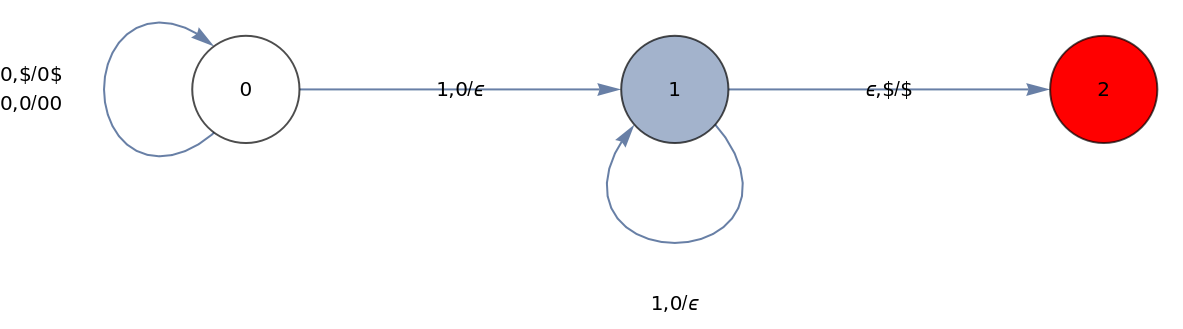
The arcs are labelled as so that it shows the symbol being read , what should be on top of the stack , and what to put back on the stack . I’m using ϵ to denote empty symbol also to indicate to add nothing to the stack.
a,X/γ
a
X
γ
The stack
The stack
The first step is to work out what to use for a stack. Mathematica has some data structures, that could be used, but instead I think it is more practical to use a stack that is just a string. The top of the stack will be the leftmost character.
We have then to define a function for Pop and another one for Push that operate on a string. For Pop,
In[]:=
SetAttributes[Pop,HoldAll]Pop[string_]:=Check[{StringTake[string,1],Check[string=StringDrop[string,1],string=""]},{"",""}]
Notice how I’m setting the HoldAll attribute to the Pop function, that is because we want the input argument to be changed in the function. To see how it works lets define a stack ,
s
s="123"
Out[]=
123
Now we apply the Pop function,
Pop[s]
Out[]=
{1,23}
If we look at the variable ,
s
s
Out[]=
23
Notice how the top item (leftmost) has been removed. Now we define a Push function
In[]:=
Push[string_,a_]:=StringInsert[string,a,1]
So,
Push[s,"1"]
Out[]=
123
We could use the same trick to change the value of the incoming argument with the Push function, but as you will see, it will be useful only when using the Pop function.
Instantaneous Description
Instantaneous Description
Our goal, given an input string, is to accept/reject this string computing this string symbol by symbol in a defined PDA. To facilitate the description of the computation process, we will use what is known as the instantaneous description of a PDA (see Hopcroft).
Basically we compute step by step so . In other words, in each step, we will have a list , and we will carry this structure as we compute. Characters being evaluated will be removed from the string, and symbols will be removed or placed on top of the stack. Our Instantaneous description function “ID” is the programmed as,
(q,aw,Xβ)⊢(p,w,αβ)
{q,string evaluated,stack}
In[]:=
ID[δ_,{state_,string_,stack_}]:=Block[{trans,tempstack=stack,tempstring=string},trans=δ[{state,First[Pop[tempstring]],First[Pop[tempstack]]}];{First[trans],tempstring,Push[tempstack,Last[trans]]}]
If you look at this code, you will notice that we take the arguments (as an ID tuplet) and make a copy in Block (because they will be modified), then calculate the transition using the function, and return another ID. Lets work with the example defined above. Lets compute the string “0011” step by step. We start with an empty stack (with the “$” symbol),
δ
ID[δ,{0,"0011","$"}]
Out[]=
{0,011,0$}
After the first computation, you can see that we have used one character of the string (we now have “011”), and our stack now has a “0” added (“0$”). One more step,
ID[δ,%]
Out[]=
{0,11,00$}
So another character in the string is consumed and we are left wit “00” and “00$” in the stack, we do 3 more steps
ID[δ,%]
Out[]=
{1,1,0$}
ID[δ,%]
Out[]=
{1,,$}
ID[δ,%]
Out[]=
{2,,$}
Notice that we have reached the final state 2. We can accept this string if and only if,
1
.We reach the final state
2
.The string being read is empty
3
.The stack is empty (with the “$” symbol)
Now we can use NestList to compute this recursively,
NestList[ID[δ,#]&,{0,"0011","$"},5]
Out[]=
{{0,0011,$},{0,011,0$},{0,11,00$},{1,1,0$},{1,,$},{2,,$}}
Notice what happens if we apply one more step,
NestList[ID[δ,#]&,{0,"0011","$"},6]
Out[]=
{{0,0011,$},{0,011,0$},{0,11,00$},{1,1,0$},{1,,$},{2,,$},{KeyAbsent,,StringInsert[,{2,,$},1]}}
We reached a “KeyAbsent” output. We can use this to apply instead a NestWhileList, and stop just before that result,
NestWhileList[ID[δ,#]&,{0,"000111","$"},#〚1〛≠"KeyAbsent"&,1,∞,-1]
Out[]=
{{0,000111,$},{0,00111,0$},{0,0111,00$},{0,111,000$},{1,11,00$},{1,1,0$},{1,,$},{2,,$}}
Now we are ready to create a string validation function,
In[]:=
IsValidQ[δ_,q0_,string_,qf_List]:=ContainsAny[NestWhileList[ID[δ,#]&,{q0,string,"$"},#〚1〛≠"KeyAbsent"&,1,∞,-1],{#,"","$"}&/@qf]
IsValidQ[δ,0,"000111",{2}]
Out[]=
True
IsValidQ[δ,0,"00111",{2}]
Out[]=
False
Another Example
Another Example
Consider this grammar , the transition function:
{|n>0}
n
a
2n
b
In[]:=
δ=Association[{0,"a","$"}{0,"a$"},{0,"a","a"}{0,"aa"},{0,"b","a"}{1,"a"},{1,"b","a"}{2,""},{2,"b","a"}{1,"a"},{2,"","$"}{3,"$"}];
The graph,
ShowGraphFA[{00,01,12,21,23},{0,1,2,3},{0},{3},{"a,$/a$\na,a/aa","b,a/a","b,a/ϵ","b,a/a","ϵ,$/$"}]
Out[]=

Lets try some strings, an invalid one,
A valid one,
We can use IsValidQ to test what strings are valid,
Final Comments
Final Comments
Here we are not allowing for NDA with ϵ transitions, but we can use the ID function for the basis of an automata that has ϵ transitions, for which closures would have to be calculated and several computations in parallel would have to be performed.
References
References
◼
Hopcroft and Ullman, Introduction to Automata Theory, Languages and Computation, Addison Wesley.
Extra code
Extra code
To display nice automata graphs,