CITE THIS NOTEBOOK: Graphing isosurfaces and field lines by Chase Marangu. Wolfram Community MAR 1 2023.
The Wolfram Language has many plotting tools and mathematical functions built in which make it possible to visualize Conservative Vector Fields with relatively few lines of code.
Choosing a Potential Function
Choosing a Potential Function
A Potential Function for a Vector Field e is a Scalar-Valued Function v such that e is the negative gradient of v. [1]
I am using e and v because they are symbols commonly used to represent Electric Field and Electric Potential, two common examples of a Conservative Field and a Potential Function respectively. Other examples include air pressure and wind force, gravitational potential energy and gravitational force, and spring potential energy and spring force.
In first code cell in this notebook (below), you can choose whatever potential function you want to graph. Some interesting examples are included in comments.
e=-∇ν
I am using e and v because they are symbols commonly used to represent Electric Field and Electric Potential, two common examples of a Conservative Field and a Potential Function respectively. Other examples include air pressure and wind force, gravitational potential energy and gravitational force, and spring potential energy and spring force.
In first code cell in this notebook (below), you can choose whatever potential function you want to graph. Some interesting examples are included in comments.
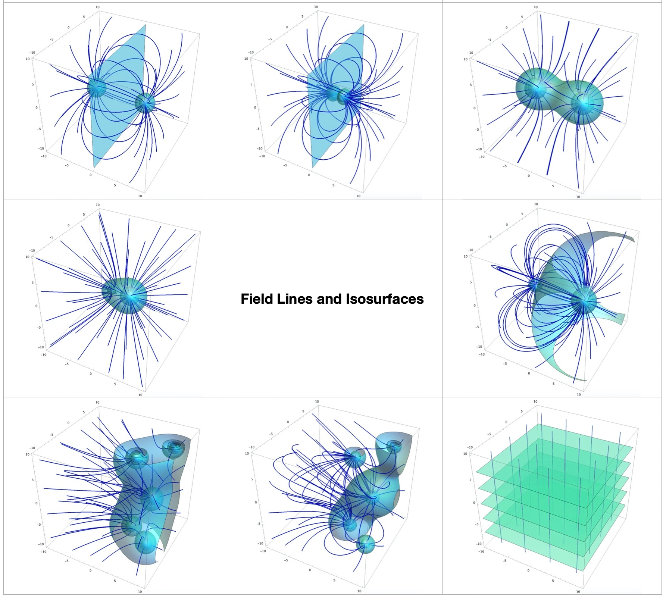
(*Clearingtokenscanclearspaceandfixbugs*)(*ClearAll["Global`*"]*)(*((Example1))electricpotentialofadipole*)v[x_,y_,z_]:=1/Sqrt[(x+5)^2+y^2+z^2]-1/Sqrt[(x-5)^2+y^2+z^2](*((Example2))electricpotentialofadipolewherethedistancebetweenthechargedparticlesismuchlessthan,or,"infinitessimal"comparedtothescaleitisbeinggraphedat*)(*v[x_,y_,z_]:=1/Sqrt[(x+0.05)^2+y^2+z^2]-1/Sqrt[(x-0.05)^2+y^2+z^2]*)(*((Example3))electricpotentialoftwopositively-chargedparticles*)(*v[x_,y_,z_]:=1/Sqrt[(x+5)^2+y^2+z^2]+1/Sqrt[(x-5)^2+y^2+z^2]*)(*((Example4))electricpotentialofasmallandalargepositivelychargedparticle*)(*v[x_,y_,z_]:=1/Sqrt[(x+2)^2+y^2+z^2]+3/Sqrt[(x-2)^2+y^2+z^2]*)(*((Example5))electricpotentialofasmallnegativeandalargepositivelychargedparticle*)(*v[x_,y_,z_]:=-1/Sqrt[(x+5)^2+y^2+z^2]+2/Sqrt[(x-5)^2+y^2+z^2]*)(*((Example6))electricpotentialofafewrandomly-placedpositivechargedparticles.Coincidentally,theirisosurfacesaredefinedthesamewayasmetaballsare.*)(*v[x_,y_,z_]:=Sum[1/Sqrt[(x-10*Sin[i*999.222])^2+(y-10*Sin[i*1234.567])^2+(z-10*Sin[i*2222.111])^2],{i,1,5}]*)(*((Example7))electricpotentialofafewrandomly-placedpositiveandnegativechargedparticles.*)(*v[x_,y_,z_]:=Sum[((-1)^i)/Sqrt[(x-10*Sin[i*999.222])^2+(y-10*Sin[i*1234.567])^2+(z-10*Sin[i*2222.111])^2],{i,1,5}]*)(*((Example8))potentialofauniformvectorfield,suchasauniformgravitationalfield*)(*v[x_,y_,z_]:=z*)
Calculating the Gradient Field
Calculating the Gradient Field
A Conservative Vector Field is any field which has an associated potential function. [2]
Below, we define our conservative vector field e for our potential function v from earlier.
Side note: I got the idea from https://reference.wolfram.com/language/ref/VectorPlot3D.html to try to use Evaluate[] to make it run faster.
Below, we define our conservative vector field e for our potential function v from earlier.
Side note: I got the idea from https://reference.wolfram.com/language/ref/VectorPlot3D.html to try to use Evaluate[] to make it run faster.
In[]:=
e[x_,y_,z_]:=Evaluate[ (-1)*Grad[v[a,b,c],{a,b,c}]/.ax/.by/.cz]
Graphing the Equipotential Surfaces and Field Lines
Graphing the Equipotential Surfaces and Field Lines
A useful way of visualizing 3-Dimensional potential fields is to plot the Equipotential Surfaces. These are the Isosurfaces of the potential field. If on one point of an equipotential surface, the potential is 5 Joules, then the potential is 5 Joules everywhere across that surface. Isosurfaces are often closed, smooth shapes like spheres, cylinders, or even Metaballs. On the contrary, an example of a common open isosurface is a plane.
plotSize = 10;potentialColorFunction = Function[{x,y,z},RGBColor[0,0.5+0.5*Sin[v[x,y,z]*30],1]];potentialPlot = ContourPlot3D[ Evaluate[v[x,y,z]], {x,-plotSize,plotSize},{y,-plotSize,plotSize},{z,-plotSize,plotSize}, MeshNone, ContourStyleDirective[RGBColor[0.238,1,1],Opacity@0.5,Specularity[White,20]], Contours5];
There are many ways to visualize vector fields. You can use VectorPlot3D[] to draw little arrows from every point which point in the direction of the field, or you can also use StreamPlot3D[] to plot several Field Lines of the vector field. StreamPlot3D[] looks nicer in my opinion, but it takes longer to run. Computing field lines and then rendering them in 3D can be difficult to program in some environments, so I was very pleased to find this nice function in the Wolfram language which lets me throw in my vector field and does all the rendering for me.
An interesting property is that at every point in space, the field lines and vectors are perpendicular (or "normal") to the isosurfaces.
An interesting property is that at every point in space, the field lines and vectors are perpendicular (or "normal") to the isosurfaces.
In[]:=
fieldPlot = StreamPlot3D[ Evaluate[e[x,y,z]], {x,-plotSize,plotSize},{y,-plotSize,plotSize},{z,-plotSize,plotSize}, StreamMarkers"Line"];
The Show[] function lets us easily superimpose two 3D graphics, including 3D plots. This is great for visualizing the perpendicularity between the field lines and the isosurfaces.
In[]:=
Show[fieldPlot,potentialPlot,ImageSizeLarge]
Here is a screenshot of the outputs created by evaluating this notebook with the various examples provided in comments in the first code cell.
Summary
Summary
You can use ContourPlot3D[] and StreamPlot3D[] to graph a scalar field and the Gradient Field of that scalar field.
Keywords
Keywords
◼
Multivariable Calculus
◼
Gradient
◼
Del
◼
Nabla
◼
3D Rendering
◼
Electromagnetism
◼
Equipotentials
◼
Isosurfaces
◼
Field Lines
◼
Vector Fields
◼
Force Fields
References
References