In the modern era of computing, it is taken for granted that every device comes with preinstalled software and tools, allowing for at least basic functionality out of the box. However, the earliest computers lacked even a basic operating system and could only perform the exact computations specified by the user, typically inputted via a punch card or magnetic tape. Although such means of calculation are obsolete today, examining the inner workings of the ancestors of today’s technology proves important not only as an educational tool, but also as a way to discover new ways to optimize the next generation of computers.
Virtual Machine Template
Virtual Machine Template
The MIX virtual machine simulates a hypothetical computer outlined in The Art of Computer Programming by Donald Knuth. The computer consists of several hardware components, such as registers, memory, and toggles. The registers act as short term storage as well as a place for arithmetic calculations. The memory acts as a longer term storage that can retain data that does not need to be changed frequently. The toggles act as indicators (or flags) for certain events, such as a register overflow or a comparison result. In addition to these hardware components, there are also 137 instructions included with the machine, all of which are simulated in the definition as well.
Virtual Machine State Definitions
Virtual Machine State Definitions
Firstly, we define a “Create” function that takes in a program as its required parameter. This function initializes the 9 registers, 4 indicators, memory, and stores the parsed program. This MIX virtual machine stores the program in a reserved space separate from memory.
Define the mixCreate function as well as helper functions to parse the specified program
Virtual Machine Execution Definitions
Virtual Machine Execution Definitions
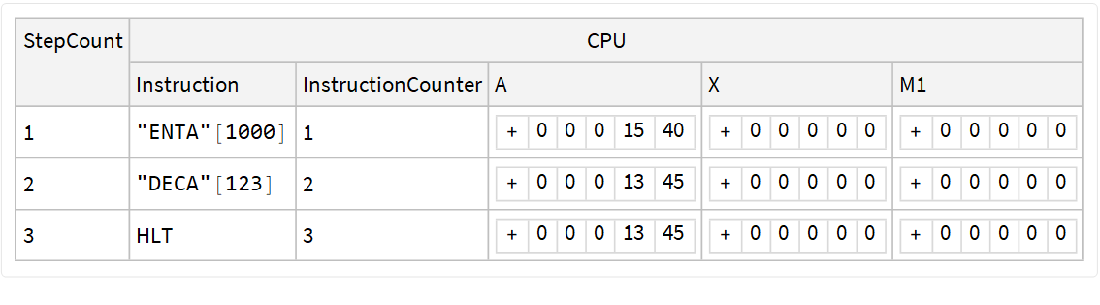
The next set of functions to create are executed every time the VirtualMachineExecute function is called later on. These functions execute instructions at the current program counter index, given that the virtual machine is in a valid state. The TraceAction option causes the VirtualMachineExecute step to return a Dataset representing the history of the machine instead of an object representing the virtual machine, allowing users to visualize the values taken on by the memory and registers.
Define the mixStep, mixExecute functions
Virtual Machine Instructions
Virtual Machine Instructions
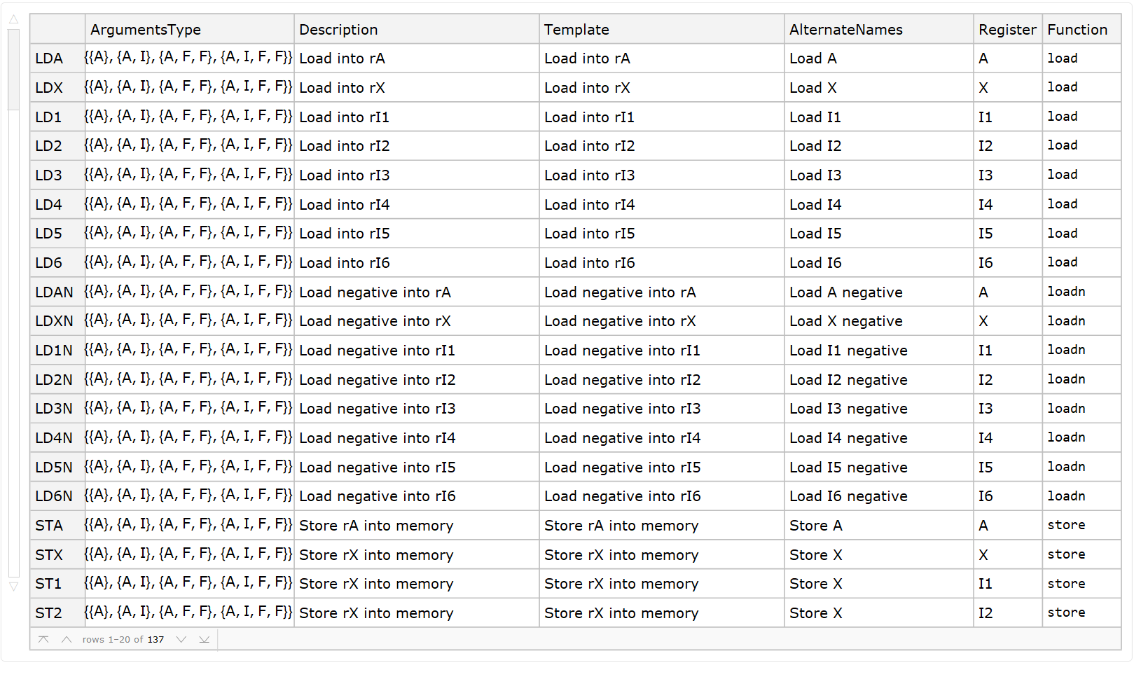
Next, we create arguably the most important (and objectively the longest) section of the virtual machine, containing the functions to execute each step. An association containing the register sizes is stored in $registerSize, allowing for functions to operate differently based on the register being modified. An association containing the functions and their descriptions, parameters, and function are stored in $instructions to be called by the step function.
Define the $registerSize and $instructions associations
View instructions, their parameters, and other properties
$instructions//Dataset[#,ItemDisplayFunction->{"ArgumentsType"->(#/.{"Address"->"A","Field"->"F","Index"->"I"}&)}]&
Out[]=
Auxiliary Functions
Auxiliary Functions
To reuse code segments, several auxiliary functions are created to assist with register/memory manipulation, arithmetic, bitwise operations, and comparison operations.
Register and Memory Manipulation
Register and Memory Manipulation
Arithmetic
Arithmetic
Bitwise Operations
Bitwise Operations
Comparison Operations
Comparison Operations
Virtual Machine Operation Definitions
Virtual Machine Operation Definitions
The operations allow for easy access into the explicit values in the registers, as well as the step counter, showing how many instructions have been executed.
Define the operations for the virtual machine to access various register values as well as the step counter
Putting It All Together
Putting It All Together
Finally, all of the aforementioned functions are combined into a template specified by the Virtual Machine Framework. This association maps each property to a function created above. Upon creating the template, there are several attributes of the virtual machine that you may access, such as the register values, the current program step counter, and so on.
Install the VirtualMachine Framework Paclet
Out[]=
PacletObject

Define the mixTemplate object
mixTemplate=VirtualMachineTemplate[<|"Type"->"Abstract","Name"->"MIX","AlternateNames"->{"MM"},"Create"-><|"Function"->mixCreate,"RequiredParameters"->{"Program"}|>,"Step"->mixStep,"Operations"->mixOperations|>]
Out[]=
VirtualMachineTemplate
Some operations for the MIX virtual machine
mixTemplate["Operations"]//Keys
Out[]=
{StepCount,rA,rX,rI1,rI2,rI3,rI4,rI5,rI6}
Virtual Machine Initialization
Virtual Machine Initialization
After creating the MIX virtual machine template, a program can be loaded onto the machine. Programs are inputted as a list of instructions and arguments.
Example of an initialized MIX virtual machine
vm1=VirtualMachine[<|"Machine"->mixTemplate,"Program"->{"HLT"}|>]
Out[]=
VirtualMachineObject
Example of an initialized MIX virtual machine with a sample program
vm2=VirtualMachine[<|"Machine"->mixTemplate,"Program"->{"ENTA"[1000],"DECA"[123],"HLT"}|>]
Out[]=
VirtualMachineObject
Virtual Machine Program Execution
Virtual Machine Program Execution
Once a virtual machine is initialized, the program can be executed using the VirtualMachineExecute function.
Execute one step in the example program
VirtualMachineExecute[vm1]
Out[]=
VirtualMachineObject
Using the TraceAction option, a Dataset containing the values of some registers and memory addresses are shown.
Execute the sample program and show memory traces
VirtualMachineExecute[vm2,3,Automatic,TraceAction->Automatic]
Out[]=
Example Programs
Example Programs
Example 1: Sideways Addition
Example 1: Sideways Addition
In The Art of Computer Programming, Knuth describes a simple function that computes the sum of the five bytes of register A.
The MIX word is converted to a base 10 number to be passed in as an argument in the first instruction of the program
x=FromDigits[{1,2,3,4,5},64];vm3=VirtualMachine[<|"Machine"->mixTemplate,"Program"->{"ENTA"[x],"STA"[1],"ENTA"[0],"LDA"[1,5,5],"ADD"[1,4,4],"ADD"[1,3,3],"ADD"[1,2,2],"ADD"[1,1,1],"HLT"}|>]
Out[]=
VirtualMachineObject
Execute the program and show memory traces
Example 2: Factorial Calculation
Example 2: Factorial Calculation
Calculate the factorial of the specified number
Confirmation that the returned result is equivalent to the actual value
Acknowledgements
Acknowledgements
I would like to thank my wonderful mentors, Christian Pasquel and Daniel Sanchez, for their continuous support and assistance. Without Christian and Daniel’s expertise, this project would not be completed to the fullest extent. I would also like to acknowledge Stephen Wolfram for defining the MIX Virtual Machine project, giving me a challenging project that allowed me to learn about the Wolfram Language and was tailored to my interests.