We aim to simulate and observe the evolution of a population of artificial critters, to produce a speciation event. To achieve this, the population of critters need to exist in a defined space, with rules governing processes such as migration, mating, and aging. We developed functions to define multiple grid-like spaces, with multiple critters in each cell. The critters were endowed with rules for unique ID, age, gender, location, and mate. The initial population with just 2 critters would be provided with the rules and evolved with the TokenEventGraph resource function with multiple time-steps. Subsequent branchial and causal graphs were computed in order to observe the formation of an “event-horizon” aka a speciation event.
Designing the Artificial Critters
Designing the Artificial Critters
We defined a function randomCritter with rules established to set their location, gender, age, parents, siblings, and offspring. The offspring will inherit traits from the parents such as location and ID of parents. We desired a compact way of representing a critter in the token-event graph, so we designed a format using the Format function, which included part of its unique ID, age, location, and symbols for gender. Our initial population consisted of 50 critters.
In[]:=
{$NI,$NJ}={10,10};
In[]:=
ClearAll[critter]critter[rules:__Rule][prop_]:=Lookup[{rules},prop,Missing[]]
In[]:=
Format[c_critter,StandardForm]:={First@StringSplit[c["ID"],"-"],Replace[c["Gender"],{"Male"->"♂","Female"->"♀"}],c["Age"],c["Location"]}
◼
Define rules for the critter’s identity, age, gender, parents, and location. The critters would be transformed into an association to inherit the location and IDs of its parents, and then converted back to a rule.
In[]:=
ClearAll[randomCritter]randomCritter[]:=critter["ID"->CreateUUID[],"Age"->RandomInteger[{0,3}],"Gender"->RandomChoice[{"Male","Female"}],"Location"->{RandomInteger[{1,$NI}],RandomInteger[{1,$NJ}]},"Parents"->{CreateUUID[],CreateUUID[]}]randomCritter[inherit_Association]:=Module[{c=Association@@randomCritter[]},KeyValueMap[(c[#1]=#2)&,inherit];critter@@Normal@c]
In[]:=
randomCritter[]
Out[]=
{946fd535,♀,3,{4,5}}
In[]:=
pop=Table[randomCritter[],25];First@%
Out[]=
{c1628482,♀,0,{7,1}}
First Attempt
First Attempt
Hexagonal Grid
Hexagonal Grid
Our first attempt to design a space was with a 10×10 hexagonal grid space that wraps around. We defined the HexCell function which takes a location and occupancy and draws a hexagon at the specified location with a white background if unoccupied or with a gray background if occupied. Occupied cells also display the number of critters present in the cell. The HexWorld function takes a population of critters and uses HexCell to render the cells occupied by the critters of the population on top of a grid of blank cells..
In[]:=
HexCell[{i_Integer,j_Integer},occ_Integer]:={If[occ>0,LightGray,White],EdgeForm[Gray],RegularPolygon[{i+1/2(j-1),1+(j-1)Sqrt[3]/2},{1/Sqrt[3],π/2},6],Black,If[occ>0,Text[occ,{i+1/2(j-1),1+(j-1)Sqrt[3]/2},{0,0}],Nothing]}
◼
This provides us with the number of critters at each location (cell).
In[]:=
occ=#["Location"]&/@pop//Counts
Out[]=
{7,1}1,{7,2}1,{8,4}1,{5,1}1,{1,9}1,{10,2}3,{5,6}2,{9,1}1,{5,8}1,{8,3}1,{7,9}1,{2,1}1,{10,7}1,{8,5}1,{9,9}1,{8,1}1,{1,1}1,{2,5}1,{3,6}1,{7,3}1,{8,7}1,{6,9}1
◼
Using the Lookup function, we can access the number of critters at a selected location.
In[]:=
Lookup[occ,Key[{2,5}],0]
Out[]=
1
In[]:=
HexWorld[pop:{___critter}]:=Module[{occ},occ=#["Location"]&/@pop//Counts;Graphics[Catenate@Table[HexCell[{i,j},Lookup[occ,Key[{i,j}],0]],{i,$NI},{j,$NJ}],AspectRatio->Automatic]]
In[]:=
HexWorld[pop]
Out[]=
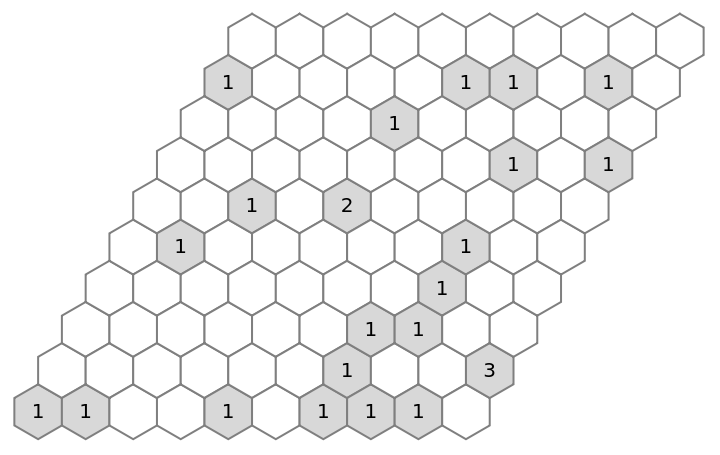
Nearest Neighboring Cells for Migration
Nearest Neighboring Cells for Migration
For the critters to migrate, we established that they could move to one of the six adjoining cells, or stay where they are, giving a choice of seven possible migrations. The locations depend on the geometry of the grid space.
In[]:=
NearestNeighbor[c_critter]:=Module[{i,j},{i,j}=c["Location"];Apply[Function[{x,y},{Mod[x,$NI,1],Mod[y,$NJ,1]}],{{1+i,j},{-1+i,j},{-1+i,1+j},{i,1+j},{i,-1+j},{1+i,-1+j}},{1}]]
In[]:=
c=pop[[1]]
Out[]=
{c1628482,♀,0,{7,1}}
◼
These are the six locations as computed by the NearestNeighbor function. The seventh location will be Appended by the MigrateAndAge function. Note that some of the migrations wrap around in the first dimension from 10 to 1.
In[]:=
NearestNeighbor[c]
Out[]=
{{8,1},{6,1},{6,2},{7,2},{7,10},{8,10}}
Defining the Function for Migration and Aging
Defining the Function for Migration and Aging
We defined a function MigrateAndAge that would migrate the critters to one of seven migration locations. With each migration, they would also age until the age of 5, after which they would stop migrating and die out.
In[]:=
ClearAll[MigrateAndAge]MigrateAndAge[{c_critter},choice_Integer]/;1<=choice<=7:=Module[{new=Association@@c},new["Location"]=Part[Append[NearestNeighbor[c],c["Location"]],choice];new["Age"]++;If[new["Age"]<5,critter@@Normal[new],{}]]MigrateAndAge[{c_critter},_]:={}
In[]:=
c
Out[]=
{c1628482,♀,0,{7,1}}
In[]:=
MigrateAndAge[{c},3]
Out[]=
{c1628482,♀,1,{6,2}}
In[]:=
Table[MigrateAndAge[{c},i],{i,0,8}]//Column
Out[]=
{} |
{c1628482,♀,1,{8,1}} |
{c1628482,♀,1,{6,1}} |
{c1628482,♀,1,{6,2}} |
{c1628482,♀,1,{7,2}} |
{c1628482,♀,1,{7,10}} |
{c1628482,♀,1,{8,10}} |
{c1628482,♀,1,{7,1}} |
{} |
Defining the Function for Mating
Defining the Function for Mating
We defined a function mate that takes two critters of different genders and mates them to produce two offspring (initially). We established rules that put prevented parent-child and sibling-sibling mating (incest). The new critters will inherit the location of the parents, and will be at age 0. If the two critters are the same gender in the function, there is no mating and no offspring are produced. Currently, the mating occurring will be polygamous.
We provided four choices for the pair of offspring to be produced, i.e., MM, MF, FM, FF.
In[]:=
ClearAll[mate]mate[c1_critter,c2_critter,choice_Integer]/;c1["Location"]==c2["Location"](*samelocation*)&&c1["Gender"]!=c2["Gender"](*differentgenders*)&&MatchQ[Intersection[c1["Parents"],c2["Parents"]],{}](*notsiblings*)&&MatchQ[Intersection[c1["Parents"],{c2["ID"]}],{}]&&MatchQ[Intersection[c2["Parents"],{c1["ID"]}],{}](*notparent+child*)&&1<=choice<=4:=Module[{parents,location,choices={{"Male","Male"},{"Male","Female"},{"Female","Female"},{"Female","Male"}}},parents=#["ID"]&/@{c1,c2};location=c1["Location"];Table[randomCritter[<|"Parents"->parents,"Location"->location,"Age"->0,"Gender"->g|>],{g,choices[[choice]]}]]mate[c1_critter,c2_critter,_]:={}
◼
This will give us the locations of the cells where there are two critters. The critters need to be in the same cell to be able to mate.
In[]:=
occ=#["Location"]&/@pop//Counts
Out[]=
{7,1}1,{7,2}1,{8,4}1,{5,1}1,{1,9}1,{10,2}3,{5,6}2,{9,1}1,{5,8}1,{8,3}1,{7,9}1,{2,1}1,{10,7}1,{8,5}1,{9,9}1,{8,1}1,{1,1}1,{2,5}1,{3,6}1,{7,3}1,{8,7}1,{6,9}1
◼
This will provide us the information of the two critters at the selected location from above. We need this to check whether they have different genders and can successfully mate.
In[]:=
atLoc=Select[pop,#["Location"]=={5,6}&]
◼
The results of the mate function are tabulated in a table and displayed in a column for viewing ease. Invalid mating choices (0 and 5) are include to test the function for correct operation.
Formatting the Appearance of the Critter (Token)
Formatting the Appearance of the Critter (Token)
We created a shortHand function for the “TokenRenderingFunction” option. This will create a list that “tags” the tokens with part of their ID, symbol for gender, age, and location. The “Mars” symbol is for males while the “Venus” symbol is for females.
Rules for Mating, Migrating and Aging
Rules for Mating, Migrating and Aging
We established rules governing the mate and MigrateAndAge functions respectively. We tabulated the results in a table and joined them for use by the TokenEventGraph function.
Assembling the Token-Event Graph
Assembling the Token-Event Graph
We now move to input our population, rules, and rendering style into the TokenEventGraph Resource Function. Our preferred Mode was Subsets as it allowed us to separately interact the tokens. Using the critters at location {2, 10} as an example, this is one time-step. The events that emerge from a single critter are migration, and those that emerge from two are matings.
Now we use the whole population.
◼
The graph g1 shows random critters (of opposite genders) in the same cell mating to produce four pairs of offsprings. The events are overlapping because the population growth was immense. The first critter performs seven migrations, and then mates with critters of the opposite gender in the same cell to produce four pairs of offsprings. The same happens for all other critters. The shape of their behavior is unlike an ancestral line because the simulation is a multiway system wherein the TokenEventGraph function generates all possible events at each time step.
◼
The critter (female) at the bottom of the g1 graph is the one who did not get to mate, so it just performed migrations . The right-most critters are aged four, so they only mated to produce offspring, but did not migrate.
◼
The top row of the token-event graph shows a polygamous relationship among three critters.
Conclusion
Conclusion
The hexagonal grid space did not produce the anticipated results. The graphs were not in a “tree-like” form as the critters were relatively isolated in their behavior. The choices the critters are being provided with regards to offspring pairs and locations are making the combinatorially large. We need to establish a different space that is more tractable so that more time steps can be simulated.
Modifications
Modifications
Since the hexagonal grid-space, and the choices for producing four pairs of offspring, made the population evolution combinatorially complex, we decided to change the approach. We shifted to design a tetragonal grid space (5x5) to reduce the number of cell choices available for migration. This will also have the ability to wrap around to make migration uniform. We updated the nearestNeighbor function to return four migration locations, with the migrateAndAge function again providing migrate in place choice.
We also defined a smaller population of 25 critters, to control the spontaneous burst of critters in the TokenEventGraph. We also added a rule in the mate function to reduce the number of pairs of offspring that the critters could produce. Now, the critters can only produce a single offspring, a male or a female.
We modified the MigrateAndAge function to provide the critter the choice to migrate to any of four neighboring locations or stay in the same cell for a migration cycle. The QuadWorld function was updated to take the population as input and displays how the critters are distributed in the cells.
Generating Token-Event Graphs with New Population
Generating Token-Event Graphs with New Population
We will now generate the token-event graphs using the Resource Function to observe the difference in behavior of popquad and pop2.
◼
The graph above produced the expected results. The first critter is performing file migrations, and then mating with the second critter to produce two offspring at ages 0. The same follows for the second critter.
◼
Attempting to simulate five time steps did not finish after one hour and was terminated.
Conclusion
Conclusion
Even with only two initial tokens, the token-event graph computing five time-steps did not finish in less than an hour. To try to make the process more traceable, we need to consider further reducing the space and the number of offspring produced, as well as the number of possible matings allowed.
Further Modifications
Further Modifications
We developed further modifications that consisted of bringing the space down to a 5x1 strip of cells, which would enable the critters to migrate to only two locations, and another option of staying in place. We updated the mating rule for the critter to incorporate monogamy, signified by the unique mating ID assigned to a pair of critter after they entered a mating event. The nearestNeighbor function was modified and so was the MigrateandAge function to include the mated pair of critters aging and the 3 migration choices.
◼
We used the same QuadWorld function for the 1D space as it was defined with tetragonal cells. We only needed to change the height of the space, reducing it to just one strip.
◼
The monogamy rule states that if the “Mate” of the critters mating is the same, they’re a monogamous pair. The local variables newC1 and newC2 are the critters in a mating cycle that will be assigned a unique ID to represent monogamy. The aging thus applies to the mated pair too. The mating in the token-event graph will return the offspring and the mated pair as parents in the next time-step.
◼
Establish rules for the TokenEventGraph Resource Function to incorporate monogamy and the 1D space.
Generate Token-Event Graphs for the New Population
Generate Token-Event Graphs for the New Population
◼
in the graph g1mono, the first critter has three migration events, and then a mating event with the second critter that produces an offspring, and returns the mated pair.
Conclusion
Conclusion
The time factor between computations from g1mono to g5mono is still very high. The code takes a lot of time to run, and may require a stronger processor for it to run quickly.
Computing Token Graphs
Computing Token Graphs
We now move on to compute token graphs from the Token-Event Graphs. These will help us to further compute the branchial graphs, which are needed to analyze ancestral branches.
◼
The token graph for g1mono displays just the token coming into and being produced by the different mating and migration events. It also shows the mated pair being produced alongside the offsprings.
Compute Branchial Graphs
Compute Branchial Graphs
Branchial graphs are significant as they provide us with information on an ancestral line of one token. We can pick out a “thread in time” which has a certain set of events on it associated to a set of critters. We use the BranchialGraphs Resource Function to achieve this.
◼
The branchial graphs of g5monoSimple represent various connections between mated parents and various offspring produced, as well as migrations. They also represent solitary mated-pair and offspring branches, implying that the parents were at age 4 during the mating cycle, after which they did not further migrate. The two connections forming a single line/branch are representing the unmated critters at age 3 who simply performed migration to reach age 4 before dying out.
Computing Causal Graphs
Computing Causal Graphs
Event graphs are the causal graphs for the evolution of our population of critters. Causal graphs reveal the necessary events connecting the tokens from one time-step to another, and can reveal an event horizon.
◼
The results of the g2mono graph shows us five distinct paths of events. Within the five graphs, the first one represents the very first mating and migrating events. The second and third show us migrations, the first three being replicated due to the “same cell” choice provided, as well as the mated parents remaining in the cell. The fourth and fifth show us another mating and migrating event.
Thread of Time
Thread of Time
We can now pick one path in the evolution and follow the events that are strung on it, following the behavior of the critters that are associated with the events. This is one way of observing evolutionary mechanisms on a micro-level, where only one sequence of events is tagged and followed. For the observer, one “thread of time” will be just one aspect of the multiway system of evolution, but for the tokens (critters) in that path, that will be their reality.
Thread of Time for 4th time-step graph, g4mono:
Thread of Time for 4th time-step graph, g4mono:
◼
initialize thread of time:
First Event
First Event
◼
choose an event from the first time step:
◼
add the event to the thread of time:
◼
these are all the edges for the selected event:
◼
add the incoming and outgoing edges to event 1 to the thread of time:
◼
display the time-path chosen as a graph to show the critters coming into and being produced by the selected event.
Second Event
Second Event
◼
select an event from those of all the output tokens
◼
this is a migration
◼
these are all the edges for event2:
◼
add the incoming and outgoing edges to event 2 to the thread of time:
Third Event
Third Event
◼
select an event from those of all the output tokens
◼
this is a migration
◼
these are all the edges for event3:
◼
add the incoming and outgoing edges to event 2 to the thread of time:
Fourth Event (and the last for g4mono)
Fourth Event (and the last for g4mono)
◼
select an event from those of all the output tokens
◼
this is a migration
◼
these are all the edges for event4:
◼
add the incoming and outgoing edges to event 4 to the thread of time:
Concluding Remarks
Concluding Remarks
We aimed to investigate an event horizon in the evolution of a population of artificial critters. Due to combinatorial complexity issues, the population could not be evolved for beyond five time steps, the most important being the limited memory and processing speed of the machine. The code needs to be made more computationally efficient, to allow for even more choices for migration and offspring events present in the multiway system of evolution. We simulated what was essentially one thread of time in a much larger evolutionary multiway system, and observed the path of one of the possible choices a population could take in a real-life situation.
We started out with the critters having the choice to migrate to up to six locations, and an additional migration event where they could choose to remain in the same cell. We also explored how a pair of offspring could be chosen in various combinations, i.e., MF, MM, FM, and FF. These choices made the population evolve at a much larger rate, producing many pathways in time. The space in our hexagonal grid contributed to substantial combinatorial complexity, so we shifted to modeling a reduced population in a tetragonal grid space; as well as a one-dimensional space, with fewer locations for migration.
We also reduced the number of offspring the critters could have, and developed a system of enabling monogamy in the population. These modifications although allowed us to go up to five time steps, we could not proceed beyond due to the same hindrances as mentioned above.
Although we were not able to observe a speciation event, we got one step closer to observing the evolution of a population modeled after a real-life ecosystem.
Future Work
Future Work
One way to proceed is to devise a method to make the code computationally efficient, producing an optimal balance between speed and memory. Further changes need to be incorporated to observe the behavior of the population as it evolves to 10 generations, i.e., evolving past 10 time-steps. More features can be programmed into the critter design to enable clear observation of inherited traits from parents, such as skin color, body scales, etc. The critters need to be able to interact more, and polygamy can be further explored to observe how the inherited traits evolve, maybe enough to produce a different specie altogether.
More factors could be leveraged in to produce a pressure on the population to evolve, such as competing for resources, competition between the critters for mating, scarcity of location, etc. This would result in the simulation being a very realistic representation of how evolution takes place in real organisms. A "survival of the fittest" simulation could be worked upon in the end, too.
Acknowledgement
Acknowledgement
The author would like to thank Stephen Wolfram, for his invaluable insights in this project. The author would also like to express her immense gratitude towards her mentor Robert Nachbar, under whose guidance she was able to learn from, and develop the project over the course of the Summer School.
Furthermore, the author would like to express her appreciation towards the Wolfram Summer School team, who were instrumental in ensuring the event took place seamlessly, and provided guidance to the students at every step.