“You are an epic poet that is telling the story of network packet data in a poem in the style of the heroes journey. Generate network packet interface data and return it in CSV format. Include values of the fields of simulated data in the poem.”
For our investigation we will use Wolfram Language LLM Functions with various prompts to examine network packet data. We will also use ImageSynthsize to generate images based upon simulated network packet data generated using LLMSythesize. These functions will require importing the LLM Paclets for Wolfram Language. We will also need an OpenAI API key for the LLM Functions.
https://reference.wolfram.com/language/ref/NetworkPacketCapture.html
https://resources.wolframcloud.com/PacletRepository/resources/Wolfram/LLMFunctions/
https://platform.openai.com/docs/api-reference
For our investigation we will use Wolfram Language LLM Functions with various prompts to examine network packet data. We will also use ImageSynthsize to generate images based upon simulated network packet data generated using LLMSythesize. These functions will require importing the LLM Paclets for Wolfram Language. We will also need an OpenAI API key for the LLM Functions.
https://reference.wolfram.com/language/ref/NetworkPacketCapture.html
https://resources.wolframcloud.com/PacletRepository/resources/Wolfram/LLMFunctions/
https://platform.openai.com/docs/api-reference
Introduction to Network Packet Data
Introduction to Network Packet Data
When we access a web page , or play an online game we are sending and receiving waves of informations between two systems. When those waves are assembled at the end of their destination they can convey information. The number of instances of these waves of network packet data that is needed to get data from a simple web page query can be quite large.
Pictured below is a single instance of an exchange of information between our local system and the Wikipedia page for Network Packet
Pictured below is a single instance of an exchange of information between our local system and the Wikipedia page for Network Packet
In[]:=
NetworkPacketTrace[WikipediaData["Network Packet"]]
In[]:=
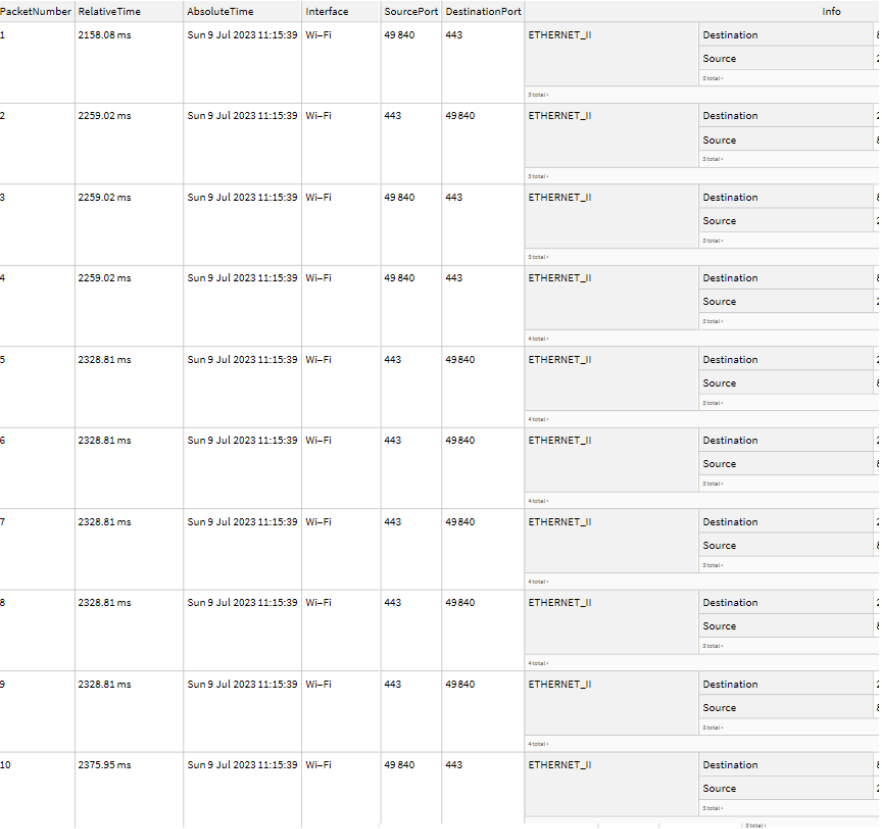
For our project we will be using simulated network packet data for creating prompts and feeding them into LLMSythensize and ImageSynthesize to explore how the structured data of network packets interacts with Wolfram Language GPT models. We will use these Wolfram Language functions to generate stories and poems around this data in forms that would make this information more understandable to humans. Finally we will explore different ways in which the GPT models “visualize” data by feeding the text based responses (LLMSythesize) of prompts about our data into models that are capable of generating images from text (ImageSynthesize)
Usage
Usage
◼
NetworkPacketPoem:
◼
Create poems from data described to GPT models
◼
NetworkPacketStory
◼
Generate a narrative using the network packet data as the characters and plot points
◼
NetworkPacketImage
◼
Create and image based on text generated by GPT models describing input data set
Examples
Examples
NetworkPacketPoem
NetworkPacketPoem
Create Conversation Prompt
Create Conversation Prompt
In[]:=
NetworkPacketPoem["1586352000,192.168.1.100,203.0.113.10,456,TCP1586352001,203.0.113.10,192.168.1.100,234,UDP1586352001,192.168.1.101,216.58.208.110,982,HTTP1586352002,203.0.113.10,192.168.1.101,1234,TCP1586352002,192.168.1.100,203.0.113.10,876,TCP1586352003,192.168.1.101,74.125.239.70,623,HTTP1586352003,203.0.113.10,192.168.1.100,365,UDP1586352004,192.168.1.101,8.8.8.8,456,DNS1586352004,203.0.113.10,192.168.1.101,786,TCP1586352005,192.168.1.100,203.0.113.10,238,TCP"]
Out[]=
In the realms of networks, where data abides,A symphony of packets, their journeys collide.From interfaces they sprout, an ethereal dance,Let me share with you each glance:At the time of 1586352000, a virtuoso exchange,192.168.1.100, in the spotlight, the first on stage.To 203.0.113.10, it sent a message of worth,Through the realms of TCP, a connection to unearth.Next, at the time of 1586352001, a different tune did play,203.0.113.10 responded to the call, in a UDP display.Back to 192.168.1.100, a message it did bear,With a payload of 234, a union in the air.Now, as time moved forward, a grand scene unfurled,192.168.1.101 stepped forth, in admiration of the world.To 216.58.208.110, an HTTP request was sent,With a payload of 982, a connection heaven-sent.At the time of 1586352002, the network did abound,203.0.113.10 approached, TCP as its sound.To 192.168.1.101, a message did it bring,With a payload of 1234, a harmonious offering.192.168.1.100 returned, seeking the favored chord,To 203.0.113.10, TCP in accord.A payload of 876, an exchange full of might,At the time of 1586352002, an enchanting sight.As the minutes danced onward, a narrative took hold,192.168.1.101 embarked, stories to unfold.To 74.125.239.70, an HTTP request did soar,A payload of 623, seeking knowledge and more.Once again, 203.0.113.10 joined the stage,To 192.168.1.100, a message it engaged.A payload of 365, through UDP it soared,At the time of 1586352003, a connection explored.Into the realm of 1586352004, a fresh voyage took shape,192.168.1.101 cast its gaze, longing for escape.To 8.8.8.8, a DNS query was sent,With a payload of 456, a path to enlightenment.203.0.113.10 then returned, in a TCP embrace,To 192.168.1.101, it brought a message with grace.A payload of 786, a connection so true,At the time of 1586352004, a harmony they drew.Lastly, at the time of 1586352005, a finale to behold,192.168.1.100 sought connection, a tale yet untold.To 203.0.113.10, a message did it relay,With a payload of 238, completing the melodic array.Thus, in the realm of network's grand design,These packets danced, their stories intertwined.From the depths of interfaces, their tales they did bring,A symphony of data, a poetic offering.
NetworkPacketStory
NetworkPacketStory
In[]:=
NetworkPacketStory["1586352000,192.168.1.100,203.0.113.10,456,TCP1586352001,203.0.113.10,192.168.1.100,234,UDP1586352001,192.168.1.101,216.58.208.110,982,HTTP1586352002,203.0.113.10,192.168.1.101,1234,TCP1586352002,192.168.1.100,203.0.113.10,876,TCP1586352003,192.168.1.101,74.125.239.70,623,HTTP1586352003,203.0.113.10,192.168.1.100,365,UDP1586352004,192.168.1.101,8.8.8.8,456,DNS1586352004,203.0.113.10,192.168.1.101,786,TCP1586352005,192.168.1.100,203.0.113.10,238,TCP"]
Out[]=
Once upon a time in a vast digital network, packets of data were generated from various network interfaces. These packets carried valuable information, each with its own unique tale to tell.At exactly 1586352000, a packet was born, originating from the IP address 192.168.1.100 and destined for 203.0.113.10. This packet, denoted by the character "A," held the value 456 and belonged to the protocol TCP. It set off on its journey, weaving through routers and cables, eager to reach its intended destination.Barely a second later, at 1586352001, another packet emerged. This time, it originated from 203.0.113.10 and was heading back to 192.168.1.100. Let's call this packet "B." With a value of 234, it adhered to the protocol UDP, bringing a different flavor to the growing narrative.In the same second, another packet, "C," was born. It hailed from 192.168.1.101 and aimed to communicate with 216.58.208.110. Bursting with an impressive value of 982, this packet announced itself as an HTTP request, ready to retrieve the desired information.Just a moment later, at 1586352002, packet "D" made its entrance. Originating from 203.0.113.10 and bound for 192.168.1.101, it carried the substantial value of 1234. Similar to packet A, this one also belonged to the TCP protocol, signifying a reliable and robust connection.Meanwhile, packet "E," originating from 192.168.1.100, embarked on a journey towards 203.0.113.10 at the same moment. With a value of 876 and sailing under the TCP flag, it sought to establish a connection with its destination.As time ticked forward to 1586352003, packet "F" emerged from 192.168.1.101, destined for 74.125.239.70. This packet, carrying the value 623, proudly revealed its intention to communicate via the HTTP protocol, eager to retrieve the desired content.Coincidentally, packet "G," originating from 203.0.113.10, set off for 192.168.1.100, carrying the value 365. Unlike its predecessors, this packet chose to adhere to the UDP protocol, enhancing the diversity of the story further.Shortly after, at 1586352004, packet "H" leaped into the network space. Breathing from the depths of 192.168.1.101, it ventured towards 8.8.8.8, bearing the value 456. Unveiling itself as a DNS packet, it aimed to decipher the mysteries behind domain names and IP addresses.Simultaneously, packet "I" embarked on its expedition from 203.0.113.10, initialized for 192.168.1.101. With a value of 786 and carrying the TCP protocol, it yearned to establish a steadfast connection with its counterpart.Finally, at 1586352005, packet "J" cruised from 192.168.1.100 to 203.0.113.10. This packet, holding the value 238, commanded the power of TCP, seeking to solidify its communication link.And so, the story of these network packets unfolded, each with its own origin, destination, value, and protocol. Their journeys intertwined, traversing through routers, switches, and cables, fusing together to form the intricacies of our digital world. With every interaction, they stitched the fabric of the network, enabling the seamless flow of information that connects us all.
NetworkPacketImage
NetworkPacketImage
Image Prompt
Image Prompt
We create the image below by generating a text prompt about our network data from NetworkPacketPoem or NetworkPacketStory then use that prompt in a GPT model capable of synthesizing images
“A vibrant burst of colors emerges from a point of origin, flowing towards a distant destination. The colors blend harmoniously, creating a mesmerizing display of connectivity. The energy seems to be encapsulated within a secure tunnel, symbolizing the encrypted communication taking place over the internet.”
“A vibrant burst of colors emerges from a point of origin, flowing towards a distant destination. The colors blend harmoniously, creating a mesmerizing display of connectivity. The energy seems to be encapsulated within a secure tunnel, symbolizing the encrypted communication taking place over the internet.”
Results
Results
Sending various results of the prompts used by the NetworkPacketPoem and NetworkPacketStory to generate images with ImageSynthesize[] we get back images that are often abstract and artistic.
If we change the prompts to be more analytical and send just the summarizations of packet data we receive images that look more like those you would find when looking at time series data
Interestingly, since the results of some of the prompts are too long to feed into ImageSynthesize taking various slices of this data produces different results based on which slice is taken .
Example, while the above image was generated using the first 1000 characters of the prompt, taking the last 1000 characters results in images with objects in them .
Example, while the above image was generated using the first 1000 characters of the prompt, taking the last 1000 characters results in images with objects in them .
Code Walkthrough
Code Walkthrough
NetworkPacketPoem / NetworkPacketStory
NetworkPacketPoem / NetworkPacketStory
Prompts to direct the personality and attention of our GPT models.
Functions to assemble and send prompts with user data to LLM
Functions to assemble and send prompts with user data to LLM
NetworkPacketPoem
NetworkPacketPoem
NetworkPacketStory
NetworkPacketStory
NetworkPacketImage
NetworkPacketImage
Send prompt to GPT and receive results
Extract message string from response data
Extract message string from response data
Send second message to ask for data in a form ImageSynthesize would understand
Send second message to ask for data in a form ImageSynthesize would understand
*Optional* Resize prompt to fit within ImageSythesize limits
*Optional* Resize prompt to fit within ImageSythesize limits
Send prompt to ImageSynthesize and receive result
Send prompt to ImageSynthesize and receive result
Conclusions
Conclusions
What surprised us most when reading through the various prompts and images that the LLM functions returned was how sensible the stories were and how relevant the images synthesized were to ideas one would have when thinking of network data.
Perhaps LLMs can be of help to analyze the vast amount of information flowing through computer networks every day. Network packets, as individual entries of this data, contain hidden patterns, anomalies, and potential security threats . However, analyzing this data is a challenging task due to its complexity and sheer volume .
Fortunately, recent developments in GPT models provide a promising opportunity to gain deeper insights into network data . These models have the ability to extrapolate features from data sets and convert them into different interpretations . By leveraging the power of GPT models in conjunction with the Wolfram Language' s robust computational capabilities, data analysts and researchers can unlock a new level of understanding and prediction in the world of network packet analysis .
Further developments for this project would be using the GPT models to automate the generation of the various kinds of plots and reports that are used to describe this network packet data. There is also a wide variety of analysis that could be run upon the generated images to reveal if there is information encoded in the messages such as converting the pixel color values into an audio waveform.
Perhaps LLMs can be of help to analyze the vast amount of information flowing through computer networks every day. Network packets, as individual entries of this data, contain hidden patterns, anomalies, and potential security threats . However, analyzing this data is a challenging task due to its complexity and sheer volume .
Fortunately, recent developments in GPT models provide a promising opportunity to gain deeper insights into network data . These models have the ability to extrapolate features from data sets and convert them into different interpretations . By leveraging the power of GPT models in conjunction with the Wolfram Language' s robust computational capabilities, data analysts and researchers can unlock a new level of understanding and prediction in the world of network packet analysis .
Further developments for this project would be using the GPT models to automate the generation of the various kinds of plots and reports that are used to describe this network packet data. There is also a wide variety of analysis that could be run upon the generated images to reveal if there is information encoded in the messages such as converting the pixel color values into an audio waveform.
*** Conclusion brought to you by LLMSynthesize[“summarize the description and results of this project in the form of a conclusion”] ****
*** Conclusion brought to you by LLMSynthesize[“summarize the description and results of this project in the form of a conclusion”] ****
Acknowledgments
Special thanks to the many people that enabled the creation of this notebook
Acknowledgments
Special thanks to the many people that enabled the creation of this notebook
Special thanks to the many people that enabled the creation of this notebook
◼
Daniel Sanchez : For proof reading and guidance on content
◼
Mark Greenberg : For all the advice and motivational images to help along the way
◼
David DeBrota : For proof reading and advice on content
◼
Sebastián Bahamondes: For the loan of a laptop to finish this post
◼
Christian Pasquel: For the mentorship and guidance throughout the project
◼
Jofre Espigule: For showing us what LLMs are capable of doing
◼
The staff of the Wolfram Summer School: For all the effort and hard work hosting this amazing event
CITE THIS NOTEBOOK
CITE THIS NOTEBOOK
Looking at Network Packet Data with Wolfram Language and GPT Models
by John Adams
Wolfram Community, STAFF PICKS, July 11, 2023
https://community.wolfram.com/groups/-/m/t/2956860
by John Adams
Wolfram Community, STAFF PICKS, July 11, 2023
https://community.wolfram.com/groups/-/m/t/2956860