Barry H Dayton, A Numerical Approach to Real Algebraic Curves with the Wolfram Language, Part II Space Curves. https://barryhdayton.space/SpaceCurves/spindex.html
FULL BOOK
FULL BOOK
Quadratic Surface Intersection Curves can be defined implicitly as the solution set of 2 real quadratic equations in three unknowns. The question of describing them explicitly by a parametric equation is a classical problem. Only recently has this been solved in general. L. Dupont, D. Lazard, S. Lazard and S. Petitjean [J. Symbolic Computing. 3(43), 2008] presented a black box algorithm using exact computations. They give a 65 page discussion. This has been implemented but requires integer coefficients although the integers can be large enabling numerical solutions or examples to be approximated.
In 2013 I published a paper, see https://barryhdayton.space/RQSIC.pdf, giving a probabilistic numerical approach. This is implemented by Mathematica in my Space Curve book https://barryhdayton.space/SpaceCurves/spindex.html The complicated formulas are hidden in Mathematica functions, however it is not black box, there are decisions required of the user.
The classical theory shows that the intersection curve of two quadratic surfaces in real projective 3-space is of genus 0 or 1. In the case of genus 0, in particular planar curves, the curve is rational and usually easy to parameterize. In this post I cover only the more difficult case of genus 1, the regular case starting with two non-singular quadratic surfaces and reducing the problem to an elliptic curve which I parameterize by using the WeierstrassP and related functions. An interesting highlight of this method is that I am able to find finite optimal parameter intervals.
This post is intended to stand alone, all Mathematica functions used are defined in terms of built-in functions. However I only summarize needed facts so for full understanding one may need to see one of my earlier posts or one of my books.
1. Preliminaries
1. Preliminaries
In this first section I will briefly discuss the techniques that I have covered elsewhere give necessary code.
1.1 Projective Linear Transformations and Transformation Functions
1.1 Projective Linear Transformations and Transformation Functions
The most important concept in working with geometry is to understand the functions which give the equivalence between various objects of study. Unfortunately most discussions of geometry give short shrift to this important part of of the subject. For our purposes projective quadric surfaces and curves are equivalent if there is a an invertible projective linear transformation which takes one to the other.
In this post we will need to use projective linear transformations from real projective space to projective space . Here we can think of projective space given by vectors of length (d+1) under the equivalence relation for any real . Such a transformation can be given by an (n+1)×(m+1) real matrix A which operates by matrix-vector multiplication as this respects scalar multiplication. The transformation is invertible if and only if the matrix A is invertible.
n
n
m
m
d
d
rv≡v
r≠0
Unfortunately working with equivalence classes is awkward, and often computationally in we prefer working with affine points, that is vectors of length d where the affine point represents the projective point . Mathematica uses Transformation Functions to achieve this. As an example given the matrix
d
{,…,}
x
1
x
d
{,…,,1}
x
1
x
d
In[]:=
A={{,,,},{,,,},{,,,}};A//MatrixForm
a
1
a
2
a
3
a
4
b
1
b
2
b
3
b
4
c
1
c
2
c
3
c
4
Out[]//MatrixForm=
a 1 | a 2 | a 3 | a 4 |
b 1 | b 2 | b 3 | b 4 |
c 1 | c 2 | c 3 | c 4 |
we get a projective linear transformation from ⟶ taking the affine point
3
2
{,,}
x
1
x
2
x
3
to
In[]:=
TransformationFunction[A][{,,}]
x
1
x
2
x
3
Out[]=
++++++,++++++
a
4
a
1
x
1
a
2
x
2
a
3
x
3
c
4
c
1
x
1
c
2
x
2
c
3
x
3
b
4
b
1
x
1
b
2
x
2
b
3
x
3
c
4
c
1
x
1
c
2
x
2
c
3
x
3
These are also called Linear Fractional Transformations (Mathematica) or Fractional Linear Transformations (flt in my books). For projective points with ≠ 0 this is the same as applying the projective linear transformation with the same matrix since projective corresponds to affine . My notation differs from Mathematica’s, I define
{,,,}
x
1
x
2
x
3
x
4
x
4
{,,,}
x
1
x
2
x
3
x
4
,,
x
1
x
4
x
2
x
4
x
3
x
4
In[]:=
fltMD[p_,A_]:=TransformationFunction[A][p]
although I may use these interchangeably . Note however that the domain of this transformation is the set of vectors where +++ ≠ 0. Those affine points where +++ = 0 go to infinite, that is non affine, points of the range under the corresponding projective linear transformation. I do have a special function for that case
{,,}
x
1
x
2
x
3
c
4
c
1
x
1
c
2
x
2
c
3
x
3
c
4
c
1
x
1
c
2
x
2
c
3
x
3
In[]:=
fltiMD[p_,A_]:=Module[{m,n,u},{m,n}=Dimensions[A]-{1,1};If[Length[p]n,u=A.Append[p,1],u=A.p];If[Abs[u[[m+1]]]<1.*^-6,u[[m+1]]=0;u,Take[Expand[u/u[[m+1]]],m]]]
When the matrix A is invertible, in particular it is square, then I can define the push forward operator FLT3D[{f,g},A] which sends, in this post, the QSIC given by a pair of quadrics to a QSIC , }so that for each point in the intersection curve of then fltMD[p,A] is in the intersection of , }.In fact this gives a 1-1 correspondence between the the two QSIC with the understanding that some affine points of one may correspond to infinite points of the other.
{f,g}
{
*
f
*
g
p
{f,g}
{
*
f
*
g
In[]:=
FLT3D[F_,A_,X_]:=Module[{B,d,g,h,t,n},n=Length[X];If[Dimensions[A]≠{n+1,n+1},Echo[{n+1,n+1},"need A to be of size"];Abort[]];If[MatrixRank[A]≠n+1,Echo["A must be invertible"];Abort[]];B=Inverse[A].Append[X,t];Reap[Do[d=tDegMD[f,X];g=Expand[t^d(f/.Thread[XX/t])];h=Expand[g/.Thread[Append[X,t]B]];Sow[Chop[h/.{t1},dTol]],{f,F}]][[2,1]]]
Note that the syntax and code here is slightly different from that in my earlier conic and cubic posts in that the input F must be a list and the output is a list. Although intended to be used in the context here this can replace the FLTxx functions for plane curves used in my earlier posts using {f} instead of f as the argument and {x,y} instead of x,y for the variables.
This cannot be used for non-invertible flt’s such as the one in the example above with a 4×3 matrix. In my Space Curves book I do give an alternate formulation that will often work but it is very complicated and NSPMJ, not suitable for publication in mathematical journals. Mathematicians would rather have no algorithm to one that might fail 3% of the time.
Further FLT3D can be used in the case one wishes to transform one surface. For example let
In[]:=
f2=x^2+y^2-1;
the cylinder with z - axis as axis. Consider the invertible projective linear transformation
In[]:=
A2={{1,0,0,0},{0,1,0,0},{0,0,0,-1},{0,0,1,0}}
Out[]=
{{1,0,0,0},{0,1,0,0},{0,0,0,-1},{0,0,1,0}}
In[]:=
g2=FLT3D[{f2},A2,{x,y,z}][[1]]
Out[]=
2
x
2
y
2
z
This is a cone . Note also that this transformation takes the infinite point of the cylinder to the origin.
In[]:=
fltiMD[{0,0,1,0},A2]
Out[]=
{0,0,0}
In[]:=
ContourPlot3D[g2==0,{x,-4,4},{y,-4,4},{z,-4,4},Mesh->None,ImageSize->Small]
Out[]=

This cone, projectively equivalent to the cylinder, has a singularity at the origin, hence the projective cylinder has a singular infinite point so is not a smooth quadric surface.
1.2 Real Quadric Surfaces
1.2 Real Quadric Surfaces
Quadric surfaces are defined from our affine point of view by an equation
a
1
2
x
a
2
a
3
2
y
a
4
a
5
a
6
2
z
a
7
a
8
a
9
a
10
The following chart from my Surface Story gives the possibilities
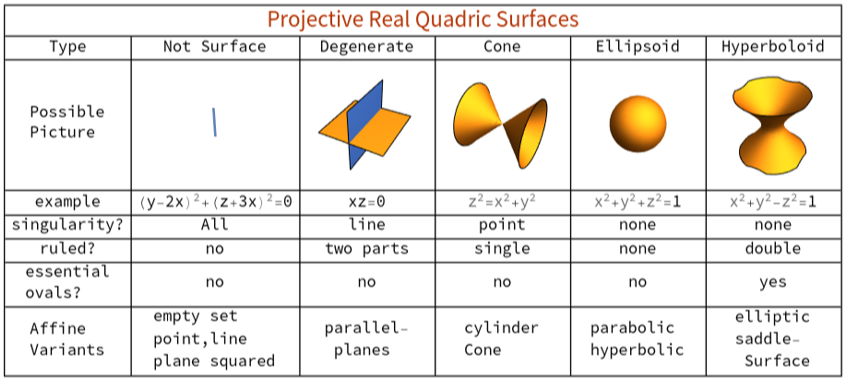
Thus the only possibilities for a real smooth projective surface are the ellipsoid and hyperboloid. However note that the paraboloid, for example , and hyperbolic ellipsoid, otherwise known as hyperboloid of 2 sheets , for example --=1, are projectively equivalent to the standard ellipsoid. In affine geometry the hyperboloid in the chart is known as the elliptic hyperboloid, and the the hyperbolic hyperboloid is otherwise known as the saddle surface, for example Again projectively they are the same. For details see my Surface Story , Chapter 2. The main difference between the hyperboloid and ellipsoid is that at every point the hyperboloid contains two lines through that point, but the ellipsoid contains no lines at all. Actually each point of an ellipsoid does contain two complex lines in the complex ellipsoid so in complex geometry all smooth quadratic surfaces are projectively equivalent. But this post is only concerned with real quadratic surfaces.
z=+
2
x
2
y
2
x
2
y
2
z
z=xy.
2. The Main Reduction
2. The Main Reduction
In this post a QSIC, is a curve in which is the intersection of two smooth quadric surfaces which are defined as projective closures of affine quadric surfaces. In other words we will start with two quadratic polynomials. Then we expect the intersection to be a space curve. But this may not be the case because we are only looking for real points. It is possible that there is no solution or a finite solution . Possibly one or both of our quadratic equations gives a singular surface. Another possibility is that the curve exists but may be planar or singular. Our method will not work in any of these cases.
If our goal was to produce a black box algorithm we would need to check all these things first. But since we are producing a user driven algorithm the easiest approach is to plow ahead and see how far we can get. While the skeptical mathematician will have no trouble finding counter examples, the probability is that we will get a solution unless we are deliberately looking for counter examples.
3
If our goal was to produce a black box algorithm we would need to check all these things first. But since we are producing a user driven algorithm the easiest approach is to plow ahead and see how far we can get. While the skeptical mathematician will have no trouble finding counter examples, the probability is that we will get a solution unless we are deliberately looking for counter examples.
The classical theory says we should expect to get a space curve of genus one. Every space curve of genus 1 has a model, a geometrically equivalent curve, which is a cubic plane curve. So what we will try to do is find a cubic curve which is the image of the intersection curve under a projective linear transformation, specifically one of our fractional linear transformations described in section 1.1. The actual transformation will play an important role. To get a parameterization we parameterize our cubic an lift it up using a right inverse to this FLT transformation.
Originally mathematicians found several ad hoc methods to get the plane cubic and transformations. One such method for which the equations needed to have a specific form is described in the book [J.W.S. Cassels, Lectures on Elliptic Curves, London Math. Soc. Student Texts 24, Cambridge University Press, 1991]. In particular if the equations have all 10 coefficients non-zero, this form is met. What I noticed is that if one takes a random real numerical 4 × 4 matrix the resulting FLT transformation will give an equivalent system satisfying this condition with probability 1. Following the method in Cassels’ book we get a simple function which requires that we first find a single real point in the solution QSIC. But first here are 3 subroutines.
In[]:=
findQpts[Q_,X_,n_]:=Re[N[X/.FindInstance[Q==0,X,Reals,n]]]tDegMD[f_,X_]:=Max[Total/@Keys[CoefficientRules[f,X]]]formMD[f_,k_,X_]:=FromCoefficientRules[Select[CoefficientRules[f,X],Total[#[[1]]]k&],X];maxFormMD[f_,X_]:=formMD[f,tDegMD[f,X],X];
Our main procedure is
In[]:=
nsQSIC[Q_,p_,{x_,y_,z_}]:=Module[{p0,A,F,h,L,M,R,S,Ω,℧},dTol=1.*^-12;p0=Normalize[Append[p,1]];A=Reverse[Orthogonalize[Prepend[RandomReal[{-1,1},{3,4}],p0]]];F=FLT3D[Q,A,{x,y,z}];L=formMD[F[[1]],1,{x,y,z}];M=formMD[F[[2]],1,{x,y,z}];R=formMD[F[[1]],2,{x,y,z}];S=formMD[F[[2]],2,{x,y,z}];h=Expand[L*S-R*M]/.{z1};Ω=Take[A,3];℧=Take[Inverse[A].Join[#,{1,(-R/L)/.Thread[{x,y,z}Append[#,1]]}],3]/Last[Inverse[A].Join[#,{1,(-R/L)/.Thread[{x,y,z}Append[#,1]]}]]&;{h,Ω,℧}]
The syntax in using this is
{h,B,℧}=nsQSIC[Q,p,{x,y,z}];
The input Q is a list of 2 smooth real quadric surfaces. p is an real affine point on the QSIC, that is the intersection of the quadric surfaces. The output gives a plane cubic h in {x,y}, B is a 3×4 transformation matrix with fltMD[s,B] in the curve h for each point u in the intersection curve, possibly infinite. Finally ℧ is a rational function, not a transformation, with domain h which maps to the intersection curve. Notice that this routine should be run without displayed output. ℧ can be inspected or saved by evaluating Simplify[℧[{x,y}] ] for the variables x,y.
This is a probabilistic algorithm that depends on a random choice made by the algorithm, so each run will give a different answer. The output list should have unique names so that the output is saved as once there is an acceptable output nsQSIC should not be run again for the same example. Since this is probabilistic one should check the claims listed above. For this purpose before running you should find at least 2 real points in the intersection curve, if you can not find them it is an indication that you should not use this algorithm. If this QSIC turns out to have a rational solution then it may not check, or perhaps it is an unfortunate random choice in which case this routine can be run again.
h should be checked for singular points, if they exist the answer is rational so this method does not apply. I recommend using this routine from my first post.
We illustrate using the QSIC in the introduction . Recall
We first do our checks, look first at hc and check for singular points
So this is not singular and safe to continue. Now check the output functions work correctly
So everything checks nicely. To see what ℧c actually does
Warning : So the text below will be consistent we are initializing my values for this output
3. Parameterizing the normal form
3. Parameterizing the normal form
The syntax is
{wg, B} = weierstrassNormalForm[f, ip, x, y]
The input is the non - singular cubic, f and a real inflection point, ip, possibly infinite. The output gives wf, the Weierstrass normal form, a 3×3 matrix B which transforms f to a non-zero multiple of wf by FLT3D and the Weierstrass Invariants.
Back to our original example Qc
Again we initialize this output for later use
We shouldn’t need to test but note our point u[[1]] on hc gives
Also
I will use Mathematica’s implementation WeierstrassP function as described in my previous post. This is actually a family of complex functions, parameterized by the Weierstrass invariants discussed above with poles, one at the origin, that is periodic in two different complex directions. Consequently for each set of Weierstrass invariants there is a period parallelogram where which defines the function over the entire complex plane. Unlike some classical expositions I put the pole at the origin in the center of my parallelogram.
The best way to work with these parallelograms is with Mathematica’s ComplexPlot. This is a two dimensional plot where the arguments of the function are given using different colors. The white areas show the neighborhoods of the poles and the dimples are zeros. See the examples below.
which, as complex has the period parallelogram as domain.
The following function draws the period parallelogram with complex plot.
The Weierstrass normal form will intersect the x-axis in 1 or 3 points. It will be useful to know these points but for technical reasons below we can not use points exactly on the axis so we pick them slightly off the axis. An inverse image under μ is shown on the plot for each of these points and the coordinates echoed. Sometimes this does not work or the point is not on the boundary of the parallelogram. Use the option ep →num where num is a small real number to run again and get a nice x-axis points.
For our running example
As we saw above the normal form had only one real component. It follows that the only real values of WeierstrassP and WeierstrassPPrime are the 4 corner points, which give the same value of the Weierstrass functions, and points on the real axis. The real axis goes through the point mapping to the infinite point of the normal form, the center of the white region, is in the domain. The two corner points on the real axis map to the point on the x-axis. So if a parameter region includes the interval between the two real corner points it will reach all real points of the normal form. We can picture this as follows, first the parameterization we will use for real points must have a real parameter and real values so we modify μ above by
Recall
The dashed line shows the parameter interval in the parallelogram . Note if we use a slightly smaller parameter interval we miss points near the x-axis so the parameter interval with the real value of the real corner points is optimal.
There are actually 5 possibilities for real normal forms . Here are the others given by their Weierstrass Invariants. We show the parameter intervals as the black dashed line.
The next two examples are more tricky as there are other points inside the parallelogram that map to real points of the curve. The original wpgramPlot shows the x-axis point as coming not at a corner point or real point.
In the Complex Plot the x-axis point has complex coordinates about 0.0163268-1.19722, we call the imaginary part
Further analysis gives (see Normal form of cubic post) the following parameterization using imaginary parameters. One needs the formal parameter t and its interval to be real for ParametricPlot to work.
It turns out, however that if we are willing to go outside the original parallelogram then by periodicity we can use the following from the corner points
Again note that a smaller interval will not give the whole curve so this is again optimal.
Finally we come to the case the normal form has 2 components so one ParametricPlot will not do the trick and at least part must be imaginary. This case will have 3 x-axis points.
4. Parameterizing the QSIC
4. Parameterizing the QSIC
So we now just put the two previous sections together, apply ℧ to the parameterization of h. In our running example we use the previously initialized values for hc, Bc, B2c, ℧c and wcg.
Every point in the normal form for hc is of the form μ[t, wcg]. Then the points of hc are given by fltMD[μ[t,wcg],Inverse[B2c]], for -1.88< t <1.88. For an arbitrary example
Therefore the parameterization of the QSIC in the introduction is given by
The interval is close to optimal .
The graphic in the introduction shows this curve superimposed on a contourPlot of the two quadric surfaces.
We do our second example straight through with few comments . The QSIC is a parabola and an ellipse.
We print out the results for replication.
We perform some checks .
Looks good so far .
In this example we need to use the option ep to get our third x - axis point on our parallelogram .
We can write down the parameterization.
Finally we show on the plot of the two surfaces .
4. A more complicated example
4. A more complicated example
We consider the example
This is the intersection of a standard hyperboloid with an elliptic hyperboloid which is an unbounded curve.
Both quadratic surfaces are non -singular so our method works but we have a problem plotting since ParametricPlot3D is not as sophisticated at handling infinite points as is ParametricPlot. The QSIC consists of two loops as the previous example but both have two infinite points.
Our 4 distinct infinite points can be approximated numerically
Approximately we plot infinite points on the upper half of affine space, with the two blue points on one curve and the two green on the other. The final picture, with code hidden, will be
The details follow.
The first step is to find some points on this QSIC. Using findQpts we get the points
Then applying nsQSIC to the first point we get {h3, T3, ℧3} as follows.
Of course you will get different values if you run this. Checking we have
These errors are satisfactory so we can continue.
Next we find inflection points of h3, we pick
Applying weierstrassNormalForm to h3 and this point we get the values
for the Weierstrass invariants, the Weierstrass Normal Form and the transformation matrix from h3 to hnw3
Again a check
Now we run wpgramPlot, we need to use option ep → .3 to get the x-axis points
Note that this function is not randomized so if you start from my value for w3g you will get the same result here. This tells us that hnw3 will have two components one parameterized on the real line in this Weierstrass parallelogram and one on the line with imaginary value -0.695683 . So we can plot hnw3 parametrically by
So far, so good . But then we should be able to plot our QSIC intersection curves by
In our ParametricPlot of hnw3 above there was no vertical line shown connecting the positive and negative infinite points of the right hand unbounded component. So again Mathematica correctly interpreted this function. But, perhaps because of the computational complexity of the function ℧3[fltMD[μ[t, w3g], Inverse[T3g]]], ParametricPlot3D did not take into account the infinite points and just connected adjacent points. So we must do this manually.
In both the Transformation Function fltMD and ℧3 we have rational functions we are most likely to have the problem of our curves crossing the denominator. Note in plotting hnw3 we did not have a problem with the pole. Without showing our work in detail we can break down our parameterization of hnw3 as follows, plot instructions are hidden
We can then plot our explicit QSIC as follows, colors as above however in our plot at the beginning of this section the blue and black curves here are part of the same projective component and given only in blue whereas the orange and green are also given there only as green.
5. Conclusion
5. Conclusion
The QSIC problem, although classical, had to wait for recent computers for a full solution because of the computational complexity of the parametric functions. Using Mathematica we can describe these functions relatively simply for human consumption
But using software leaves us at the mercy of the software and the theory then must be compatible with the software.
I have only addressed one case, the non-singular quadratic equations with a genus 1 QSIC. As it is a black box solution is not reasonable as seen especially in the last example. It might be interesting to use AI to give a full black box solution.
CITE THIS NOTEBOOK
CITE THIS NOTEBOOK
Parameterizing Regular Quadratic Surface Intersection Curves
by Barry H Dayton
Wolfram Community, STAFF PICKS, December 28, 2023
https://community.wolfram.com/groups/-/m/t/3092421
by Barry H Dayton
Wolfram Community, STAFF PICKS, December 28, 2023
https://community.wolfram.com/groups/-/m/t/3092421