The Wolfram Emerging Leaders Program: High School (WELP:HS) is a remote, semester-long program designed for exceptional graduates from the Wolfram High School Summer Research Program to continue to develop their skills. Students work in a small group over the course of a semester to do either a research-based project or a product development–based project under the guidance of expert mentors. Projects are centered around a topic at the intersection of the group’s interests.
This essay was written by:
This essay was written by:
In this essay, we aimed to created a three-dimensional Lindenmayer-system function able to model organic growth processes such as plants and trees. Currently, the Wolfram Function Repository has an L-system function capable of producing 2D fractals. Our work was able to extend the controls to account for 3 coordinate axes, making the modeling of 3D fractals possible. Concepts such as string rewriting systems, roll-pitch-yaw orientation, and branching are discussed.
What are Lindenmayer systems?
What are Lindenmayer systems?
Lindenmayer systems, also called L-systems, are string rewriting systems commonly used to generate self-similar fractals and model organic growth processes such as that of plants and trees. They usually consist of an alphabet of symbols that make up a larger "word." Starting from an initial axiom string, each iteration follows given string replacement rules in order to create larger strings, ending in the final word. That word can then be processed into directions for movement in a 2D/3D space in order to build structures.
Our Function
Our Function
String Replacement Rules
String Replacement Rules
The basis of building an L-System is using string replacement rules to create the final word, made up of characters that each give different instructions for movement and orientation. Starting from an initial axiom string, each iteration follows the replacement rules in order to create larger strings, ending in the final word.
We can utilize the function SubstitutionSystem to do the replacements for us. For example, we can use the following L-System:
◼
Variables: A, B
◼
Constants (characters that don’t function as directions): None
◼
Axiom (starting string): A
◼
Rules: A -> AB, B -> A
The 0th iteration is simply the initial string, “A”. After 1 iteration, the A is replaced by AB based on our first replacement rule:
In[]:=
SubstitutionSystem[{"A"->"AB","B"->"A"},"A",1]
Out[]=
{A,AB}
As we increase the number of iterations, we see the final word grow larger and larger:
In[]:=
Column[SubstitutionSystem[{"A"->"AB","B"->"A"},"A",7]]
Out[]=
A |
AB |
ABA |
ABAAB |
ABAABABA |
ABAABABAABAAB |
ABAABABAABAABABAABABA |
ABAABABAABAABABAABABAABAABABAABAAB |
The final string will be used to help create the final image.
Our Alphabet
Our Alphabet
In our L-system function processes characters in the word as follows:
◼
F = forward
◼
B = backward
◼
U = up
◼
D = down
◼
L = left
◼
R = right
◼
P = pitch
◼
Y = yaw
◼
A = roll
◼
< : opens new branch
◼
> : closes branch
◼
+ : should be written before either P, Y, or A to rotate the orientation in the positive direction (counter-clockwise)
◼
- : should be written before either P, Y, or A to rotate orientation in the negative direction
◼
Everything else is considered a constant
Pitch, Roll, & Yaw - Orientation Controls
Pitch, Roll, & Yaw - Orientation Controls
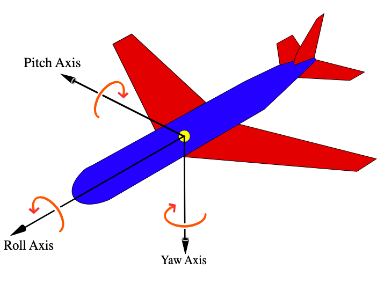
While there are different conventions for how to update the orientation and movement controls in a 3D space, we chose to use Roll, Pitch, and Yaw for our three axes. Roll corresponds to the x-axis, Pitch corresponds to the y-axis, and Yaw corresponds to the z-axis. The following image visualizes how each of them would rotate the orientation of an airplane:
Using our L-system function (explained in detail later), we can get a better sense of how the controls work. First, we can see what happens when we move forward, pitch upwards at a 45 degree angle, and move forward again:
Out[]=

Yaw can be imagined as turning left or right. If we move forward, yaw at a 45 degree angle, and move forward again:
Out[]=

Simply rolling and then moving forward will change our orientation, but would still result in drawing a straight line. To visualize a roll, we can move forward, roll 90 degrees and pitch upwards 45 degrees, and move forward again. While it looks similar to the pitch example, we notice the difference by paying attention to the x-y-z axes:
Out[]=

Tracking Orientation
Tracking Orientation
A good way to visual how the function is drawing lines and branches is to imagine a turtle starting at the origin. As the turtle moves, a line is drawn following its path. For our function, the initial orientation of the “turtle” pointed in the positive x-direction. We tracked orientation using an orientation matrix of the form {a,b,c}, where a is a 3D vector representing the direction of the x-axis of the turtle’s reference frame, b is a 3D vector representing the y-axis, and c is a 3D vector representing the z-axis. The orientation matrix defining the turtle’s initial coordinate system was the identity matrix {{1,0,0},{0,1,0},{0,0,1}}.
Parsing the String
Parsing the String
The follow code is part of a switch statement inside the final function:
"F", position+=orientation[[1]]; AppendTo[currentBranch,position];, "B", position-=orientation[[1]]; AppendTo[currentBranch,position];,"U", position+=orientation[[3]]; AppendTo[currentBranch,position];,"D", position-=orientation[[3]]; AppendTo[currentBranch,position];,"R", position-=orientation[[2]]; AppendTo[currentBranch,position];,"L", position+=orientation[[2]]; AppendTo[currentBranch,position];,"Y", orientation=RotationMatrix[sign*yawAngle,{0,0,1.}].orientation;,"P", orientation=RotationMatrix[sign*pitchAngle,{0,1.,0}].orientation;,"A", orientation=RotationMatrix[sign*rollAngle,{1.,0,0}].orientation;,"+", sign=1;,"-", sign=-1;
When parsing the final word, if the function comes across a “Y”, the rotation matrix representing a rotation in the yaw plane(the turtle’s z-axis) is multiplied to the orientation matrix, updating the orientation matrix and rotating the turtle’s coordinate system about its z-axis. Similarly, when the function comes across a “P” or an “A”, it updates the turtle’s coordinate system by rotating about the turtle’s y or x axes, respectively.
Additionally, when the function comes across a “+“, it updates the direction of subsequent rotations to be counterclockwise. When the function comes across a “-“, it updates the direction of subsequent rotations to be clockwise.
When the function sees an “F” it moves forward in the turtle’s coordinate system’s positive x-axis. When the function sees a “U”, it moves upwards in the direction of the turtle’s positive z-axis. When the function sees an “L”, it moves leftwards in the direction of the turtle’s positive y-axis. “B”, “D”, and “R” are the negatives of “F”, “U”, and “L”, respectively.
Additionally, when the function comes across a “+“, it updates the direction of subsequent rotations to be counterclockwise. When the function comes across a “-“, it updates the direction of subsequent rotations to be clockwise.
When the function sees an “F” it moves forward in the turtle’s coordinate system’s positive x-axis. When the function sees a “U”, it moves upwards in the direction of the turtle’s positive z-axis. When the function sees an “L”, it moves leftwards in the direction of the turtle’s positive y-axis. “B”, “D”, and “R” are the negatives of “F”, “U”, and “L”, respectively.
Branching
Branching
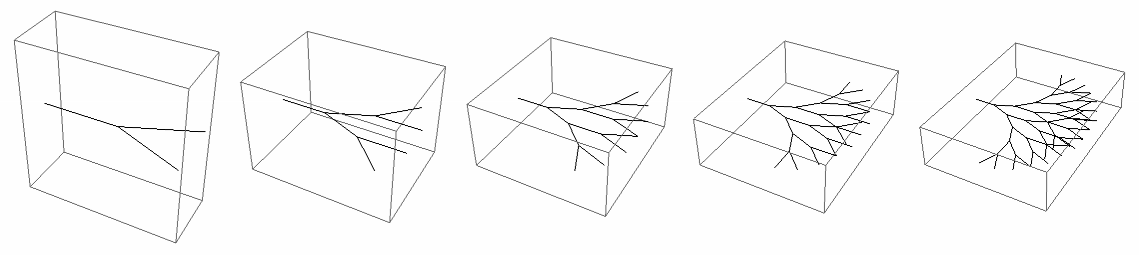
Branching is a special control that helps create more complex turtle paths than a continuous line forwards. When a new branch is opened, the turtle moves according to the instructions inside. After the branch is closed, rather than continuing from the most current coordinate location and orientation, the turtle returns to its previous orientation before the branch was opened. We can visualize this is using our function, with a simple fork pattern that splits off in two directions. As the iterations increase, we witness a fractal pattern begin to emerge:
Out[]=
The following code is part of a switch statement inside the final function and implements the necessary components for branching:
Each branch is stored within the currentBranch variable. By separating each branch and appending them to the final list of points, we can make each branch into its own line, preventing any unwanted connections between the ends of branches and their starting points. We push the current position and rotation of the system onto the stack at the start of each new branch, so that we are able to return to the initial point after the branch ends.
The Final Function
The Final Function
Finally, we can put it all the pieces together to form our final LSystem3D function. Our function takes in the list of replacement rules, initial string, and number of iterations as its arguments and returns a list of coordinate points that can be plotted. The pitch, yaw, and roll angles can be specified if needed. While the function is very long, we decided not to break it up given that information such as the current orientation and current branch must be global to the function and updated after every character.
2D Examples - Plant Gallery
2D Examples - Plant Gallery
The following images were generated with our L-system function using different string replacement rules.
3D Examples
3D Examples
Here are some interesting 3D examples, including both classic fractals and fern variations:
Hilbert Curve 3D
Dragon Curve
Dragon Curve
Fern Fractal & Variants
Future Directions
Future Directions
In the future, we hope to extend the capabilities of this function. In particular, one feature we want to add is the ability to vary the amount of rotation for each rotation within the final word. For example, there could be a 30 degree pitch rotation at one point in the word and a 60 degree pitch rotation at another. Additionally, something else we wanted to add was making the function nondeterministic, allowing for more random (and potentially realistic) modeling.
Sources
Sources
Acknowledgements
Acknowledgements
We would like to thank Dugan Hammock for his guidance throughout the project. He provided us countless clarifications and lots of helpful discussion. We would also like to thank Rory Foulger and Eryn Gillam for their continued support and logistical help.
CITE THIS NOTEBOOK
CITE THIS NOTEBOOK
Generating Plant Structures with 3D Lindenmayer-Systems
by Wolfram Emerging Leaders Program
Wolfram Community, STAFF PICKS, January 2, 2024
https://community.wolfram.com/groups/-/m/t/3094962
by Wolfram Emerging Leaders Program
Wolfram Community, STAFF PICKS, January 2, 2024
https://community.wolfram.com/groups/-/m/t/3094962