Mathematicians welcome, all others . . .
BOW YOUR HEADS!
BOW YOUR HEADS!

This is an active computable document created on software owned by Roger Wells January 2018 .
Wolfram Mathematica ID: rogerwells2017@hotmail.com. PTC Mathcad username: iornfist666@yahoo.com
Password: Javadog License Number 3991-4623 Password: 1javadog Mathcad serial # EN901002DS2411A
https://user.wolfram.com/portal/ProductRegistration?execution=e1s Linkdln: fgmju@yahoo.com 1javadog!
Wolfram Mathematica ID: rogerwells2017@hotmail.com. PTC Mathcad username: iornfist666@yahoo.com
Password: Javadog License Number 3991-4623 Password: 1javadog Mathcad serial # EN901002DS2411A
https://user.wolfram.com/portal/ProductRegistration?execution=e1s Linkdln: fgmju@yahoo.com 1javadog!
{“Kernel” -> {“Version” -> “11.2.0 for Microsoft Windows (64-bit) (September 11, 2017)”, “ReleaseID” -> “11.2.0.0 (5822651, 2017091101)”, “LicenseID” -> “L3991-4623”, “PatchLevel” -> “0”, “ActivationKey” -> “3991-4623-49AQHW”, “ActivationGroupID” -> “L3991-4623”, “MachineID” -> “6202-12511-69189”, “UserName” -> “Owner”, “MachineName” -> “tyrannasaurus-r”, “MachineDomains” -> {}, “LicenseServer” -> “tyrannasaurus-r”, “MaxLicenseProcesses” -> 2, “LicenseExpirationDate” -> {Infinity, 0, 0, 0, 0, 0}, “MachineType” -> “PC”, “OperatingSystem” -> “Windows”, “ProcessorType” -> “x86-64”, “Language” -> “English”, “CharacterEncoding” -> “WindowsANSI”, “SystemCharacterEncoding” -> “WindowsANSI”, “TimeZone” -> -6., “CreationDate” -> DateObject[{2017, 9, 11, 10, 31, 25.}, “Instant”, “Gregorian”, -6.], “InstallationDirectory” -> “C:\\Program Files\\Wolfram Research\\Mathematica\\11.2”,
Machine Epsilon 2022045 * 10^-16
Machine precision 159546
Machine Number Limits { 2.225.7 * 10^ -308, 1,79769 *10^ 308}
Number Limits {6,22968849675322 * , 16052167619336622 * }
Machine Epsilon 2022045 * 10^-16
Machine precision 159546
Machine Number Limits { 2.225.7 * 10^ -308, 1,79769 *10^ 308}
Number Limits {6,22968849675322 *
-1355718576299610
10
1355718576299609
10
Unquestionably my highest achievement in keyboard and coding. This time starting with the usual f[t] := and then using the construct function. Symbols represented by formal letters, or formal symbols, appear in the output of certain functions. They are indicated by gray dots above and below the English letter (x.). t goes ghost grey and x becomes “Formal”, used to represent a formal parameter that will never be assigned a value.
f[t]:=-t^5+5t^4+t^3-5t^2+3
ShowPlotFunction[t,-t^5+5t^4+t^3-5t^2+3][x.],x.,-6,6,PlotRange{-50,250},AxesLabel{HoldForm[Seconds],HoldForm[Displacement]},PlotLabelHoldForm[Position],LabelStyle{RGBColor[1.`,0.`,0.`]}
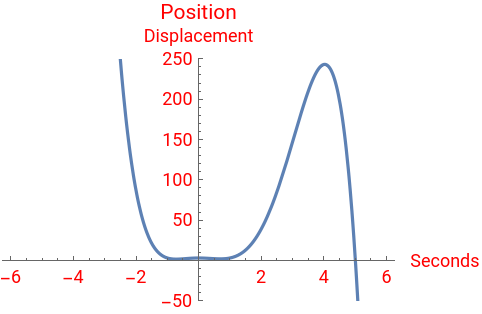
Now clear f and define the same function in x using the global operator : = and the rule_ (underscore) The x goes ghost grey unlike the t which remained blue in the first line describing the f of t. The trick, I have learned is not to start with the function that came right from the textbook problem. On Wolfram it is easy to end up with five to ten graphs that scroll frustratingly down. When the notebook is re opened or evaluated these will all appear . . . again. There is a “roll up” feature on the suggestion bar that combines lines of code. Attempting to repair redundant code that generates repeated graphics is how you end up with ridiculous line of Heading that go . . . Manipulate[Show [Show[ Show [Plot [ Function. On this masterpiece you can close and re open or click evaluate and nothing will change. It is a very neat and clean notebook. There is no variable or definition drift.
Clear[f]
f[x_]:=-x^5+5x^4+x^3-5x^2+3
Introduce a “velocity” function v [a] and use the “rule” assigned to x. Notice the x goes unevaluated blue in the output line!
v[a_]:=f[a]+f'[a](x-a)
At this point the suggestion bar offers to construct a pure function. The color coding of x and a (blue and ghost grey).
Function[a,f[a]+[a](x-a)]
′
f
Function[a,f[a]+[a](x-a)]
′
f
An explosion in computer algebra. Orange is the color used when I wrote this on a problem from Stewert Calculus 6e pg.171. I wrote about the VertexColor→ {Orange} and the meaning of SaveDefinations → True. Here is what I said . . . “I suspect SaveDefinations → True tells the machine to keep the definition {Orange} in tact and True for each time the machine calculates the arithmetic, keeping the tangent line orange”. Otherwise the thing would appear orange (yellowish) only when the line of code was initialized. And then I changed the color to VertexColors → {Red} and found it is only the color of the dot!
Manipulate[Show[Plot[{f[x],v[a]},{x,-6,6},PlotRange{250,-50}],Graphics[{PointSize[Large],Point[{a,f[a]},VertexColors{Red}]}]],{{a,-0.5},-6,6,Appearance"Labeled"},SaveDefinitionsTrue]


In these analyses remember also that the letters chosen for variance are not really random but are either familiar to us or conventional. The t of course is a regular actor in time and a just happens to be the first letter in acceleration. Most university texts use s in the first position plot, and not a p. I suppose s equals the f of t is more elegant than the p of s. And now of course we have a ghost grey h on the scene as well in the familiar limit definition.
f'[x]Limit,h0
f[x+h]-f[x]
h
-10x+3+20-5-x(10-3x-20+5)
2
x
3
x
4
x
2
x
3
x
Plot[{f[x],f'[x]},{x,-6,6},PlotRange{250,-50}]
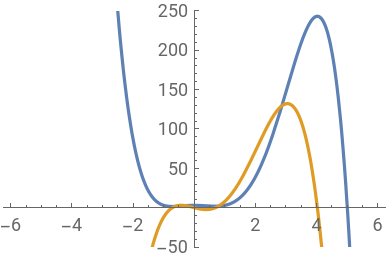
The logic is confirmed using double equal to set v[a] equal to [a] and the exact algebra shows up in the output line. The velocity is the derivative of the position function.
f
v[a]f'[x]
3-5++5-+(-10a+3+20-5)(-a+x)-10x+3+20-5
2
a
3
a
4
a
5
a
2
a
3
a
4
a
2
x
3
x
4
x
Another great tool in setting up an interactive physics study notebook like this is the Global question typed here as ?v There are not enough words to narrate the amount of mental quantifiers and fixed conditions and rules of syntax occurring already.Typing ? v[a] will return no match found even though it appears in the line of code just above. But typing ?v gives a result using the underscore, f and x and a too.
?v
Global`v
|
myfunc[{x_,y_}]:={1-2x+y,y-x/4}
myfunc[{6,7}]
-4,
11
2