Input the silhouette image to be used and generate mesh
Input the silhouette image to be used and generate mesh
Image generated with Illustrator and Photoshop to have a clean B & W image
title1=ColorNegate
;
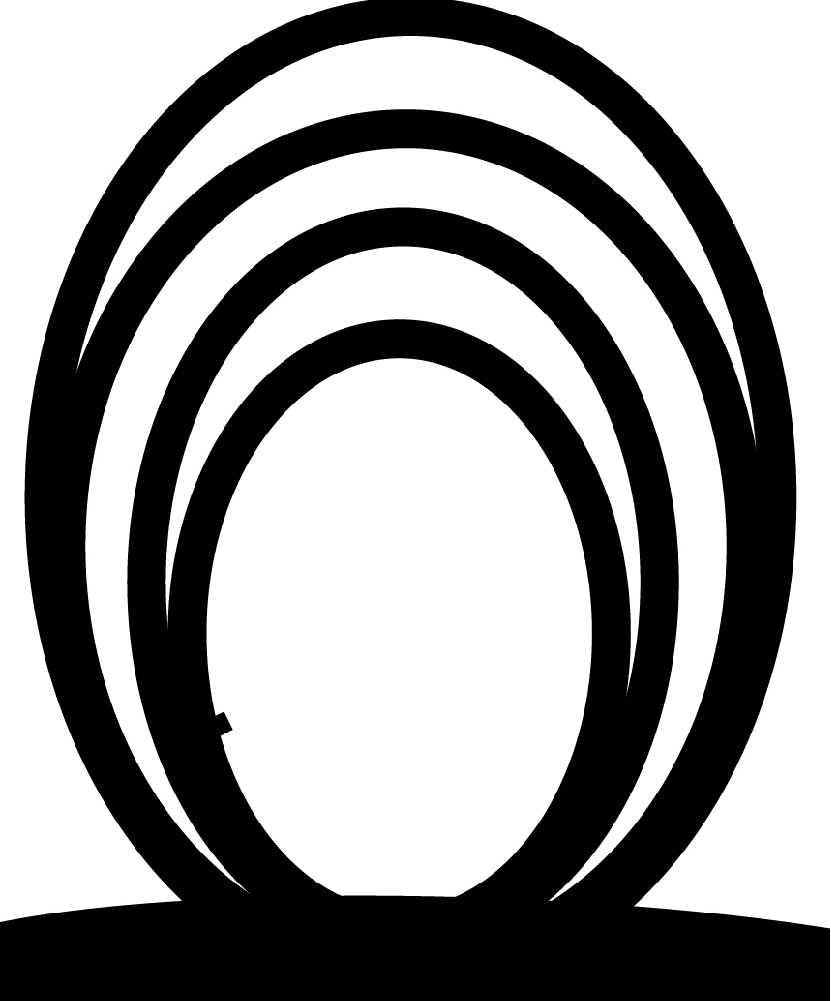
Image generated with Illustrator and Photoshop to have a clean B & W image
title2=ColorNegate
;

In[]:=
II=ImageMesh[title1];II2=ImageMesh[title2];
2 D representation show the trianulation
IIt=TriangulateMesh[II];IIt2=TriangulateMesh[II2]
Out[]=

In[]:=
can2=Graphics3D[ResourceFunction["Annulus3D"][{{0,0,-400},{0,700,-400}},{330,400}]]
Out[]=

Generate the expanded grid to have a 3D object
Generate the expanded grid to have a 3D object
Using concepts from this source
https://demonstrations.wolfram.com/ThickeningAPolygonMeshForRapidPrototyping3DPrinting/
https://demonstrations.wolfram.com/ThickeningAPolygonMeshForRapidPrototyping3DPrinting/
In[]:=
MeshCoordinates[IIt];(*Givesalistof2Dcoordinatesinthemeshregion*)(*Forexample{{72.81923607275456`,120.53381934552493`},{70.00000000000001`,113.5`},{72.37931034482769`,112.31034482758612`},...*)
In[]:=
temp=MeshPrimitives[IIt,2];temp2=MeshPrimitives[IIt2,2];(*Polygon,....*)


In[]:=
trianglecoords=MeshPrimitives[IIt,2][[All,1]];dim=Dimensions[trianglecoords];nnno=dim[[1]];tt1[k_]:=Table[{Join[trianglecoords[[k,i]],{1}]},{i,1,3}](*Addingaz-componentofvalue1toall2Dx,ypoints*);arg11=Table[{tt1[i][[1]][[1]],tt1[i][[2]][[1]],tt1[i][[3]][[1]]},{i,1,dim[[1]]}];polTable=Table[Polygon[{tt1[i][[1]][[1]],tt1[i][[2]][[1]],tt1[i][[3]][[1]]}],{i,1,dim[[1]]}];Graphics3D[polTable]
Out[]=

In[]:=
trianglecoords2=MeshPrimitives[IIt2,2][[All,1]];dim2=Dimensions[trianglecoords2];nnno2=dim2[[1]];tt12[k_]:=Table[{Join[trianglecoords2[[k,i]],{1}]},{i,1,3}](*Addingaz-componentofvalue1toall2Dx,ypoints*);arg112=Table[{tt12[i][[1]][[1]],tt12[i][[2]][[1]],tt12[i][[3]][[1]]},{i,1,dim2[[1]]}];polTable2=Table[Polygon[{tt12[i][[1]][[1]],tt12[i][[2]][[1]],tt12[i][[3]][[1]]}],{i,1,dim2[[1]]}];Graphics3D[polTable2]
Out[]=

In[]:=
MeshCoordinates[polTable];
In[]:=
polys=MeshCells[IIt,2];polys2=MeshCells[IIt2,2];
In[]:=
nos=Dimensions[polys][[1]]
Out[]=
1358
In[]:=
nos2=Dimensions[polys2][[1]]
Out[]=
2505
Adding a z - component of value of 20 to all 2 D x - y points
tt20[k_]:=Table[{Join[trianglecoords[[k,i]],{20}]},{i,1,3}]
In[]:=
tt202[k_]:=Table[{Join[trianglecoords2[[k,i]],{20}]},{i,1,3}]
Generate two flat images in 3D
Generate two flat images in 3D
One a z = 1 and one at z = 20
In[]:=
polTable1=Table[Polygon[{tt1[i][[1]][[1]],tt1[i][[2]][[1]],tt1[i][[3]][[1]]}],{i,1,dim[[1]]}];polTable12=Table[Polygon[{tt12[i][[1]][[1]],tt12[i][[2]][[1]],tt12[i][[3]][[1]]}],{i,1,dim2[[1]]}];
In[]:=
polTable20=Table[Polygon[{tt20[i][[1]][[1]],tt20[i][[2]][[1]],tt20[i][[3]][[1]]}],{i,1,dim[[1]]}];polTable202=Table[Polygon[{tt202[i][[1]][[1]],tt202[i][[2]][[1]],tt202[i][[3]][[1]]}],{i,1,dim2[[1]]}];
Thicken polygons to 3D by 20 using the flat image at 20
Thicken polygons to 3D by 20 using the flat image at 20
averagepoints[points_?MatrixQ]:=Mean[If[TrueQ[First[points]==Last[points]],Most,Identity][points]](*Newell'salgorithmforfacenormals*)newellNormals[pts_?MatrixQ]:=Module[{tp=Transpose[pts]},Normalize[MapThread[Dot,{RotateLeft[ListConvolve[{{-1,1}},tp,{-1,-1}]],RotateRight[ListConvolve[{{1,1}},tp,{-1,-1}]]}]]]thickenaux[points_,thick_]:=Module[{center=averagepoints[points],nrm=newellNormals[points],outerpoints,radialpoints},outerpoints=Map[TranslationTransform[thicknrm],points];radialpoints=MapThread[Join[#1,Reverse[#2]]&,Map[Partition[#,2,1,1]&,{points,outerpoints}]];Flatten[{Polygon[Reverse[points]],Polygon/@radialpoints,Polygon[outerpoints]}]]ThickenPolygons[shape_,thick_:20.]:=shape/.Polygon[p_?MatrixQ]:>thickenaux[p,thick](*0.04*)
Developing a curved figure about a cylinder
Developing a curved figure about a cylinder
Showing axes of the next line of code
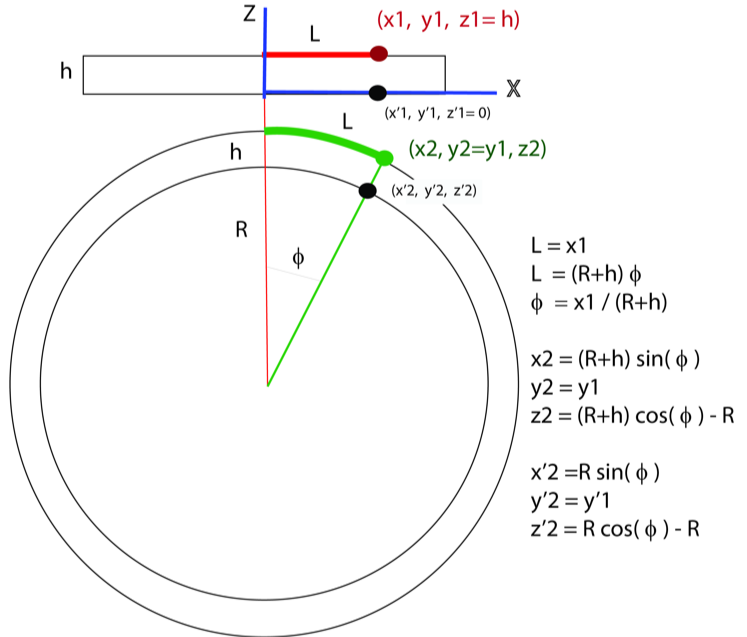
XYZTransform Figure
Defining struct
The transformation function of the points
The transformation function of the points
Assuming a thickness of 20 and wrapping the object about a cylinder of radius 200
Looking a the construction of several “struct”’s
struct[[1,1, object number, face number,1]]
Looking a the construction of several “struct”’s
struct[[1,1, object number, face number,1]]
struct[[1,1, object number, face number,1]]
Getting face points for object mobi and face nface
Defining point arrays for 3 or 4 pts per polygon
CITE THIS NOTEBOOK
CITE THIS NOTEBOOK
Making images into 3D cylindrical shape
by Gilmer Gary
Wolfram Community, STAFF PICKS, October 7, 2024
https://community.wolfram.com/groups/-/m/t/3293037
by Gilmer Gary
Wolfram Community, STAFF PICKS, October 7, 2024
https://community.wolfram.com/groups/-/m/t/3293037