Introduction
Introduction
One of the "standard" things to do with an Agentic Artificial Intelligence (AI) system is to summarize (large) texts using different Large Language Model (LLM) agents.
This (computational Markdown) document illustrates how to specify an LLM graph for deriving comprehensive summaries of large texts. The LLM graph is based on different LLM- and non-LLM functions . The Raku package "LLM::Graph" is used, [AAp1].
Using the LLM graph is an alternative to the Literate programming based solutions shown in [AA1, AAn1].
Procedure outline
Procedure outline
For a given URL, file path, or text a comprehensive text summary document is prepared in the following steps (executed in accordance to the graph below):
◼
User specifies an input argument
◼
LLM classifies the input as "URL", "FilePath", "Text", or "Other"
◼
The text is ingested
◼
If the obtained label is different than "Text"
◼
Using asynchronous LLM computations different summaries are obtained
◼
The title of the summary document can be user specified
◼
Otherwise, it is LLM-deduced
◼
A report is compiled from all summaries
◼
The report is exported and opened
◼
If that is user specified
Out[]=
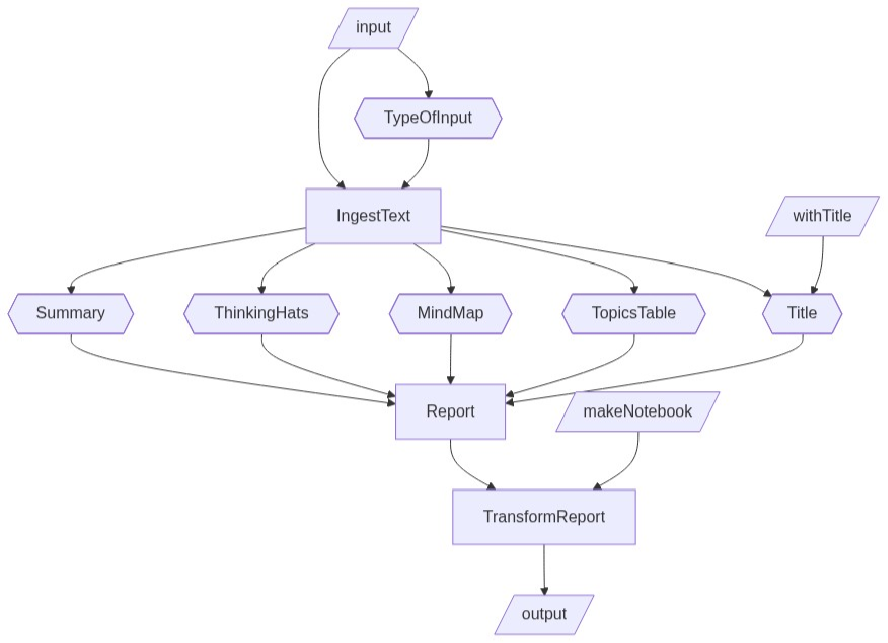
In the graph:
◼
Parallelogram nodes represent user input or LLM-graph output
◼
Hexagonal nodes represent LLM calls
◼
Rectangular nodes represent deterministic computations
LLM graph
LLM graph
Specify the LLM graph nodes:
In[]:=
rules=<|"TypeOfInput"-><|"EvaluationFunction"->Function[LLMSynthesize[{"Determine the input type of\n\n",#input,"\n\n","The result should be one of: 'Text', 'URL', 'FilePath', or 'Other'.",LLMPrompt["NothingElse"]["single string"]}]],"Input"->{"input"}|>,"IngestText"-><|"EvaluationFunction"->(If[StringMatchQ[#TypeOfInput,___~~("URL"|"FilePath")~~___],Echo[#input,"Importing:"];Import[#input],#input]&)|>,"Title"-><|"EvaluationFunction"->(If[StringQ[#withTitle],#withTitle,LLMResourceFunction["TitleSuggest"][#IngestText,"article"]]&)|>,"Summary"->StringTemplate["<* LLMPrompt[\"Summarize\"][] *>\n\n`IngestText`"],"TopicsTable"->StringTemplate["Give a Markdown table of the themes in the foolowing text \n\n`IngestText`\n\n. The table should have two columns: 'theme' and 'content'. Make sure each of the content descriptions has no more than 12 words."],"MindMap"->StringTemplate["<* LLMPrompt[\"MermaidDiagram\"][#IngestText, \"CONCISE mind-map\"] *>"],"ThinkingHats"->StringTemplate["<* LLMPrompt[\"ThinkingHatsFeedback\"][#IngestText,\"Markdown\"] *>"],"MarkdownReport"-><|"EvaluationFunction"->Function[StringRiffle[{"# "<>#Title,"#### **LLM summary report**","*Input type: "<>#TypeOfInput<>"*","## Summary",#Summary,"## Topics",#TopicsTable,"## Mind map","Relationships between the concepts in the text:",Block[{t},t=StringReplace[#MindMap,{"```mermaid","```"}->""];"```wl\nResourceFunction[\"MermaidInk\"][\""<>StringReplace[t,"\""->""]<>"\"]\n```"],"## Thinking hats",StringReplace[#ThinkingHats,{"```markdown","```"}->""]},"\n\n"]]|>,"TransformReport"-><|"EvaluationFunction"->Function[If[TrueQ[#makeNotebook],ResourceFunction["ImportMarkdownString"][#MarkdownReport,"Notebook"],(*ELSE*)#MarkdownReport]],"Input"->{"makeNotebook","MarkdownReport"}|>|>;
Remark: The LLM graph is specified with functions and prompts of the Raku packages "LLM::Functions", [AAp2], and "LLM::Prompts", [AAp3].
Make the LLM graph:
In[]:=
gCombinedSummary=LLMGraph[rules]
Out[]=
LLMGraph


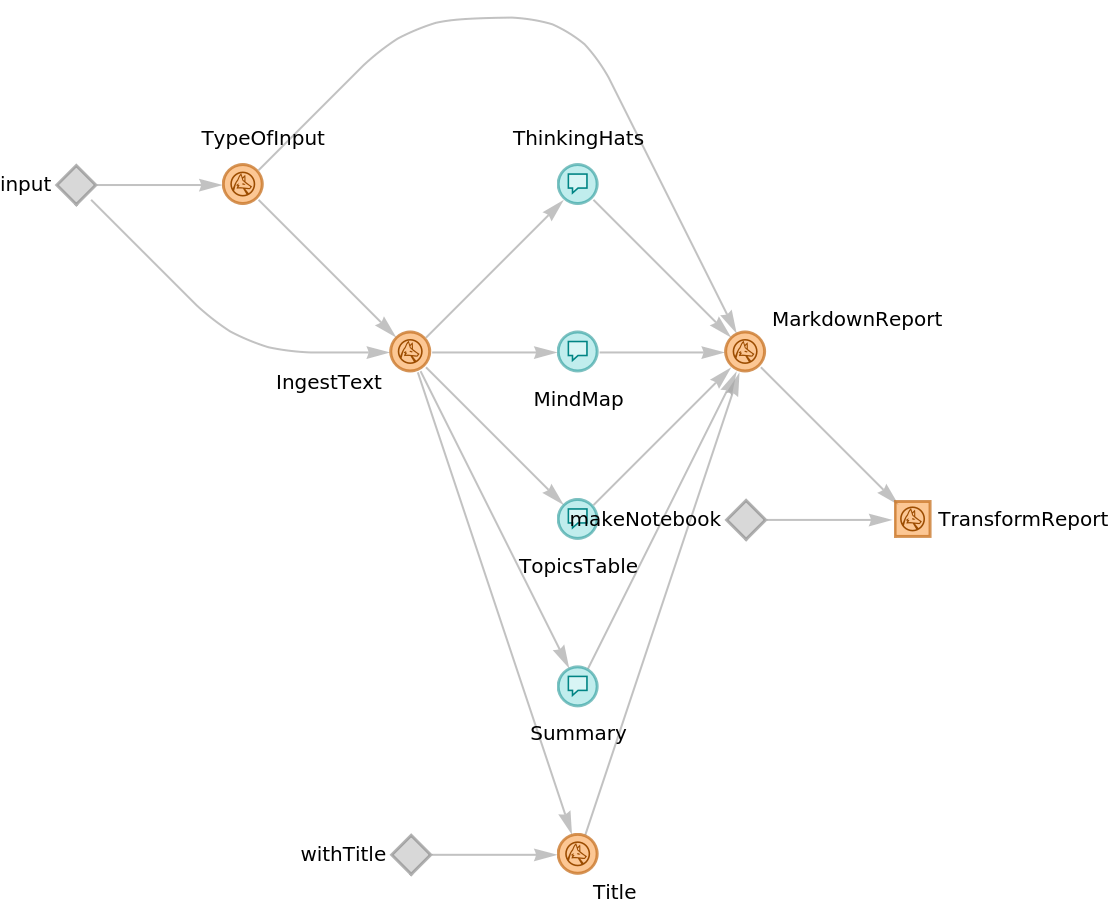
Here the corresponding graph plot is shown:
In[]:=
Information[gCombinedSummary,"Graph"]
Out[]=
Graph evaluation
Graph evaluation
URL and text statistics:
In[]:=
url="https://raw.githubusercontent.com/antononcube/RakuForPrediction-blog/refs/heads/main/Data/Applications-of-Monadic-Programming-YouTube-Ezi5M9Zw6uw.txt";txtFocus=Import[url];TextStats[txtFocus]
Remark: The function data-import is provided by the Raku package "Data::Importers", [AAp4].
Computation:
Remark: Instead of deriving the title using an LLM, the title is specified as an argument.
If the result is notebook, then open it; else, render the Markdown result as a notebook panel:
Here is screenshot of a notebook result:
Graph instead of mind-map
Graph instead of mind-map
Consider the task of converting the Mermaid-JS mind-map code into Wolfram Language (WL) Graph code. This is done in two steps: (i) an “economical” LLM-graph evaluation, (ii) a conversion to WL by an LLM invocation.
Graph evaluation with nodes results
Graph evaluation with nodes results
During development of the LLM-graph, the use of predefined node results speeds-up the experiments. For example, in order to experiment with mind-map conversions this specification is useful:
Remark: The LLM-graph evaluation is done with the argument “LLMGraph” in order to be able to access the individual nodes results.
Here is the “MindMap” node information:
Getting Graph code
Getting Graph code
Here first is obtained the result of the node “MindMap” and then the corresponding mind-map is rendered by the resource function MermaidInk, [AAf1]:
Here the conversion to WL from Mermaid-JS is done by an LLM invocation. then the result -- which is WL code -- is evaluated:
Additional comments
Additional comments
◼
The “problematic” making of mind-maps postponed the publication of this notebook.
◼
I have been using the described text summarization graph for more than 6 months.
◼
In both Raku, [AA1], and Wolfram Language.
◼
It is a good didactic exercise to compare the text summarization LLM-graph with its Python version based on LangGraph.
◼
Compared to using a notebook for text summarization -- as discussed in "LLM comprehensive summary template for large texts" -- the use of an LLM-graph is more “encapsulated” and faster.
◼
Because of the asynchronous evaluation of LLMGraph -- using the notebook means summarizing the text sequentially.
◼
(Of course) using different LLMs might produce very different results over the same text.
◼
With many LLMs MermaidDiagram produces mind-maps that a too detailed (with too many nodes.) An alternative ad hoc “MindMap” LLM-graph node can be the following:
"MindMapMermaid" -> StringTemplate["Give a CONCISE mind map for the different logical parts in the text:\n\n`IngestText`\n\n<* LLMPrompt[\"NothingElse\"][\"Wolfram Language Graph code\"] *>"]
Setup
Setup
References
References
Blog posts
Blog posts
Functions
Functions
Notebooks
Notebooks
[AAn1] Anton Antonov, "LLM comprehensive summary template for large texts" , (2025), Wolfram Community .
Prompts
Prompts
CITE THIS NOTEBOOK
CITE THIS NOTEBOOK
Agentic-AI for text summarization via LLM-graph
by Anton Antonov
Wolfram Community, STAFF PICKS, April 20, 2026
https://community.wolfram.com/groups/-/m/t/3696462
by Anton Antonov
Wolfram Community, STAFF PICKS, April 20, 2026
https://community.wolfram.com/groups/-/m/t/3696462