In the Wolfram Language a Molecule is a symbolic representation of a molecule, and is represented internally as a Graph object with atoms for vertices and edges for bonds. Atoms are referred to by their atom index. In the following example we replace a particular atom in a hydrocarbon with sulfur:
In[]:=
MoleculePlot[MoleculeModify[Molecule["nonane"],{"ReplaceAtom",#->"S"}]]&/@{3,4,5}
Out[]=
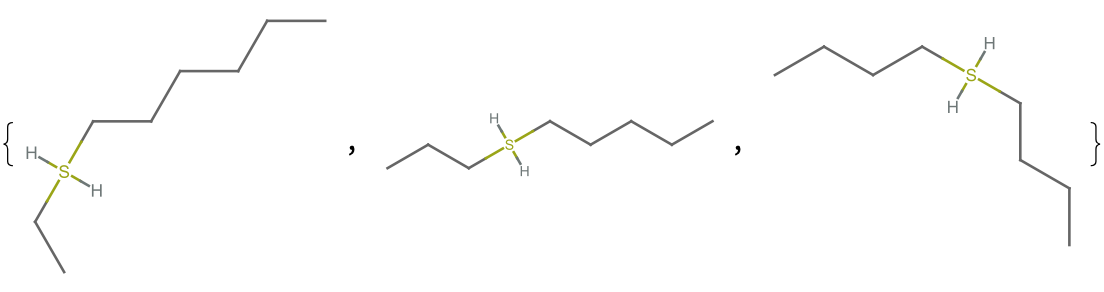
If you want to replace or delete an atom or group of atoms, you have to know their atom indices. This can often be achieved programmatically using the function FindMoleculeSubstructure, but sometimes you just want to point at the molecule and say “I mean that atom”. This is the use case for the new functions AtomSelector and AtomSelector3D, from the new Wolfram Language paclet ChemistryFunctions.
First install and load the paclet:
PacletInstall["WolframChemistry/ChemistryFunctions"]Needs["WolframChemistry`ChemistryFunctions`"]
The usage for AtomSelector is similar to other dynamic controls:
In[]:=
?AtomSelector
Out[]=
So let’s create a molecule, m, and a variable to store the selected atom indices:
In[]:=
m=Molecule["(2S,3S)-1-[(7-methyl-2,3-dihydro-1H-inden-4-yl)oxy]-3-[(1-methylethyl)amino]butan-2-ol"];selection={};AtomSelector[m,Dynamic[selection]]Row[{"selection = ",Dynamic[selection]}]
Out[]=
The variable selection contains the list of selected atoms. Find the SMILES string for this substructure:
In[]:=
m[{"SMILES",selection}]
Out[]=
C(O)CNCC
If you don’t pass in a second argument wrapped in Dynamic, you can still retrieve the selected atom indices using the button in the upper right corner of the graphics. This will place the selection in your clipboard. Here is an example using AtomSelector3D:

In[]:=
AtomSelector3D@Molecule["CCOC(=O)Oc1ccc2cc(S(=O)(=O)C3SC(=O)NC3=O)ccc2c1"]
Out[]=
Unfortunately the dynamic functionality used by AtomSelector and AtomSelector3D do not currently work in Wolfram Cloud notebooks.