Abstract
Abstract
The goal of this project is to come up with a program that can be used to Inpaint audios by using spectrograms or spectrogram arrays. The resulting function allows the user to input an audio file with a missing part and obtain a file that has filled in the unknown section.
Various approaches used
This section covers different approaches for audio inpainting that did not work as expected but helped me get to the final outcome.
Approaching with spectrograms
Approaching with spectrograms
The first method that I could instantly think of for this project was to take Spectrogram as an image and use Inpaint on it. One of the built-in function of Mathematica is Inpaint which takes in an image and a region to retouch the parts of the image that correspond to the nonzero elements of the area.
Bringing in a spectrogram of a audio file with a part to Inpaint
sampleSpectrogram[audiofile_]:=Spectrogram[audiofile,PlotRange8000,MaxPlotPointsInfinity,ImageSize800,AxesFalse,FrameFalse,ColorFunctionGrayLevel]
The mask can be created by:
In[]:=
intvalue[audiofile_]:=AudioIntervals[HighpassFilter[audiofile,1000],"Inaudible"]
In[]:=
region[sampleSpectrogram_,int_]:=Binarize[Show[sampleSpectrogram,Graphics[{EdgeForm[{Thick,White}],White,Polygon[{{int[[1,1]],0},{int[[1,2]],0},{int[[1,2]],8000}{int[[1,1]],8000}}]&/@int}]],0.99999999]
Getting a result:
In[]:=
final[audiofile_,sampleSpectrogram_,region_]:=AudioTimeStretch[Audio[InverseSpectrogram[Inpaint[sampleSpectrogram,region]]],Duration[audiofile]]
Also noticeable in the example, inpainting on the Spectrogram seemed successful. However, due to the nature of how spectrogram is formatted, there were crucial informations about the audio that was lost throughout the process and made the audio sound weird.
Example
Example
I'll be using a file of Bach's cello concerto with a missing part.
In[]:=
CloudPut
Out[]=
In[]:=
originalBach=CloudGet[CloudObject[
https://www.wolframcloud.com/obj/2f222264-5877-4525-aaab-b4a353259666
]]Out[]=
In[]:=
originalBach//Spectrogram
Out[]=
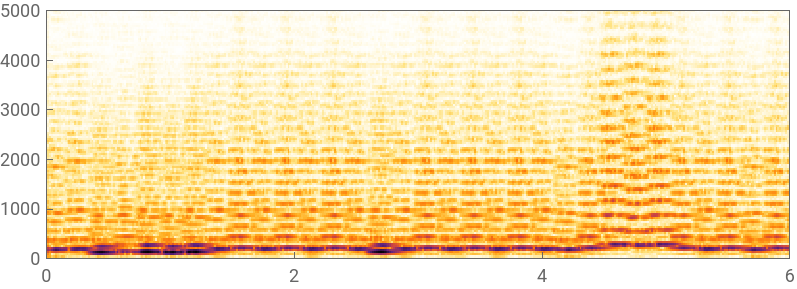
This is how the original audio file's spectrogram looks like. The goal will be to use Inpaint and get a spectrogram that is similar to the original version.

In[]:=
bachWithCut=CloudGet[CloudObject[
https://www.wolframcloud.com/obj/8be39dae-ff92-4c00-bd75-6ac330826d79
]]Out[]=
In[]:=
glspectro=Spectrogram[bachWithCut,PlotRange8000,MaxPlotPointsInfinity,ImageSize800,ColorFunctionGrayLevel,AxesFalse,FrameFalse];
In[]:=
int=AudioIntervals[HighpassFilter[bachWithCut,1000],"Inaudible"]
Out[]=
{{2.05497,2.5658}}
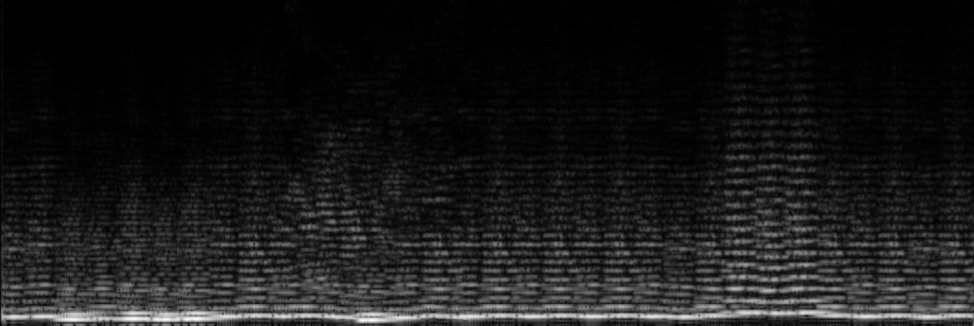
By using HighpassFilter and "Inaudible", I could find the time interval of audio file that I will have to Inpaint. When setting the size of the polygon, I made the interval slightly bigger that the original interval of inaudible. This helps the Inpaint function to work with greater accuracy.
rst=Binarize[Show[glspectro,Graphics[{EdgeForm[{Thick,White}],White,Polygon[{{#[[1]]-0.3,0},{#[[2]]+0.3,0},{#[[2]]+0.3,8000},{#[[1]]-0.3,8000}}]&/@int}]],0.999999]
Out[]=

In[]:=
inpainted=Inpaint[glspectro,rst]
Out[]=
In[]:=
AudioTimeStretch[Audio[InverseSpectrogram[inpainted]],Duration[bachWithCut]]
In[]:=
spectrogramResult=CloudGet[CloudObject[
https://www.wolframcloud.com/obj/a587fb5a-fc16-4225-870e-e41ac5831edb
]]Out[]=
Approaching with shortTimeFourier/SpectrogramArray
Approaching with shortTimeFourier/SpectrogramArray
Since using a spectrogram for this project did not seem like the best approach, I decided to try with either short time fourier transform or spectrogram array.
Checking how short time fourier array reconstructs audio files
Checking how short time fourier array reconstructs audio files
reconstructing a audio with short time fourier informations:
In[]:=
stft[audiofile_]:=Audio@InverseShortTimeFourier@FullForm[ShortTimeFourier[audiofile]][[1,1,"Data"]];
I could conclude that short time fourier can sustain more information about the audio file which allows better reconstructions. However, since Inpaint does not work with arrays, I needed to look for another way to Inpaint the audio file.
Using Interpolation for Inpaint
Using Interpolation for Inpaint
Unfortunately, the built-in function of Inpaint does not support arrays. So, one approach that I came up with to allow the program to guess the missing part based on evidence was to use Interpolation. Interpolation works on functions to fill in the missing parts of the function based on the original function.
trying interpolation with lists:
Show[ListPointPlot3D[SparseArray[Flatten[Drop[MapIndexed[{#2,#1}&,Partition[Range[100],10],{2}],{5}],1]/.{{x_,y_},z_}{y,x}z]],Plot3D[Interpolation[Flatten[Drop[MapIndexed[{#2,#1}&,Partition[Range[100],10],{2}],{5}],1]][x,y],{x,1,10},{y,1,10}]]
Out[]=

Spectrogram Array
Since the previous approaches shown either did not work or was not ideal, I had to look for another approach for this project. The final idea that worked was to convert the full spectrogram array into a two channel image that contains the information about the audio.
Taking Spectrogram array
Taking Spectrogram array
Bringing data as a Spectrogram Array:
In[]:=
spectroArray[audio_]:=SpectrogramArray[audio,Automatic,Automatic,HannWindow];saPhase[spectroarray_]:=Map[{Abs@#,newArg@#}&,spectroarray,{2}];
Changing the form of data:
newArg[z_]:=Arg[z]/;Arg[z]≥0.newArg[z_]:=2.π+Arg[z]/;Arg[z]<0newArg[0.`+0.`]:=0.
Arg allows the spectrogram array data to be transformed into the argument of the complex number.
Cutting the file and making a mask :
Inpaint:
Reconstruct the image:
Example
Example
The following is the outputs
Conclusion
Future Work
Future Work
Overall, I would like to work on the capability of this program. With a better understanding of Audio, I will be able to work on the output audio file’s quality. It will be interesting to figure out how features in Audio works so that I could be able to reconstruct better, which was one of the difficulties that I had in this project. Also, I will work on to enhance the accuracy of Inpaint in audio files which I have not had a chance to try yet.
Acknowledgments
Acknowledgments
I would like to thank Arben Kalziqi, the most amazing mentor, for helping me out with this project and giving great ideas. I would also like to thank all the Wolfram Summer Camp staff for providing me with a great experience this summer.
KeyWords
◼
Audio
◼
ShortTimeFourier
◼
Spectrogram
◼
Inpaint