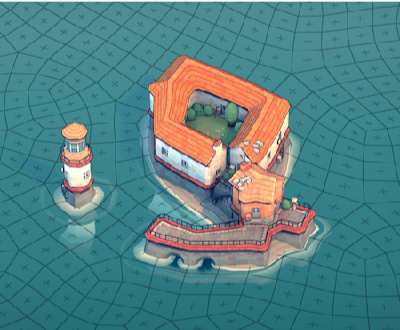
Townscaper (also available as a web-app on its author’s site) is a sandbox game I found quite relaxing. In the spirit of festival season, I want to share my town building experience with Wolfram Language. I will describe how I did it in this post, meanwhile you can enjoy a tour to this industrial style small town on YouTube.
Basically, in the game there is a 2 dimensional irregular base-grid. Building blocks can be put on grid’s vertices at any height. Players also have control of where to put blocks, the game will compute the types -- be it a house, a street ground, a piece of grassland, etc. -- according to an algorithm called “Wave function collapse”.
If you are interested in the technique details, I'd recommend Maxim Gumin’s repository on wave function collapse algorithm, as well as Oskar Stålberg’s talk Beyond Townscapers on SGC21.
My original plan was to take Graphics3D from functions like Plot3D, ParametricPlot3D, etc., “rasterize” them on the game’s grid. Unfortunately due to the limited memory of my computer, town maps that large kept crashing the game. So I thought maybe I’d better try something different.
A computable form of the base-grid
A computable form of the base-grid
Nevertheless, to design a town programmably, first I need access to the base-grid. I started from a big symmetric map kindly shared in Steamcommunity, trying to extract the grid to have a computable form.
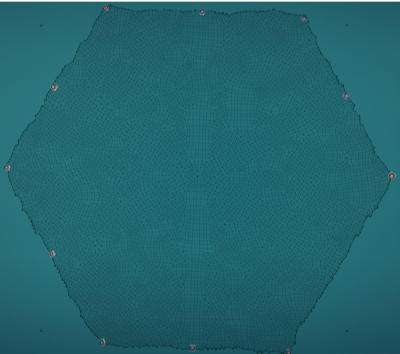
To begin with it, I took a screenshot of the empty grid:
ClearAll[ocean,rgbImg]ocean=RGBColor[0.166562091503268,0.4462832244008709,0.4762396514161214];rgbImg=
;(*^^Note:Thisisjustadummyimageheretoreducecloudnotebooksize!Useyourownfullresolutionscreenshot.*)
The grid lines looks like a color blending between black and the background ocean, so I computed its pixel-wise ColorDistance from the mean color of the ocean:
In[]:=
ClearAll[similarityMap]similarityMap=rgbImg//ColorDistance[#,ocean]&;similarityMap//ImageAdjust
Out[]=
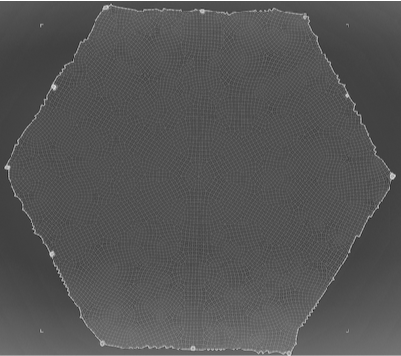
Despite a visible vignette effect, LocalAdaptiveBinarize took care of isolating the grid lines nicely:
In[]:=
ClearAll[pipe,branch,branchSeq]pipe=RightComposition;branch=Through@*{##}&;branchSeq=pipe[branch[##],Apply[Sequence]]&;ClearAll[skeletonImg]skeletonImg=similarityMap//pipe[branchSeq[LocalAdaptiveBinarize[#,10,{1,0,.02},Padding"Ignored"]&,pipe[LocalAdaptiveBinarize[#,10,{1,0,.2},Padding"Ignored"]&,Dilation[#,DiskMatrix[2]]&]],#1(1-#2)&,DeleteSmallComponents,SkeletonTransform];
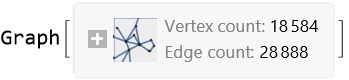
And MorphologicalGraph gave me a Graph out of the box:
In[]:=
skeletonGraph=MorphologicalGraph[skeletonImg,EdgeWeightNone]
Out[]=
Some vertices in skeletonGraph sit beside each other too much closer than the average distance around 10 pixels:
In[]:=
fullCorners=VertexCoordinates/.Options[skeletonGraph,VertexCoordinates];EdgeList[skeletonGraph]//pipe[Thread[VertexList[skeletonGraph]->fullCorners]//Dispatch//ReplaceAll,Norm[#1-#2]&@@@#&,Histogram[#,200,{"Log","Count"},PlotRangeAll]&]
Out[]=
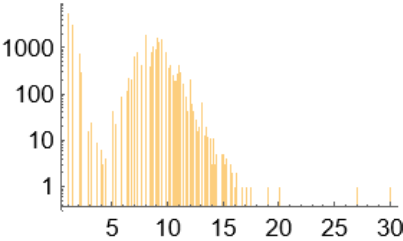
To correct that, I merged those vertices closer than 5 pixels by first looking for clusters:
In[]:=
smallClustersGraph=EdgeList[skeletonGraph]//pipe[branchSeq[Identity,pipe[Thread[VertexList[skeletonGraph]->fullCorners]//Dispatch//ReplaceAll,Norm[#1-#2]&@@@#&,UnitStep[#-5]&]],Pick[##,0]&,Graph]
Out[]=
In[]:=
smallClusters=smallClustersGraph//pipe[VertexList,Thread[VertexList[skeletonGraph]->fullCorners]//Dispatch//ReplaceAll,branchSeq[Identity,Nearest[fullCorners->VertexList[skeletonGraph]][#][[;;,1]]&],Thread[Rule[##]]&,VertexReplace[smallClustersGraph,#]&,ConnectedComponents]
Then merging them manually: (I could have used VertexContract here except it’s somehow a bit slow for this graph.)
In[]:=
AbsoluteTiming[skeletonGraph=Module[{origvlst=VertexList[skeletonGraph],elst,vlst},vlst=origvlst//DeleteCases[Alternatives@@Flatten[smallClusters[[;;,2;;]]]];elst=skeletonGraph//pipe[EdgeList,smallClusters//pipe[Map[Thread[Rest[#]->First[#]]&],Flatten,Dispatch,ReplaceAll],DeleteCases[v_v_],Map@Sort,DeleteDuplicates];Graph[vlst,elst,VertexCoordinates(vlst//pipe[smallClusters//pipe[branchSeq[#[[;;,1]]&,pipe[Thread[origvlst->fullCorners]//Dispatch//ReplaceAll,Map@Mean]],Thread[Rule[##]]&]//Dispatch//ReplaceAll,Thread[origvlst->fullCorners]//Dispatch//ReplaceAll]),GraphLayoutNone]//IndexGraph]]
Edges with extreme lengths (like those around center) were deleted, gave me the final skeletonGraph:
Indeed skeletonGraph captured almost all grid lines (except a few corner cases), gave me the wanted computable base-grid:
Align the grid
Align the grid
Townscaper auto-saves current game as plain XML in its own directory (please read Cris Love's blog for more details):
C:\Users\<user>\AppData\LocalLow\Oskar Stalberg\Townscaper\Saves\
Of course with WL’s XML importer, I can read the file and analyse it. Except, as mentioned in Cris Love’s blog, the save file only contains “corners” with building blocks, so I randomly marked the map:
That way I can compare the building blocks’ locations from save file with the ones extracted through image analysis from screenshot.
I started from centroids of individual sites, matched them with coners in skeletonGraph:
On the other hand, I can read the save file as a ground-truth:
Then easily find the relation between rendered grid and saved coordinates:
So I can match every corners to their coordinates meant to be used in save files:
Unfortunately my luck ended here. As can be seen clearly in this example, the relation between rendered grid and saved coordinates are more than just a linear fractional transformation:
As an educated guess, I think maybe what’s in the save file is a set of initial seeds for the grid relaxing algorithm (see Oskar’s tweets for details). Without knowing the algorithm I was stuck.
Or was I? -- Very thankfully, my partner got interested in this project and volunteered to fill the grid, one corner a mouse click! So here I’m, a fully filled grid with all corners present in save file:
I could see clearly most of savedCorners align with a regular grid, indeed quite different from what I got previously from fullCorners//hex2saveTF:
Now I could use FindMinimumCostFlow to find an optimal bipartite matching between them:
But the result was not quite what I wanted, due to the real target here was not exactly representable with minimum cost flow. Here is a close-up of problematic regions:
So I decided to abandon grid lines found in skeletonGraph along with hex2saveTF, just built a NearestNeighborGraph from save file:
Build a town
Build a town
The design in my mind was to “grown” a town like a tree, rooted at central corner, so first step was to give each edge a outwards direction:
I defined a growing probability rule negatively related to distance from the center:
Then performed the growing strategy for 200 iterations:
Each vertex of spanGraph became a build block:
I would like to restrict the size of the town inside a circle:
Although I couldn’t really control the types of building blocks, I could influence them, say, by how they stack or connect. So I divided blocks into two parts. The build part would then sit on top of a fully paved ground layer, and pier part would rise above water:
I planned an annular region as tall buildings along coast line:
Three inner concentric circular building regions:
And a bell towner at the center of the whole town:
Here is what the plan looks like:
The void among branches of build part looked a bit boring, so I thought it would be nice to have some urban green spaces. In Townscaper garden appears automatically whenever a ground is fully surrounded by buildings. The way I did it is a mimic of Dilation in image processing but on graph:
As previously planned I paved the ground, with a gap to coastWall, which would be rendered as a moat in game:
With region planned, next step I would stack building blocks at corresponding corners, transform and format the final result according to hex2saveTF and xmlTemplate (see code behind this part):
xmlTemplate is a template for Townscaper save file (*.scape):
Open the game, clicked Open, I saw the town I just generated right there :)
Unfortunately my town seemed too large to export as a 3D model, otherwise I’d have more fun.
Happy 2022!
Hope you enjoyed! :)
Hope you enjoyed! :)
CITE THIS NOTEBOOK
CITE THIS NOTEBOOK
Designing Townscaper town on computable base-grid
by Silvia Hao
Wolfram Community, STAFF PICKS, January 1, 2022
https://community.wolfram.com/groups/-/m/t/2435403
by Silvia Hao
Wolfram Community, STAFF PICKS, January 1, 2022
https://community.wolfram.com/groups/-/m/t/2435403