Introduction
Introduction
In tackling real - world problems, it' s crucial to understand how different factors change across various areas. This knowledge is key in a wide range of situations. For instance, we need it to check if bridges can hold up under heavy traffic, to ensure music sounds great everywhere in a concert hall, or to control how pollutants spread in rivers and lakes. Understanding these changes helps us create better, safer solutions.
To get this understanding, we use Partial Differential Equation (PDE) analysis. This method helps us look closely at how things change from one part of a structure or system to another, giving us valuable insights for making good decisions.
However, the effectiveness of PDE (Partial Differential Equation) analysis is a computationally expensive and depends heavily on setting accurate boundary conditions, a process that can be quite complex. To avoid this hurdle, we can effectively simplify and capture the complexity of nonlinear PDE dynamics in system-level modeling by using PDE and multi-domain modeling together.
Linear Beam
Linear Beam
We will start with linear vulcanized beam modeling.
Load the finite element package:
In[]:=
Needs["NDSolve`FEM`"]$HistoryLength=0;
Beam Geometry
Beam Geometry
The first step for a finite element analysis is to generate the geometric model.
Create a beam geometry:
In[]:=
length=0.5;height=0.1;thickness=height;Ω=Rectangle[{0,0},{length,height}];
Mesh Generation
Mesh Generation
Create a mesh of the geometry:
In[]:=
mesh=ToElementMesh[Ω]
Out[]=
ElementMesh[{{0.,0.5},{0.,0.1}},{QuadElement[<405>]}]
Visualize the mesh:
In[]:=
mesh["Wireframe"]
Out[]=

FEM Model
FEM Model
Next we set up the PDE model. This will be done through the . For more information, please refer to the reference page or the monograph explaining the functionality available at great length.
We choose the material data of a vulcanized rubber. Here we have two dependent variables, also called field variables, and which represent the displacement of beam in the three spatial dimensions.
u
v
We will make two models. In the first model we use a linear elastic material model. Later, in the second case we use a hyperelastic material model.
Set up a copper solid mechanics component:
In[]:=
pars=<|"ShearModulus"->441000,"Thickness"->thickness,"PoissonRatio"->0.49|>;vars={{u[x,y],v[x,y]},{x,y}};op=SolidMechanicsPDEComponent[vars,pars];
Next we discuss the boundary conditions.
Set beam to be fixed on the left:
In[]:=
Γ
fixed
Set up a downward parametric force on the right end of the beam:
In[]:=
Γ
loadParametric
Solver
Solver
To solve the PDE we set up the parametric solver. The force in the boundary load is the parameter we’d like to vary.
Make a parametric solve for the downward force:
In[]:=
pfun=ParametricNDSolveValue[{op,},vars[[1]],vars[[-1]]∈mesh,{force}]
Γ
loadParametric
Γ
fixed
Out[]=
ParametricFunction


Evaluate the parametric function for various forces and store the associated displacements:
In[]:=
parametricForces={10,25,50,75,100};AbsoluteTiming[displacements=pfun/@parametricForces;]
Out[]=
{0.0000881,Null}
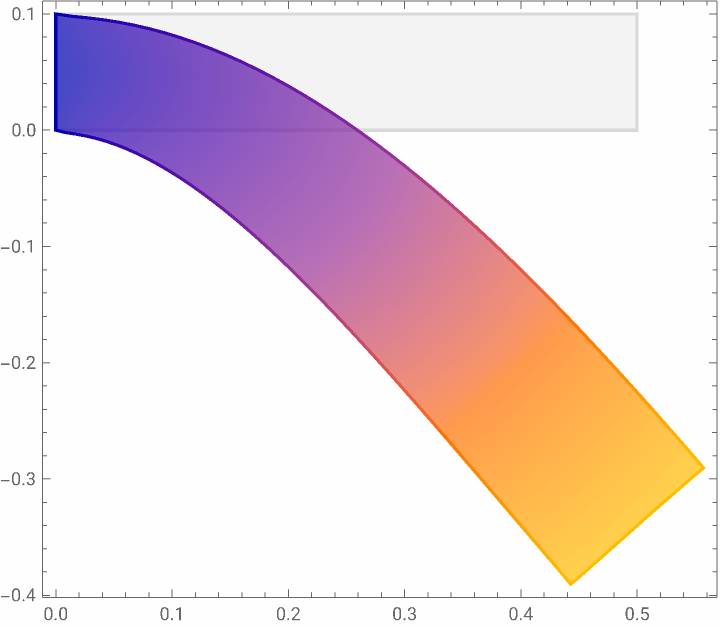
Visualize the displacement of the spring for the largest force:
In[]:=
VectorDisplacementPlot[Evaluate[displacements[[-1]]], {x, y} ∈ MeshRegion[mesh], VectorSizes -> Full]
Out[]=
Force Displacement Plot
Force Displacement Plot
In order compute the spring constant we would like to make a force/displacement plot. For this we first find a point in the geometry.
Set a point in the geometry:
In[]:=
point={length,height/2};
We compute the magnitude the the displacement and record that for the forces applied.
Evaluate the magnitude of displacement at this point for the various displacement solutions:
In[]:=
data=Transpose[{Sqrt[Total[(displacements/.Thread[Rule[{x,y},point]])^2,{2}]],parametricForces}];ListLinePlotdata,
Out[]=
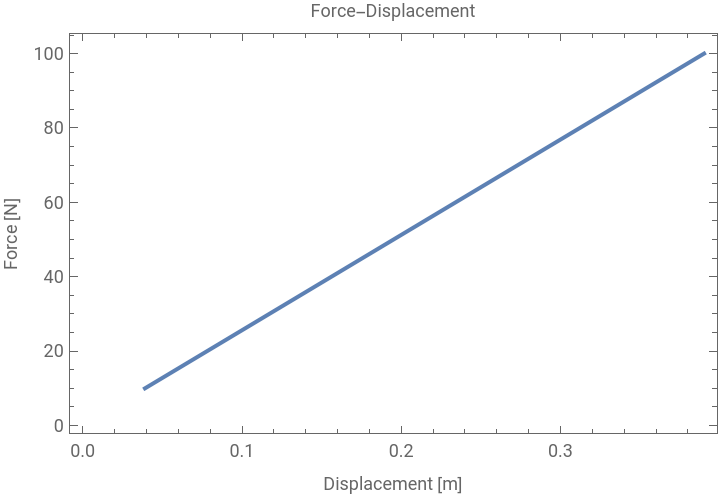
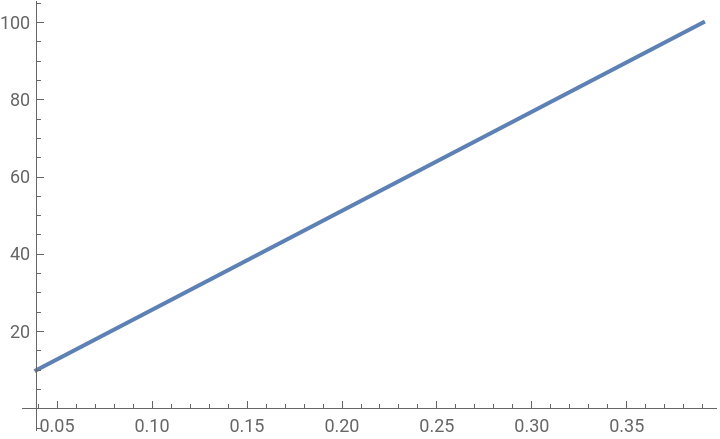
Since we have made use of a linear elastic solid mechanics material model the force displacement relation is also linear. To compute the spring constant we create an interpolating function and compute the derivative of that.
Create an interpolating function from the data:
In[]:=
if=Interpolation[data]
Out[]=
InterpolatingFunction

Visualize the interpolation function:
In[]:=
Plot[if[x],Evaluate[Flatten[Join[{x},if["Domain"]]]]]
Out[]=
Compute the derivative:
In[]:=
dx=D[if[x],x]
Out[]=
InterpolatingFunction[x]

Plot the spring constant:
Inspect the actual values of the interpolating function:
Compute the spring constant as the mean of the data:
Spring-Mass Model
Spring-Mass Model
In this section we will use the just computed spring constant in a system mass-spring model. Since the model is simple we create it in Mathematica.
Compute the mass of the beam:
Collect spring-mass system model components:
Create a system model connection:
Connect the components and set initial values for the spring constant and mass and the initial displacement:
Show how the mass position oscillates:
Show how the force varies on the beam:
Hyperelastic Beam
Hyperelastic Beam
Set up a hyperelastic material model:
Setup the PDE operator:
The boundary conditions are the same as above.
Evaluate the parametric function for various forces and store the associated displacements:
Visualize the displacement of the spring for the largest force:
Force Displacement Plot
Force Displacement Plot
For the force displacement plot we compute the magnitude of the displacement and record that with the forces.
Evaluate the magnitude of the displacement at this point for the various displacement solutions:
Now, the force-displacement relation is no longer linear.
Create an interpolating function from the data:
Visualize the interpolation function:
Compute the derivative:
Plot the spring constant:
Inspect the actual values of the interpolating function:
The spring 'constant' is now no longer constant.
Nonlinear Spring
Nonlinear Spring
To make use of the nonlinear spring data we proceed differently then in the linear case. In this case we need to create a custom model in System Modeler.
After we create a nonlinear model in System Modeler, we import it here.
Import the system model:
In our approach, we adjust the linear force-displacement relationship of the default spring component to reflect a nonlinear behavior. The linear spring constant is replaced with a forceDisplacement data is added in this custom spring component.
This data is provided using the table shown in the diagram view below, which contains data characterizing the nonlinear force - displacement relationship specific to a vulcanized hyperelastic rubber beam.
Inspect the available variables in model:
Update the force-displacement curve of the nonlinear spring component:
Simulate the nonlinear spring model in System Modeler:
Extract the position and the force of the spring:
Visualize the displacement versus the force:
There are two main things to keep in mind. First, we see negative forces and movements in our results, but these didn’t come from our original model of the rubber beam. This happens because our modeling tool, the System Modeler, fills in these negative values by itself, using the closest positive values it has from our model. Second, we notice that when the beam moves more (positive displacement), the force needed to move it also goes up. This means the beam gets harder to bend the more it is stretched.
Show how the mass position oscillates:
Show how the force varies on the beam:
Compare the displacements of the spring computed with the linear and the nonlinear material model:
Compare the forces acting on the spring computed with the linear and the nonlinear material model:
Given that the nonlinear model, represented in red, is more rigid compared to the linear model, its eigenfrequencies are higher than those of the linear model. Consequently, the displacement period in the nonlinear model is shorter than in the linear model. Additionally, the nonlinear model can withstand greater forces than the linear spring at the same level of displacement, as illustrated above.
This example demonstrates how the complexity of nonlinear PDE dynamics can be effectively simplified and captured in system-level modeling through the combined use of System Modeler and Mathematica.
CITE THIS NOTEBOOK
CITE THIS NOTEBOOK
Exploring Real-World Problems: Simplifying complexity of nonlinear PDE models
by Vedat Senol and Oliver Rübenkönig
Wolfram Community, STAFF PICKS, November 27, 2023
https://community.wolfram.com/groups/-/m/t/3072567
by Vedat Senol and Oliver Rübenkönig
Wolfram Community, STAFF PICKS, November 27, 2023
https://community.wolfram.com/groups/-/m/t/3072567