This project focuses on developing an algorithm to find the path between two points on a map that utilizes the least amount of power while minimizing elevation changes and using only existing road networks. San Francisco was taken as a city in this project due to various elevation changes that could be used as a demonstration for this project. The work involves acquiring and processing geospatial data from the Wolfram Knowledge Base and subsequently using the function to determine the best route, in addition to calculating the amount of fuel used and the subsequent costs.
FindShortestPath
Introduction
Introduction
Pathfinding is the method of getting from one point to another through the constraints of space in the most efficient way. Wolfram has a good set of pathfinding tools built-in for large distances like intercity or international travel, and resources like Google or Apple Maps provide real-time data. However, currently, the quantification of such costs in terms of fuel used or money spent is not readily available in these programs. This project aims to provide a small-scale mathematical model as a proof-of-concept to not only find the shortest path between intersections in a city based on elevation but to determine the minimum power, fuel used and subsequent costs. Due to the constraints of vehicular movement within urban environments, it is imperative to construct a road network of the environment based on available databases. The function is acknowledged; however, it does not take elevation or other factors besides distance — it most likely relies on obtaining data where necessary from OpenStreetMap. Additionally, it is preferable to minimize the usage of geographical functions like , as they need to request data externally, which increases evaluation times. Congestion was initially desired to be added as a factor as well; however, due to the map being located inside a city, the congestion is more or less homogeneous and is redundant.
TravelDirections
TravelDirections
Current online services, such as those from Google Maps or OpenStreetMap, provide some popular pathfinding algorithms based on transit, car, public transport, walking, or bicycle, and others for the general public. Here is an example of both the former (in Figure 1a generated from Input 1) and the latter (in Figure 1b) algorithms from Boston Logan Airport to Bentley University by car, where the 2025 Wolfram Summer School happened:
Input 1: Generation of travel directions from Bentley University to Logan Airport.
In[]:=
GeoGraphicsStyleLineTravelDirections,,TravelMethod"Driving",Thick,Red
a)b)
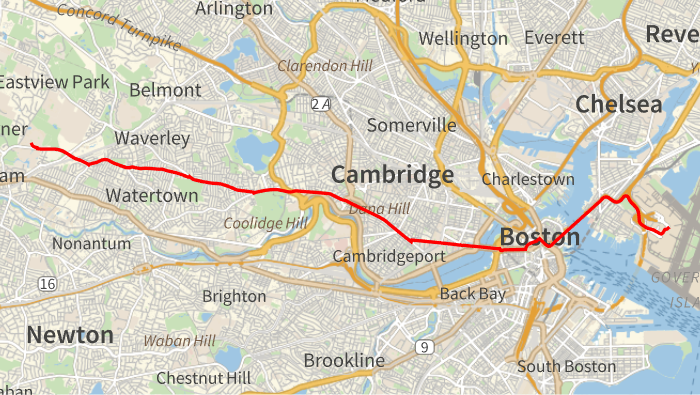
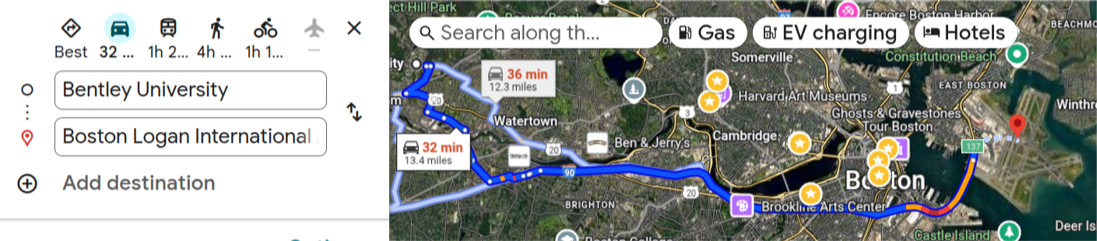
Figure 1 a) The route from Bentley University using a) the built-in system using the Wolfram Language, and b) Google Maps.
We can develop our pathfinding algorithms in order to attend to additional industry demands, such as for electric vehicles, lower fuel consumption, and better logistics, for example.
Data Parsing
Data Parsing
The first step is to find street data for the urban area of interest. Boston was selected when the project began, and a CSV file containing an array of street information was obtained from its government website [5]. For the purpose of this project, only three columns were of interest: the street name, one-way data for directed edges, and line information. Typically, the shape of a road is represented by at least one line segment. For roads that are curved or otherwise non-linear, a series of line segments is used to approximate its shape; this series is called a polyline. Input 2 shows how the parsing can be done for a sample polyline represented by well-known text (WKT), a textual way of representing geometrical objects.
Input 2: Multiline string parsing for a sample string.
bostonData="city_of_boston_managed_streets.csv"
city_of_boston_managed_streets.csv
In[]:=
string="MULTILINESTRING ((-71.084696070999939 42.302740313000072, -71.084391610999944 42.303254695000078, -71.08422257999996 42.303339480000034, -71.084151278999968 42.303403931000048))";Map[ToExpression,Map[StringSplit@*StringTrim,StringSplit[First@StringCases[string,"MULTILINESTRING"~~Whitespace~~"(("~~x__~~"))":>x],","]],{2}]
Out[]=
{{-71.0847,42.3027},{-71.0844,42.3033},{-71.0842,42.3033},{-71.0842,42.3034}}
For the CSV file, a different approach was adopted. Initially we were looking at two columns only - their street names and their shapes. Input 3 shows how the CSV file from [1] was parsed:
Input 3: Method of extracting street information from Boston and some sample output.
In[]:=
{First[#],Partition[ToExpression[StringCases[Last[#],RegularExpression["[-.[0-9]+"]]],2]}&/@Normal[Values[bostonData[All,{"STREETNAME","shape_wkt"}]]]//Column
{{CRESTHILL ROAD,{{-71.1585,42.356},{-71.1581,42.356}}},{ROCKVALE CIRCLE,{{-71.1048,42.307},{-71.1047,42.3069}}},{ALLSTON STREET,{{-71.1378,42.3483},{-71.1377,42.3484}}},{ROXBURY STREET,{{-71.091,42.3301},{-71.0914,42.33}}},{LONGWOOD AVENUE,{{-71.1083,42.3395},{-71.1083,42.3395},{-71.1078,42.3392},{-71.1073,42.3389}}}}
Path Setup
Path Setup
Due to the shape of the counties surrounding Boston, some limitations were present when trying to move laterally. For example, consider trying to move from an area in Brighton to West Roxbury using only information about Boston roads as shown in Figure 2. The steps to generate the code are written in Input 4:
Input 4: The method of generating the road network using the CSV file and overlaying it on a map.
points={GeoPosition[{42.34949,-71.15330}],GeoPosition[{42.27860,-71.14883}]};labels={"Brighton","West Roxbury"};bostonMap=Graphics[{Gray,Tooltip[Line[#2],#1]&@@@streetData},AspectRatio->Automatic];Show[bostonMap,GeoGraphics[{Red,AbsolutePointSize[5],Point[points],Red,Style[Text[labels[[1]],points[[1]],{1,1}],12,Bold],Red,Style[Text[labels[[2]],points[[2]],{1,1}],12,Bold]}]]
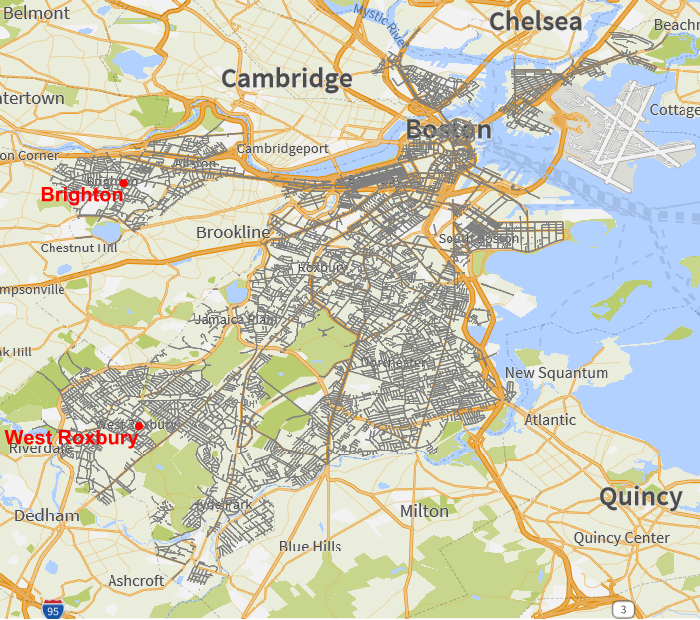
Figure 2: A map of Boston generated with the function overlaid on , with the suburbs Brighton and West Roxbury labeled. As seen here, the two suburbs straddle a different county and thus are not included within the CSV file.
Line
GeoGraphics
There is missing data south of Brighton because that area is not inside the county. Therefore it was decided to go with San Francisco for the project due to a more regular county structure and more changes in elevation. A CSV file containing street data was obtained from the official DataSF website [6], and the street names, their directional information, and their line shapes (in the form of multi-line strings, which were obtained using the earlier methodology) were parsed in Input 5 and drawn as a graphic in Figure 3:
Input 5: The method of generating the San Francisco map.
In[]:=
fullMap=Graphics[{Gray,Tooltip[Line[#3],#1]&@@@streetData},AspectRatio->Automatic]
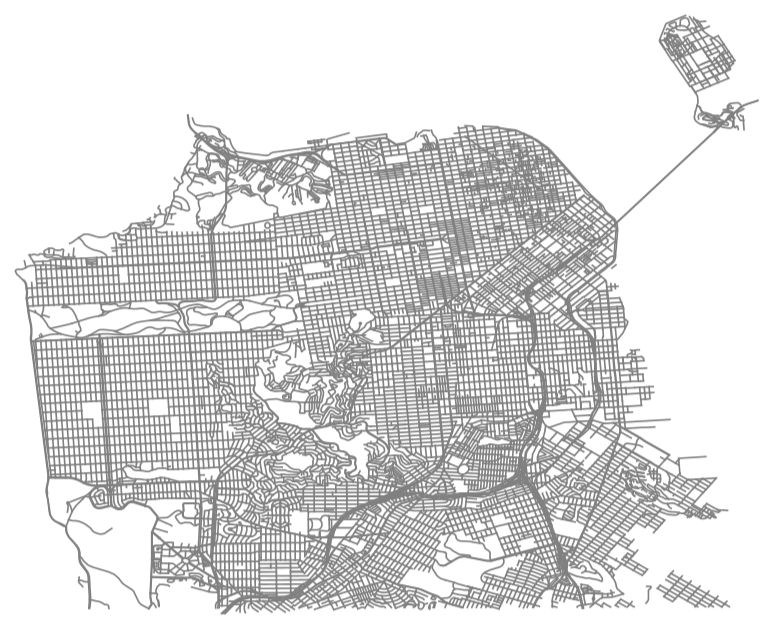
Figure 3: A map of San Francisco drawn with the Line function.
The next step was to create a partially directed graph where bidirectional streets are represented by undirected edges and one way streets are represented by directed edges.
There are three data associated with each street which are stored in a list: its name, its one way data and its coordinate data. Input 6 takes the street data and returns a list of edges with rules for the street names, along with the geodesic distances (critical to use due to the shape of the Earth) and the elevation change for each edge:
There are three data associated with each street which are stored in a list: its name, its one way data and its coordinate data. Input 6 takes the street data and returns a list of edges with rules for the street names, along with the geodesic distances (critical to use due to the shape of the Earth) and the elevation change for each edge:
Input 6: Definition of edges, distances and elevation data. Evaluating the deltaElevation variable is very time-consuming; it is recommended to iconize the data when it is completed.
edgesWithLabels=Catch@Catenate Map Module{edge}, edge=Switch#1[[2]], "B",MapApply[UndirectedEdge,Partition[#1[[3]],2,1]], "T",MapApply[DirectedEdge,Partition[#1[[3]],2,1]], "F",MapApply[DirectedEdge,Partition[Reverse[#1[[3]]],2,1]], _,Print[StringTemplate["Unrecognized street direction `` encountered."][#1[[2]]]]; Throw[$Failed] ; Thread[edge->#1[[1]]] &, streetData ;
distances=GeoDistance@@@(List@@@Keys[Reverse/@edgesWithLabels]);deltaElevation=Map[GeoElevationData@*Reverse,List@@@Keys[edgesWithLabels],{2}]//QuantityMagnitude[#,"Meters"]&//Map[Reverse]//MapApply[Subtract];
“B” means the street goes both ways and is undirected, “T” means the street is one-way in the direction of the following street, and “F” means it is one way in the direction of the previous street. Thus we reverse the direedge for streets containing an “F” by itself in the list.
We then create a graph using distances and elevations as weights in Input 7 to create a graph in Figure 4:
cted
We then create a graph using distances and elevations as weights in Input 7 to create a graph in Figure 4:
Input 7: Method to create a graph.
graph=Graph edgesWithLabels[[All,1]], EdgeLabels->edgesWithLabels, VertexLabels->Placed["Name",Tooltip], EdgeWeight->distances ;
Figure 4: The graph itself. Note that the graph does not match the visual image as it uses its own algorithms to construct itself.
Figure 5: Map of San Francisco with intersections found within the first 300 streets.
The outputs are contained in a dataset for future use with the columns “Street 1”, “Street 2”, and “Intersection”. There are numerous duplicate street names when the dataset is created. This is due to how the CSV data is formatted. A junction between any two line segments is marked as an intersection even if they are part of the same road. Below, in Figure 6, the green and blue lines constitute the same street, yet their junction (marked in black) is marked as an intersection.
Figure 6: Demonstration of the polyline functionality. Intersections are marked in black.
To circumvent this, a filter function is applied to check if the values in “Street 1” and “Street 2” match and all instances thereof are removed. The result of such filtering is shown in Figure 4.
Power Cost Function
Power Cost Function
The next step is to define the function for the cost in power, fuel and money spent. The model used is largely based on a paper by Loulizi et al. (2016) [1]. It was initially decided to recreate the methodology in the paper and use several different equations and variables, such as air density, drag coefficient, vehicular parameters and rolling resistances, to represent the fuel consumed. However, a simplification was made to instead use curve fitting on the data shown in the results as a function of two variables only: the grade (in meters per meter) and speed (in km/h) to save resources. Robert Nachbar was extremely helpful in showing how to fit curves in Wolfram and helped parse the graph data from the rasterized image and obtained the graph in Figure 7.
Figure 7: Original Data from [1]
Figure 7: Original Data from [1]
Input 7: Fitting for the relevant data.
Table 1: Parameter table for the quadratic fit including P-values.
However, while the right hand side of the curve was very well-fitted, it did not account well for the flatness on the left side as seen below in Figure 7:
Figure 7: Initial fitting with a quadratic function.
Therefore an exponential fit was found to be the most reasonable as its curve approximates the shape of each of the results quite well. This was an iterative process of model fitting. We wanted a single function to describe all available curves, and for this project we used Input 8 to get the parameter table in Table 2 and the final form shown in Figure 8:
Input 8: The nonlinear model fit and its parameter table.
Table 2: The parameter table for the exponential fit.
Figure 8: Exponential fitting for the data.
It is acknowledged that there is some systematic deviation in the fit of the 160 km/h data; however, the speed in this project will be relatively low (<50km/h) and thus the model should be suitable for our purposes.
Thus we arrive to the final equation in Input 9 based on the best fit of the curves:
Input 9: Finding the best fit.
This formula is implemented in Input 10 — a function that takes the start point, end point, and specified speed. It calculates the grade and speed and plugs them into the above equation, converting units where necessary. As this city is in the US, it is preferable to use US-based units, so the units were converted appropriately.
Input 10: Function to calculate the overall power consumption.
Travel Directions
Travel Directions
Input 11: The custom travel directions function including several helper functions.
Manipulator
Manipulator
The final part of the project as shown in Input 12 was to create an interactive manipulator to visually show the lowest energy-demand path, a plot of the elevation, and the costs with a slider for the speed:
Input 12: Functionality for the manipulator.
Figure 9a) (top left): Visualization of the manipulator. 9b) (top right) Elevation profile along the route. 9c) (bottom) Travel directions for the route.
Concluding Remarks
Concluding Remarks
A method was made for San Francisco using street data from OpenSF [6]. Intersections were parsed from the CSV file and turned into a graph and a graphic for visualization. The fuel costs in the user-selected route can be modelled through curve fitting from [1]. This all ultimately led to an interactive manipulator feature that allows for easy visualization of the path and its corresponding elevation profile along with custom travel directions.
Further work:
- Publish this new pathfinding algorithm at the Wolfram Function Repository
- Publish this project at Wolfram Demonstrations Project
- Extend this project to cover all roads in all the USA territory
- Publish this new pathfinding algorithm at the Wolfram Function Repository
- Publish this project at Wolfram Demonstrations Project
- Extend this project to cover all roads in all the USA territory
Acknowledgements
Acknowledgements
I would like to thank Robert Nachbar for his invaluable mentoring throughout the program — his guidance accelerated my work tremendously. I would also like to thank Daniel Carvalho for showing how to extract the data properly from the street data CSV files and for his additional support throughout the program. Lastly, I want to thank Lina Ruiz and Eric Parfitt for helping me with creating a dataset of intersections and reversing coordinates to match GeoPosition formatting respectively.
References
References
[1] Loulizi, A., Rakha, H., & Bichiou, Y. (2017). Quantifying grade effects on vehicle fuel consumption for use in sustainable highway design. International Journal of Sustainable Transportation, 12(6), 441–451. https://doi.org/10.1080/15568318.2017.1385878
[2] Hesham A. Rakha, Kyoungho Ahn, Kevin Moran, Bart Saerens, Eric Van den Bulck, Virginia Tech Comprehensive Power-Based Fuel Consumption Model: Model development and testing, Transportation Research Part D: Transport and Environment, Volume 16, Issue 7,
2011, Pages 492-503, ISSN 1361-9209, https://doi.org/10.1016/j.trd.2011.05.008.
[3] https://data.sfgov.org/Geographic-Locations-and-Boundaries/Streets-Active-and-Retired/3psu-pn9h/about_data
[4] U.S. Environmental Protection Agency (EPA) (May 2011). “New Fuel Economy and Environment Labels for a New Generation of Vehicles”. EPA. Archived from the original on 2016-12-20. Retrieved 2016-12-12.
[5] City of Boston Managed Streets, (2025) https://data.boston.gov/dataset/city-of-boston-managed-streets
[6] Streets – Active and Retired (2025) https://data.sfgov.org/Geographic-Locations-and-Boundaries/Streets-Active-and-Retired/3psu-pn9h/about_data
[2] Hesham A. Rakha, Kyoungho Ahn, Kevin Moran, Bart Saerens, Eric Van den Bulck, Virginia Tech Comprehensive Power-Based Fuel Consumption Model: Model development and testing, Transportation Research Part D: Transport and Environment, Volume 16, Issue 7,
2011, Pages 492-503, ISSN 1361-9209, https://doi.org/10.1016/j.trd.2011.05.008.
[3] https://data.sfgov.org/Geographic-Locations-and-Boundaries/Streets-Active-and-Retired/3psu-pn9h/about_data
[4] U.S. Environmental Protection Agency (EPA) (May 2011). “New Fuel Economy and Environment Labels for a New Generation of Vehicles”. EPA. Archived from the original on 2016-12-20. Retrieved 2016-12-12.
[5] City of Boston Managed Streets, (2025) https://data.boston.gov/dataset/city-of-boston-managed-streets
[6] Streets – Active and Retired (2025) https://data.sfgov.org/Geographic-Locations-and-Boundaries/Streets-Active-and-Retired/3psu-pn9h/about_data
CITE THIS NOTEBOOK
CITE THIS NOTEBOOK
Finding Low-Energy-Demand Routes in Urban Settings: Distance, Grade, and Speed Trade-Offs
by William Creighton
Wolfram Community, STAFF PICKS, July 9, 2025
https://community.wolfram.com/groups/-/m/t/3497596
by William Creighton
Wolfram Community, STAFF PICKS, July 9, 2025
https://community.wolfram.com/groups/-/m/t/3497596