Brian, I am using a logistic model fit almost exactly like yours. I couldn’t find a data set exactly like yours but this one is close. If you would post your data it would take only a few seconds to use your data.
In[]:=
covid19Data=ResourceData["Epidemic Data for Novel Coronavirus COVID-19"];
In[]:=
okData=covid19Data@Select#Country===&&#AdministrativeDivision===&;
In[]:=
okDeaths=okData[Total,"Deaths"]//Normal;
These are the points.
In[]:=
data={DateDifference[DateObject[{2020,3,22}],#1][[1]],#2}&@@@Select[okDeaths,#[[1]]>DateObject[{2020,3,22}]&]
Out[]=
{{1.,2},{2.,3},{3.,5},{4.,7},{5.,8},{6.,15},{7.,16},{8.,16},{9.,23},{10.,30},{11.,34},{12.,38},{13.,42},{14.,46},{15.,51},{16.,67},{17.,79},{18.,80},{19.,88},{20.,94},{21.,96},{22.,99},{23.,108}}
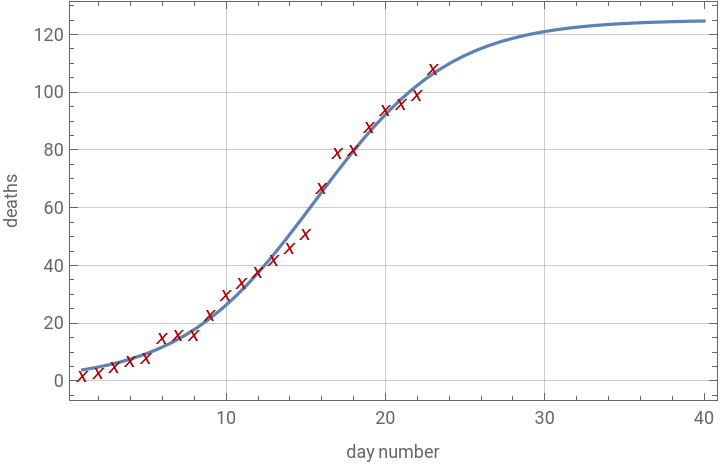
The model parameters I use are a little different from yours. L is your numerator. t0 is the point in time where the peak of the first derivative occurs, you get it for free when you parameterize this way. k is the same as your rate parameter, and k*t0 gives your third parameter. Since the data points are not the same, the fit is a little different.
In[]:=
nlm=NonlinearModelFitdata,,{{k,0.3},{L,data[[-1]][[2]]},{t0,data[[-1]][[1]]}},t;
L
1+
-k(t-t0)
In[]:=
param={k,L,t0}/.nlm@"BestFitParameters"
Out[]=
{0.236041,125.066,15.6069}
Your third parameter.
In[]:=
param[[1]]param[[3]]
Out[]=
3.68388
In[]:=
nlm//Normal
Out[]=
125.066
1+
-0.236041(-15.6069+t)
A similar plot to yours.
In[]:=
Show[Plot[nlm[t],{t,1,40},GridLinesAutomatic,FrameTrue,FrameLabel{"day number","deaths"}],ListPlot[data,PlotMarkers{"x"},PlotStyleDarker@Red]]
Out[]=
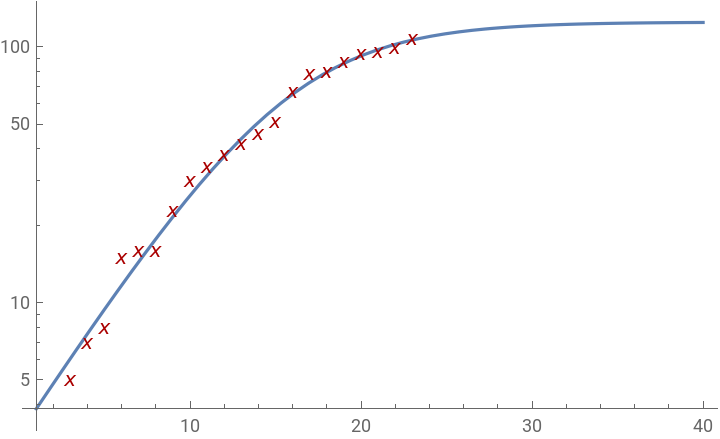
A log plot which I use to show that the case data are not so accurate. Death is a hard end point, and is likely to be reported within a day or two of the event. And all the death cases were likely tested to protect the medical staff. So it is not surprising that the death data look more accurate. Positive test reports are another animal. The result is posted after it is discovered, but the person might have been infected for a month. Initially there was also a several day delay in getting test results.
In[]:=
Show[LogPlot[nlm[t],{t,1,40}],ListLogPlot[data,PlotMarkers{"x"},PlotStyleDarker@Red]]
Out[]=
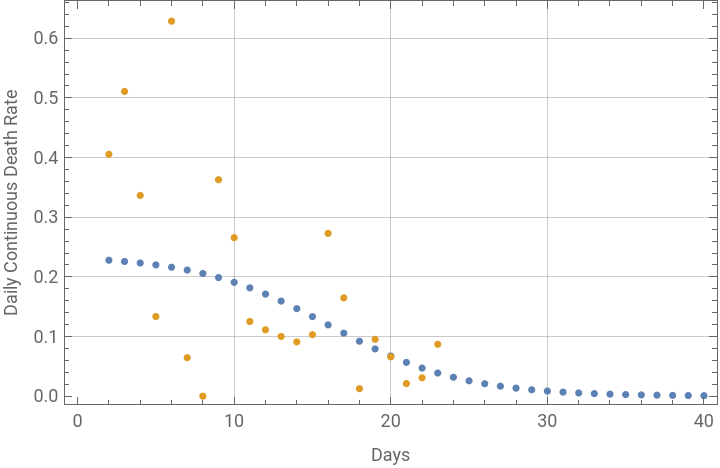
This is how the daily differences were done. Log was taken of the raw data points then they were differenced to get the daily continuous rate from the data. The difference points were aligned with the second day of the interval. This is very different from a first derivative curve.
In[]:=
dataLogDiff=Transpose[{Rest[data[[All,1]]],Differences[Log@N@data[[All,2]]]}];
For the model, the fit was applied to the day numbers to get the death count at the day as predicted by the fit. Then the log and differences were applied exactly the same way as for the raw data.
In[]:=
modelLogDiff=Transpose[{Range[2,40],Differences[Log[nlm/@Range[1,40]]]}];
The same plot for the data similar to yours is below. The idea of the plot is not so useful for deaths because they are going to lag the case data. The idea for using it with the case data is to use the model to show when the quarantine measures are actually beginning to work. And for cases, this plot does show convergence for most of the data.
In[]:=
ListPlot[{modelLogDiff,dataLogDiff},GridLinesAutomatic,FrameTrue,FrameLabel{"Days","Daily Continuous Death Rate"}]
Out[]=
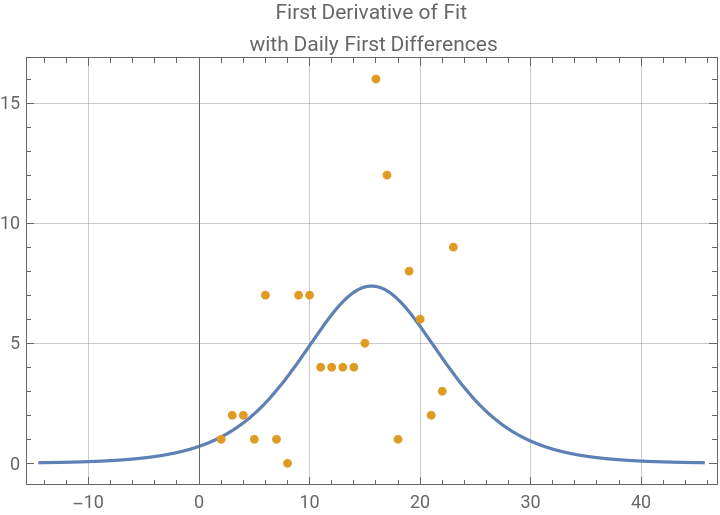
This is the plot of first derivative of the fit. The first derivative of the model is always symmetric, but the data may not be. But there is no way to get a good estimate of the peak from the raw data. The rate plot above does suggest that the death data early on might be a little further from the fit, but the plot of the first differences to estimate the first derivative is useless.
In[]:=
Show[Plot[nlm'[t],{t,param[[3]]-30,param[[3]]+30},PlotRangeAll,GridLinesAutomatic,FrameTrue,PlotLabel"First Derivative of Fit\n with Daily First Differences"],ListPlot[Transpose[{Rest[data[[All,1]]],Differences[data[[All,2]]]}],PlotStyleColorData[97][2]]]
Out[]=
It you would like to post your data points, I would be happy to redo this with your exact data.
Bob
Bob