The purpose of my project is to track and analyze how the pupil dilates after exposure to illumination using image processing functions in the Wolfram Language. First, I collected and organized primary data from volunteers using Wolfram Language tools. I used a combination of image adjustments and image segmentation functions to achieve this. I then plotted the results.
Study of pupil dilation
Study of pupil dilation
There is two types of muscles which is responsible for changing in the pupil size. The parasympathetic nervous system innervates the circumferential (sphincter muscle), which is located in the iris edge, and the (iris dilator muscle), which extends radially from the iris root to the sphincter's periphery. Together, these two muscles control the size of the pupil. Additionally, the visual cells of the retina which is rods and cones they controls the pupillomotor activity. Pupil dilation is when the center of the iris grows bigger to let more light in.
Primary Data Collection and Experimentation
Primary Data Collection and Experimentation
Experiment - Procedure
To retrieve the data, first I had to follow this procedure below:
Prepare a dark room
Prepare a dark room
The setup room had minimal light and every part of the room was blocked with black curtain to make sure no external light source is available in the room.
Positioning of the Participants
Positioning of the Participants
Incorrect positioning of the head while capturing the video of the eye will provide error which impacts the overall data. Participants must sit in front of the computer with their head straight. Here, I used a bottle to rest their chin so that the head is placed in correct position. The bottle was placed in center of the computer screen making sure it touches the computer .
Recording and brightness
Recording and brightness
I evaluated VideoCapture[] to start the recording of the eye. Secondly, I dimmed the computer brightness gradually until the screen is dark. The next step included sitting in the darkness for 30 seconds while looking at the camera straight. After 30 seconds of darkness, the pupil would be exposed to full-light for 5 seconds. For the light, I have used iPhone's highest brightness flashlight. After 5 seconds the recording has been stopped.
Controlled variables
Controlled variables
1. Dark room
2. Distance between the eye and the camera
3. Intensity of light
4. Length of video capture
5. Amount of time when pupil was exposed to light
2. Distance between the eye and the camera
3. Intensity of light
4. Length of video capture
5. Amount of time when pupil was exposed to light
Tracking and Pupil Detection
Tracking and Pupil Detection
Video preprocessing
Video preprocessing
After collecting the videos according to the procedure above, I needed to organize and process the data. Since I want to protect the volunteers' privacy, instead of using the actual video I captured, I'm using a video from the Wolfram documentation to demonstrate the process.
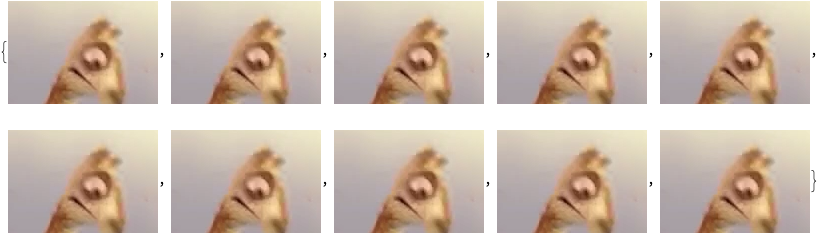
Each of the videos was too long , that's why I used VideoTrim[] to trim the video to only include the part where pupil was exposed to full light.The isolateEyeFrames function is intended to extract and isolate frames of the left eye from a video based on the given videoData and position of the eye. VideoFrameList[] generates a list of video frames which divides the trimmed video obtained from myVideoTrim into each frame (30 frames/second for 5 seconds). The reason why I trimmed 150 frames for each data is to observe and analyze the change in the pupil size clearly. The gradual change in the pupil in frame enhances the visibility and makes the pupil size more easily detectable.
Get example video from Wolfram knowledgebase:
In[]:=
exampleVideo=Video["ExampleData/Caminandes.mp4"]
Out[]=
Define necessary variables for starting time and position of the crop:
In[]:=
exampleData=<|"Video"->exampleVideo,"StartingTime"->25,"LeftEyePosition"->{{120,222},{311,460}}|>;
Define function to trim the video:
In[]:=
myVideoTrim[video_,startingtime_]:=VideoTrim[video,{startingtime,startingtime+5}];
Define isolateEyeFrames:
In[]:=
isolateEyeFrames[videoData_]:=ImageTake[#,videoData["LeftEyePosition"][[1]],videoData["LeftEyePosition"][[2]]]&/@VideoFrameList[myVideoTrim[videoData["Video"],videoData["StartingTime"]],30*5]
Isolate the area of interest from the example video:
In[]:=
exampleVideoFrames=isolateEyeFrames[exampleData];exampleVideoFrames[[;;10]]
Out[]=
Import the frame data for each of the experimental data sets:
In[]:=
georgeEyeFrames=CloudGet[CloudObject[
https://www.wolframcloud.com/obj/2887f7d6-9806-4629-af1a-c5eca60a09bb
]];In[]:=
alisaEyeFrames=CloudGet[CloudObject[
https://www.wolframcloud.com/obj/e755b9df-3bcf-48fd-8f68-58e370daeb57
]];In[]:=
danaeEyeFrames=CloudGet[CloudObject[
https://www.wolframcloud.com/obj/420bd5c8-6989-498e-9793-ff0eddaa493a
]];In[]:=
sophieEyeFrames=CloudGet[CloudObject[
https://www.wolframcloud.com/obj/8efcf19e-3402-424d-b507-e2a701e7afe4
]];In[]:=
isabelEyeFrames=CloudGet[CloudObject[
https://www.wolframcloud.com/obj/b3c9dda8-551c-4d57-9dd3-b1cbacf84e40
]];Find pupil size
Find pupil size
Image preprocessing
Image preprocessing
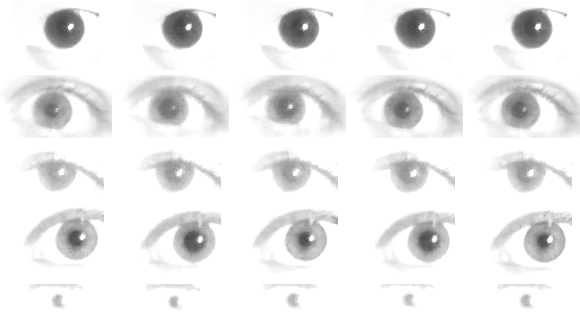
We need to modify the image that is provided. Increase the brightness and contrast makes each of the points distinct and easy to detect. Converting the image to grayscale allows us to ignore color differences and only look at brightness.
Process the image:
In[]:=
processImage[rawImage_]:=ColorConvert[ImageAdjust[rawImage,{0.6,0.2}],"Grayscale"];
allFrameData is using association to store the key and values for each of the data provided:
In[]:=
allFrameData=<|"George"->georgeEyeFrames,"Alisa"->alisaEyeFrames,"Danae"->danaeEyeFrames,"Sophie"->sophieEyeFrames,"Isabel"->isabelEyeFrames|>;allProcessedData=Map[processImage,allFrameData,{2}];
Show 5 random frames from each eye to illustrate the adjustments:
In[]:=
Grid[Values[Map[RandomSample[#,5]&,allProcessedData]]]
Out[]=
Find darkest points
Find darkest points
Finding the darkest spot in the image with the help of findDarkestPosition would enable us to detect the pupil radius easily . Additionally, MinDetect allows the darkest points in the image visible . Overall, it improves the image that is provided, making it easier for us to analyse it .
Define findDarkestPositions:
In[]:=
findDarkestPositions[image_,distance_]:=MinDetect[image,distance];
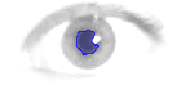
To get a better view of the image and to easily detect the darkest region of the pupil we need to highlight the points. Providing a specific threshold aids the HightlightImage to outline the pupil on the image
Define highLightDarkestPositions and HighlightImage:
In[]:=
hightlightDarkestPositions[image_,distance_]:=HighlightImage[image,{Blue,findDarkestPositions[image,distance]}];
Here's an example of how hightlightDarkestPositions works on the data:
In[]:=
In[]:=
hightlightDarkestPositions[testImg,0.22]
Out[]=
Separate pupil from image
Separate pupil from image
After getting a clear frames of the each data. Firstly, I fitted a circle into the pupil using the functions shown below. As it will be exhausting to do it manually for 150 frames, I made a function which would take all the frames in a list and will fit a circle around the pupil.Secondly,to detect the darkest positions of the pupil we have to precisely locate a circle in the pupil. In order to enhance the overall image I used DeleteSmallComponents which would remove the unnecessary spot in the image by making it focused. Lastly, I used MorphologicalComponents for identifying the specific shape which would include the darkest points in the image.
In[]:=
findPupil[image_,distance_]:=MorphologicalComponents[DeleteSmallComponents[MorphologicalComponents[findDarkestPositions[image,distance]]],Method->"BoundingDisk"];
Here is an example of how circle is fitting on the pupil.
Manually review pupil fit
Manually review pupil fit
The variable distanceThreshold is mainly associating the function as key and value.
Here distanceThresholds is storing all the keys. However, for each key the value is different, as each video had slightly different processing needs.
Here distanceThresholds is storing all the keys. However, for each key the value is different, as each video had slightly different processing needs.
In[]:=
Define the function distanceThresholds:
Define the function distanceThresholds:
Here is an example of how distanceThresholds work in all the data.
Now, I have used map which has created an association to take a list of all pupil data that is provided. Furthermore, to outline the pupil for each image I had to determine specific ranges for each image.
Here is an illustration of how distanceThresholds functions across all data.
Define allPupilData:
Show highlighted pupil to check accuracy
Show highlighted pupil to check accuracy
To show the data all at once I have made a function.The main purpose of this function is to show all the data where circle has fitted the pupil. Unfortunately, the circle did not completely outline the entire pupil as after lot of trial and error I could not find the perfect range for the circle to cover the whole pupil. Additionally, the reason why the circle did not fit well for each pupil is that, some iris's color is darker or same color as the pupil , which has confused the boundingDisk which part to outline. As we can see in the fourth and fifth row, the circle has almost covered the whole pupil because their iris have lighter color than their pupil. The presence of the eyelashes during image cropping may also be a factor in why the circle did not fit the pupil properly because highlightImage has outlined that area. I had to use a pure anonymous function to illustrate the circle has fitted on all the pupil.
Here is a random sample of all the data each framed for five times. HighlightImage is highlighting the provided image. Map is applying HighlightImage to each of the element in the list.
Define testData:
Measure pupil radius
Measure pupil radius
To find the area of the pupil I had to create a function which would calculate the radius of the pupil based on the given data. Moreover, to measure the properties of the connected components in the Colorize[pupilData] image I have used ComponentMeasurements.
Example of how pupilRadius works on the code.
Define pupilRadius:
Here, radiusData is storing all the data of each pupil by the help of map.
Results
Results
Plotting pupil size over time
Plotting pupil size over time
Now I will plot the pupil radius as a function of time (s) and find a best fit line for each set of data. This will allow us to compare the changes in pupil radius between test subjects.
Define a function to plot the radius data over time with a best fit line:
Now I will discuss more detail about each of the graph. What was my expectation and why each of them are different.
Isabel, Sophie, Alisa
Isabel, Sophie, Alisa
These graphs show the expected change in pupil size. Once the eye is exposed to full light, the pupil contracts very quickly and then goes back to close to the starting size after 5 seconds. Nevertheless, they are all distinctly different from one another due to change in pupil size.The circle has almost outlined for Sophie's pupil.I expected the graph to have a smooth parabola shape but, the graph could have been much better if the circle would have completely encircled the pupil. For Isabel's eye I have the same explanation. Lastly, for Alisa's eye the result was not unexpected. For most frames, the circle has more precisely fitted the pupil which has created cleaner data.
George
George
George's graph shows almost a linear progression and as we can see the points are scattered all around the place. This is because the circle also highlighted some part of the iris, which is nearly as dark as the pupil.
Danae
Danae
Danae's graph shows that, the radius gradually increases over time(s). Personally, I expected it have a little more curvey line but, the result was not what I imagined. The explanation to this is that while highlighting the pupil, the lashes were also in the highlighting range which led to less accurate measurements.
Conclusion
Conclusion
My first thought about my project is that, there is a lack of accuracy in my primary data collection. I think precise method on how to retrieve the data would help on the data collection. More accurate data would lead to a more precise result.
Acknowledgement
Acknowledgement
I would like to express my sincere gratitude to all those who have helped me throughout my project. I am immensely thankful to my mentor Isabel Skidmore for her valuable guidance and support! I am also thankful to my TAs Sophie Chen and Henry Gustafson for your amazing support!
Thanks to the directors for your encouragement and support!
Thanks to the directors for your encouragement and support!
Bibliography
Bibliography
Spector, R. H. (1990, January 1). The Pupils - Clinical Methods - NCBI Bookshelf. The Pupils - Clinical Methods - NCBI Bookshelf. https://www.ncbi.nlm.nih.gov/books/NBK381/#:~:text=The%20normal%20pupil%20size%20in,pupil%20dilates%20in%20the%20dark
CITE THIS NOTEBOOK
CITE THIS NOTEBOOK
Track and analyse pupil dilation after exposure to illumination
by Anusheh Shreonty
Wolfram Community, STAFF PICKS, July 13, 2023
https://community.wolfram.com/groups/-/m/t/2963135
by Anusheh Shreonty
Wolfram Community, STAFF PICKS, July 13, 2023
https://community.wolfram.com/groups/-/m/t/2963135