ORIGINAL ARTICLE: Oliver James, Eugénie von Tunzelmann, Paul Franklin, Kip S. Thorne; Visualizing Interstellar’s Wormhole. American Journal of Physics 1 June 2015; 83 (6): 486–499. https://doi.org/10.1119/1.4916949
CUSTOMER STORIES: Academy Award-Winning Interstellar Visuals Prototyped with the Wolfram Language
CUSTOMER STORIES: Academy Award-Winning Interstellar Visuals Prototyped with the Wolfram Language
Let me start off by saying that I know almost nothing about general relativity, but I thought it was really fun translating the equations presented in this paper by Oliver James, Eugenie von Tunzelmann, Paul Franklin, and Kip Thorne into notebook expressions.
Embedding Diagrams
Embedding Diagrams
The paper gives some really cool figures to show the curvature of 4-dimensional spacetime in the region around a wormhole. The physics of the wormhole is essentially described by three parameters:
1
.ρ
2
.a
3
.M
To look at the curvature for a given set of parameters, we only really care about the ratios and .
a/ρ
M/ρ
Taking equations (5) and (6) from the paper, we can plot the curvature for any pair of these parameters using cylindrical coordinates. Since the coordinate is described found via numerical integration, I chose to speed up the ParametricPlot3D by first forming an interpolating function.
z
In[]:=
embeddingDiagram[a_,M_,lmax_:4]:=Module[{ρ=1,z,zz,x,r},x[l_]:=(2(Abs[l]-a))/(π*M);r[l_]:=ρ+UnitStep[Abs[l]-a](M(x[l]*ArcTan[x[l]]-1/2Log[1+(x[l])^2]));z[l_]:=NIntegrate[Sqrt[1-(UnitStep[Abs[ll]-a](2ArcTan[(2(-a+Abs[ll]))/(Mπ)]Sign[l])/π)^2],{ll,0,l}];zz=Interpolation@({#,z[#]}&/@Subdivide[lmax,20]);ParametricPlot3D[{{r[l]Cos[t],r[l]Sin[t],zz[l]},{r[l]Cos[t],r[l]Sin[t],-zz[l]}},{l,0,lmax},{t,0,2π},PlotStyle->Directive[Orange,Specularity[White,50]],Boxed->False,Axes->False,ImageSize->500,PlotPoints->{40,15}]]
and here are three examples shown in the paper,
In[]:=
embeddingDiagram[0.005,0.05/1.43]embeddingDiagram[0.5,0.014]embeddingDiagram[0.5,0.43,10]
Out[]=

Out[]=

Out[]=

Tracing rays through the wormhole
Tracing rays through the wormhole
The appendix to the paper describes a procedure for creating an image taken from a camera on one side of the wormhole. The procedure involves generating a map from one set of spherical polar coordinates (the “camera sky”) to the “celestial spheres” describing the two ends of the wormhole.
First a location is chosen for the camera, then light rays are traced backwards in time from the camera to one of the two celestial spheres. This ray tracing involves solving 5 coupled differential equations back from to minus infinity (or a large negative time).
First a location is chosen for the camera, then light rays are traced backwards in time from the camera to one of the two celestial spheres. This ray tracing involves solving 5 coupled differential equations back from
t0
For this I use ParametricNDSolve. The functions being solved for are the spherical coordinates of the light rays and their momenta.
The parameters for ParametricNDSolve are the wormhole parameters listed above, the camera’s position {lcamera, θcamera, ϕcamera} and the “camera sky” coordinates, used to build the map. Rather than walk through their derivation (again, not a cosmologist), I cite the paper for the equations given below:
In[]:=
rayTrace=Module[{(*auxilliaryvariables*)nl,nϕ,nθ,pϕ,bsquared,M,x,r,rprime,(*parametersforParametricNDSolve*)θcamsky,ϕcamsky,ρ,lcamera,θcamera,ϕcamera,W,a,(*timedependentparameterstobesolvedfor*)l,θ,ϕ,pl,pθ,(*thetimevariable*)t},(*Eq.(7)*)M=W/1.42953;(*Eq.5*)x[l_]:=(2(Abs[l]-a))/(π*M);r[l_]:=ρ+UnitStep[Abs[l]-a](M(x[l]*ArcTan[x[l]]-1/2Log[1+(x[l])^2]));rprime[l_]:=UnitStep[Abs[l]-a](2ArcTan[(2(-a+Abs[l]))/(Mπ)]Sign[l])/π;(*Eq.A.9b*)nl=-Sin[θcamsky]Cos[ϕcamsky];nϕ=-Sin[θcamsky]Sin[ϕcamsky];nθ=Cos[θcamsky];(*Eq.A.9d*)pϕ=r[lcamera]Sin[θcamera]nϕ;bsquared=(r[lcamera])^2*(nθ^2+nϕ^2);ParametricNDSolveValue[{(*Eq.A.7*)l'[t]==pl[t],θ'[t]==pθ[t]/(r[l[t]])^2,ϕ'[t]==pϕ/((r[l[t]])^2(Sin[θ[t]])^2),pl'[t]==bsquared*rprime[l[t]]/(r[l[t]])^3,pθ'[t]==pϕ^2/(r[l[t]])^2Cos[θ[t]]/(Sin[θ[t]])^3,(*Eq.A.9c*)pl[0]==nl,pθ[0]==r[lcamera]nθ,(*Initialconditions,paragraphfollowingEq.A.9d*)l[0]==lcamera,θ[0]==θcamera,ϕ[0]==ϕcamera},{l,θ,ϕ,pl,pθ},{t,0,-10^6},{θcamsky,ϕcamsky,lcamera,θcamera,ϕcamera,ρ,W,a}]];
Now to use the rayTrace function - we want to build up an array of values for which we can use a ListInterpolation function to map any direction in the camera’s local sky to coordinates in one of the celestial spheres. Exactly which celestial sphere is determined by the sign of the length coordinate, l. The size of the array is very important. I find that it is important to use an odd number of array elements, or you’ll end up with an ugly vertical line in the center of your image.
In[]:=
generateMap[nn_,lc_,θc_,ϕc_,ρ_,W_,a_]:=ParallelTable[{Mod[#2/π,1],Mod[#3/(2π),1],#1}&@@Through[rayTrace[θ,ϕ,lc,θc,ϕc,ρ,W,a][-10^6]][[;;3]],{θ,Subdivide[π,nn]},{ϕ,Subdivide[2π,nn]}]
Finally you need a function to transform the two input images using the map generated by the above function. I would be very happy if someone could suggest a method to do this better - perhaps using ImageTransformation? I was able to make something work with ImageTransformation but it was much less efficient than this. Essentially, ImageTransformation can map pixels from one part of an image to another, but they won’t grab pixels from another image. You could create a composite image, with the two stacked on top of each other, or you could use the transformation function on each one separately and then combine them.
In[]:=
blackHoleImage[foreground_,background_,map_]:=Module[{raytracefunc,img1func,img2func,nrows,ncols,mapfunc},{nrows,ncols}=Reverse@ImageDimensions@foreground;raytracefunc=ListInterpolation[#,{{1,nrows},{1,ncols}},InterpolationOrder->1]&/@Transpose[(map),{2,3,1}];img1func=ListInterpolation[#,{{0,1},{0,1}}]&/@Transpose[(foreground//ImageData),{2,3,1}];img2func=ListInterpolation[#,{{0,1},{0,1}}]&/@Transpose[(background//ImageData),{2,3,1}];mapfunc[a_,b_,x_/;x<=0]:=Through[img2func[a,b]];mapfunc[a_,b_,x_/;x>0]:=Through[img1func[a,b]];Image@Array[mapfunc@@Through[raytracefunc[#1,#2]]&,{nrows,ncols}]]
Low-resolution test
Low-resolution test
To generate a map using takes about 15 to 20 minutes on my PC, so it’s no good for testing the effects of various parameters. So we’ll make a much smaller map, and the quality of the image will be lower. We can grab a couple of images from the cite listed in the paper,
nn=501
In[]:=
foreground=Import["http://www.dneg.com/wp-content/uploads/2015/02/InterstellarWormhole_Fig6b.jpg"];background=Import["http://www.dneg.com/wp-content/uploads/2015/02/InterstellarWormhole_Fig6a.jpg"];
and make a 101 by 101 map in under a minute:
In[]:=
map1=generateMap[101,6.0,π/2,0,5.0,0.07,2.4];//AbsoluteTiming
{36.2135,Null}
Here I’ve taken some some paramters I think make a cool picture (, , ) and put the camera at . Since the map is low resolution, I can reduce the resolution of the images to get a quick result,
ho5.0
a2.4
WM/1.430.07
{l,θ,ϕ}{6,π/2,0}
In[]:=
blackHoleImage[ImageResize[foreground,500],ImageResize[background,500],map1]
Out[]=
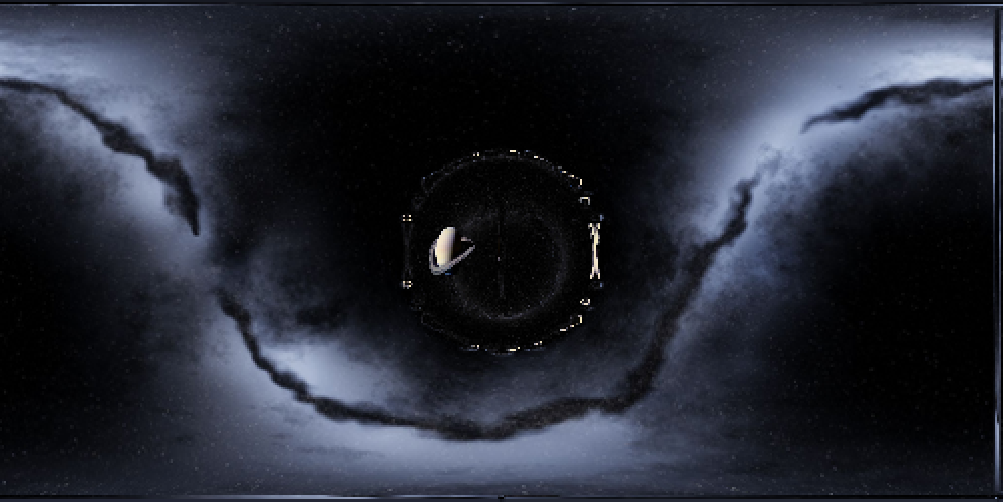
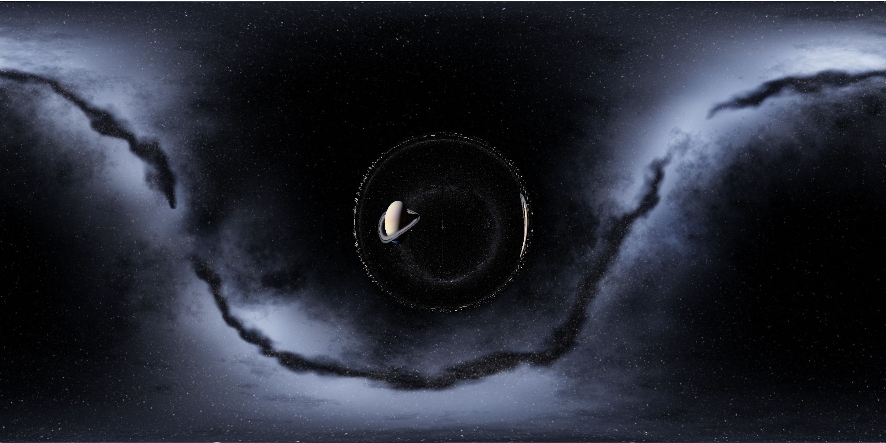
But if you set and don’t resize the images you get
nn=501
Alien invasion
Alien invasion
Have you ever read the Commonwealth Saga by Peter F. Hamilton, wherein an alien invades human-held territories via wormhole with the intent of exterminating our species?
Unfinished tasks
Unfinished tasks
I think it would be very interesting to take the result of rayTrace and plot it on top of the embedding diagram, but I haven’t quite figured this out. I also think it would be pretty neat to take a terrestrial picture (say of the White House), and have a wormhole open up in the background. Finally, I would be very pleased to figure out how to put the wormhole at any position in an image I want, rather than just the center.
CITE THIS NOTEBOOK
CITE THIS NOTEBOOK
Visualizing Interstellar's Wormhole (Christopher Nolan Movie) with Kip S. Thorne et al. Algorithm
by Jason Biggs
Wolfram Community, STAFF PICKS, 2016
https://community.wolfram.com/groups/-/m/t/852052
by Jason Biggs
Wolfram Community, STAFF PICKS, 2016
https://community.wolfram.com/groups/-/m/t/852052