This project explores the boid simulation, a widely used model for simulating emergent flocking behavior from simple rules. We explore how static vector fields can be used to manipulate the boid simulation, allowing the flock to follow defined parametric paths and avoid obstacles. We effectively implement an algorithm to generate vector fields that converge to and follow parametric paths (which have defined start and end points), while maintaining the flocking characteristics of the base boid simulation. The process of vector field generation shown in this project can be applied to fields including computer graphics and swarm robotics.
Introduction
Introduction
What are boids?
What are boids?
Using three simple rules (separation, alignment, and cohesion), the boid algorithm can simulate the real life flocking behavior of birds with surprising realism. The boid simulation is an example of emergent behavior: each boid is acting independently within the simulation, similar to real life birds, relying solely on their observations of a restricted field of view. Even though they are based on simple rules, groups of boids (or flocks) are able to exhibit complex flocking patterns, which have been used widely in computer graphics and swarm robotics applications.
What is a vector field?
What is a vector field?
A vector field assigns a vector to every point in a plane. Vector fields can be used to model various processes, such as gravity, electrical charge, and fluid flow. In the case of the boid simulation, a vector field can be used to represent external forces such as wind, obstacles in the boids’ path, and defined flocking patterns.
The boid algorithm moves individual boids according to specified vectors. Using vector fields, the simulation can incorporate any manner of explicitly defined behaviors by influencing the boids’ movement vectors.
Objectives
Objectives
This project aims to:
1
.effectively implement the boid algorithm
2
.define a parametric path for the boids to follow
3
.generate a vector field that converges the boids to the defined parametric path
4
.implement obstacles for the boids to avoid
2-D
2-D
We start by modeling our boid simulation in 2D, before extending the simulation to three dimensions.
Parametric Path Function
Parametric Path Function
We want our boids to follow a parametric path, in which each time value (t) within a certain range (in this case 0 to 1) represents a certain coordinate (x, y) on the plane. Using a parametric path allows for:
1
.the modelling of more complex trajectories
2
.the specification of the direction of the path (which is essential when trying to get from point A to point B)
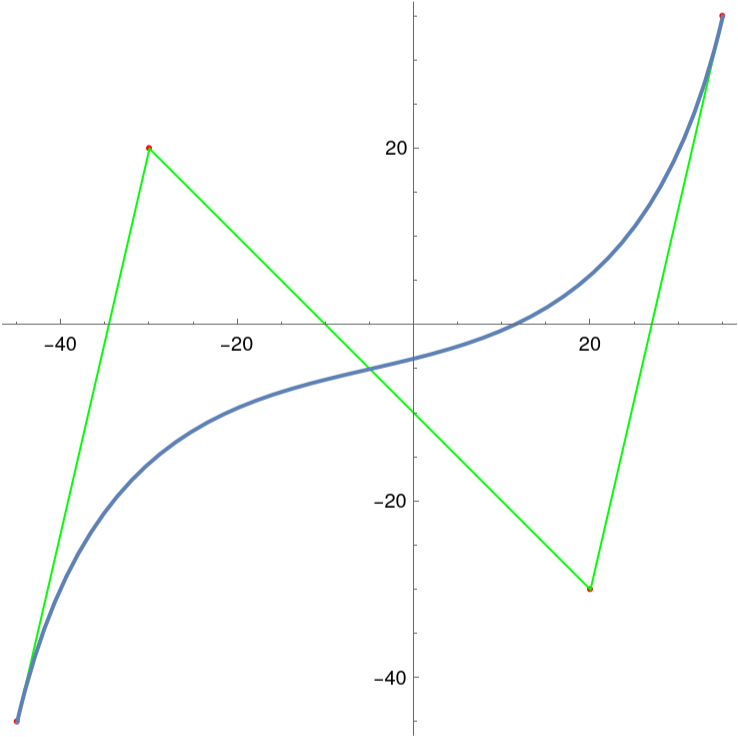
In this exploration, we define our parametric path as a Bezier curve, which uses a set of control points to generate a smooth path for the boids to follow.
Define the size of the field:
In[]:=
fieldSize=100;
Bezier path defined by a set of constraint points (including visualization):
In[]:=
pts={{-45,-45},{-30,20},{20,-30},{35,35}};pathFunction=BezierFunction[pts];Show[Graphics[{Red,Point[pts],Green,Line[pts]},Axes->True],ParametricPlot[pathFunction[t],{t,0,1}]]
Out[]=
Defining the Vector Field
Defining the Vector Field
We want to generate a vector field that allows boids to converge to and follow the parametric path defined above. We also want the boids to end up roughly around the endpoint of the path (t = 1). In order to achieve this, we do the following (given a point on the field):
1
.determine the closest point on the path to the point
2
.calculate the tangent vector at that point
3
.define the target point on the path as the endpoint of the tangent vector
4
.define a target vector with a start point at the boid’s position, and an end point at the target point
Find the closest point on the path to a given point:
In[]:=
closestPointT[point_]:=Table[{t,Norm[pathFunction[t]-point]},{t,0,1,0.01}]//SortBy[Last]//FirstclosestPoint[point_]:=pathFunction[closestPointT[point]//First]
Tangent vector to a path point:
In[]:=
pathTangent[t_]:=If[t<.999,(pathFunction[t+0.001]-pathFunction[t])//Normalize,(pathFunction[1]-pathFunction[1-0.001])//Normalize]
Target point and target vector to path from a given point:
In[]:=
boidTargetPoint[point_]:=Module[{t,pathPoint,tangent,target},t=closestPointT[point]//First;pathPoint=pathFunction[t];tangent=pathTangent[t];target=pathPoint+tangent]boidTargetVector[point_]:=Normalize[boidTargetPoint[point]-point]*closestPointT[point][[2]]
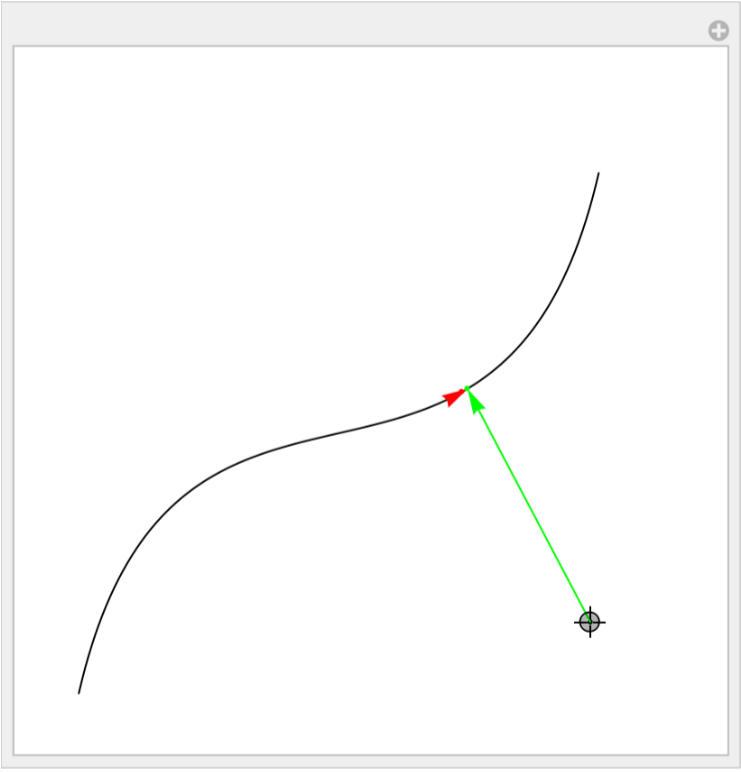
The behavior of the vector field can be visualized below, where the locator represents a given point on the field, the red point represents the tangent vector, and the green arrow represents the target vector at that point. We can also notice that the vectors do not extend beyond the endpoint on the path, which allows our boids to converge onto the endpoint.
Visualization of target vector for a given point:
Manipulate[Graphics[{Point[point],Line@Table[pathFunction[t],{t,0,1,.01}],Red,Arrow[{closestPoint[point],closestPoint[point]+pathTangent[closestPointT[point]//First]}],Point[closestPoint[point]],Green,Point[boidTargetPoint[point]],Arrow[{point,point+boidTargetVector[point]}]},PlotRange->fieldSize/2],{point,Locator}]
Out[]=
The full vector field can be plotted as seen below. We can clearly see the vectors converging onto and following the parametric path.
Vector field visualization:
In[]:=
VectorDensityPlot[boidTargetVector[{x,y}],{x,-fieldSize/2,fieldSize/2},{y,-fieldSize/2,fieldSize/2}]
An Alternate Approach to Vector Field Generation
An Alternate Approach to Vector Field Generation
While developing the vector field generation approach, we also attempted another method, with interesting results.
Given a point on the path, we define a conic centered at that point. This can be visualized below for each point on our parametric path. The plot represents an attractive potential field, where vectors will be defined to point towards areas of lower elevation from areas of higher elevation.
Cone potential at a single point on the path:
By combining the conic for each point on the path in discrete intervals, we can generate a “valley” (attractive field) that rises up from the “river” (path). We can also include a slight slope in the path to represent the directionality of the parametric.
Visualized potential for the entire path:
This is an interesting approach to vector field generation. However, it falls short in a few ways:
1
.it is computationally expensive to generate cone potential as the size of the field increases
2
.the downhill approach is not very effective for path following
3
.this approach is not easily applicable to 3D vector fields
Boid Simulation
Boid Simulation
As mentioned earlier, the boid simulation uses three simple rules (separation, alignment, and cohesion) to simulate complex behavior. Each boid acts independently, using only information in a specified field of view (or radius) around itself.
We start by defining tunable constants which can influence the boid simulation’s emergent behavior.
Define public constants:
Each boid is represented by a position (x, y) and a velocity vector (vx, vy). We can populate a field of specified size with randomly placed boids.
Boid object:
New boid at random position:
Get the boid’s position:
Get the boid’s velocity:
Get the boid’s index in the list of all boids:
Populate the field with randomly placed boids (and visualize):
We can use the Nearest function to locate boids within a specified radius to a target boid. This is very important to preserving the emergent and individual-centered behavior of the boids.
We also define other helper functions: updateBoid to append new information to a boid’s position/velocity, constrainVelocity to limit the boids’ velocity to a reasonable range, and boidBounce to divert boids as they approach the boundaries of the field.
Find boids within a given radius:
Update a boid’s position and/or velocity:
Constrain a boid’s velocity:
Apply smooth turning radius for boids at field boundaries:
The first of the three behavior functions, separation takes the average position of all other boids within a boid’s protected range, and then applies the opposite vector to steer away from them. It uses the nearestBoids function to locate all other boids within its protected range, takes the average of their position, and then appends the opposite vector of that average to its velocity.
Separation function:
The second behavior function, alignment, steers the boid to match the velocity of other boids within its field of view (not including boids within its protected range). It takes the average of the velocities of all other boids in a certain distance from itself, and then appends that velocity to its own velocity vector.
Alignment function:
The final behavior function, cohesion, steers the boid towards the center of mass of the other boids within its field of view (not including boids within its protected range). It does this by taking the average position of the boids in its field of view, and then appends the opposite vector from that position to its velocity vector.
Cohesion function:
Applying the vector field to the boids is as simple as appending the vector at the boid’s position to the boid’s velocity. We can also apply a bias vfBias to lower the impact of the vector field on the behavior of the boids (to preserve the previously defined boid behavior).
Apply the vector field:
Simulate
Simulate
The frame can then be simulated by modifying each boid’s velocity vector with each of the defined functions, and then updating the boids’ positions with their new velocity vectors.
Simulate frame:
Render simulation for specified frame length:
Below is the final output of the boid simulation. We can clearly see the boids converging to the parametric path, and following it towards its end point. We can also notice the prevalent flocking behavior.
3-D
3-D
By adding the “z” dimension to our boid functions, we can model the behavior of boids within 3D space. This gives us added insight into their behavior in relation to real life flocking patterns, which are often three-dimensional.
3D Parametric Path Function
3D Parametric Path Function
The 3D Bezier path can be defined by using constraint points of the form (x, y, z), forming a curve that crosses into the z dimension.
3D Bezier path defined by constraint points:
3D Vector Field
3D Vector Field
Since we defined our functions without dimensionality, we can use the same vector field definition as in the 2D simulation.
Same tangent vectors as above (using the 3D path):
Below is the visualization of the target vector at a given point in 3D space. The sliders represent the x, y, and z coordinates of a point in the plane. The green arrow, similarly to the 2D example, represents the target vector from the given point to the parametric path.
3D visualization of target vector at a given point:
In the following plot, we can clearly see the 3D vector field converging onto the parametric path, similarly to the 2D example.
3D vector field:
3D Boid Simulation
3D Boid Simulation
We can use the same boid simulation as before, with small modifications to incorporate three-dimensionality.
Randomly placed boids in 3D field:
Adding Obstacles
Adding Obstacles
For the 3D simulation, we also demonstrate how obstacles can be added. We use a sphere, with extended normal vectors. Boids can look for the closest point on the sphere to their current position, and apply a normalized vector to move away from the obstacle.
Intensity of repulsion from obstacle:
Define sphere obstacle:
Apply the repulsion vector to the boids:
Simulate 3D
Simulate 3D
Simulate 3D frame:
Run 3D simulation for specified frame length:
We can see the final outputs of the 3D simulations. Similar to the 2D simulation, the boids are converging onto and following the paths. They can also be seen interacting in different ways with the obstacles on their paths.
In this first simulation, the boids are converging to and following a 3D parametric path. This example is very similar to the 2D simulation shown earlier.
In this second simulation, the boids encounter a spherical obstacle on their path. Some of the boids are able to navigate around the obstacle and continue following the path to the endpoint. However, it is interesting to note that some of the boids are unable to navigate around the obstacle. It is also interesting to observe that the boids that do navigate around the obstacle tend to stay together, instead of dividing into multiple groups.
Conclusion
Conclusion
In this project, we exhibited how boids can be manipulated with external vector fields. We showed that parametric paths can be used to generate vector fields with relative efficiency. We also showed that obstacles can be introduced, with varying responses from the boids.
Future Directions
Future Directions
1
.Applying the vector field generation algorithm to other applications in swarm robotics
2
.Implementing a fluctuating vector field (eg. wind simulation)
3
.Giving boids more characteristics (eg. agitation when their path is restricted by an obstacle)
Acknowledgements
Acknowledgements
Thank you to my mentor Drake Hayes and to Dugan Hammock for aiding me in the completion of this project.
References
References
1
.Reynolds, C. W. (1987, August). Flocks, herds and schools: A distributed behavioral model. In Proceedings of the 14th annual conference on Computer graphics and interactive techniques (pp. 25-34).
2
.Boids. (n.d.). Retrieved July 10, 2024, from https://people.ece.cornell.edu/land/courses/ece4760/labs/s2021/Boids/Boids.html#Background-and-Introduction
3
.Kapitanyuk, Y. A., Proskurnikov, A. V., & Cao, M. (2017). A guiding vector-field algorithm for path-following control of nonholonomic mobile robots. IEEE Transactions on Control Systems Technology, 26(4), 1372-1385.
Cite This Notebook
Cite This Notebook