In this post I will show how to parameterize a smooth plane cubic curve. As in my earlier post, The Normal Form for Complex Projective Conics, I will first find a normal form that can be parameterized and then pull that parameterization back to the original curve. The difference here is that instead of having one normal form with an obvious parameterization there are infinitely many normal forms for cubics. We will use the Weierstrass normal form =4-x-for complex numbers ,which will depend on the original curve. If the curve and these Weierstrass constants are real we have ] but there are technical difficulties in getting the right sign and the right parameter intervals. A better method for this case, and an essential method for the complex case, is to use the Weierstrass P function which fortunately is nicely implemented in Mathematica. However there are still some unexpected technical details that arise. CITATION (original book): Barry H. Dayton (2018), A Numerical Approach to Real Algebraic Curves with the Wolfram Language. Wolfram Media, Inc. ISBN: 9781579550240. https://www.wolfram-media.com/products/dayton-algebraic-curves/
Amazon: https://a.co/d/eOn3RTP
2
y
3
x
g
2
g
3
g
2
g
3
y=±Sqrt[
4-x-
3
x
g
2
g
3
Amazon: https://a.co/d/eOn3RTP
This is a sequel to my post for conics. For completeness in that post and this post I am including background information so the reader will not need to look elsewhere to understand this. Much of the background here is the same as that for my previous post so if you have read that you may skim over much of the first three sections. The examples here, however, are different.
1. Cubics in the Projective Plane
1. Cubics in the Projective Plane
The proper setting for studying algebraic plane curves is the complex projective plane. But this is difficult to work with computationally so we will work mostly in the affine real plane , or sometimes the affine complex plane , with the understanding that there are also infinite points on our curves.
2
2
A simple introduction to these infinite points is in Section 1.1 of my Plane Curve Book shown above where I talk about lines. I develop an algorithm for finding the line through 2 points but note that it can be naturally extended to points with three coordinates, these are the points on the projective plane.
In[]:=
line2D[p_,q_,x_,y_]:=Module[{e1,e2,a,b,c,M},e1=Switch[Length[p],2,Append[p,1],3,p];e2=Switch[Length[q],2,Append[q,1],3,q];M={e1,e2,RandomReal[{-1,1},3]};({a,b,c}/.(Solve[M.{a,b,c}{0,0,1}][[1]])).{x,y,1}];
Example: Find the equation of the line through {2,5} and {3,1}.
In[]:=
l1=line2D[{2,5},{3,1},x,y]
Out[]=
3.30753-1.0177x-0.254425y
This can be normalized for people by
In[]:=
Expand[l1/Coefficient[l1,y]]
Out[]=
-13.+4.x+1.y
Of course we are identifying the polynomial with the actual line which is the solution set of
4x+y=13
But if we replace one or both points by triples we still get an answer
In[]:=
l2=line2D[{2,5,1},{1,-4,0},x,y]Expand[l2/Coefficient[l2,y]]
Out[]=
-1.19881+0.368865x+0.0922163y
Out[]=
-13.+4.x+1.y
This is the same answer! So for this algorithm the triple {2,5,1} is a replacement for the point {2,5} but the triple {1,-4,0} indicates that the slope of the line is -4. We will call the triples with last coordinate 0 infinite points. These could indicate slope or direction. But another observation is that for this algorithm these triples are homogeneous, that is multiplying each coordinate by the same non-zero number gives the same answer, up to constant multiple.
In[]:=
l3=line2D[{6,15,3},{-2,8,0},x,y]Expand[l3/Coefficient[l3,y]]
Out[]=
1.66543-0.51244x-0.12811y
Out[]=
-13.+4.x+1.y
Thus the projective plane consists of all triples with at least one zero coordinate modulo the relation that a non-zero multiple of a triple is equivalent to the original triple. Triples with last coordinate zero are called infinite points and points with non-zero third coordinate should be identified with the affine point where the first two coordinates are divided by the third and the the last discarded. Thus {3,7,9} corresponds to the affine point The important thing is that as long as we do not use 2 infinite points the line2D algorithm respects this equivalences. If we do apply line2D with 2 infinite points we get a constant
,.
1
3
7
9
In[]:=
line2D[{2,3,0},{3,5,0},x,y]
Out[]=
-1.42058
which indicates we have the infinite line.
I note that specifically for this post that the coordinates may be complex numbers so is a complex infinite point and, as projective points, {1+2 , 5, 3+4 } = {+,-, 1}.
{4+3I,-2-6I,0}
11
25
2
25
3
5
4
5
By cubic I mean a polynomial in two variables of degree 3. That is
f=+y+x+++xy++x+y+
a
1
3
x
a
2
2
x
a
3
2
y
a
4
3
y
a
5
2
x
a
6
a
7
2
y
a
8
a
9
a
10
where the coefficients may be exact or Mathematica machine complex numbers. At least one of ,…, should be non-zero. I will give further examples below. For now I will note that conics generally have 3 infinite points although 2 or 3 may coincide. If the coefficients are all real then one or all three infinite points will also be real. The polynomial +y+x+ is the maximal form, it can aways be factored into linear polynomials, the slopes of which, as triples above, are the infinite points. Here is a routine
a
1
a
4
a
1
3
x
a
2
2
x
a
3
2
y
a
4
3
y
In[]:=
infiniteCubicPoints2D[f_,x_,y_]:=Module[{mf,rrl,sv},mf=FromCoefficientRules[Select[CoefficientRules[f,{x,y}],Total[#[[1]]]3&],{x,y}];sv=NSolveValues[mf==0&&RandomReal[{-1,1},3].{x,y,1}==0,{x,y},Complexes];{Append[sv[[1]],0],Append[sv[[2]],0],Append[sv[[3]],0]}];
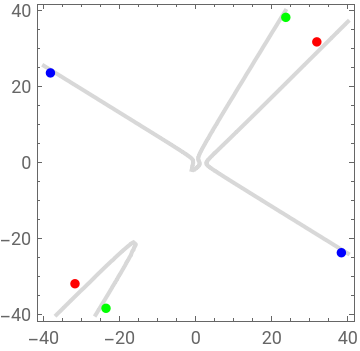
Example : The dots are affine approximations of the infinite points, two approximations of same color for each infinite point.
In[]:=
f=x^3-2xy^2+y^3-3x^2-y+2ipf=infiniteCubicPoints2D[f,x,y]apts=Take[#*45/Norm[#],2]&/@ipf;Show[ContourPlot[f==0,{x,-40,40},{y,-40,40},ContourStyle->LightGray],Graphics[{{Red,PointSize[.03],Point[{apts[[1]],-apts[[1]]}]},{Green,PointSize[.03],Point[{apts[[2]],-apts[[2]]}]},{Blue,PointSize[.03],Point[{apts[[3]],-apts[[3]]}]}}],ImageSize->Small]
Out[]=
2-3+-y-2x+
2
x
3
x
2
y
3
y
Out[]=
{{3.61954,3.61954,0},{1.45437,2.35321,0},{-1.24916,0.772025,0}}
Out[]=
In[]:=
g=x^3-2Ix^2y+(2-I)y^3-(3+4I)y^2-Ixy+2;
In[]:=
infiniteCubicPoints2D[g,x,y]
Out[]=
{{-0.044387-0.154466,0.130799-0.124361,0},{-0.166265+0.112664,0.0326755+0.0907062,0},{-0.101673+0.037405,0.0846782+0.0301148,0}}
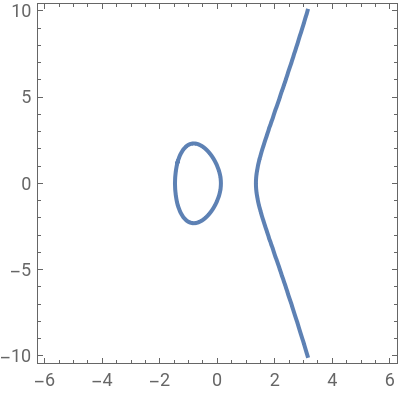
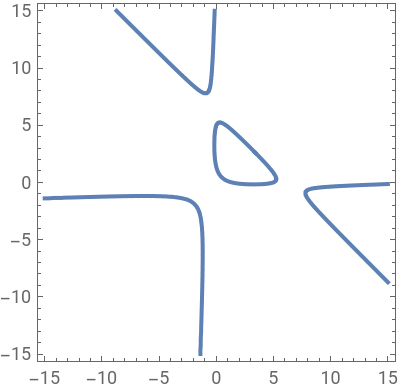
As mentioned in Chapter 8 of my Plane Curve Book projective topological connected components of real curves can be classified into ovals or pseudo lines. The first have an even number, possibly zero, of infinite points and the second has an odd number. Every non-degenerate real cubic has exactly one pseudo line and possibly one oval. The function f above has one pseudo line only, connected in the projective plane, the curve on the left below has a pseudo-line and an oval, the curve on the right
y^2=4x^3-8x+1
gr=-1+x-.2x^2+.008x^3+y+xy-.2x^2y-.2y^2-.2xy^2+.008y^3;
also has one pseudo line and an oval, the middle finite component. The other three affine components meet at infinite points so they are part of the pseudo line.
In[]:=
Row[{ContourPlot[y^2==4x^3-8x+1,{x,-6,6},{y,-10,10},ImageSize->200],ContourPlot[gr==0,{x,-15,15},{y,-15,15},ImageSize->200]}]
Out[]=
2. Transformation Functions or Fractional Linear Transforms
2. Transformation Functions or Fractional Linear Transforms
Since the real and complex projective plane can be formally defined as equivalence classes of triples, given a 3×3 real or complex matrix A then multiplication by matrices is a linear function so we have for any triple p and any scalar ζ, real or complex, A(ζ p) = ζ (A p) = A p. Thus matrix multiplication respects our equivalence relation and hence gives a well defined transformation of projective space. These transformations are called projective linear transforms are form a transformation group on projective algebraic geometry. In particular, if a projective linear transform sends a object to an object then then these objects are considered geometrically equivalent. More generally algebraic geometers consider objects under birational transformations equivalent and projective linear transforms are a special case of these. In this post the objects we are considering are conics.
As I have already mentioned, working with the equivalence classes with software, or even by hand, is awkward. Fractional linear transforms on one-space are classical, already in 1990 Shreeram S. Abhyankar devoted one chapter of his famous book Algebraic Geometry for Scientists and Engineers, (AMS, 1990) to generalizing this topic to arbitrary projective spaces as an alternative to projective linear transformations, allowing one to work on affine space, in our case ordered pairs. Unfortunately he did not make general use of them in his book. But I have, in my books.
Mathematica has adopted these transforms under the name TransformationFunction. Not so much for algebraic geometry but, because as I will show immediately below, these make a good platform for ordinary geometric transforms. Mathematica uses also, more in our context, the name LinearFractional Transform, in my books I follow Abhyankar in calling them fractional linear transforms using functions with names starting with flt.
Mathematica defines TransformFunction for 3×3 matrices and ordered pairs as follows, let
In[]:=
A={{,,},{,,},{,,}};A//MatrixForm
a
1
a
2
a
3
b
1
b
2
b
3
c
1
c
2
c
3
Out[]//MatrixForm=
a 1 | a 2 | a 3 |
b 1 | b 2 | b 3 |
c 1 | c 2 | c 3 |
In[]:=
TransformationFunction[A][{x,y}]
Out[]=
,
x+y+
a
1
a
2
a
3
x+y+
c
1
c
2
c
3
x+y+
b
1
b
2
b
3
x+y+
c
1
c
2
c
3
Besides the transforms we will use here this is a general formulation for more commonly known transformations. For example if the last row and column are {0,0,1}
In[]:=
AL={{,,0},{,,0},{0,0,1}};AL//MatrixForm
a
1
a
2
b
1
b
2
Out[]//MatrixForm=
a 1 | a 2 | 0 |
b 1 | b 2 | 0 |
0 | 0 | 1 |
we just get the linear transform given by matrix
{{,},{,}}.
a
1
a
2
b
1
b
2
In[]:=
TransformationFunction[AL][{x,y}]
Out[]=
{x+y,x+y}
a
1
a
2
b
1
b
2
If this latter matrix is orthogonal, that is if its inverse exists and is its transpose, then we have an orthogonal transformation. If
In[]:=
AA={{,,},{,,},{0,0,1}};AA//MatrixForm
a
1
a
2
a
3
b
1
b
2
b
3
Out[]//MatrixForm=
a 1 | a 2 | a 3 |
b 1 | b 2 | b 3 |
0 | 0 | 1 |
we call this an affine transform
In this note we will be using these Transformation Functions as proxies for projective linear transformations. To see how this works, rather than confuse you with subscripts, I will pick a pseudo random integer matrix A of single digit integers.
Simplifying
But as a projective point this is
If z were zero this would not work. Suppose, for example our point {x,y,z}= {-88, -145, 76}. Note
This is because
So what we give up by using Transformation Functions of affine points is that the domain of the transformation function does not contain the line 4 x - 4 y - 3 z = 0 as this line is sent to the infinite line. If we need to apply our transformation to points on this line we must go back to the original transformation function given my matrix multiplication of projective triples. Actually I do have an alternative in my books. First my transformation functions use the alternate form derived from my notation Fractional Linear Transformations
Then to deal with points going to the infinite line I have fltiMD[p,A]. In the example above
There are several more important things about Transformation Functions as projective linear transformations, first they are homogeneous, that is if you multiply each element of A by the same non-zero scalar one obtains the same transformation. For example for the matrix A above
Now think of A, B as arbitrary 3×3 matrices, Transposition functions compose by matrix multiplication, that is
Note as in usual function composition the right hand transformation is applied first.
The most important use of this fact is that
3. The Push Forward FLT
3. The Push Forward FLT
Transformation Functions take points to points by projective linear transformations. We are more interested in taking cubics to cubics by projective linear transformations. I have developed a function derived from the fractional linear transformations that takes cubics, as equations, to cubicss. This, however, only works for invertible transformations. It is well known that given a conic g, or more generally a plane curve g, and 3×3 matrix A the set, here we revert to ordinary math notation and think of g as a set of points,
is also a curve We call this the pull back.
But when A is invertible we can take the push forward of the inverse transformation. Unfortunately there are issues dealing with the denominators that arise, we can handle this better using the projective linear transformation and converting the affine curve to homogeneous coordinates and then back. Also it is neater when we work numerically. Here is our code for plane cubics.
We can get some approximate infinite points by
The following plot shows the original cubic f as blue and its image h as the orange curve under this transformation and showing selected blue points end up on the orange curve.
Note both points a, b end up close together . This is because a,b are near the same infinite point. We can travel this curve and its image in order a,b,c,d,e,f in both cases.
4. Weierstrass normal forms for cubics
4. Weierstrass normal forms for cubics
Around 1870 Weierstrass invented his normal forms to classify cubics. In this case, unlike conics, there are infinitely many of them. Also they still don’t completely classify cubics with respect to projective linear transformations as different normal forms may be equivalent. But there are still many inequivalent types. Because cubics have 10 coefficients but multiples are equal, we can think of the set of cubics as a 9 dimensional complex space while the distinct normal forms are a 2 dimensional complex space and projectively linear distinct classes will form a 1 dimensional complex space. So Weierstrass was able to simplify the theory of cubic curves immensely.
The Weierstrass Normal form for cubics is
Since we are using possibly machine numbers perhaps the integer 4 is not necessary today, but we use it to be consistent with older notation.
Similar to the conic situation where we needed a point tangent to the infinite line, here we need an inflection point tangent to the infinite line. We can get inflection points from
Example :
We still need
Our main algorithm is then
And the chosen inflection point goes to the infinite point {0, 1, 0}.
For the example f above
From a previous run we obtained
5. Real Case
5. Real Case
When the curve, transformation and normal form are all real we can use the normal form directly to parameterize our curve. However this parameterization is neither polynomial or rational . We will give an example using the previous curve
We first look at the single variable polynomial in x removing the y^2 term.
As a cubic polynomial we know fx will have 1 or 3 real zeros.
We next look at the three infinite points of f
Finding 3 points on fw which go to infinity.
These are all in the real part . The point of fr that goes to the unique infinite point of fw is
For parameterizing purposes we use the following single variable function in t
Note this function extends to the projective line
The red points are the two points in the range of this plot that go to infinite points .
Our parameterization is then given in the following graphic where the endpoints of the interval are the points calculated above except 2000 is used as an approximation of ∞.
6. The general case
6. The general case
6.1 Introduction to the Weierstrass Elliptic function
6.1 Introduction to the Weierstrass Elliptic function
This includes both real and complex . We will use the WeierstrassP function to get our parameterization. While the real case does not require this advanced topic, it will be easier in cases such as above to use this when available, eg Mathematica. In particular we will get two functions as was the case in my Conics post, which was not quite the case above where we had 5 cases.
There is a fair amount of information about the Weierstrass functions in the Mathematica help pages, some how-to information in Wolfram Alpha and a more complete description Wolfram Math World https://mathworld.wolfram.com/WeierstrassEllipticFunction.html but from a somewhat advanced mathematical point of view. I have a somewhat more elementary discussion of the WeierstrassP function in terms of the Jacobi elliptic functions in my Theory of Equations book https://barryhdayton.space/theoryEquations/theq6.pdf None of this may be particularly helpful for our use since my normal form routine is not available in these references. But fortunately the Mathematica syntax is very convenient for our use. I will discuss this a bit later, but first a small digression.
A nice way to visualize the Weierstrass P function is by using Mathematica’s ComplexPlot. For completeness here is is a short discussion of this for those readers not familiar with this function.
ComplexPlot will give a picture of a complex function of one complex variable . I prefer this to the similar ComplexPlot3D which gives a 3 dimensional picture but, if ComplexPlot is used correctly, no further information is given.
Here is the plot of the function z
In comparison
Only the colors distinguish them!
In particular we have
One more example
6.2 Simple use of WeierstrassP and WeierstrassPPrime with normal form
6.2 Simple use of WeierstrassP and WeierstrassPPrime with normal form
Here is a simple real example, note the signs on the input.
If we want to consider the complex solutions we can view, as in my post on conics, the two components separately, just like plots of Sin and Cos describe the circle in Trigonometry.
Note that the real parameter t follows the dashed horizontal line. We see that the two functions have a pole at the origin.
Here we come up with a mysterious number that we will explain in section 6.4
We can not get the small oval of this real curve using the Weierstrass parameterization using only real parameters! We can get some idea from the complex plots.
Again we see a pole at 0 + 0 so as we get t close to 0 the points are very large in magnitude. So we are actually plotting points twice if we use positive and negative values of t. Also note the symmetry between adding the imaginary part iconst or subtracting it.
As with our post on conics, we are defining coordinate functions which functionally solve our cubics. Here they are
The best way to check the complex case is by plotting using ComplexPlot3D, where the z value is the absolute value ,since numerically we don' t get an exact 0. For one pseudorandom complex example
6.3 Use of WeierstrassP and WeierstrassPPrime for arbitrary cubics
6.3 Use of WeierstrassP and WeierstrassPPrime for arbitrary cubics
When given an arbitrary smooth cubic we can now parameterize the normal form and then bring it back by the inverse of the transformation to the normal form. It is enough to give the example fr above to see how this works. Here is the data from Section 5.
After calculating this data, we parameterize fw using the Weierstrass functions.
We can now try to parameterize fr choosing parameter interval by trial and error.
There are several holes in our parameterization. We discuss this issue in the next subsection.
6.4 Double Periodicity of the Weierstrass P functions on Normal Forms
6.4 Double Periodicity of the Weierstrass P functions on Normal Forms
It is known, in fact that’s why the P function is famous, that Weierstrass P is a complex function with a pole at the origin and has double periodicity, that is there are two complex periods. As points in the plane, considering ReIm[z], the periods are independent. In fact is periodicity allows one to partition, not uniquely, the complex plane into parallelograms, each one of which is a full domain for values of the P function.
Notice the white region around the infinite value is at the center.
A real normal form will intersect the x - axis in t least one point . We would like to see where these points come from under the parameterization in section 6.2, however the inverse map, InverseWeierstrassP will find these points to be singular so we need to use a point very close to this. The following plots show the period parallelogram and the inverse image of points on the x-axis for the various situations that you are likely to come upon with real normal forms. We show the code for the first case only, others are hidden. Also I am approximating with the display values to make the following easier to read.
Here the single zero point is on the real axis and boundary with coordinates
so we can use the real- coordinates as the parameter endpoints .
Our second example gives
Here the x - axis point is on the top corner, but note that subtracting twice the first half period, that is a full period gives
the corner point on the real axis. So we can use this for the parameter limit
Next is our third example
Here the x - axis point is a corner point on the real axis . So we can immediately use
So far the entire curve is a pseudo line and plotting the real values in the period parallelogram gives the full real curve. But unfortunately this is not always the case, even when the real curve has only one component.
Our fourth example
note this point has the same imaginary value as the zero point! By symmetry we get two points on the upper side of the period parallelogram with the negative of this imaginary point. In fact every parallelogram point with this imaginary part or its negative gives a real point after mapping to the curve.
So applying ParametricPlot, noting 0 ± impart I goes to the point where the curve crosses the x-axis. Note since we are expecting real values we use the Re function to make the Mathematica value real since Parametric Plot will reject points with an non-zero imaginary part even if the imaginary part is very small.
Because the blue part of the curve passes through the infinite point we get the entire real curve. This is the example I did not expect, where I need imaginary points in the period parallelogram to get the real pseudo line component of my curve. However if I am willing to go outside my period parallelogram, notice that the point opposite to { 1.175, -impart} in the parameter plot to the left is = {1.175 ,0} so by periodicity the Weierstrass map will take it to the same point on the curve. Also then
so the Green part of the curve above
can be replaced by using real points of the parameter space . Likewise we can replace the orange part by a real parameter getting the entire curve, again remembering that truncating the range of the plot does not matter since the range of this parameter interval contains the infinite point.
A wider range would also work, but the parameterization would no longer be 1-1. A narrower range would miss points.
Finally we come to an example where we expect to need infinite points in our parameter space, the case where our normal curve has two components, an oval and the required pseudo line.
The plot on the left shows the three points on the x-axis of the plot on the right come from the boundary of the period parallelogram. The two on the top go to the oval where the third goes to the pseudo-line. Thus we can accurately predict the parameterization.
7. Conclusion
7. Conclusion
This was an unexpectedly hard post to write. We theoretical mathematicians are used to reading definitions and proofs and think we understand. But when we try to code this we realize that there are a lot of details that have been overlooked and leave gaps in our understanding. Hopefully future leaders of mathematics will realize this and encourage coding in our published papers rather than forbidding this.
CITE THIS NOTEBOOK
CITE THIS NOTEBOOK
A numerical approach to real algebraic curves: normal forms of complex projective cubics
by Barry H. Dayton
Wolfram Community, STAFF PICKS, November 28, 2023
https://community.wolfram.com/groups/-/m/t/3072983
by Barry H. Dayton
Wolfram Community, STAFF PICKS, November 28, 2023
https://community.wolfram.com/groups/-/m/t/3072983