In chemistry, functional groups are a specific combination of atoms and bonds in a chemical compound. Some may be common, others uncommon, some may be small and others big, but they are important in determining what type of chemical compound is being dealt with, and in most circumstances, drives its reactivity. Thus, the work done in this project is in a hope to help identify those functional groups that are present in an inputted molecule, with a goal of better understanding those molecules, and functions that aid in this regard have been developed.
Introduction
Introduction
Defining Functional Groups
Defining Functional Groups
In the Wolfram Language, functional groups are built as molecule patterns, or parts of a molecule that are recognized as common among various molecules, and the function searches for these patterns in the inputted molecule, where it searches for the specific atoms and bonds connected in the special way that define that functional group. Molecule patterns are defined with inputting the atoms and the type of bond between the atoms.
Build the association of a functional group name to the molecule pattern (functional group itself).
In[]:=
"hydroxyl"->MoleculePattern[{"O","H"},{Bond[{1,2},"Single"]}]"carboxylic acid"->MoleculePattern[{"C","O","O","H"},{Bond[{1,2},"Double"],Bond[{1,3},"Single"],Bond[{3,4},"Single"]}]"thiol"->MoleculePattern[{"S","H"},{Bond[{1,2},"Single"]}]
Out[]=
hydroxylMoleculePattern


Out[]=
carboxylic acidMoleculePattern
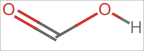
Out[]=
thiolMoleculePattern

Library of Functional Groups
Library of Functional Groups
There are many functional groups found in the organic molecules that exist, and there are even more that can be found in molecules that are synthesized by humans. Thus, it is impossible to compile a list of all the functional groups and find if they exist in a chosen molecule. However, a relatively small number of functional groups make up the overwhelming majority of functional groups found in all organic molecules, so we can compile a default library of them.
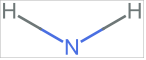
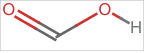
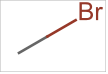
The library is built as an association of functional groups which were built as molecule patterns.
In[]:=
library=<|"hydroxyl"->MoleculePattern,"primary amine"->MoleculePattern,"secondary amine"->MoleculePattern,"thiol"->MoleculePattern,"carbonyl"->MoleculePattern,"carboxylic acid"->MoleculePattern,"phenyl"->MoleculePattern,"nitrile"->MoleculePattern,"alkene"->MoleculePattern,"alkyne"->MoleculePattern,"fluorohalide"->MoleculePattern,"chlorohalide"->MoleculePattern,"bromohalide"->MoleculePattern,"iodohalide"->MoleculePattern,"ether"->MoleculePattern,"phosphate"->MoleculePattern,"diphosphate"->MoleculePattern,"sulfide"->MoleculePattern,"disulfide"->MoleculePattern,"aldehyde"->MoleculePattern|>;

















Function: findFunctionalGroups
Function: findFunctionalGroups
Introducing the Function
Introducing the Function
The goal of the function is to return an association of functional groups with their atom indices so we know precisely where the functional group is located on the inputted molecule.
Apply “ClearAll” to the function.
In[]:=
ClearAll@findFunctionalGroups;
Functionality using the Default Library
Functionality using the Default Library
The backbone of the findFunctionalGroups function is the existing FindMoleculeSubstructure function - this is why the output of findFunctionalGroups attempts to mimic the output of FindMoleculeSubstructure, because the two are meant to work together.
Select statement used to return only the located functional groups:
Select[Association@KeyValueMap[#1->FindMoleculeSubstructure[mol,#2,All]&,library],#!={}&]
Functionality using a User-Inputted Library
Functionality using a User-Inputted Library
A very useful capability is the option for a user to input their own library of functional groups. Perhaps they want a very specific set of functional groups that they are searching for, or perhaps they want to extend the library with some uncommon functional groups. Regardless of the reason, the user choice is supported.
Define an Append option:
In[]:=
Options[findFunctionalGroups]={Append->True};
Define a down value for chemical entities:
In[]:=
findFunctionalGroups[chem:Entity["Chemical",_],lib_Association:{},opts:OptionsPattern[]]:=findFunctionalGroups[Molecule[chem],lib,opts]
Define a down value for molecules:
In[]:=
findFunctionalGroups[mol_Molecule,lib_Association:{},opts:OptionsPattern[]]:=Module[{append=TrueQ[OptionValue[Append]],funcGroup=Replace[lib,Except[Association[KeyValuePattern[{_String->_MoleculePattern}]]]->{}],library},library=<||>;library=If[append,Association[library,funcGroup],funcGroup]];
Error checking
Error checking
As the function can only accept objects of head Molecule and optional head of Association, there are several different types of errors that can result based on the type of input that the function receives.
The default error message indicates the user to enter a valid molecule object.
In[]:=
findFunctionalGroups[___]:=Failure["Invalid object",<|"MessageTemplate"->"Enter a valid molecule object"|>]
When the user attempts to enter a molecule as a string instead of a Molecule object, they are prompted to enter an object of an acceptable head.
When the user attempts to enter a molecule as a string instead of a Molecule object, they are prompted to enter an object of an acceptable head.
findFunctionalGroups cannot accept strings and thus displays an accurate error message.
In[]:=
findFunctionalGroups["carbon dioxide"]
Out[]=
Failure
Putting it all together
Putting it all together
In[]:=
Testing
Testing
To truly determine whether or not our function works in every case intended, we must test it out with a variety of molecules and with a variety of inputs.
Small Molecules
Small Molecules
First, lets test a simple molecule like ethylene with the findFunctional Groups function.
Use natural language input with “ethylene” which converts to an Entity of type “chemical”, then function converts it to a molecule. The function returns an alkene located on ethylene with the first atom of the Carbon-Carbon double bond located at Carbon #1 on the molecule, and the second atom of the double bond located at Carbon #2 on the molecule.
How do we know that our function is reliable in its output of functional groups? We can confirm by taking a look at the chemical structure of ethylene, and find out that it does in fact have a double bond located between Carbon #1 and Carbon #2.
Generate a 2D Molecule Plot, using Natural Language Input, of the ethylene molecule.
To make sure the function is compatible with all types of input that can be converted to a molecule, a molecule object can be built manually to be inputted into the function. Using ethane (classified as one of the simplest organic molecules), the function returns that there are no notable functional groups present in the molecule.
Build the molecule of ethane by first listing out the atoms and then the nature of bonds and connectivity between those atoms.
We can once again confirm that there are, in fact, no notable functional groups present in ethane, by generating its molecule plot (a 3D version this time, which allows for rotation around the molecule). The reason for this is the nature of the bonding in ethane - there is simply one carbon-carbon bond (making it an alkane), with hydrogen atoms added as filler for carbon’s valence.
Use MoleculePlot3D to generate a 3D plot of the ethane molecule, allowing for free movement of the molecule.
Larger Molecules
Larger Molecules
For small molecules, the functional group test is simply one of functionality, as we could relatively easily count and identify the functional groups present. The same cannot be said of larger molecules - of course, it is still possible, but it is extremely difficult to manually identify every functional group present from its chemical structure, so the findFunctionalGroups function is optimal to determine functional groups in this case.
The compound glutathione is important in biology as a strong antioxidant, and this is evidenced by the presence of a thiol group (the active group of the molecule), as was outputted as one of the functional groups from running the function on glutathione.
Running findFunctionalGroups with a Natural Language Input of “glutathione” returns an association of the various functional groups present in the molecule, along with the positions of the atoms in those functional groups relative to the position of atoms in the molecule of glutathione.
To confirm that the function was capable and accurate with handling a larger organic molecule, the chemical structure (molecule plot) of glutathione can be generated to cross-check that the functional groups outputted match those observed in the chemical structure. For example, based on the output of the function, there should be exactly one thiol group, and this matches the structure. There should be exactly two carboxylic acid groups, and this matches the structure. There should be exactly one primary amine group, and this matches the molecule plot chemical structure.
Using “glutathione” with Natural Language Input in MoleculePlot returns a 2D chemical structure, with colors helping to distinguish the various atoms and bonds present in the chemical structure of the molecule.
The molecule of rottlerin is also an antioxidant (similar to glutathione from the previous example), but it is mainly used as a dye for clothing (producing an orange/yellow color). Like every single organic molecule in existence, rottlerin’s properties and capabilities can be explained almost wholly by the functional groups it contains.
Taking a Natural Language Input of “rottlerin” and running it against findFunctionalGroups outputs the functional groups as an association with their locations in the molecule.
We can look at the chemical structure of rottlerin to confirm the function was accurate and returned the functional groups from the default library. For instance, there should be only one phenyl ring (the -C6H5 substituent), and there is only one in the structure. There should be only one ether functional group, and this is also confirmed visually by observing the 3D structure of the molecule of rottlerin.
To confirm that the findFunctionalGroups function was accurate in this scenario, we can generate a 3D Molecule Plot of rottlerin with Natural Language Input, which allows for rotation and easy observation of functional groups present in that molecule.
BioMolecules
BioMolecules
For biomolecules, even larger than the large organic molecules explored in the previous section, it is virtually impossible for one to find out what functional group exist without utilizing the findFunctionalGroups function developed in this paper. The function is especially important in the case of biomolecules, such as the one used as an example below, Interleukin 8. This biomolecule “supports proliferation” of cancer cells, and may have “tumor-promoting features” (Meier et.al.). So, to figure out how to deal with this biomolecule, a thorough analysis of its chemical composition must be made known - after identifying the functional groups, one can then identify active and reactive sites, and we are one step closer to finding a ‘cure’ for cancer (Interleukin 8 is already a target for certain immunotherapic approaches) (Meier et.al.).
Run findFunctionalGroups on Interleukin 8. It can only be accessed as a BioMolecule object, so it must be converted to a Molecule object to be run with the function. The output is a very large association of all the functional groups and their locations in the molecule, and thus the output has been hidden (double click cell side bar to see full output).
To visualize Interleukin 8, use MoleculePlot3D and convert it from a BioMolecule object to a Molecule object. Note the difficulty in identifying even one atom or functional group given the chemical structure of the molecule, something that is greatly simplified using the findFunctionalGroups function.
Adjusting the Library
Adjusting the Library
One of the most important features of the findFunctionalGroups function is the option for the user to input their own library. There are several cases in which the user may wish to use this feature, but in the following example, the user wants to get only the “alkane” functional group (which is just a C-C single bond) outputted as a functional group.
Using findFunctionalGroups on rottlerin (example from earlier), but this time only grabbing the C-C bonds in the molecule, as Append has been set to False.
Extensions and Future Goals
Extensions and Future Goals
The true strength of the findFunctionalGroups function lies not only in its output, but applications of that output. With the output format being an association, the output of the FindMoleculeSubstructure function is mimicked, which allows for extra functionality when combined with other functions. Thus, the output of findFunctionalGroups is not the ultimate output, but merely a starting point for a wide assortment of capabilities.
Deleting Duplicate Assignments
Deleting Duplicate Assignments
One main feature that is expected to be added in a future version of the function is the option to toggle a “Delete Duplicates” option. Basically, with the current functionality of findFunctionalGroups, there is a chance that an atom may be classified as part of more than functional group. For example, from the example of running findFunctionalGroups on “glutathione” above, there are some mappings of carbonyls that are actually part of carboxylic acids. In other words, the current functionality detects the carboxylic acid as a functional group, but also detects the carbonyl and hydroxyl group that make it up as valid functional groups in the molecule. For most uses, this is not practical, because when we are analyzing the reactive properties of a molecule, we want each atom to be binned into one functional group at maximum, so we can determine the nature of that molecule based on its functional group composition. In some cases still, the default option where it returns every possible functional group may be desired. Thus, introducing the deletion of duplicates is best as an option chosen by the user. As for the deletion of duplicates itself, it can be done using applications of set theory: Consider again the example, of the set of all carboxylic acid functional groups found in a molecule and and all the carbonyl functional groups found in the molecule. The delete duplicate functionality would first consider the union of the two functional groups, and bin them as part of carboxylic acid (as a part of a molecule that returns both carboxylic acid and carbonyl should be identified as a carboxylic acid overall). Then, all the carbonyls identified would simply be part of the original, unique carbonyl set, and the carboxylic acids that should be identified would be the original unique carboxylic acid set, combined with the union of the carboxylic acid and carbonyl sets. Overall, one would need to “sort” the library of functional groups by the number of atoms contained in them, with the functional groups containing the highest number of molecules checked and identified first, before moving onto the smaller functional groups.
Highlighting Functional Groups in 2D/3D Plots of Molecules
Highlighting Functional Groups in 2D/3D Plots of Molecules
Visualizing functional groups in a molecule can serve as a boost compared to simply seeing text specifying where a functional group is located in the molecule. Thus, a future extension of this project will incorporate a function that will allow one to highlight chosen (or all) functional groups in 2D and 3D plots of a molecule (using the functions MoleculePlot and MoleculePlot3D). The main setback here is transforming the association output from findFunctionalGroups into something that is viable for the hypothetical function highlightFunctionalGroups. If, say, we had a list of functional groups rather than an association, it is possible to highlight the functional groups in a molecule. The following example of glutathione with its carboxylic acid functional group highlighted represents one of the goals of the future highlightFunctionalGroups function.
Using MoleculePlot3D with glutathione (from earlier examples) and specifying that the Molecule Pattern representing the Carboxylic Acid functional group is wanted causes those four atoms (and the bonds between them) to be highlighted the same color, distinct from the other atoms, allowing one to clearly see where that functional group is present in the molecule.
Counting and Tallying Different Functional Groups
Counting and Tallying Different Functional Groups
As was observed in the example of the bio molecule Interleukin 8, the output is simply too large to easily conclude something about the functional groups - we could count the number of each type of functional group (tally) or the total number of functional groups (count) manually, but it is much easier if there is a function to do this. Thus, in future developments and iterations of this project, there will be functionalities to address this issue. For instance, we should be able to take the ‘length’ of some list or association of a specific functional group’s associations in that molecule to find the tally for that functional group in that molecule - and the count could simply be the length of all the associations or a list with all functional groups, or, in the case that the Delete Duplicates option is toggled, simply summing all the tallies would suffice to give out the total count of functional groups in that molecule.
Conclusion
Conclusion
In my project, I developed a function that identifies the various functional groups present in a wide variety of molecules. I analyzed test cases and made my function such that it would be very interface-friendly for the user with easy input and understandable output, and perhaps the opportunity to extend upon my work. Via my project, a problem that concerns chemists daily has been greatly reduced - as Dr. Stephen Wolfram would put it, this was a “computationally reducible” problem, as computational tools and the Wolfram language have been used to greatly simplify the problem and make it easier for chemists to identify functional groups much more efficiently via this innovative method. However, as was outlined in the future goals section, this function and project is only the beginning - so much more can be done working off of this project in the world of computational chemistry, with the ultimate goal of solving problems and helping others.
References
References
Perricone, Carlo, et al. “Glutathione: A Key Player in Autoimmunity.” ScienceDirect, Jul. 2009, www.sciencedirect.com/science/article/abs/pii/S1568997209000561
Chakraborty, J.N. “2-Colouring Materials (from Fundamentals and Practices in Colouration of Textiles).” ScienceDirect, www.sciencedirect.com/science/article/abs/pii/B9789380308463500029
Meier, Clara, and Angela Brieger. “The Role of IL-8 in Cancer Development and Its Impact on Immunotherapy Resistance.” ScienceDirect, 11 Mar. 2025, www.sciencedirect.com/science/article/pii/S0959804925000486
“Wolfram Language & System Documentation.” Wolfram, https://reference.wolfram.com/language/
Sonnenberg, Jason. “Project Brief - Identifying Reactive Functional Groups.” www.wolframcloud.com/obj/WolframChemistryTeam/Published/Curricula/WSRP/2025/Briefs/FunctionalGroups.nb
Wolfram, Stephen. A New Kind of Science.
Acknowledgements
Acknowledgements
First and foremost, I am deeply indebted to my mentor, Dr. Jason Sonnenberg. He guided me throughout the project and was always there to help me whenever I felt uncertain. I am also grateful to my teaching assistants Ameya Srinivasan and William Choi-Kim, for their support in the project. Additionally, I would like to thank Max Wang for providing me inspiration for a part of my project. I would also like to thank the various other teaching assistants and mentors for their assistance in my project. I am also thankful for the program directors and everyone who made this program and project possible.
CITE THIS NOTEBOOK
CITE THIS NOTEBOOK
Identifying reactive functional groups
by Vikrant Chintanaboina
Wolfram Community, STAFF PICKS, July 10, 2025
https://community.wolfram.com/groups/-/m/t/3502520
by Vikrant Chintanaboina
Wolfram Community, STAFF PICKS, July 10, 2025
https://community.wolfram.com/groups/-/m/t/3502520