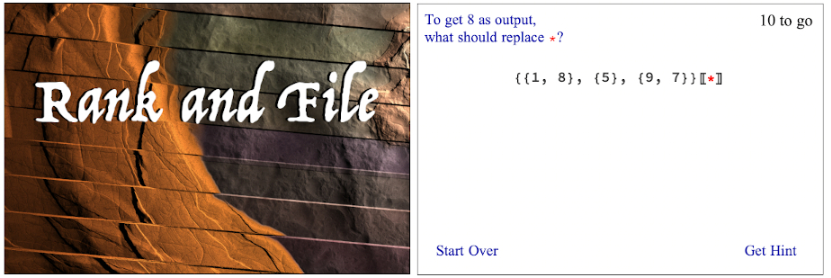
One part of a balanced learning experience is fun, and one way to make learning fun is to turn practice into a game. Rank and File shows what that might look like for learning the Wolfram Language.
Introduction
Introduction
I am a retired math teacher. One type of activity in my teaching repertoire was gamified practice. My website has over a hundred examples of games that I would assign to my students to practice various math skills. I coded those games in HTML5 and JavaScript with MathJax for typesetting. Rank and File is a Mathematica adaptation of that game format for practice with the Part function, which one has to learn in order to master the Wolfram Language. Games in the same format could provide practice for many skills of the language.
Rank and File is written in the Wolfram Language. I won’t go over every code block of its programming; it is mostly interface assembly and If statements controlling the game logic — mundane stuff. Instead I’ll focus on a few key components that I think would be of interest. A link to the full notebook is in the conclusion below.
Rank and File is written in the Wolfram Language. I won’t go over every code block of its programming; it is mostly interface assembly and If statements controlling the game logic — mundane stuff. Instead I’ll focus on a few key components that I think would be of interest. A link to the full notebook is in the conclusion below.
Feature 1: Question Generation
Feature 1: Question Generation
In school, every copy of a practice activity has the same set of questions. If you need more practice, the worksheet you just finished is useless. Rank and File generates new questions on the fly, trillions of unique questions. No matter how many times you return to the game, you’ll never see the same question twice. Rank and File asks eight different types of questions to add variety:
prompt | question | answer |
Whatistheoutputofthisexpression? | {8,3,0,3,8,4,2,1}〚3;;5〛 | {0,3,8} |
Whatistheoutputofthisexpression? | {5,9,9,6,0,8,1,9}〚7〛 | 1 |
Whatistheoutputofthisexpression? | {{5,4},{2,0,8},{0},{1,7}}〚2,3〛 | 8 |
Whatistheoutputofthisexpression? | {{8,8,3},{2},{7,9},{0,4,8}}〚3〛 | {7,9} |
Toget{3,8},whatshouldreplace*? | {8,3,6,3,8,7}〚*〛 | 4;;5 |
Toget0asoutput,whatshouldreplace*? | {5,5,0,9,0,3,1}〚*〛 | 3 |
Toget6asoutput,whatshouldreplace*? | {{9,4,1},{6,2},{1,6,7,0}}〚*〛 | 2,1 |
Toget{7,7},whatshouldreplace*? | {{9,0,5,5},{8},{7,7},{4}}〚*〛 | 3 |
All of the numbers and the length of each list vary randomly. Also, you may have noticed that there are several ways to answer a question. For instance, the fifth sample question above says that the answer is 4;;5, but 4;;-2 is also correct. Rank and File accepts equivalent correct answers. Here is the code for generating the first type of question.
Write the prompt (just a string in this case, but some prompts involve more complex expressions):
In[]:=
prompt="What is the output of this expression?"
Out[]=
What is the output of this expression?
Generate the list for the question:
In[]:=
dat=RandomInteger[{0,9},RandomInteger[{5,12}]]
Out[]=
{3,5,8,3,0,0,1,8,3,5,1}
Generate the Part shorthand for the question:
In[]:=
qAB=Sort[RandomSample[Range[1,Length[dat]],2]];qPart=" 〚"<>ToString[qAB〚1〛]<>" ;; "<>ToString[qAB〚2〛]<>"〛"
Out[]=
〚6 ;; 8〛
Assemble the two parts of the question as a string:
In[]:=
q=ToString[dat]<>qPart
Out[]=
{3, 5, 8, 3, 0, 0, 1, 8, 3, 5, 1} 〚6 ;; 8〛
Determine the answer (Wolfram Language has a big advantage here):
ans=ToExpression[q];
Write a hint:
In[]:=
ords={"first","second","third","fourth","fifth","sixth","seventh","eighth","ninth","tenth","eleventh","twelvth"};hint="the "<>ords〚qAB〚1〛〛<>" through the "<>ords〚qAB〚2〛〛<>" items of the list"
Out[]=
the sixth through the eighth items of the list
Feature 2: Key Capture
Feature 2: Key Capture
Rank and File listens for key strokes. If the player types an allowable character, then it is added to the response string. If the player types the backspace key, then a character is removed from the end of the response. The game shows the player’s response continuously on the screen, just like a word processor does, so it has a natural look and feel.
What isn’t so natural is that Rank and File (along with the math games on my site) doesn’t display a cursor. There is no “place” to type; you just type and the response appears in the appropriate spot. This is disconcerting for adults. Some try clicking a few times and then ask “Where do I type the answer?” (Even Stephen Wolfram asked.) Kids however never ask. They just start typing. It would be easy for me to program in a cursor. Since the game is meant for students, I prefer the current design.
To achieve key capture, I launch Rank and File in its own notebook. This code should be run from a desktop version of Mathematica, and don’t be surprised when a new notebook pops up.
What isn’t so natural is that Rank and File (along with the math games on my site) doesn’t display a cursor. There is no “place” to type; you just type and the response appears in the appropriate spot. This is disconcerting for adults. Some try clicking a few times and then ask “Where do I type the answer?” (Even Stephen Wolfram asked.) Kids however never ask. They just start typing. It would be easy for me to program in a cursor. Since the game is meant for students, I prefer the current design.
To achieve key capture, I launch Rank and File in its own notebook. This code should be run from a desktop version of Mathematica, and don’t be surprised when a new notebook pops up.
Build the response string:
In[]:=
buildResp[oldStr_,ch_]:=(If[ch"\b",If[StringLength[oldStr]>0,resp=StringReplace[oldStr,_~~" "...~~EndOfString""]],If[StringContainsQ["{};,-0123456789",ch],resp=StringReplace[oldStr<>ch,","~~" "...", "]]]);
Launch a new notebook:
In[]:=
resp="";nb=CreateDocument[{Pane[Style[Dynamic[resp],32]]}];SetOptions[nb,WindowSize{680,480},NotebookEventActions{"KeyDown"buildResp[resp,CurrentValue["EventKey"]]}]
Key capture allows me to limit the keys players can type. Based on what the player enters, I could also typeset responses with fractions, radicals, and such, though I don’t need that feature in this game. If done well, key capture can improve the user experience.
Feature 3: Scoring
Feature 3: Scoring
If it’s a game, then Rank and File needs to have some way of winning, some sort of goal. The game offers ten questions and displays a score once the player has successfully answered all ten. The score is based on three criteria: elapsed time, number of times backspace was used, and difficulty level of each question. As new questions are generated and the player answers them, the variables accPen and diffBonus keep track of the backspaces (accuracy penalty) and question difficulty (difficulty bonus). I seeded some phoney play stats in the following code so you can see how it works.
Compute a time score (a “perfect score” is 4000, though higher is possible):
In[]:=
Out[]=
3877.75
Compute an accuracy score (a perfect score is 3000):
In[]:=
Out[]=
2559
Compute a final score including the difficulty bonus (average bonus is around 2500):
Out[]=
8894
A goal of 8,000 or 9,000 can be set by a teacher. Often players will try to best each other, which drives scores into the 9,000 range.
Feature 4: The Human Factor
Feature 4: The Human Factor
It isn’t really a coding thing, more like a design philosophy. I want the players to desire to play again and again until they have either reached a goal or beaten their friends. This idea affects all of the design choices.
◼
Scores — The scores are big integers, in the high thousands. For some psychological reason, big numbers are more exciting than small numbers. Designers of the old pinball machines knew this, making scores with seven or eight digits. So Rank and File’s scores look like 8,532 instead of 8.532 or 0.8532. The scores also align with students’ expectations that numbers starting with 9 or 8 are good while numbers starting with 7 and lower are not so good. There is a rough equivalence from score to grade. The score of 8,119 is roughly equivalent to a B-, or an indication of a mildly successful attempt that might improve with further tries.
◼
Hints — Every question has a custom hint that takes the player halfway to the answer. Some points are deducted when a player uses a hint and she loses time too, but for a player who needs the extra help it could make the difference between giving up and continuing on.
◼
Colors — This is subtle, but the Wolfram Language allows you to be as subtle as you wish when designing an interface. The base text color is Darker[Blue]. The player’s response is pure blue because that’s where I want the focal point to be. Unimportant text in the interface is in black. When the question includes code snippets, they are in GrayLevel[.25] with the same font and weight as code in the notebook environment.
◼
Sounds — Audio cues are usually a good thing in game design, but not in this case. Learning is risky, and sounds that indicate success or failure can make players self-conscious. Also, my games do end up being used in school computer labs where audio cues become comically distracting (not that I know this first-hand or anything). Therefore, Rank and File has no audio cues.
◼
Unlimited Attempts — A player who already knows how to use the shorthand version of the Part function will finish the game in under two minutes and be satisfied. That’s as it should be. A player who has limited understanding of the function will finish and get a score of, say, 6,255. He’ll play again, and perhaps again, to better his score, all the while getting more and more familiar with the syntax.
So far almost every detail that I wish to include in the game design is possible or even easy to do in the Wolfram Language. I have made learning games in several different programming languages, and the Wolfram Language has proven to be the best, in my opinion, for this type of project.
Conclusion
Conclusion
Rank and File is a polished proof of concept. It could be the first of a collection of games to teach the Wolfram Language, though I don’t have any immediate plans to make more. Now that the framework has been built once, subsequent games will be easier to develop.
Here is a that launches the game. It has all the code. Feel free to play the game, experiment with the code, make a new game, or do whatever you want with it. Rank and File is optimized for the desktop environment, not the cloud.
One final thought: I think that the Wolfram Language can be taught successfully at the high school level. The usual way of teaching in high school may not be the best approach, but certainly the students can handle it. If that’s the case, then it is up to us adults to figure out how to structure the learning experience for success.
Here is a that launches the game. It has all the code. Feel free to play the game, experiment with the code, make a new game, or do whatever you want with it. Rank and File is optimized for the desktop environment, not the cloud.
One final thought: I think that the Wolfram Language can be taught successfully at the high school level. The usual way of teaching in high school may not be the best approach, but certainly the students can handle it. If that’s the case, then it is up to us adults to figure out how to structure the learning experience for success.