Heat transfer structures are pivotal for managing high-temperature environments in the field of aerospace engineering. This essay focuses on modeling the effectiveness of liquid-cooled TPMS based heat exchangers through a 2D slice analysis as well as the structural stability of TPMS geometries through a 3D analysis. My findings indicate that TPMS structures are extremely effective heat exchangers, and that fluid-facilitated heat transfer at low velocities can be accurately modeled, to a reasonable degree, with laminar flow. Gyroid based structures are particularly effective, while Schwarz-primitive based structures are worse heat conductors. My findings also indicate that gyroids make great structural supports, while Schwarz-primitives compress too much when under stress. These results contribute to the relatively new literature base surrounding the use of complex geometries as heat exchangers and structural supports.
Introduction
Introduction
The recent advent of metallic 3D printing has led to a large increase in research relating to Triply Periodic Minimal Surfaces (TPMS) and their possible applications as heat exchangers. TPMS geometries are surfaces that repeat in all three dimensions and have a mean curvature of zero at every point. This essentially means that they are smooth everywhere and have no sharp points. Their extremely high surface area-to-volume ratio makes them ideal for heat transfer, and by extension, makes them extremely important in aerospace engineering. They can be used to cool high-velocity airplanes, engine bells during rocket launches, and heat shields during reentry. These systems could be made out of metals like copper or stainless steel, and some researchers are experimenting with nickel alloys. Not only are they effective heat exchangers, they also provide a large amount of structural support. Since there are no sharp points, there is no place for stress to accumulate. This makes them advantageous for aerospace in two separate ways: heat and structure.
In this project, I studied the effectiveness of TPMS heat exchangers when filled with a low-velocity, laminar fluid. The main TPMS structures examined were the gyroid and the Schwarz-primitive. I created a refined mesh of a TPMS cell, defined the physical properties of the fluid flowing throughout it, and used Wolfram's differential equation solver to solve the systems of partial differential equations for velocity, pressure, and temperature. Once the equations were solved, I created visualizations to analyze the final fluid and heat simulation. After studying heat exchangers, I also studied the effectiveness of these structures at keeping their shape under pressure. By solving for the strains and displacement of each point on the object mesh, I created plots and analyzed the results.
In this project, I studied the effectiveness of TPMS heat exchangers when filled with a low-velocity, laminar fluid. The main TPMS structures examined were the gyroid and the Schwarz-primitive. I created a refined mesh of a TPMS cell, defined the physical properties of the fluid flowing throughout it, and used Wolfram's differential equation solver to solve the systems of partial differential equations for velocity, pressure, and temperature. Once the equations were solved, I created visualizations to analyze the final fluid and heat simulation. After studying heat exchangers, I also studied the effectiveness of these structures at keeping their shape under pressure. By solving for the strains and displacement of each point on the object mesh, I created plots and analyzed the results.
Gyroid Fluid and Heat Simulation
Gyroid Fluid and Heat Simulation
The gyroid is a relatively modern TPMS structure. It was discovered by NASA scientist Alan Schoen in 1970 and has been one of the main focuses of TPMS research.
Before simulations can begin, we need to be able to make a region for the fluid to go through the gyroid. This is done by making a finite element mesh of that region, which is a triangular approximation of the geometry it is modeling.
Import NDSolve's Finite Element Mesh (FEM) package.
In[]:=
Needs["NDSolve`FEM`"]
Shape and Mesh Creation
Shape and Mesh Creation
A gyroid is a specific type of TPMS defined by the equation:
sin(x)cos(y)+sin(y)cos(z)+sin(z)cos(x)=0
This can be expressed with a custom function.
In[]:=
gyroid[x_,y_,z_,w_:2*π]:=Sin[wx]Cos[wy]+Sin[wy]Cos[wz]+Sin[wz]Cos[wx]
A w of 2π is used so that the main cell fits cleanly in a 1x1x1 box. A thickness of 0.2 is defined since the actual structure needs to have some thickness.
A gyroid would look like this using RegionPlot3D.
t=0.2;RegionPlot3DAbs[gyroid[x,y,z]]<=t,{x,0,1},{y,0,1},{z,0,1},
Out[]=
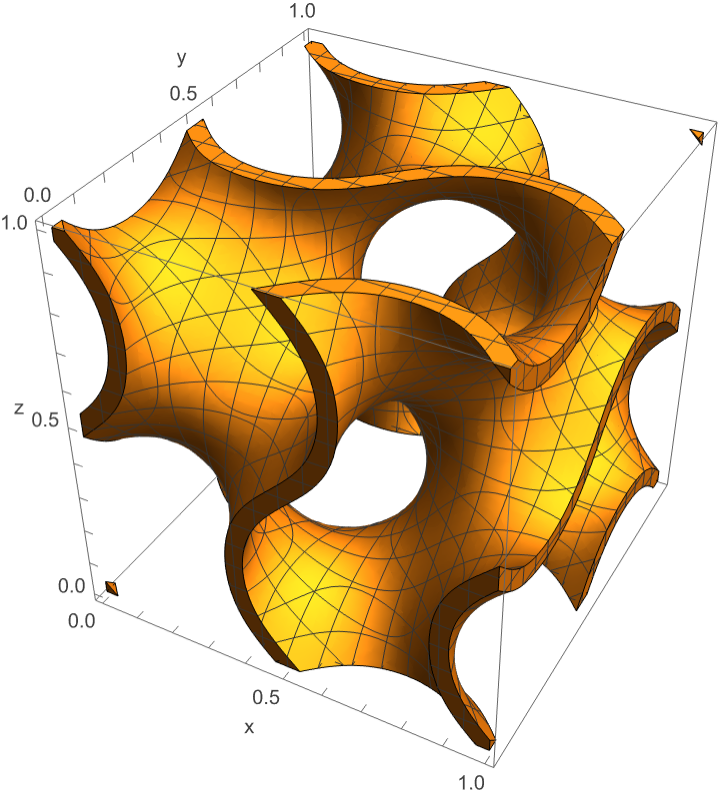
While this can be meshed into a 3D structure and then evaluated for velocity (in all 3 dimensions), pressure, and temperature, it is not feasible to do on the hardware available. Instead of a 3D mesh, 100 2D slices will be taken, and velocity (in 2 dimensions), pressure, and temperature will be calculated. This is far less computationally demanding than a 3D mesh. Meshes of each slice need to be created for the fluid and temperature simulations. To create the meshes of each individual slice, NDSolveFEM’s ToElementMesh function is used.
Define the regions that need to be meshed.
In[]:=
channels=ImplicitRegion[Abs[gyroid[x,y,#]]<=t,{{x,-0.05,1.05},{y,-0.05,1.05}}]&/@Range[0,1,0.01];
Mesh those regions.
In[]:=
channelMeshes=ToElementMesh[channels[[#]],MaxCellMeasure->0.0003]&/@Range[100];
Turn those meshes into mesh regions.
In[]:=
meshRegions=MeshRegion[channelMeshes[[#]],ImageSize->100]&/@Range[100];
Due to random errors with the RegionDifference function, the output of meshRegions is pasted into the second argument of RegionDifference instead of writing “meshRegions.”
In[]:=
fluidDomains=RegionDifference,[[#]]&/@Range[100];
Mesh these regions for the final meshes of the fluid domain.
In[]:=
fluidDomainMeshes=ToElementMesh[fluidDomains[[#]]]&/@Range[100];
PDE Setup
PDE Setup
To simulate heat transfer and fluid dynamics, various different partial differential equations (PDEs) must be set up. For fluids, this includes: the Navier-Stokes equations which define steady, incompressible flow; and the continuity equation, which ensures that the mass leaving the system is the same as the mass entering. For heat transfer, the equation used is the heat equation to model energy transfer into the fluid.
First parameters, variables, and a model must be set up for the fluid equation.
FluidFlowPDEComponent is used to set up fluid equations.
parameters={ρ,k,μ,Cp};pars=<|"MassDensity"->ρ,"DynamicViscosity"->μ|>;CFDvars={{u[x,y],v[x,y],p[x,y]},{x,y}};CFDModel=FluidFlowPDEComponent[CFDvars,pars]
ρ
water
k
water
μ
water
Cp
water
Out[]=
{ρu[x,y],ρv[x,y]}.u[x,y]+·{p[x,y],0}+·-2μ[x,y],-μ[x,y]+[x,y],{ρu[x,y],ρv[x,y]}.v[x,y]+·{0,p[x,y]}+·-μ[x,y]+[x,y],-2μ[x,y],ρ[x,y]+ρ[x,y]
∇
{x,y}
∇
{x,y}
∇
{x,y}
(1,0)
u
(0,1)
u
(1,0)
v
∇
{x,y}
∇
{x,y}
∇
{x,y}
(0,1)
u
(1,0)
v
(0,1)
v
(0,1)
v
(1,0)
u
The fluid being used will be water. This is because of its high heat capacity and widespread usage for general heat transfer systems. When setting up the temperature equations, the thermal conductivity of water will be reduced to make the visualizations understandable.
Define important properties of water.
In[]:=
ρ
water
k
water
μ
water
Cp
water
After this, boundary conditions need to be set up. The first is the inlet condition which defines the initial fluid velocity at the bottom of the domain. Next is the no-slip boundary condition which adds walls at the sides of the domain and makes the area that the gyroid occupies an impermeable wall. Finally, the outlet condition states that there is no pressure backflow at the top/exit of the domain, allowing fluid to cleanly exit.
All boundary conditions are set up with the DirichletCondition function.
In[]:=
Γ
inlet
v
in
In[]:=
Γ
wall
In[]:=
Γ
outlet
Now, NDSolve can be run to solve the fluid differential equations.
In[]:=
velocitySol=NDSolveValue[{CFDModel=={0,0,0}/.parameters,[[#]],/.->2*^-6,},{u,v,p},Element[{x,y},fluidDomainMeshes[[#]]],Method->{"PDEDiscretization"->{"FiniteElement","InterpolationOrder"->{u->2,v->2,p->1}}}]&/@Range[100];
Γ
wall
Γ
inlet
v
in
Γ
outlet
Define the velocity in both the x (u) and y (v) directions, as well as the pressure with the following functions.
In[]:=
uFun=velocitySol[[All,1]];vFun=velocitySol[[All,2]];pFun=velocitySol[[All,3]];
To solve the temperature equation, I follow a similar process. Set up the temperature parameters, variables, and model. The thermal conductivity is intentionally decreased to better visualize the results.
HeatTransferPDEComponent is used to set up the heat equation.
In[]:=
tvarsF={T[x,y],{x,y}};heatPDE=HeatTransferPDEComponent[tvarsF,<|"MassDensity"->ρ,"SpecificHeatCapacity"->Cp,"ThermalConductivity"->(k/2.5)*IdentityMatrix[2],"HeatConvectionVelocity"->{uFun[[#]][x,y],vFun[[#]][x,y]}|>/.parameters]&/@Range[100];
Set up the boundary conditions. The first is defining the fluid inflow temperature to be 300 degrees Celsius, and the second is to set the temperate of the gyroid to be 375 degrees Celsius.
In[]:=
Γ
temp
Now, NDSolve can be run to solve the heat differential equations.
In[]:=
tSol=NDSolveValue[{heatPDE[[#]]==0,[[#]]},T,Element[{x,y},fluidDomainMeshes[[#]]],Method->{"PDEDiscretization"->{"FiniteElement","InterpolationOrder"->{T->2}}}]&/@Range[100];
Γ
temp
Visualization and Analysis
Visualization and Analysis
Now that I have set up and solved the equations for velocity, temperature, and pressure, I can generate visualizations to better interpret the data. Please see the note in the appendix on how to increase the quality of these visuals.
I use a CloudGet function to retrieve data that I have already compiled. For all CloudGet functions, I have also included the function that generated that information in the appendix.
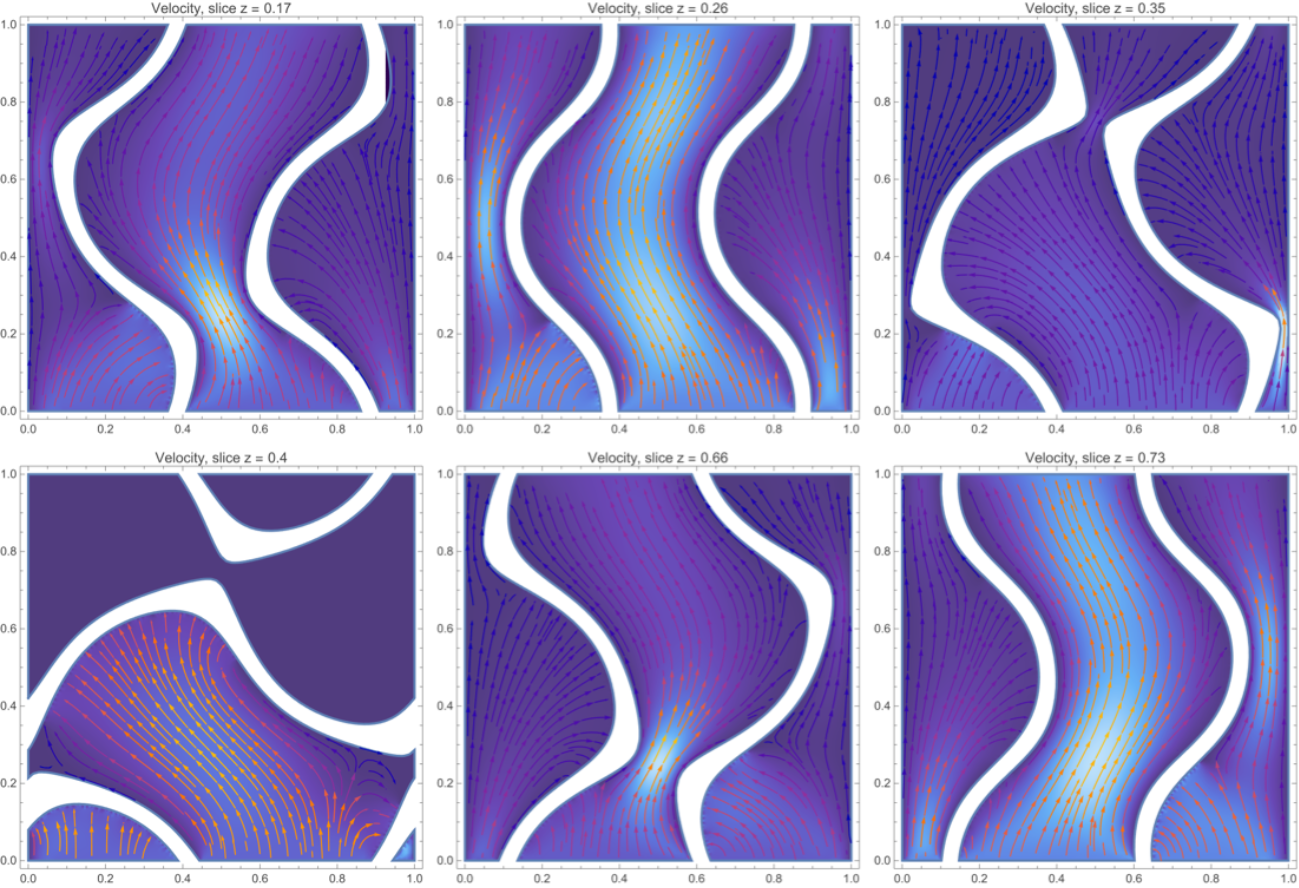
This visualization is of the fluid velocity. I selected certain frames that best exemplify it.
Grid[Partition[CloudGet[CloudObject[
https://www.wolframcloud.com/obj/nolanarias/velocityPlotGyroid
]][[{18,27,36,41,67,74}]],3]]Out[]=
You may also run a ListAnimate function to see it all together.
These visuals have provided us with some key findings. The velocity plot shows that fluids retain most of their velocity when traveling through gyroid heat exchangers. This is important when you begin to analyze the entire system. There needs to be a pump that moves the fluid in the first place. If the system is cyclic, that means the pump will need to continuously circulate the same fluid. If the fluid velocity decreases, it forces the pump to do more work. If a drop in velocity is too big, it requires a bigger and more expensive part. While this has been the obstacle for complex heat exchangers in the past, the gyroid’s unique geometry maintains a large portion of the fluid’s velocity.
Similarly, I can generate a density plot for temperature and then select certain interesting frames.
This is the ListAnimate function you may run.
The temperature graph also provides some valuable insight into the effectiveness of TPMS heat exchangers. The fluid, even with the decreased thermal conductivity that was added, is nearly entirely red at the top of the domain in every slice. This means that it is drawing heat out extremely effectively. If there were just one wall or if the fluid were enclosed in a tube, like most current heat exchangers, you would still see some blue/white at the top.
Finally, I can make a pressure visualization.
Interesting frames:
ListAnimate function:
The pressure visualization can be used to validate the accuracy of this simulation. It is building up everywhere I expect it to.
You may have noted that in some portions of these graphs, there are "dead zones" (such as slice z = 0.4) where there appears to be no velocity, no pressure, and high temperature. This is a result of the 2D slice method. With the 3D structures, there would be fluid and heat transfer there, but in 2D it is treated as a hard cutoff. Either way, the simulation is still accurate up until that cutoff point, and for the majority of it the fluid does go through.
Quantitatively, the fluid's average temperature can be evaluated at the point with most flow for the most accurate data.
Use mean to get the average temperature at slice 27.
For velocity, that average can be calculated like this.
Schwarz Primitive Fluid and Heat Simulation
Schwarz Primitive Fluid and Heat Simulation
The Schwarz-primitive (often just primitive) was the first TPMS structure discovered by Hermann Amandus Schwarz in 1865. It is known as the primitive because of both its origins and simple formula.
Most of these steps are similar to the gyroid setup. If you would like, you may go to the visualization portion.
Shape and Mesh Creation
Shape and Mesh Creation
A primitive is a specific type of TPMS defined by the equation:
This can be expressed with a custom function.
A w of 2π is used so that the main cell fits cleanly in a 0.9x0.9x0.9 box. These dimensions had to be used because the primitive's unique geometry makes it hard to maintain laminar flow if the full 1x1x1 cell is in use. Similar to the gyroid, its thickness of 0.2 is defined.
A primitive would look like this using RegionPlot3D.
Define the regions that need to be meshed.
Mesh those regions.
Turn those meshes into mesh regions.
Take the region difference to make the fluid domains.
The box defined here goes from {0.1, 0.1} to {0.9, 0.9}.
Make the final meshes.
Primitive meshes are sometimes not generated correctly. Check each mesh with this function, and regenerate if something looks off.
PDE Setup
PDE Setup
Define the parameters, variables, and the model.
Define properties of water.
Define the inlet, outlet, and no-slip boundary conditions.
Now, solve the fluid equations. You may notice that some meshes are excluded here (particularly 20, 21, 22, 80, 81, and 82). These meshes were excluded for a similar reason as the new range. The primitive's geometry makes it nearly impossible for flow to be laminar at those points since the fluid gets squeezed into an extremely confined space.
Define velocity in both directions and pressure.
Set up the variables, parameters, and model for the heat equations.
Set up boundary conditions for heat.
Solve the heat equation.
Visualization and Analysis
Visualization and Analysis
These visualizations will be similar to the gyroid, just with the primitive instead.
Begin by analyzing velocity.
Select interesting frames:
ListAnimate function:
The velocity plots show that velocity is mostly conserved throughout from the inlet to the outlet. This is a result of the zero mean curvature characteristic of TPMS geometries and was seen with the gyroid as well. This is important for the pumping that the whole system requires (see “Gyroid Fluid and Heat Simulation” visualization and analysis section for more details). While the gyroid did have marginally better velocity conservation, it was only by about 3.4%, not nearly enough to offset the temperature losses.
Run the temperature visualizations.
Select interesting frames:
ListAnimate function:
While the information I learned from velocity was similar across both the gyroid and the primitive, temperature was not. The gyroid was almost always carrying away a large amount of heat, but the primitive was not as effective. For large portions of the structure (near the center), a lot of fluid was too far from the walls to maximize heat absorption. Given the temperature range of 300-375, the gyroid was 40.3% more effective (when comparing mean temperature at the slices with most flow) at transferring heat. Overall, the gyroid was more effective at maintaining velocity while absorbing the most heat.
Run the pressure visualizations.
Select interesting frames:
ListAnimate function:
Evaluate the average temperature at the point of most flow:
Evaluate the average velocity:
Similar to the gyroid, you may have noticed some "dead zones." Again, these are results of the 2D slicing method, but the overall simulation is still accurate. With the primitive, this dead zone was the center of the structure while it was closed. In reality, there would be fluid flowing there as it would enter from the bottom, but it would not interact with the fluid from the outside. This just means the simulation gives slightly less data, but is still accurate.
I believe the gyroid was more successful because of its more uniform geometry. While the primitive starts small, expands, and then becomes small again, the gyroid is consistently contacting a similar amount of fluid at any given point. Even at the slices where most flow goes through, the gyroid made substantial contact while the primitive is far away from the walls. This feature of the gyroid makes it more effective at carrying away heat.
Gyroid Solid Mechanics Simulation
Gyroid Solid Mechanics Simulation
I now move to the solid mechanics simulation to test the structural properties of TPMS structures. TPMS geometries are known for their amazing structural properties, primarily due to their zero mean curvature. This property makes it so that there are no sharp points anywhere on the surface, making it very difficult for stress to build up anywhere and strain the structure. In a world where buildings keep on rising and humanity keeps on testing the levels it can reach, having a strong support is a necessity.
Shape and Mesh Creation
Shape and Mesh Creation
The key difference here is that I am actually able to run a 3D simulation with the hardware available. This is for two main reasons. The first is that there are fewer equations to solve for; there are only three as opposed to five. The second reason is that the mesh is smaller. Instead of making a mesh of the entire fluid domain, which is most of the volume, I only have to make a mesh of where the gyroid occupies, which is far fewer elements. Because of this, no slicing needs to be done and a 3D mesh can be generated.
Create the implicit region:
Turn that implicit region into a 3D mesh:
PDE Setup
PDE Setup
Define variables, properties of copper (the metal I will be making the mesh out of), parameters, and the model.
Define the boundary condition that applies pressure to the top of the structure.
Define the boundary condition that keeps the bottom in place.
Solve for the displacement using NDSolve (~30 sec).
I can get the strains on the object using the function SolidMechanicsStrain. The strains represent how much the object has deformed, which in turn shows how strong the structure is.
Retrieve the second element of the first part of strains to get the XY shear strain.
Get each component of displacement in all 3 directions.
Visualization and Analysis
Visualization and Analysis
Analyze the strain on every point of the gyroid. You may note that the mesh has rough borders. This is a byproduct of how NDSolveFEM meshes 3D structures and does not affect the simulation.
Analyze the displacement of the structure due to the strain.
Use VectorDisplacementPlot3D:
Average displacement magnitude:
Average XY shear strain:
As can be seen, the gyroid withstood pressure on top of it very well. The only large deformation was bending at the sides, which could be fixed by connecting them with a plate on top or having more cells side-by-side. Overall, it performed remarkably for the small volume and mass that it uses.
Schwarz Primitive Solid Mechanics Simulation
Schwarz Primitive Solid Mechanics Simulation
This will follow a similar workflow to that of the gyroid.
Shape and Mesh Creation
Shape and Mesh Creation
Create the implicit region:
Mesh the implicit region:
PDE Setup
PDE Setup
Variables, parameters, properties, and boundary conditions are the same ones used on the gyroid.
Generate the model:
Solve for the displacement:
Retrieve the strains:
Retrieve the XY shear strain:
Get each displacement component:
Visualization and Analysis
Visualization and Analysis
Visualize the strains:
Visualize the displacement:
Average displacement magnitude:
Average XY shear strain magnitude:
The primitive performed far worse than the gyroid. The top got compressed by a large amount. As opposed to the gyroid, this would not make a great structural support. The primitive had 266.7% more average displacement, and experienced 127.9% more average strain. While adding more cells may help it, the overall compression from above is too extreme to fully fix. These results are likely due to the primitive’s open center. While it does dissipate some of the stress around the sides (similar to a dome), the gyroid’s centralized structure withstood the stress better.
Conclusion
Conclusion
In this research project, I explored the effectiveness of TPMS geometries as both fluid-filled heat exchangers and structural support elements. Using 2D slices and 3D models, I found that TPMS structures are extremely effective at transferring heat and working as structural support elements. Gyroids were nearly 3 times more effective under stress and 40% more effective at transferring, making them the clear path forward. These properties make them extremely important in the growing field of aerospace engineering. More efficient and structurally sound heat transfer systems allow manufacturers to shed weight while not compromising their plane or rocket, leading to increases in payload capacity and more scientific research in space. Overall, this project contributed to the understanding of how heat, fluid, and mechanical stress interact within TPMS geometries and how they can be used in the real world.
Limitations and Future Directions
Limitations and Future Directions
One of the main limitations during this project is that a true 3D fluid analysis could not be performed, and only laminar flow regimes could be solved. You may have noticed that in some of the velocity graphs, it seemed as if the fluid was colliding into the walls in a strange way. This is a result of the 2D slice method and the boundary conditions that had to be used. If I were to fix the boundary conditions, a majority of the slices would be unusable. The current method is the best approximation I was able to do with slicing.
Future work to continue this project would primarily involve more advanced hardware to run the 3D fluid simulation. This would eliminate the "dead zones" that appeared on some of the visuals throughout the essay, and make the simulation more accurate. Another improvement would be to create a turbulent flow simulation. Wolfram can natively solve laminar flow problems with FluidFlowPDEComponent, but has no dedicated function for turbulent flow equations. Building a turbulent flow simulation was not feasible in the time period provided, but it can be done with months of dedication.
Future work to continue this project would primarily involve more advanced hardware to run the 3D fluid simulation. This would eliminate the "dead zones" that appeared on some of the visuals throughout the essay, and make the simulation more accurate. Another improvement would be to create a turbulent flow simulation. Wolfram can natively solve laminar flow problems with FluidFlowPDEComponent, but has no dedicated function for turbulent flow equations. Building a turbulent flow simulation was not feasible in the time period provided, but it can be done with months of dedication.
Acknowledgements
Acknowledgements
I would like to thank my mentor Shenghui Yang for his continuous support along every step of the way. Whenever I needed help, you always had a solution for me. I would also like to thank the WSRP directors and staff for allowing me to expand my research horizons into the areas that I love, and Oliver Rübenkönig for his help with setting up my PDEs. Finally, I would like to thank Stephen Wolfram for making this entire program possible.
References
References
◼
Dharmalingam et al. (2022). Review of Triply Periodic Minimal Surface (TPMS) based Heat Exchanger Designs. International Refrigeration and Air Conditioning Conference. https://docs.lib.purdue.edu/cgi/viewcontent.cgi?article=3392&context=iracc
◼
Huang & Zhai (2025, April 1). Structural optimization, compressive strength analysis, and application exploration of triply periodic minimal surfaces (TPMS) in Interior Design. Scientific Reports. https://www.nature.com/articles/s41598-025-95778-1
◼
Rashid et al. (2026, April 2). Triply periodic minimal surface heat exchanger: Innovations, mathematical modelling, and performance enhancement-a state-of-the-art review. International Communications in Heat and Mass Transfer. https://www.sciencedirect.com/science/article/pii/S073519332600641X
◼
Saghir & Yahya (2024, August 27). Convection Heat Transfer and Performance Analysis of a Triply Periodic Minimal Surface (TPMS) for a Novel Heat Exchanger. Energies. https://www.mdpi.com/1996-1073/18/16/4275
CITE THIS NOTEBOOK
CITE THIS NOTEBOOK
Finite element analysis of TPMS heat exchanger geometries
by Nolan Arias
Wolfram Community, STAFF PICKS, July 9, 2026
https://community.wolfram.com/groups/-/m/t/3749542
by Nolan Arias
Wolfram Community, STAFF PICKS, July 9, 2026
https://community.wolfram.com/groups/-/m/t/3749542