2D cellular automata has been proposed to model pedestrian dynamics and crowd flow. In this project, we implement the project in Wolfram Language and study the effects of changing certain parameters within the model and relevant to the model. Using the model, we examine how the dimensions and shape of the room affect how agents within the room navigate to the exit, as well as how long it takes for all agents to evacuate the room. This could be used in crowd control applications to predict the flow of pedestrians out of a enclosed space in the event of an urgent evacuation, potentially saving lives.
Introduction
Introduction
Forecasting crowd dynamics constitutes a critical component of effective risk mitigation strategies. Several fatal disasters, including the Itaewon, The Station, and The Who crowd crush incidents were caused, in part or in whole, by the lack of accurate evacuation models.
This project intends to provide a simple framework for further research and development into an effective and optimized cellular automata model to accurately predict the flow of crowds, particularly in the event of an evacuation. We explore the effects of changing certain variables both within the context of the model and applying the model to certain independent variables.
Before we begin, we would like to note that Wolfram’s built in CellularAutomata function is rather undeveloped for simulation-based cellular automata models and could not fulfill the requirements for this project. We have chosen to construct our own CellularAutomata function.
An Important Note on Assumptions
An Important Note on Assumptions
To simplify the cellular automata model, we have chosen to establish some assumptions.
1
.Assume that each agent is attempting to exit the enclosed region as quickly as possible.
2
.Assume that each agent is incapable of making decisions about their behavior on the strategic or tactical levels--we are only interested in operational behavior
2
.1
.Strategic and tactical levels of pedestrian behavior deal with choice of activities, routing, scheduling, etc.... We do not reference any of those factors in this model. Instead, this model primarily considers walking and other basic low-level interactions between agents and their environment.
3
.Assume that only six exit cells exist, three on each vertical side. Assume that they are located in the middle of the wall.
4
.Assume the exclusion principle applies and a maximum density of 6.25 persons per .
2
m
4
.1
.The exclusion principle posits that no more than one agent can occupy a cell at a time.
4
.2
.Keep in mind that 6.25 persons per is an EXTREMELY dangerous density. We are modeling crowd flow in evacuation scenarios where all agents are attempting to exit as quickly as possible.
2
m
Create a Floor Field
Create a Floor Field
Most crowd dynamic models derived from cellular automata use a floor field to compute agent movement. A floor field is an array of valid positions (i.e. agents are allowed to occupy those cells) assigned certain numerical values based on certain formulas or patterns. Each cell’s value was determined by subtracting the distance to a target cell from the maximum value contained within the floor field. In this project, exits represent target cells as agents will attempt to navigate towards the exit in all scenarios.
An example of a static floor field for a 9x30 cell rectangular room
In[]:=
staticfloorfieldsetup[{9,30},{}]
Out[]=
{{0,0,0,0,0,0,0,0,0,0,0,0,0,0,0,0,0,0,0,0,0,0,0,0,0,0,0,0,0,0,0,0,0,0},{0,0,0,0,0,0,0,0,0,0,0,0,0,0,0,0,0,0,0,0,0,0,0,0,0,0,0,0,0,0,0,0,0,0},{0,0,15,14,13,12,11,10,9,8,7,6,5,4,3,2,1,1,2,3,4,5,6,7,8,9,10,11,12,13,14,15,0,0},{0,0,16,15,14,13,12,11,10,9,8,7,6,5,4,3,2,2,3,4,5,6,7,8,9,10,11,12,13,14,15,16,0,0},{0,0,17,16,15,14,13,12,11,10,9,8,7,6,5,4,3,3,4,5,6,7,8,9,10,11,12,13,14,15,16,17,0,0},{0,23,18,17,16,15,14,13,12,11,10,9,8,7,6,5,4,4,5,6,7,8,9,10,11,12,13,14,15,16,17,18,23,0},{0,23,18,17,16,15,14,13,12,11,10,9,8,7,6,5,4,4,5,6,7,8,9,10,11,12,13,14,15,16,17,18,23,0},{0,23,18,17,16,15,14,13,12,11,10,9,8,7,6,5,4,4,5,6,7,8,9,10,11,12,13,14,15,16,17,18,23,0},{0,0,17,16,15,14,13,12,11,10,9,8,7,6,5,4,3,3,4,5,6,7,8,9,10,11,12,13,14,15,16,17,0,0},{0,0,16,15,14,13,12,11,10,9,8,7,6,5,4,3,2,2,3,4,5,6,7,8,9,10,11,12,13,14,15,16,0,0},{0,0,15,14,13,12,11,10,9,8,7,6,5,4,3,2,1,1,2,3,4,5,6,7,8,9,10,11,12,13,14,15,0,0},{0,0,0,0,0,0,0,0,0,0,0,0,0,0,0,0,0,0,0,0,0,0,0,0,0,0,0,0,0,0,0,0,0,0},{0,0,0,0,0,0,0,0,0,0,0,0,0,0,0,0,0,0,0,0,0,0,0,0,0,0,0,0,0,0,0,0,0,0}}
Visualize the floor field
In[]:=
ArrayPlot[%]
Out[]=
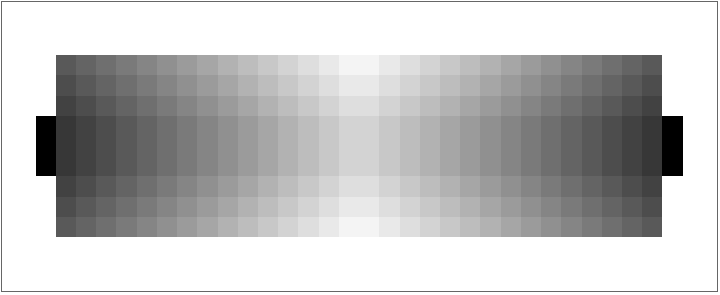
The value of each cell in the floor field determines the probability that an agent navigates to that cell. Lower floor field values are less likely to be navigated too, whereas cells assigned high floor field values are more likely to be navigated too. Notice how the exit cells--the three cells protruding from each side—are much darker than the rest of the floor field; they have higher floor field values to increase the probability that a given agent moves towards that cell. Agent movement will be expanded upon later.
Global Variables
Global Variables
We begin by defining global variables. The variable frictionCoefficent defines a set of probabilities used to resolve conflicts. We will be return to this topic further in the essay. The variable multiplier defines a global exponent value that will be applied to the floor field. The variable offsets defines the set of directional vectors b such that, for a given coordinate a, a + b yields the coordinates of neighboring cells.
Set-up global variables
In[]:=
frictionCoefficient={0.25,0.3,0.45};(*Prevent,Redirect,Allow*)ticksToRun=60;multiplier=39.221184080780255;offsets={{-1,0},{1,0},{0,-1},{0,1}}(*Down,Up,Left,Right*);
Creating a Floor Field
Creating a Floor Field
Now, we need to create a floor field. We start by creating an array where valid positions are given the value 1 and invalid positions are given the value 0. As part of this, we must calculate the positions of the exit cells and convert them from invalid to valid cells.
A Simple Floor Field
A Simple Floor Field
We calculate the simple floor field by taking dimensions and positionsToEliminate as arguments. dimensions establishes the floor field to the dimension specified; this will always return a rectangular floor field. Then, the cells listed in positionsToEliminate are assigned the value 0 to eliminate them from the valid cells in the floor field.
Returns the integer 1
In[]:=
returnOne[y_,x_]:=1
Returns a simple array displaying valid cells dependent on the dimensions inputted
In[]:=
getSimpleFloorFieldArray[dimensions_,positionsToEliminate_]:=ReplacePart[ReplacePart[ArrayPad[Array[returnOne,dimensions],2],positionsToEliminate->0],getExits[dimensions]->1]
Return the median y-value, rounded down to the nearest integer
In[]:=
getMedianYDimension[dimensions_]:=Floor[Median[Range[dimensions[[1]]+4]]]
Returns three exit cells on each side of the room, as close to the middle as possible
In[]:=
getExits[dimensions_]:=Flatten[Table[{getMedianYDimension[dimensions]+x,y},{x,{0,-1,1}},{y,{2,dimensions[[2]]+3}}],1];
The function getExits only works if exit cells border at least one cell that is a valid position.
An example of getExits for a 15x15 cell (6x6 m) room
In[]:=
getExits[{15,15}]
Out[]=
{{10,2},{10,18},{9,2},{9,18},{11,2},{11,18}}
getSimpleFloorFieldArray takes a dimension specification (without the two units of padding) and a list of invalid positions to eliminate from the simple floor field. The output of getSimpleFloorFieldArray is the basis of the weighted static floor field, which is expounded on in the next subsection.
An example of getSimpleFloorFieldArray for a 15x15 cell (6x6 m) room with 6 exit cells and a 1x1 cell (.4x.4 m) pillar located in the center of the room
In[]:=
ArrayPlot@getSimpleFloorFieldArray[{15,15},{{10,10}}]
Out[]=

Notice how the interior of the enclosed area is 15x15, not the entire floor field. Additionally, notice the 6 exit cells that are shown as valid positions.
A Weighted Floor Field
A Weighted Floor Field
The floor field isn’t quite complete yet—the floor field needs to be weighted. Each cell should be assigned a integer value that inversely corresponds with the distance to the nearest exit cell. Cells closer to the exits are expected to have higher values, whereas cells further away from the exits are expected to have lower values.
Returns an array of integer values such that cells with a shorter distance to the exits have higher values and cells further away from the exits have lower values
In[]:=
getWeightedStaticFloorField[dimensions_,positionsToEliminate_]:=ReplacePart[getSimpleFloorFieldArray[dimensions,positionsToEliminate],getGraphBasedDistance[Position[getSimpleFloorFieldArray[dimensions,positionsToEliminate],1],getExits[dimensions]]];
Take the weighted floor field and manually replaces all exits with an integer value above the maximum value of the floor field
In[]:=
staticfloorfieldsetup[dimensions_,positionsToEliminate_]:=ReplacePart[getWeightedStaticFloorField[dimensions,positionsToEliminate],getExits[dimensions]->Max[Flatten[getWeightedStaticFloorField[dimensions,positionsToEliminate]]]+5]
Get the valid positions (i.e. cell that agents are permitted to occupy) for a floor field
Get the invalid positions (i.e. cell that agents are forbidden to occupy) for a floor field
Example: Get the floor field for a 9x50 rectangular room
Graph-Based Distance
Graph-Based Distance
Notice how distance, not displacement, is used to calculate the value that should be assigned to cells in the weighted floor field.
To calculate distance with a graph, we must first make a graph. Graphs in Wolfram Language require two pieces of data: vertices and edges. Vertices is simple—the list of all valid positions doubles as the list of vertices for a graph. Edges are a little bit more difficult.
Given a coordinate y, we can compute y+x where x is a value of the variable offsets. If we traverse through the list of offsets with a Table, the computation returns a set composed of all neighbouring cells. A simple UndirectedEdge function creates an edge object between the given coordinate y and each neighboring cell. Table replaces y while it traverses through every value of vertices, thus returning a complete list of edge objects between every coordinate and their neighbouring four cells. We then eliminate any edge incident to a vertex that is not part of the variable vertices (composed of only valid positions).
Return a list of the edges connecting adjacent vertices
A graph can be created after getEdges is evaluated and list of undirected edges is returned. However, getEdges has duplicates as it does differentiate between
{ab} and {ba}. A simple DeleteDuplicates command will not work, leaving SimpleGraph as the most effective and least complex solution. It takes a graph and automatically deletes multiple edges incident to the same two vertices.
{ab} and {ba}. A simple DeleteDuplicates command will not work, leaving SimpleGraph as the most effective and least complex solution. It takes a graph and automatically deletes multiple edges incident to the same two vertices.
Return a simple graph
The graph of a 9x30 rectangular room is shown below as a reference. Notice how there are three exit cells protruding from the 9x30 grid on the left and right of the graph.
Example graph using the floor field of a 9x30 rectangular room
Return a 3D Array composed of the GraphDistance between each point in the Array and each exit cell
Returns an association where each valid position is a key matched with the graph distance between said position and the nearest exit cell
3D array resulting from evaluating getAllExits3DArray on a 9x30 rectangular room.
Circular Floor Fields
Circular Floor Fields
Of course, we may want to work with rooms other than perfect rectangles. Any complete examination of pedestrian dynamics must include alternative room designs--that is, models that utilize a non-rectangular floor field. Here, we examine the influence of a circular room on crowd dynamics compared to a rectangular room. Further examination into the effect of room design on pedestrian dynamics is advised.
To begin, we get the invalid positions for a circular array. An example using a circle with radius 10 is shown below.
Return the invalid positions for a circle with a given radius
Example of getInvalidPositionsForCircularFloorField with radius 10
The function staticfloorfieldsetup requires dimensions and a list of invalid positions to remove from the floor field with the given dimensions. Thus, we call getInvalidPositionsForCircularFloorField with our radius to retrieve a list of invalid positions. The floor field of a radius 10 circle is shown below.
Return a circular static floor field with a given radius
Example of getCirucularStaticFloorField with radius 10
Cellular Automata Model
Cellular Automata Model
Wolfram Language’s built-in symbol for CellularAutomata is not designed for dynamic, simulation-based applications of 2D cellular automata. As such, we have decided to create our own custom cellular automata program, which can be called by evaluateCAonce.
An array keeps track of where each agent is located in the cellular automata model. We take the positions of all the agents, applies certain transformations on the data to get a list of new positions, and create a SparseArray with said list. SparseArray is normalized and displayed to the user as a tick of the program, then the array is fed back into the program to calculate the next tick. This repeats until a given number of ticks has been run.
Agent Movement
Agent Movement
Agents move by retrieving the floor field values of their neighboring cells. These values correspond to weighted probabilities that determine how likely an agent in cell {i, j} will move to the cells {i+1, j}, {i-1, j}, {i, j-1}, and {i, j+1}. The floor field that getWeights and getweightedinteger accept as an argument are based off the floor field returned by the staticfloorfieldsetup function. Each value in the floor field is raised to the power of the multiplier to make the difference between values in the floor field more drastic.
Returns the static floor field values of neighbouring cells to the position of an agent
Returns a random integer between 1 and 4 using the static floor field values as weighted probabilities
Collision Resolution
Collision Resolution
Collision resolution is an paramount element of agent behavior. We expect high amounts of collisions as every agent is moving towards only a few locations as quickly as possible.
Returns a list of duplicates from DuplicatesList resource function. Primarily for readability and shortening code
Returns a list of the indices of duplicates from duplicatesList
getDuplicates is extremely important for the collision resolution mechanism. Below is an example of getDuplicates as applied to a dummy list of certain coordinates.
Find the indices of duplicates in the list {{3,3},{4,4},{3,4},{4,3},{3,3},{5,3},{5,5},{5,5}}
Every agent returns to their previous position—all agent movement is inhibited
One agent occupies the cell, other agent returns to their previous position
A special getWeightedInteger function that is exclusively for dealing with collisions in the redirectAgentMovementUponCollision function
One agent occupies the cell, other agents are redirected to move in a different direction in accordance with getweightedintegercollision.
Each grouping of indices is assigned an integer that corresponds with whether the preventAgentMovementUponCollision, redirectAgentMovementUponCollision, or allowAgentMovementUponCollision functions
changeDuplicates function definition - Solves conflicts between agents by running the Prevent, Allow, or Redirect functions based off of the friction coefficient.
Starting Position
Starting Position
We want to create a starting position for the agents to start at. Randomly distributed agents eliminate potential human bias that could influence results in an array pre-determined by humans. A random number of valid positions are assigned the value 1, representing a cell occupied by an agent. Invalid cells are assigned the value 2. Unoccupied but valid cells are assigned 0 to denote their empty state. The startingPos function creates a SparseArray with these values that can be taken as a parameter for the model.
Returns an array where a random sample of cells are assigned the value 1, invalid cells are assigned 2, and unoccupied but valid cells are assigned 0
Cellular Automata Model
Cellular Automata Model
This four line function is the heart of the model, so let us break it down in detail. evaluateCAonetick takes the parameters previousSparseArray and floorfield. The first line retrieves all positions that are occupied in the array, removes any agents that are on an exit cell, and saves the remaining coordinates to the local variable pos. The next line selects an integer value between 1 through 4 that represents a direction that the agent will travel in by calling getweightedinteger and applies that movement to a each element of pos. newPos repeats changeDuplicates until all duplicates have been eliminated. SparseArray creates an array where all values of newPos are assigned 1 and all invalid positions are assigned 2.
Returns the next tick of the model.
Returns the frames to one evaluation of the cellular automata model
Output
Output
Now that we have our model, we can run the simulation and explore patterns within it. This subsection goes over a couple sample evaluations of the cellular automata model.
A sample evaluation of evaluateCAonce with a rectangular 9x30 room, 150 agents, and 40 ticks.
Animate it
Lets put this into a DynamicModule to explore the model.
Interactive controls for the cellular automata
Tuning the Value of exponent
Tuning the Value of exponent
The static floor field is composed of a an array where each cell is assigned an integer value representing its approximate distance from the nearest exit using a graph. These values are the basis of the weighted probabilities in agent movement. However, using the raw data from the floor field does not prove to be strong enough. Thus, we take all values of the floor field and raise it to the power of an exponent.
Variable set-up
Run the cellular automata model 12 times per multiplicity
Evaluation takes a loooooong time, so here’s the data
Plot the lines of best fit
Now that we have a set of linear functions, we can calculate the x-intercepts for all of them. This represents the average duration of a complete evacuation using a given multiplicity in the model.
Calculate the x-intercepts of each line of best fit
Plot the x-intercepts on a 2D coordinate grid using ListPlot, where x represents the multiplicity and y represents the x-intercept
Now that we have a set of average evacuation times as a function of multiplicity, we can perform a regression to find an accurate model.
Execute a regression to find a rational function that models the graph.
limx∞ f(x) = 32.6904. If we establish that once f(x) ≤ (1.25)32.6904 (a 25% “buffer zone” around 32.6904) equates to “low effectiveness”
Plot the regression and x-intercepts layered on top of each other
Examining the effect of dimensions on evacuation time
Examining the effect of dimensions on evacuation time
Differences in the dimension of rectangular rooms can have an outsized impact on crowd flow. Interesting patterns arise when examining how dimensions affect evacuation time.
Using a standard 9x30 rectangular rooms, we have 270 valid cells excluding the 6 exit cells. Increasing the area of the room would clearly impact crowd flow—we’re examining the impact of dimensions on crowd flow, not the impact of area. Thus, we should maintain 270 valid cells for all dimensions that we wish to examine.
All the factors of 270 are listed below:
1, 2, 3, 5, 6, 9, 10, 15, 18, 27, 30, 45, 54, 90, 135, 270
Thus, we have 16 factor pairs—and 16 dimensions—to test. They are listed below.
Initialize variables and define the list of dimensions that we want to examine
To ensure accuracy, we take several trials of each dimension—50 to be exact. These are saved to framesdimensions. datadimensions calculates the number of agents in the model at each tick of each run of framesdimensions. lobfdatadimensions takes data from datadimensions and creates index-value pairs that can be plotted in a ListPlot. Additionally, lobfdatadimensions deletes all index-value pairs where the value is 0. Fit runs a simple linear regression to find the line of best fit. This process is repeated for multiple dimensions using different floor fields.
Run the CA model 50 times per dimension, plot the number of agents in the room as a function of time/tick count, and calculate a line of best fit
Evaluate the runCADimensionTesting function for all floor fields that result from listOfDimensionsToTest
Now that we have a list of linear functions, we can plot them for an visualization of the amount of agents as a function of both time in ticks and room dimensions.
Plot the lines of best fit
The x-intercept of the lines of best fit represent the average evacuation time for each dimension.
Find the x-intercepts of the lines of best fits.
Plot the average evacuation time of the different dimensions
Most dimension pairs that include {a,b} and {b,a} are roughly equal to each other, however, there tends to be a slight preference for horizontal rooms. We suspect that this is an effect of exit cell placement but more trials are necessary to confirm said suspicion. The room that was quickest to evacuate had dimensions of {15, 18}. Below is an animation of the cellular automata model using a 15x18 rectangular room.
Visualizing the movement of agents on a 2D plane
Visualizing the movement of agents on a 2D plane
Visualizing this model in 2D yields interesting results. Here, we compress each tick of the cellular automata model by representing the number of agents in a column with the color of that cell. Once we have collapsed a tick of the model into a 1D representation, we can introduce time as the second dimension, visualizing an entire evaluation of the model with a 2D plane.
Transpose each array in an evaluation of the cellular automata model such that each subsublist represents a column, then drop the first two and last two rows for each array (these are empty columns that are composed of all invalid cells or exit cells)
Count the number of cells with a value of 1 for each subsublist in the array and return it as a grid of numbers or an ArrayPlot
Create controls to change the dimensions and type of array array visualization
What if we used a circular room?
What if we used a circular room?
Rectangles aren’t the only shape, though. A thorough examination of pedestrian dynamics requires an evaluation into non-rectangular rooms. Here, we implement and test a circular room and compare it to the results of rectangular rooms with approximately the same area. The methodology used here is very similar to the methodology used in the section “Examining the effect of dimensions on evacuation time”. Please refer to that section for additional details.
Create a list of static floor fields, where the first is a circular room with a radius of 10 and the second are
Evaluate every floor field 50 times and find a line of best fit.
Find the line of best fit for every element in listOfFloorFieldsToTestCR
Plot the lines of best fit
It appears that circular rooms have about the same evacuation time as a horizontal rectangular room.
Conclusion
Conclusion
In conclusion, we created a 2D cellular automata to model crowd flow and pedestrian dynamics within an enclosed area. We examined the effects of changing several variables, both variables within the model and applied to the model.
Modeling crowd flow with cellular automata is promising to be a useful tool for avoiding dangerous crowd crushes. Further research and development into the model and its applications is essential.
Future Directions
Future Directions
◼
Perform statistical analysis on several results to confirm that we can reject the null hypothesis.
◼
Modify the friction coefficient to examine different pedestrian behaviors, particularly arch formation similar to those found in granular materials.
◼
Implement creative and realistic collision resolution.
◼
Use game theory to determine collision resolution.
◼
Multiway graphs can model this application of game theory.
◼
Perhaps there should be a chance that two agents can take up the same cell, which would represent a crowd crush.
◼
Implement a dynamic floor field.
◼
Apply this model to real world applications, such as:
◼
Modelling the evacuation time of Clapham Common Station and the likelihood of a fatal incident due to overcrowding.
◼
Evacuation of commercial airliners, particularly in circumstance where not all emergency chutes are operable.
References
References
◼
Andreas Schadschneider. (2001). Cellular Automaton Approach to Pedestrian Dynamics - Theory.
◼
Bouzat, S., & Kuperman, M. (2014). Game theory in models of pedestrian room evacuation. Physical review. E, Statistical, nonlinear, and soft matter physics, 89, 032806.
◼
Schadschneider, Andreas. “Cellular Automata Models of Pedestrian Dynamics.”
Acknowledgements
Acknowledgements
I just want to thank everyone here who has supported me throughout the process of writing this essay. That includes Rory Foulger, Eryn Gillam, and Megan Davis—the directors that have made this all possible; Stephen Wolfram, who came up with this project idea; Henry Gustafson, my mentor and advocate who has provided immense amounts of support; the TA team, who have worked late into the night helping debug ridiculously long error messages from every student’s project; and the other students at WSRP, who have helped me on many occasions.