This is a continuation to the posts listed at: https://community.wolfram.com/web/ggoff/
Supplementary files available here: https://www.dropbox.com/scl/fi/iese06la5z21vivqmpj77/data8.zip?rlkey=q2fjecyxymxd88nm8lev897lq&dl=0. Included are objects in 3D and clips. Both can be user either as input/output.
Supplementary files available here: https://www.dropbox.com/scl/fi/iese06la5z21vivqmpj77/data8.zip?rlkey=q2fjecyxymxd88nm8lev897lq&dl=0. Included are objects in 3D and clips. Both can be user either as input/output.
Abstract
Abstract
An ”eye-catching” table and three objects were created and presented. Wolfram Language was used to build the three surfaces and sets of curves used for covering the objects on display. Furthermore the audio/video processing possibilities were explored.
Experiment
Experiment
Eye-Catching-Table
Eye-Catching-Table
Out[]=
In[]:=
path1=SetDirectory[NotebookDirectory[]]
Out[]=
D:\DDocs\0-published\woco\ams20pub
WL - Extraction of properties via Natural Language Input
WL - Extraction of properties via Natural Language Input
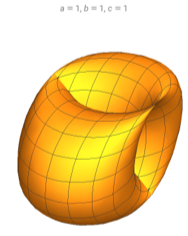
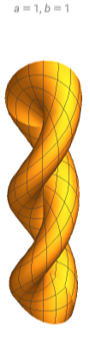
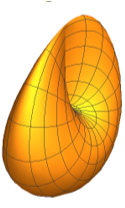
Several properties for three surfaces were retrieved. They are relevant for plotting them in 3D.
In[]:=
Out[]=
In[]:=
ShowSurfaceData,"Image",ImageSize->Tiny
In[]:=
SurfaceData,
Out[]=
Functiona.,b.,c.,Function{u.,v.},a.Cos[u.],b.Cos[v.]+a.Sin[u.],c.Sin[v.]
In[]:=
SurfaceData,
Out[]=
Functiona.,b.,c.,Function{u.,v.},u.,0,2π,{v.,0,2π}
In[]:=
Out[]=
In[]:=
ShowSurfaceData,"Image",ImageSizeTiny
In[]:=
SurfaceData,
Out[]=
Functiona.,b.,Function{u.,v.},a.Cos[u.]Cos[v.],a.Sin[u.]Cos[v.],a.Sin[v.]+b.u.
In[]:=
SurfaceData,
Out[]=
Functiona.,b.,Function{u.,v.},u.,0,6.9115,{v.,-π,π}
In[]:=
Out[]=
In[]:=
ShowSurfaceData,"Image",ImageSize->Tiny
In[]:=
SurfaceData,
Out[]=
Functiona.,Function{u.,v.},a.Sin[u.]Sin[2v.],Sin2u.,Cos2u.
1
2
2
Sin[v.]
2
Sin[v.]
In[]:=
SurfaceData,
Out[]=
Function{a.},Function{u.,v.},u.,0,π,{v.,Rational[-1,2]π,Rational[1,2]π}
WL - Creation and rotation of table with three “shiny” objects
WL - Creation and rotation of table with three “shiny” objects
To give the “Bohemian Dome surface” holes, it was recreated with two sets of stripes. Finally PBR-materials and three -point-lighting were used to let them shine.
In[]:=
Clear[r1,r2,bo1,bo2,bo3,bo4,co1,co2,co3,cr1,cr2,cr3,tt1,tt2,bg,combo,rc]
In[]:=
r1=((Range[32]-1)*Pi/16);r2=Table[r1[[i]],{i,1,Length[r1],2}];
In[]:=
bo1=Show[ParametricPlot3D[{Cos[u],Cos[v]+Sin[u],Sin[v]},{v,#,#+Pi/16},{u,0,2π},Mesh->None]&/@r2];bo2=Show[ParametricPlot3D[{Cos[u],Cos[v]+Sin[u],Sin[v]},{u,#,#+Pi/16},{v,0,2π},Mesh->None]&/@r2];bo3=Graphics3D[{Translate[Rotate[Rotate[{bo1[[1]],bo2[[1]]},-90Degree,{1,0,0}],60Degree,{0,0,1}],{3,-4,0.4}]}];bo4=Graphics3D[{MaterialShading[{"Glazed",Darker[Red]}],bo3[[1]]},Axes->False,Boxed->False,Lighting->"ThreePoint"];Show[bo4,ImageSize->Tiny]
Out[]=

In[]:=
co1=ParametricPlot3D[{Cos[u]Cos[v],Cos[v]Sin[u],u+Sin[v]},{u,0,6.9115},{v,-π,π},Mesh->None];co2=Graphics3D[Translate[Scale[co1[[1]],0.75],2{0,1,-0.8}]];co3=Graphics3D[{MaterialShading[{"Glazed",Darker[Yellow]}],co2[[1]]},Axes->False,Boxed->False,Lighting->"ThreePoint"];Show[co3,ImageSize->Tiny]
Out[]=

In[]:=
In[]:=
cr1=ParametricPlot3DSin[u]Sin[2v],Sin[2u],Cos[2u],{u,0,π},v,-,,Mesh->None;cr2=Graphics3D[{MaterialShading[{"Glazed",Green}],Translate[Rotate[Scale[cr1[[1]],2],-60Degree,{0,0,1}],{-3,-4,0.4}]}];cr3=Graphics3D[{MaterialShading[{"Glazed",Darker[Green]}],cr2[[1]]},Axes->False,Boxed->False,Lighting->"ThreePoint"];Show[cr3,ImageSize->Tiny]
1
2
2
Sin[v]
2
Sin[v]
π
2
π
2
Out[]=

A triangular table was designed with a combination of two prism and proper PBR-materials. As final touch the table, the objects were given a gradient as background.
WL - Tour
WL - Tour
The objects in the scene were rotated together around the center of the table in an animation. For the camera position a circle was used.
The videos were exported and read in again in dedicated subsections to keep the notebook kind of “slim” for cloud usage.
For video v1 a number of frames was calculated.
A video v2 was generated with a blurred gradient as background.
WL - Loading videos & External playback - 1
WL - Loading videos & External playback - 1
The videos were read in from a folder data. Due to the appearance setting “Thumbnail” videos are played back with the local default player. Possible replacement settings are: “Minimal” and “Basic”.
WL - Un-/Veiling of jewellery piece, based on corkscrew surface
WL - Un-/Veiling of jewellery piece, based on corkscrew surface
A video v3 was generated with the unveiling of the cross-cap surface. As background a gradient was added.
WL - Loading video & External playback - 2
WL - Loading video & External playback - 2
WL - Combo
WL - Combo
A combined video v4 was generated including a transition effect.
WL - Loading video & External playback - 3
WL - Loading video & External playback - 3
Blender/DaVinci Resolve/WL - Embedding tutorial
Blender/DaVinci Resolve/WL - Embedding tutorial
A video tutorial was generated from a rendered clip, annotated screenshots and text snippets converted to audio. It illustrated a partial and/or abrigded version of the workflow for creating the title video. All of it could be done with Wolfram Language alone. By using the combo the author can play to their strength and keep the focus on the creative process.
References
References
Collections of animations
Collections of animations
The original video for “Eye Catching Table” is the latest entry in the collection “Animations-05”.
References
References
Scene:
Plots of three surfaces were created together with a series of curves rebuilding each surface. The objects were given precious materials and presented accordingly.
‘Enter Free-Form Input—Wolfram Language Documentation’. Accessed 12 November 2023. https://reference.wolfram.com/language/workflow/EnterFreeFormInput.html.
‘ParametricPlot3D—Wolfram Language Documentation’. Accessed 12 November 2023. https://reference.wolfram.com/language/ref/ParametricPlot3D.html.
‘Video Processing—Wolfram Language Documentation’. Accessed 6 December 2023. https://reference.wolfram.com/language/guide/VideoProcessing.html.
‘SpeechSynthesize: Text to Speech—Wolfram Documentation’. Accessed 6 December 2023. https://reference.wolfram.com/language/ref/SpeechSynthesize.html.
Audio:
Stock Music & Sound Effects - Royalty Free Audio - Storyblocks
https://storyblocks.com/audio (Accessed 2023-11-12)
Orefice, Enzo. Soon Forever (30 Seconds). Accessed 11 November 2023. Access-ID: SBA-347563753.
Plots of three surfaces were created together with a series of curves rebuilding each surface. The objects were given precious materials and presented accordingly.
‘Enter Free-Form Input—Wolfram Language Documentation’. Accessed 12 November 2023. https://reference.wolfram.com/language/workflow/EnterFreeFormInput.html.
‘ParametricPlot3D—Wolfram Language Documentation’. Accessed 12 November 2023. https://reference.wolfram.com/language/ref/ParametricPlot3D.html.
‘Video Processing—Wolfram Language Documentation’. Accessed 6 December 2023. https://reference.wolfram.com/language/guide/VideoProcessing.html.
‘SpeechSynthesize: Text to Speech—Wolfram Documentation’. Accessed 6 December 2023. https://reference.wolfram.com/language/ref/SpeechSynthesize.html.
Audio:
Stock Music & Sound Effects - Royalty Free Audio - Storyblocks
https://storyblocks.com/audio (Accessed 2023-11-12)
Orefice, Enzo. Soon Forever (30 Seconds). Accessed 11 November 2023. Access-ID: SBA-347563753.
CITE THIS NOTEBOOK
CITE THIS NOTEBOOK
Animating Wolfram surfaces with Blender: Eye Catching Table
by Guenther Gsaller
Wolfram Community, STAFF PICKS, December 12, 2023
https://community.wolfram.com/groups/-/m/t/3082397
by Guenther Gsaller
Wolfram Community, STAFF PICKS, December 12, 2023
https://community.wolfram.com/groups/-/m/t/3082397