The 3D story is the same — maps directly to THREE.js objects written into GPU memory. The only difference is that you now also have for lighting.
GraphicsComplex
BufferAttribute
VertexNormals
Find Part 1 of this post here: https://community.wolfram.com/groups/-/m/t/3720274
Original article: https://wljs.io/blog/graphicscomplex2
Original article: https://wljs.io/blog/graphicscomplex2
Let's start with a dodecahedron:
In[]:=
v=PolyhedronData["Dodecahedron","Vertices"]//N;i=PolyhedronData["Dodecahedron","FaceIndices"];
Wireframe:
In[]:=
GraphicsComplex[v,{Red,Line[i]}]//Graphics3D
Out[]=

Solid:
In[]:=
GraphicsComplex[v,Polygon[i]]//Graphics3D
Out[]=

Vertex colors in 3D
Vertex colors in 3D
Same idea as in 2D — per-vertex colors get linearly interpolated by the GPU rasterizer:
In[]:=
v={{1,0,0},{1,1,1},{0,0,1}};Graphics3D[{Yellow,GraphicsComplex[v,Polygon[{1,2,3}],VertexColors->{Red,Blue,Green}]},ViewPoint->{1,1,1}]
Out[]=

Again, we recommend avoiding color symbols inside ; use triples of real numbers instead.
VertexColors
Normals and lighting
Normals and lighting
“You may think of normals as a sort of workaround to avoid having an infinite number of polygon faces while modeling smooth surfaces. We will touch on this more closely after this next “formal” example.”
Without explicit normals, the renderer computes flat normals from polygon faces, resulting in flat shading. Kinda like a 90s demo effect:
In[]:=
v={{1,0,0},{1,1,1},{0,0,1}};Graphics3D[{Yellow,GraphicsComplex[v,Polygon[{1,2,3}]]},ViewPoint->{1,1,1}]
Out[]=

Supply your own , and you control exactly how light bounces off the surface:
VertexNormals
In[]:=
v={{1,0,0},{1,1,1},{0,0,1}};n={1,-1,1};n2={-1,0,-1};Graphics3D[{Yellow,GraphicsComplex[v,Polygon[{1,2,3}],VertexNormals->{n2,n,n}]},ViewPoint->{1,1,1}]
Out[]=

The idea of having normals is not quite there if you have a single flat triangle. The change of color at the bottom is due to Lambert’s law.
“Lambert’s Cosine Law states that the radiant intensity or luminous intensity observed from an ideal diffusely reflecting surface is proportional to the cosine of the angle between the observer’s line of sight and the surface normal. It is named after Johann Heinrich Lambert, from his Photometria, published in 1760.”
I(θ)∝cos(θ)
Here is an example:
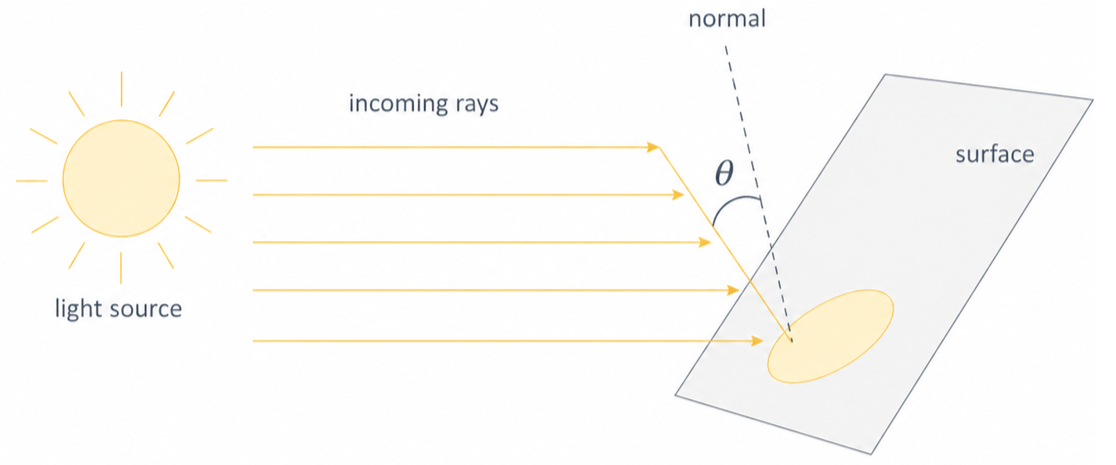
This is widely used in old and modern computer graphics to model realistic diffuse surfaces, as well as so-called normal map textures used in deferred lighting.
Let's generate a sphere mesh from randomly scattered points.
In[]:=
mesh=DelaunayMesh[SpherePoints[50]];v=MeshCoordinates[mesh];i=MeshCells[mesh,2][[All,1]];
One could sample more points, but it would be too expensive. Instead, let's define normals for each vertex based on the fact that the object has to represent a sphere:
Oops! We have a problem here. Unfortunately, the indices of a triangulated mesh are often not sorted (in the best case, they should follow the CW or CCW rule), i.e. the 3D engine cannot tell whether a given polygon faces in or out. We can fix this by presorting them manually based on our normals:
Let's plot it:
Nice and smooth, with just 50 extra normals provided.
Texture mapping in 3D
Texture mapping in 3D
UV coordinates work identically to the 2D case:
The mapping can also be done automatically:
How about animation and manipulation?
Animating 3D meshes
Animating 3D meshes
Fixed 10,000 vertices
Fixed 10,000 vertices
Akin to the 2D case, we are free to mutate vertex data with ease. Normals can be provided as well; otherwise, the 3D engine will automatically estimate them based on the direction the polygon is facing — flat shading.
Here's a 100×100 grid — that's 10,000 vertices and ~20,000 triangles — animated in real time:
The triangle indices are computed once and stay fixed. Only the vertex positions change each frame — which means only the position buffer gets updated on the GPU:
Adding dynamic color
Adding dynamic color
Same grid, but now we also update a color buffer each frame. Two GPU buffers updated per frame — positions and colors — still smooth:
Animated surface with AnimationFrameListener
Animated surface with AnimationFrameListener
Dynamic topology in 3D
Dynamic topology in 3D
Two orbiting holes punch through the mesh in real time:
Hijacking plot functions as geometry generators
Hijacking plot functions as geometry generators
Define a function that interpolates between a torus and a seashell:
Try it!
CITE THIS NOTEBOOK
CITE THIS NOTEBOOK
Real-time GPU rendering via local JavaScript engine. Part 2
by Kirill Vasin
Wolfram Community, STAFF PICKS, May 22, 2026
https://community.wolfram.com/groups/-/m/t/3720773
by Kirill Vasin
Wolfram Community, STAFF PICKS, May 22, 2026
https://community.wolfram.com/groups/-/m/t/3720773