Introduction
Introduction
Looking at the stock graphs of cryptocurrencies on Yahoo Finance, it was apparent how drastically their price fluctuated. One day they were up 20%, then the next they were down by 30%. In stock terms, these are what are called volatile stocks. There are many ways to measure stock volatility, such as standard deviation and maximum drawdown, but as I was looking into how we could measure volatility, I thought: Wouldn't it just be easier to measure their percent profit or loss over time? For example, if Apple is currently at $146, and the stock goes up to $153.3 after a month, that would be a 5% increase. In the next month, say the price went down to $150. Although the price is approximately 2.7% higher than 2 months ago, in respect to the price of Apple in the previous month, it would be around a 2% decrease. I wanted to visualize these changes over time. And not just for a bunch of random stocks, for all stocks in the S&P500, Dow Jones Industrial Average, all cryptocurrencies available with the Wolfram Data Repository, and 30 hand-picked stocks classified as 'extremely volatile'. In addition, since I look at both non-volatile and volatile stocks, it is best to categorize what is done in this project as finding fluctuation or percent change over time instead of volatility of stocks.
Finding the Change of Any Stock's Price over Time
Finding the Change of Any Stock's Price over Time
The first step we need to take is getting the financial data of a stock. The Wolfram Data Repository allows us to do this for any timespan in the stocks history
Get the price of any stock from each month in the last 4 years as a time series:
In[]:=
FDPY[company_]:= FinancialData[company,{Now-Quantity[48,"Months"],Now,"Month"}]
We can apply this function to any number of companies
In[]:=
{FDPY["Apple"],FDPY["Google"],FDPY["Boeing"],FDPY["3M"]}
Out[]=
TimeSeries,TimeSeries,TimeSeries,TimeSeries


The time series' consists of a stocks price over time. Since we want to get change in price over time, we only need to modify the y coordinate price vector. The question is, how do we do that? Let's just consider a stock with 2 data points, meaning it is only 2 months old, and its price has only been obtained 2 times. By subtracting the old price from the new price, we find how much the stock rose or fell in a month. If we then divide this value by the new price, we get the percent increase or decrease. And then that's it. Here's how we can apply that concept with code:
Get percent change from each consecutive point in a list of points
In[]:=
PercentChange[data_] := Differences[#]/Drop[#,1]&@data
In[]:=
N[PercentChange[{1,3,7,4,7,9,5,3,6}]]
Out[]=
{0.666667,0.571429,-0.75,0.428571,0.222222,-0.8,-0.666667,0.5}
With the Percent Change function initialized, we now need to apply it to the prices of our time series'. We can do this by simply extracting the y coordinates from our time series, applying the Percent Change function to every value, matching them back with their respective time, or x coordinate, and making a new time series
Get the percent change of a stock price over time and put the data into a time series:
In[]:=
PercentChangeTime[name_] := Module[{coordinates,ycoordspercentchange,xcoordspercentagechange},coordinates = With[{fig=DateListPlot[FDPY[name]]},Catenate@Cases[fig,Line[x_]:>x,Infinity]];ycoordspercentchange = PercentChange[coordinates[[#]][[2]]&/@Range[Length[coordinates]]];xcoordspercentagechange = Drop[coordinates[[#]][[1]]&/@Range[Length[coordinates]],1];TimeSeries[ycoordspercentchange,{xcoordspercentagechange}]]
Getting the Data for All Stocks
Getting the Data for All Stocks
Before we find the percent change over time of our stocks, we need to get them first.
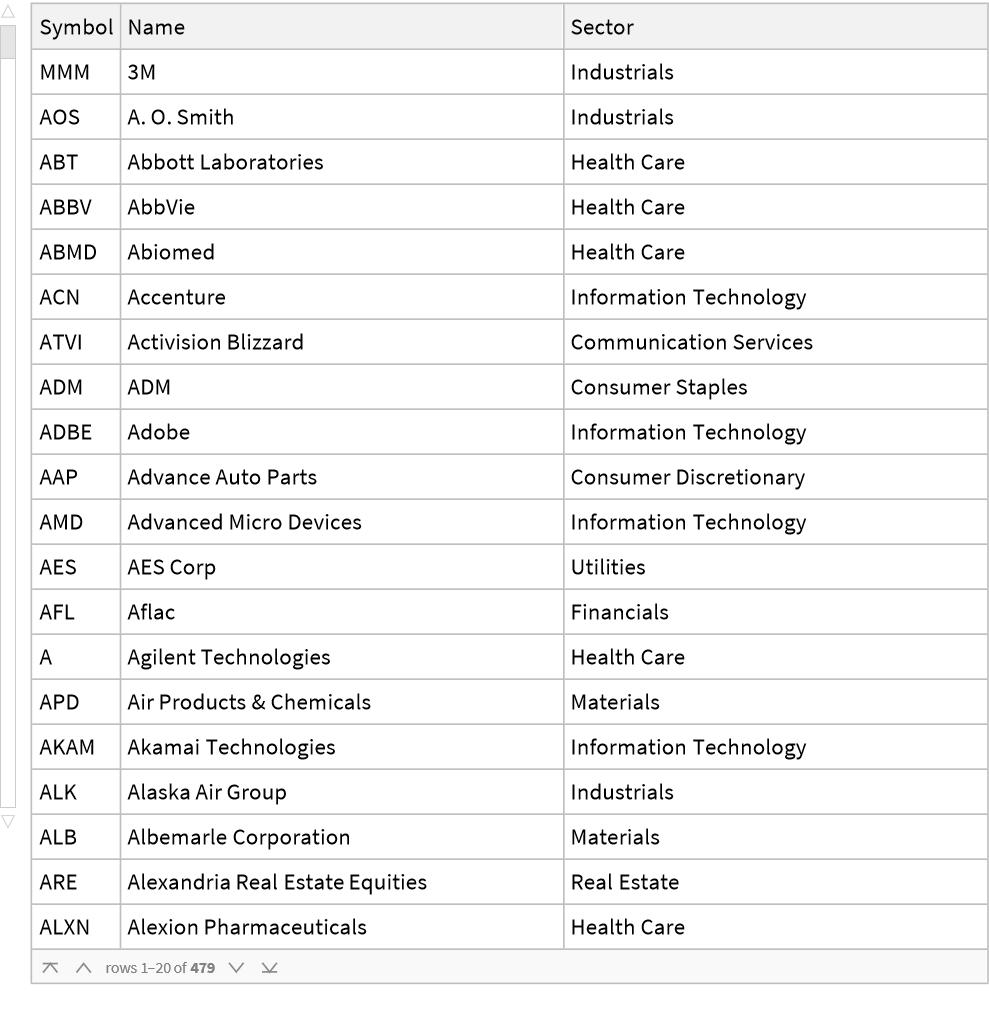
Import S&P500 data about name, symbol, and sector from a dataset. This file will be linked in the attachments for this project
In[]:=
SP500=Import["C:\\Users\\Arshaan\\Downloads\\constituents.csv","Dataset","HeaderLines"->1]
Out[]=
All other stocks we will be looking at:
In[]:=
DowJones={"3M","American Express","Amgen","Apple","Boeing","Caterpillar","Chevron","Cisco Systems","Coca-Cola","Disney","Dow","Goldman Sachs","Home Depot","Honeywell","IBM","Intel","Johnson& Johnson","JP Morgan Chase","McDonald’s","Merck","Microsoft","Nike","Procter&Gamble","Salesforce","Travelers","UnitedHealth","Visa","Walgreens","Walmart"};Cryptocurrencies={"BTC","ETH","ARK"};VolatileStocks={"NAOV","TAL","GOTU","EDU","XBIO","SCKT","GME","MOXC","DAO","UPC","COE","YQ","XTLB","ZME","VNE","IPA","NRXP","ACOR","MDGS","NEW","IGC","NVFY","ALZN","NWHM","METX","ELEV","MSC","LAIX","SAM","AACG"};
Organizing and Finding the Percent Change over Time of our Data
Organizing and Finding the Percent Change over Time of our Data
Most of our data is fairly organized, however, there are a lot of stocks in the S&P500, and we need a way of grouping them. The best way to do that is by sector, which we can filter by in our dataset.
Get all stocks in the S&P500 from any of the 11 sectors
In[]:=
GetSector[name_]:= (Module[{sector},sector = SP500[Select[#Sector==name&],{"Name"}];Normal[sector[All,"Name"]]])
All stocks in the S&P500 grouped into the 11 sectors:
In[]:=
InformationTechnology=GetSector["Information Technology"];HealthCare=GetSector["Health Care"];Financials=GetSector["Financials"];ConsumerDiscretionary=GetSector["Consumer Discretionary"];CommunicationServices=GetSector["Communication Services"];Industrials=GetSector["Industrials"];ConsumerStaples=GetSector["Consumer Staples"];Energy=GetSector["Energy"];Utilities=GetSector["Utilities"];RealEstate=GetSector["Real Estate"];Materials=GetSector["Materials"];
Awesome. All of our data is grouped, but there is one more step before we can find their percent change over time. As of now, the PercentChangeTime function will only display the new time series of a stock, not its name. With so many time series', it would be hard to read the data. Fortunately, we can label each time series using an association
Thread the name of a stock to its correlated time series:
In[]:=
AThread[list_]:=AssociationThread[list,PercentChangeTime[#]&/@list]
Now we're good to go. Let's get the percent change over time for all our stocks
Applying the AThread function to all stocks:
In[]:=
ATInformationTechnology = AThread[InformationTechnology];ATHealthCare = AThread[HealthCare];ATFinancials = AThread[Financials];ATConsumerDiscretionary = AThread[ConsumerDiscretionary];ATCommunicationServices = AThread[CommunicationServices];ATIndustrials = AThread[Industrials];ATConsumerStaples = AThread[ConsumerStaples];ATEnergy = AThread[Energy]; ATUtilities = AThread[Utilities];ATRealEstate = AThread[RealEstate];ATMaterials = AThread[Materials];ATDowJones = AThread[DowJones];ATCryptocurrencies = AThread[Cryptocurrencies];ATVolatileStocks = AThread[VolatileStocks];
Example output of the cryptocurrencies data:
Out[]=
BTCTimeSeries,ETHTimeSeries,ARKTimeSeries


Finally, let's group all our data up into a single, organized association.
Thread Sectors with their respective stocks and percent change over time:
In[]:=
SP500Stocks=AssociationThread[{"Information Technology","Health Care","Financials","Consumer Discretionary","Communication Services","Industrials","Consumer Staples","Energy","Utilities","Real Estate","Materials"},{ATInformationTechnology,ATHealthCare,ATFinancials,ATConsumerDiscretionary,ATCommunicationServices,ATIndustrials,ATConsumerStaples,ATEnergy,ATUtilities,ATRealEstate,ATMaterials}];Stocks=AssociationThread[{"Dow Jones (IA)","Cryptocurrencies","Volatile Stocks"},{ATDowJones,ATCryptocurrencies,ATVolatileStocks}];
Visualizing the Data
Visualizing the Data
Now that we have all of our data, we can visualize it. Since there are 500 companies, and 11 sectors in the S&P500, we can't display their percent changes over time in a single list line plot. It would better if we had to option to visualize certain plots at a time. Using manipulate to build an interactive model will let us do just that.
And we're done! Let's check out the results:
Interactive model of the percent change over time of all stocks in the S&P500:
Interactive model of the percent change over time of all stocks in the Dow Jones Industrial Average, available cryptocurrencies, and volatile stocks:
As many know, stocks are not just affected by what the company does, but also by how other stocks in the stock market are performing. We see this concept play out when we check out all of the stocks. In either model, and in any category, visualizing any number of stocks show they all follow a general pattern of percent change over time. If some stocks have a large negative percent change, many of the others have a negative percent change. If some stocks have a large positive percent change, many of the others also have a positive percent change. As an example, in early 2020, when quarantine started, all companies(except in the Health Care sector) had a huge dip in their percent change.
Classifying the Data
Classifying the Data
Those are some pretty interesting plots. It was fairly easy to identify the general trend of percent change among stocks in the same sector or category. But we can do better than just eyeballing similarities in the plots. Using Machine Learning with the FeatureSpacePlot function, we can visualize similar percent changes in stocks as a cluster of data points.
To start this, we follow the exact same process we used in the PercentChangeTime function, however, instead of extracting the y coordinates, changing them, and putting back into a time series, we can just get the average of all of the changed y coordinates, which will give overall percent change over time.
Find the overall percent change of any company with data from the last 4 years
Let's find the overall percent change of all of our stocks, grouped by sector or category:
Before we display these on a feature space plot, let's make a simple function that will let us label the percent change of stocks in each sector/category with a distinct color.
Thread all percent change values to a certain color circle with an association, then display the results on a feature space plot:
Visualizing the Data
Visualizing the Data
All of our data is organized and ready to visualize. Let's check it out.
Plot of all sectors in the S&P500, individually organized and color-coded:
The feature space plots provide some fairly interesting results. Many stocks of a similar category seem to have points positioned to form a diagonal line across the plot. They also seem to be very spread out. Because the plots from before showed similarities in the percent changes of companies in the same sector or category, this might seem unexpected.
An especially interesting result is the clustering of the stocks in the financials sectors. There are 2 main clusters, which most likely show half of the financial companies in the S&P500 having a positive percent change over the past 4 years, and the other half having a negative percent change over the past 4 years. Most of the other data, on the other hand, does not seem to have any clusters or similarities.
An especially interesting result is the clustering of the stocks in the financials sectors. There are 2 main clusters, which most likely show half of the financial companies in the S&P500 having a positive percent change over the past 4 years, and the other half having a negative percent change over the past 4 years. Most of the other data, on the other hand, does not seem to have any clusters or similarities.
Plot of the overall percent change of the Down Jones (IA), cryptocurrencies, and 30 volatile stocks, individually plotted and colored :
Like the S&P500 plot, the results seem fairly random. These results appear to not tell us much, but they actually give us some pretty keen insight to stocks. Even if the percent change of stocks in the same sector or category follow a similar pattern over time, there is little to no correlation between their overall percent changes.
Like the S&P500 plot, the results seem fairly random. These results appear to not tell us much, but they actually give us some pretty keen insight to stocks. Even if the percent change of stocks in the same sector or category follow a similar pattern over time, there is little to no correlation between their overall percent changes.
Bonus Extension with an Interactive Model
Bonus Extension with an Interactive Model
This part isn't necessary, however it may be slightly inconvenient to read all of the data on an overlay plot, especially when each feature space plot was calculated individually. To solve this issue, we can create an interactive model to only show certain plots at a time like before. The manipulate plot for this model is computationally heavy for most computers(mine included), so this will be an extra component to the project.
The code here is fairly similar to what was done with the previous interactive models, so it will not take a long time to make.
Thread associated sectors to their feature space plots:
Create an interactive model to toggle plots of different sectors on and off:
Here is the code to visualize the interactive models:
Visualizing the results for the S&P500 stocks:
Visualizing the results for all other stocks:
Conclusion
Conclusion
Both the interactive models and the feature space plot of stocks give us insight to how the stock market works, and let us uncovering interesting trends in the data. Even if it was at different proportions, it was especially fascinating how stocks in the same sector or category follow similar positive and negative percent changes over time, even if their overall percent changes have no similarity. It's been commonly known that volatile stocks are high risk high reward, and non-volatile stocks low risk, low reward. With this project, we were able to identify not just which stocks in particular fluctuate a lot and a little, but also which sectors or categories of stocks are more volatile than others. By visualizing that volatility or percent change over time, it is clear which sectors or categories of stocks, like cryptocurrencies, to invest into if seeking high risk and high reward. In addition, we can see which sectors or categories of stocks, like the Dow Jones Industrial Average, are low risk, and can invest into if playing safe. There are many tools to visualize these types of patterns, but I hope this project deepened your understanding of general patterns in fluctuations for various groups and stocks in the stocks market.
Extensions
Extensions
There are several extensions to this project. One, of course, is to look at more stocks. In particular, it would be interesting to visualize the percent change over time of the NASDAQ-100, or perhaps I could look at some smaller, more random companies to see if they have any similarities. Another extension is plotting key events in a stocks or the worlds history to see how major events affect a stocks percent change over time. A great example of this would be March 2020, the start of quarantining, where most stocks percent change became largely negative. Going beyond this, though, I can try to use a machine learning model to predict a stocks future percent change. This would be extremely difficult, and requires in-depth knowledge about the stock market, but the results would be intriguing.
Keywords
Keywords
◼
Volatility
◼
S&P500 Sectors
◼
FeatureSpacePlot