This is a continuation to the posts listed at: https://community.wolfram.com/web/ggoff/
Abstract
Abstract
Wolfram Language encourages to explore different fields. In Example 1 several aspects of a MRI-contrast agent were visualized. In Example 2 a glass sphere and the development of a modified cylindrical & spherical spiral shaped strip were animated. Again in both cases the preparation was done in Mathematica, the animation in Blender.
Experiments
Experiments
In[]:=
SetDirectory[NotebookDirectory[]];
In[]:=
iSize=Small;
Example 1: MRI
Example 1: MRI
In[]:=
EmbeddedService[{"Vimeo","576586206"}]
Out[]=
The cif-file for the contrast agent can be loaded from the Crystallography Open Database with the according COD-ID: 71522110.
In[]:=
(*mol0=Import["7152110.cif","Molecule"];*)
Direct import of the cif-file brought up an error-message in MoleculePlot3D (invalid valence). Therefore it was converted to pdb-format (e.g. with VESTA) and re-imported:
In[]:=
(*mol0=Import["7152110.pdb","Molecule"];MoleculePlot3D[mol0]*)
In[]:=
mol0= ;Show[mol0,ImageSize->iSize]
Out[]=
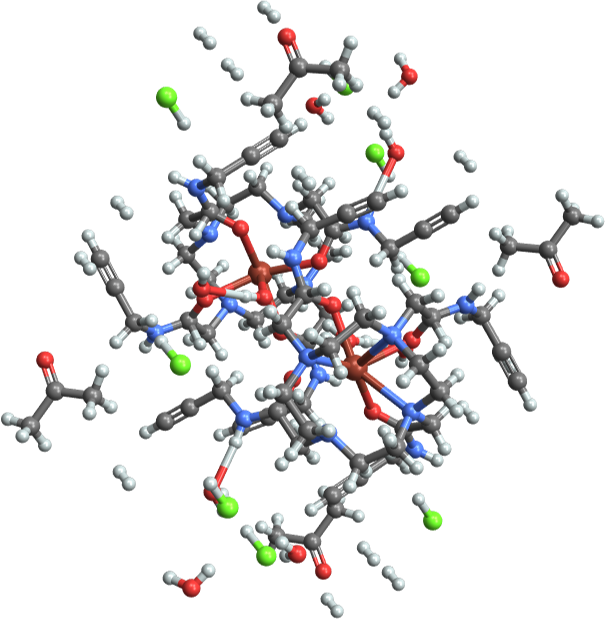
To disable distractions a part of the molecule around one of the active centers was extracted:
In[]:=
mol= ;Show[mol,ImageSize->iSize]
Out[]=
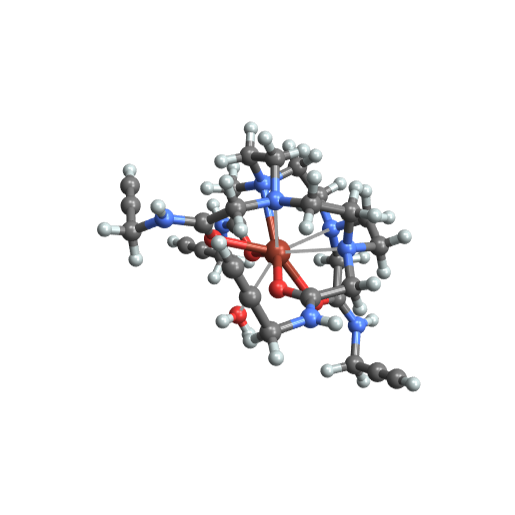
Using the Part command delivered the coordinates of the atoms :
In[]:=
pts=mol[[1,1,4,1]];pts[[2]]
Out[]=
{411.35,489.88,313.5}
To enable export in ply - format, the lines had to be changed to cylinders:
In[]:=
m2a=Graphics3D,Thickness[Large],Cylinder[#,6]&/@{{{237.23,344.55,353.18},{316.91,337.15,104.98}},{{237.23,344.55,353.18},{160.1,124.45,233.27}},{{237.23,344.55,353.18},{-22.86,326.79,345.04}},{{237.23,344.55,353.18},{381.2,349.01,562.8}}};

In[]:=
m2b=Graphics3D[mol[[1,1]],Lighting"Neutral"];
In[]:=
gr1=Show[m2a,m2b,Boxed->False,ImageSize->iSize,Lighting"Neutral"]
Out[]=
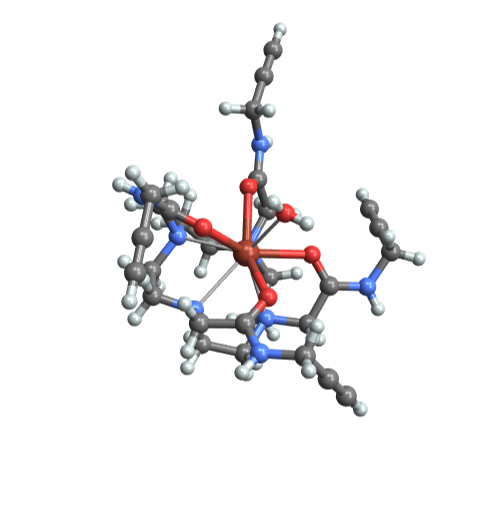
The molecule and the inscribed trigonal prism:
In[]:=
gr2=Show[gr1,Graphics3D[{Yellow,Opacity[0.3],GraphicsComplex[pts,Polygon[{{4,3,2,7},{3,8,12,4},{2,8,12,7},{2,3,8},{7,4,12}}]]}],ImageSize->iSize,Lighting"Neutral"]
Out[]=
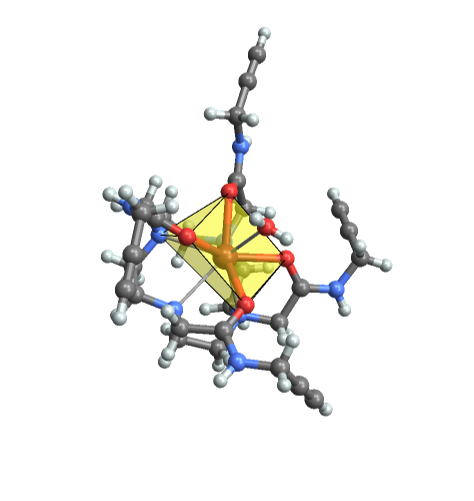
The molecule and three pyramids for enhancing the trigonal prism to tricapped-trigonal-prism:
In[]:=
gr3=Show[gr1,Graphics3D[{Yellow,Opacity[0.15],GraphicsComplex[pts[[{2,3,4,7,83}]],Polygon[{{1,2,3,4},{1,2,5},{2,3,5},{3,4,5},{4,1,5}}]]}],Graphics3D[{Yellow,Opacity[0.15],GraphicsComplex[pts[[{3,4,12,8,9}]],Polygon[{{1,2,3,4},{1,2,5},{2,3,5},{3,4,5},{4,1,5}}]]}],Graphics3D[{Yellow,Opacity[0.15],GraphicsComplex[pts[[{2,7,12,8,15}]],Polygon[{{1,2,3,4},{1,2,5},{2,3,5},{3,4,5},{4,1,5}}]]}],ImageSize->iSize,Lighting"Neutral"]
Out[]=
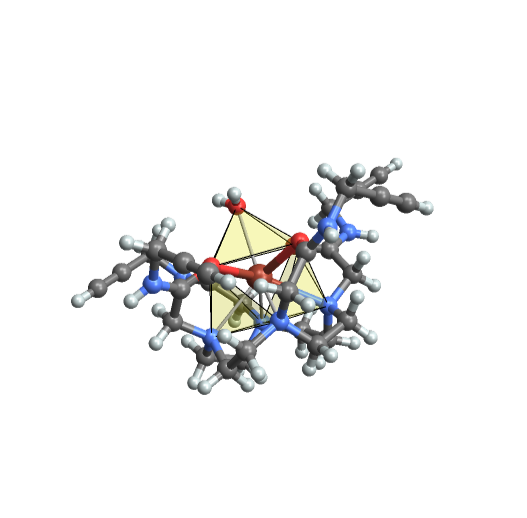
The final step with all necessary parts included :
The four 3d - graphics were exported in ply - format:
The file containing the molecule (1.ply) was imported in Blender in part 1. The colors were enabled using a vertex-color node in the according material. A 360° rotation of the molecule around the z-axis was keyframed.
The same was done in part 2 with 2.ply. Additionally the opacity of the trigonal prism was changed from completely transparent to semi-transparent.
In part 3 the pyramids were added to finish with a tricapped-trigonal prism as coordination polyhedron.
A pdb-file with two coordination polyhedra was imported in part 4. The visualization was done in a more artistic style.
The same was done in part 2 with 2.ply. Additionally the opacity of the trigonal prism was changed from completely transparent to semi-transparent.
In part 3 the pyramids were added to finish with a tricapped-trigonal prism as coordination polyhedron.
A pdb-file with two coordination polyhedra was imported in part 4. The visualization was done in a more artistic style.
Example 2: Rosetta
Example 2: Rosetta
A sphere in parametric form :
The stripe in general parametric form:
The stripe with specific parameters:
Sphere & stripe combined:
Varying a parameter to test the right distance between sphere and stripe:
One curve was exported from Mathematica as dxf-file:
In Rosetta animation - part 1 a sphere was recreated in Blender via an subdivided ico sphere. To the sphere a glass material was applied.
The curve was imported as dxf, beveled round and multiplied around the sphere via array modifier. The development of the curve-object with appropriate material was animated through changing the end-mapping value from 0 to 1.
Part 2 contains a transition of the curve-object from one material to another (emissive) material. The factor value for a mixed shader, with both material as input, was keyframed.
The glowing effect for the emissive material was done in part 3. Bloom was enabled and the strength for the emissive material was increased.
The curve was imported as dxf, beveled round and multiplied around the sphere via array modifier. The development of the curve-object with appropriate material was animated through changing the end-mapping value from 0 to 1.
Part 2 contains a transition of the curve-object from one material to another (emissive) material. The factor value for a mixed shader, with both material as input, was keyframed.
The glowing effect for the emissive material was done in part 3. Bloom was enabled and the strength for the emissive material was increased.
References
References
List of animations
List of animations
References
References
MRI
“Crystallography Open Database.” Accessed July 19, 2021. http://www.crystallography.net/cod/. COD ID: 7152110.
Gsaller, Guenther. “Wolfram Demonstrations Project.” Accessed July 19, 2021. http://demonstrations.wolfram.com/MetalCompoundsInMedicine/.
Milne, Mark, Kirby Chicas, Alex Li, Robert Bartha, and Robert H. E. Hudson. “ParaCEST MRI Contrast Agents Capable of Derivatization via ‘Click’ Chemistry.” Organic & Biomolecular Chemistry 10, no. 2 (December 8, 2011): 287–92. https://doi.org/10.1039/C1OB06162C.
Audio:
“Stock Music & Sound Effects - Royalty Free Audio - Storyblocks,” July 19, 2021. https://www.storyblocks.com/audio.
Piddubnyk, Volodymyr. Ambient Background Chill Corporate Music [ 30 Seconds ]. Accessed July 19, 2021. Asset ID: SBA-300481055.
“Crystallography Open Database.” Accessed July 19, 2021. http://www.crystallography.net/cod/. COD ID: 7152110.
Gsaller, Guenther. “Wolfram Demonstrations Project.” Accessed July 19, 2021. http://demonstrations.wolfram.com/MetalCompoundsInMedicine/.
Milne, Mark, Kirby Chicas, Alex Li, Robert Bartha, and Robert H. E. Hudson. “ParaCEST MRI Contrast Agents Capable of Derivatization via ‘Click’ Chemistry.” Organic & Biomolecular Chemistry 10, no. 2 (December 8, 2011): 287–92. https://doi.org/10.1039/C1OB06162C.
Audio:
“Stock Music & Sound Effects - Royalty Free Audio - Storyblocks,” July 19, 2021. https://www.storyblocks.com/audio.
Piddubnyk, Volodymyr. Ambient Background Chill Corporate Music [ 30 Seconds ]. Accessed July 19, 2021. Asset ID: SBA-300481055.
Rosetta
Scene: Modified Cylindrical & Spherical Spiral Shaped Strip
Krivoshapko, S.; Ivanov, V. N. Encyclopedia of Analytical Surfaces; Springer International Publishing, 2015; pp 284-285. https://doi.org/10.1007/978-3-319-11773-7.
(accessed 2021-07-26)
Audio:
Stock Music & Sound Effects - Royalty Free Audio - Storyblocks
https://www.storyblocks.com/audio (accessed 2021-07-26)
Kopec, Ben. Big Bang Theory. Accessed July 26, 2021. Asset ID: SBA-300223993.
Scene: Modified Cylindrical & Spherical Spiral Shaped Strip
Krivoshapko, S.; Ivanov, V. N. Encyclopedia of Analytical Surfaces; Springer International Publishing, 2015; pp 284-285. https://doi.org/10.1007/978-3-319-11773-7.
(accessed 2021-07-26)
Audio:
Stock Music & Sound Effects - Royalty Free Audio - Storyblocks
https://www.storyblocks.com/audio (accessed 2021-07-26)
Kopec, Ben. Big Bang Theory. Accessed July 26, 2021. Asset ID: SBA-300223993.